
Введение
This manual provides detailed instructions for the installation, operation, and maintenance of your Hama 00118498 Monitor Desk Mount. Designed to enhance your ergonomic workspace, this monitor arm allows for flexible positioning of your display, promoting a comfortable and productive environment. Please read these instructions carefully before beginning installation.
Инструкции по установке
Follow these steps to correctly install your Hama 00118498 Monitor Desk Mount.
1. Прикрепление настольной консолиamp
- Поместите стол clamp assembly onto the edge of your desk. Ensure the desk surface is sturdy and can support the weight of the mount and your monitor.
- Затяните крепление.amp Затягивайте винты до тех пор, пока крепление не будет надежно зафиксировано на столе. Не перетягивайте.
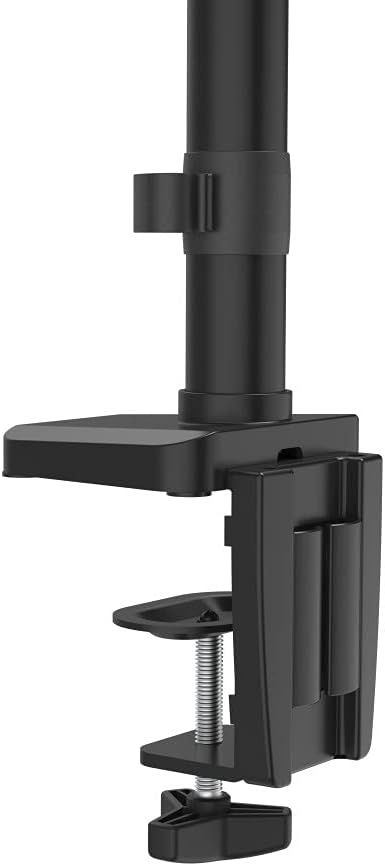
Image: The desk clamp mechanism, showing how it attaches to the desk edge for secure mounting.
2. Крепление монитора
- Убедитесь, что ваш монитор совместим со стандартом VESA (100x100 мм или 75x75 мм).
- Carefully attach the VESA plate from the monitor arm to the back of your monitor using the provided screws. Make sure the screws are tightened securely.
- Slide the monitor (with the attached VESA plate) onto the arm's mounting head. Ensure it clicks into place or is secured with any locking mechanism provided.

Image: The monitor arm's VESA plate and adjustable joint, ready for monitor attachment.

Изображение: вид сбоку view of the assembled monitor arm, highlighting the VESA mount and integrated cable management channels.
3. Организация кабелей.
Utilize the integrated cable management system to route your monitor cables neatly along the arm. This helps maintain a tidy workspace and prevents cable clutter.
Инструкция по эксплуатации
The Hama 00118498 Monitor Desk Mount offers various adjustment options for optimal viewУтешение.
- Регулировка высоты: The integrated pneumatic spring allows for smooth and effortless vertical height adjustment. Gently push or pull the monitor to your desired height.
- Поворотный: The arm can swivel horizontally, allowing you to rotate your monitor to share your screen or change your viewугол наклона.
- Наклон: Adjust the monitor's tilt angle (up or down) to reduce glare and find the most comfortable viewпозиция.
- Вращение: Rotate your monitor from landscape to portrait orientation as needed for different tasks.
Adjustments should be smooth. If the monitor does not hold its position, refer to the troubleshooting section for tension adjustments.
Обслуживание
Регулярное техническое обслуживание обеспечивает долговечность и оптимальную работу кронштейна монитора.
- Уборка: Протрите поверхность кронштейна монитора мягкой тряпкой.amp ткань. Избегайте использования абразивных чистящих средств или растворителей.
- Проверьте соединения: Периодически проверяйте все винты и соединения на надёжность и надёжность затяжки. При необходимости подтяните.
- Смазка: The pneumatic spring is maintenance-free. Do not attempt to lubricate internal components.
Поиск неисправностей
If you encounter issues with your Hama 00118498 Monitor Desk Mount, refer to the following common problems and solutions:
- Монитор провисает или не удерживает положение: The tension of the pneumatic spring may need adjustment. Locate the tension adjustment screw (usually found on the arm joint) and turn it clockwise to increase tension for heavier monitors, or counter-clockwise for lighter monitors. Adjust gradually until the monitor holds its position.
- Monitor is Difficult to Move: If the arm is too stiff, the tension may be too high. Turn the tension adjustment screw counter-clockwise to decrease tension.
- Arm Feels Loose on Desk: Убедитесь, что стол чистыйamp is fully tightened. If the desk surface is too thin or fragile, consider adding a protective pad between the clamp and the desk.
- Колебания монитора: Check all mounting screws on the VESA plate and the arm joints to ensure they are securely fastened.
Технические характеристики
| Особенность | Деталь |
|---|---|
| Номер модели | 00118498 |
| Тип крепления | Письменный стол Clamp |
| Тип движения | Rotating, Swivel, Tilt, Height Adjustable (Pneumatic Spring) |
| Бренд | Хама |
| Материал | Алюминий |
| Цвет | Черный |
| Совместимые устройства | Монитор |
| Минимальный совместимый размер | 10 дюймов |
| Максимальный совместимый размер | 32 дюймов |
| Вес товара | 2.2 Килограмма |
| Страна происхождения | Китай |
Гарантия и поддержка
For warranty information or technical support, please refer to the documentation included with your purchase or visit the official Hama webСайт. Обычно там можно найти контактную информацию службы поддержки, ответы на часто задаваемые вопросы и дополнительные ресурсы.
Официальный Хама Webсайт: www.hama.com