
1. Введение
Thank you for choosing the A4tech FG1112 Fstyler Wireless Keyboard and Mouse Set. This compact and efficient combo provides a reliable 2.4GHz wireless connection, offering convenience and comfort for your daily computing needs. The keyboard features a Q Turkish layout with FN multimedia keys, while the mouse offers precise 1200 DPI optical tracking. This manual will guide you through the setup, operation, and maintenance of your new device.
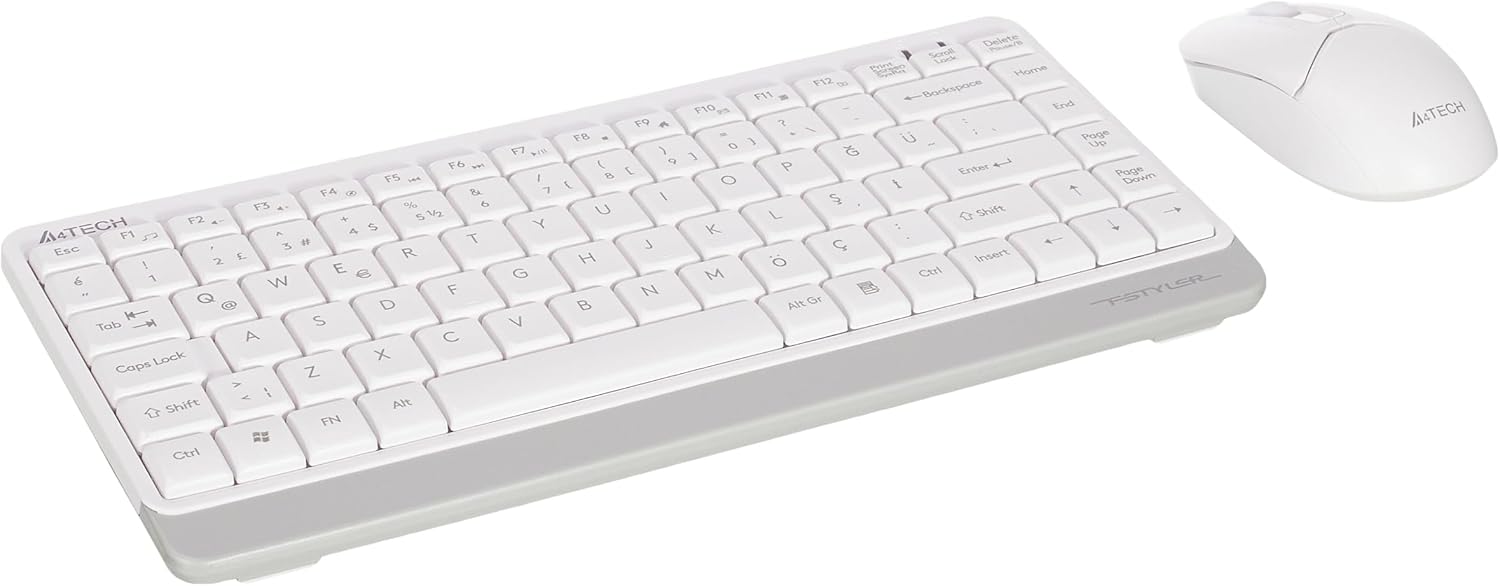
Image 1.1: A4tech FG1112 Fstyler Wireless Keyboard and Mouse Set (White)
2. Содержимое упаковки
Пожалуйста, проверьте содержимое упаковки, чтобы убедиться в наличии всех предметов:
- 1 x A4tech FG1112 Wireless Keyboard
- 1 x A4tech Fstyler Wireless Mouse
- 1 х USB нано-приемник
- 2 батарейки AAA (для клавиатуры)
- 1 x AA Battery (for mouse, typically included)
- 1 x Руководство пользователя (этот документ)
3. Инструкции по настройке
- Вставьте батареи:
- For the keyboard: Open the battery compartment cover on the underside of the keyboard. Insert two AAA batteries, ensuring correct polarity (+/-). Close the cover.
- For the mouse: Open the battery compartment cover on the underside of the mouse. Insert one AA battery, ensuring correct polarity (+/-). Close the cover.

Image 3.1: Mouse bottom view showing battery compartment and power switch.
- Подключите USB-нано-приемник: Locate the USB Nano Receiver, typically stored inside the mouse's battery compartment or packaged separately. Plug the receiver into an available USB port on your computer.
- Включение питания:
- For the keyboard: Ensure the keyboard is powered on. There might be a power switch on the top right or underside.
- Для мыши: переведите переключатель питания на нижней стороне мыши в положение «ВКЛ».
- Автоматическое подключение: Your computer should automatically detect and install the necessary drivers for the keyboard and mouse. This process may take a few moments. Once complete, your devices are ready for use.
Video 3.1: A short demonstration of the A4tech Fstyler Wireless Keyboard and Mouse Set, showing its compact design and wireless connectivity. This video illustrates the product's features and ease of use.
4. Инструкция по эксплуатации
4.1 Использование клавиатуры
The A4tech FG1112 keyboard features a compact design with a Q Turkish layout. It is designed for comfortable and quiet typing.

Изображение 4.1: Верх view of the A4tech FG1112 Wireless Keyboard, highlighting its Q Turkish layout.
Мультимедийные и функциональные клавиши:
The keyboard includes 12 multimedia and internet function keys integrated into the F1-F12 keys. To activate these functions, press the FN клавишу одновременно с нужной F-клавишей.
- ФН + Ф1: Медиа плеер
- ФН + Ф2: Звук тише
- ФН + Ф3: Увеличить громкость
- ФН + Ф4: Немой
- ФН + Ф5: Предыдущий трек
- ФН + Ф6: Следующий трек
- ФН + Ф7: Воспроизведение/Пауза
- ФН + Ф8: Стоп
- ФН + Ф9Главная страница
- ФН + Ф10: Эл. адрес
- ФН + Ф11: Мой компьютер
- ФН + Ф12: Калькулятор

Image 4.2: Illustration of FN key functionality for multimedia controls.
4.2 Использование мыши
The A4tech Fstyler mouse provides precise 1200 DPI optical tracking for smooth and accurate cursor movement.

Изображение 4.3: Верх view of the A4tech Fstyler Wireless Mouse.
Основные функции:
- Щелчок левой кнопкой мыши: Primary function, used for selecting items, opening fileс и т.д.
- Щелкните правой кнопкой мыши: Вторичная функция, обычно открывает контекстные меню.
- Колесо прокрутки: Used for scrolling documents and web pages vertically. Can also function as a middle click button.
5. Техническое обслуживание
- Уборка: Для чистки клавиатуры и мыши используйте мягкую сухую ткань. Для удаления стойких загрязнений слегка протрите поверхность сухой тканью.amp Можно использовать ткань, но следите за тем, чтобы жидкость не попала внутрь устройств.
- Замена батареи: When the keyboard or mouse becomes unresponsive or exhibits delayed input, it's time to replace the batteries. Follow the "Insert Batteries" steps in the Setup section.
- Хранилище: When not in use for extended periods, turn off the mouse to conserve battery life. Store the devices in a cool, dry place.
6. Поиск Неисправностей
| Проблема | Возможное решение |
|---|---|
| Клавиатура/мышь не отвечает |
|
| Delayed or intermittent response |
|
| Мультимедийные клавиши не работают |
|
7. Технические характеристики
| Особенность | Деталь |
|---|---|
| Бренд | A4tech |
| Модель | ФГ1112 |
| Технология связи | 2.4GHz Wireless |
| Раскладка клавиатуры | Q Turkish |
| Тип клавиатуры | Multimedia Membrane |
| DPI мыши | Оптический датчик 1200 DPI |
| Источник питания клавиатуры | 2 батареек типа ААА |
| Источник питания мыши | 1 x AA Battery (typical) |
| Особые возможности | Wireless, Mini, Multimedia Keys, Optical Mouse, Laser Printed Keys, Water-resistant design (with drainage channels) |
| Вес продукта | 0.62 Kilograms (Set) |
| Размеры (клавиатура) | Approx. 315mm (Width) x 146mm (Depth) x 25mm (Height) |
| Размеры (Мышь) | Approx. 64mm (Width) x 108mm (Depth) x 35mm (Height) |

Image 7.1: Dimensions of the A4tech FG1112 Keyboard and Mouse.
8. Гарантия и поддержка
This A4tech FG1112 Fstyler Wireless Keyboard and Mouse Set comes with a Гарантия 2 год С даты покупки. Сохраните чек на случай предъявления гарантийных претензий.
For technical support, troubleshooting assistance, or warranty inquiries, please contact A4tech customer service through their official webсайте или у местного дистрибьютора.
Более подробную информацию и ресурсы поддержки вы можете найти на сайте A4tech Store on Amazon.