
1. Введение
This manual provides essential instructions for the installation, operation, and maintenance of your Hikvision 8MP AcuSense WDR Mini Bullet Network Camera, model DS-2CD2083G2-IU. Please read this manual thoroughly before using the product and retain it for future reference.
Продукт болееview
The Hikvision DS-2CD2083G2-IU is a high-performance 8-megapixel (4K) network camera designed for advanced surveillance. It features AcuSense technology for accurate human and vehicle target classification, Wide Dynamic Range (WDR) for clear imaging against strong backlight, and a fixed 2.8mm lens for a wide field of view. Its IP67 rating ensures robust outdoor performance, and the integrated microphone allows for audio monitoring.
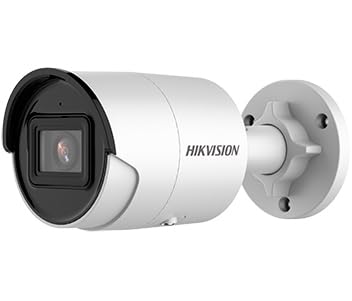
Figure 1: Hikvision 8MP AcuSense WDR Mini Bullet Network Camera (DS-2CD2083G2-IU)
This image displays the Hikvision 8MP AcuSense WDR Mini Bullet Network Camera, highlighting its compact bullet-style design suitable for various installation environments.
Основные характеристики
- Разрешение 8 мегапикселей (4K): Delivers high-quality, detailed video.
- Технология AcuSense: Reduces false alarms by accurately classifying human and vehicle targets.
- Широкий динамический диапазон (WDR): Ensures clear images even in scenes with strong contrast.
- Fixed 2.8mm Lens: Обеспечивает широкий viewугол наклона.
- Инфракрасное (ИК) освещение: Night vision up to 40 meters.
- Степень защиты IP67: Подходит для использования на открытом воздухе в различных погодных условиях.
- Встроенный микрофон: Enables audio monitoring.
- Встроенный считыватель карт: Supports local storage (microSD card not included).
2. Информация по технике безопасности
Пожалуйста, соблюдайте следующие меры предосторожности, чтобы предотвратить травмы или повреждение изделия:
- Ensure the power supply meets the camera's requirements (6.5 Watts).
- Не подвергайте камеру воздействию экстремальных температур, влажности или агрессивных сред.
- Avoid pointing the lens directly at strong light sources, as this may damage the sensor.
- Установка должна выполняться квалифицированным персоналом в соответствии с местными электротехническими нормами.
- Используйте только аксессуары, указанные производителем.
- Протрите объектив камеры мягкой сухой тканью. Избегайте использования агрессивных химикатов.
3. Настройка и установка
3.1 Распаковка
Carefully unpack the camera and check for any signs of damage. Ensure all components are present. (Typical components include: camera unit, mounting template, screws, waterproof connector, quick start guide).
3.2 Физическая установка
The camera is designed for ceiling mounting. Select a suitable location that provides the desired field of view and is within reach of network and power cables. Due to its IP67 rating, it is suitable for outdoor environments.
- Use the provided mounting template to mark drill holes on the ceiling.
- Просверлите необходимые отверстия и при необходимости вставьте дюбели.
- Secure the camera base to the mounting surface using the supplied screws.
- Отрегулируйте угол камеры для оптимального покрытия.
3.3 Подключение к сети и электропитанию
This is an IP network camera. It requires a network connection and power. Power over Ethernet (PoE) is typically supported, simplifying installation by delivering both power and data over a single Ethernet cable. If PoE is not used, a separate 12V DC power adapter (not included) will be required.
- Connect an Ethernet cable from your network switch/router to the camera's RJ45 port. Use the waterproof connector for outdoor installations.
- Если не используется PoE, подключите адаптер питания 12 В постоянного тока к входу питания камеры.
- Once connected, the camera will power on. Allow a few minutes for it to boot up.
3.4 Начальная конфигурация
Доступ к камере web интерфейс через web browser using its default IP address (refer to the quick start guide or use Hikvision's SADP tool to discover the IP address). You will be prompted to set a strong password for security. Follow the on-screen instructions to configure network settings, date/time, and other basic parameters.
4. Инструкция по эксплуатации
4.1 Прямой эфир View и запись
После первоначальной настройки вы можете view the live feed from the camera through its web interface, a Network Video Recorder (NVR), or Hikvision's client software (e.g., iVMS-4200) or mobile app (Hik-Connect). Configure recording schedules and methods (continuous, motion-triggered) via the camera's settings or NVR.
4.2 AcuSense Smart Features
The AcuSense technology allows the camera to distinguish between humans, vehicles, and other moving objects, significantly reducing false alarms caused by animals, rain, or falling leaves. Configure these detection rules in the camera's event settings to receive more accurate alerts.
- Обнаружение движения 2.0: Set up detection zones and sensitivity for human and vehicle events.
- Обнаружения вторжений: Define virtual boundaries, and the camera will trigger an alarm if a human or vehicle crosses them.
- Обнаружение пересечения линии: Similar to intrusion, but for a specific line.
4.3 Широкий динамический диапазон (WDR)
WDR compensates for extreme lighting conditions, such as strong backlight, to ensure that both bright and dark areas of the image are clearly visible. This feature is typically enabled by default but can be adjusted in the image settings.
4.4 Инфракрасное (ИК) ночное видение
The camera automatically switches to IR mode in low-light conditions, providing clear black-and-white video up to 40 meters. Ensure no obstructions block the IR LEDs for optimal night vision performance.
4.5 Мониторинг звука
With its built-in microphone, the camera can capture audio from the surveillance area. Audio settings, including gain control, can be configured in the camera's web interface. Ensure local regulations regarding audio recording are followed.
5. Техническое обслуживание
- Уборка: Регулярно очищайте объектив и корпус камеры мягкой тряпкой.amp Ткань. Не используйте абразивные чистящие средства.
- Обновления прошивки: Периодически проверяйте официальный сайт Hikvision. webСайт для обновления прошивки. Регулярное обновление прошивки обеспечивает оптимальную производительность, доступ к новым функциям и улучшениям безопасности.
- Проверка кабеля: For outdoor installations, periodically inspect cables and connections for wear or damage, especially the waterproof connectors.
- Управление паролями: Regularly change your camera's password to maintain security.
6. Поиск Неисправностей
| Проблема | Возможная причина | Решение |
|---|---|---|
| No image/camera offline | No power, network cable disconnected, incorrect IP address. | Check power supply and network cable. Verify IP address using SADP tool. Restart camera. |
| Плохое качество изображения | Dirty lens, incorrect focus (if adjustable), poor lighting, network bandwidth issues. | Clean the lens. Ensure adequate lighting. Check network connection speed. Adjust image settings (WDR, exposure). |
| Ложные тревоги от обнаружения движения | Sensitivity too high, environmental factors (trees, animals), AcuSense not configured. | Adjust motion detection sensitivity. Configure AcuSense human/vehicle detection. Adjust detection zones. |
| Невозможно получить доступ web интерфейс | Incorrect IP address, network connectivity issue, browser compatibility. | Verify IP address. Ensure camera and PC are on the same network segment. Try a different browser. |
If the problem persists after attempting these solutions, please contact Hikvision technical support.
7. Технические характеристики
| Особенность | Деталь |
|---|---|
| Номер модели | ДС-2CD2083G2-ИУ |
| Датчик изображения | КМОП |
| Макс. разрешение | 8 МП (4K) |
| Линза | Фиксированный объектив 2.8mm |
| ИК диапазона | До 40 метров |
| ВДР | Поддерживается |
| АкуСенс | Human and Vehicle Target Classification |
| Аудио | Встроенный микрофон |
| Локальное хранилище | Integrated Card Reader (MicroSD slot) |
| Всепогодный рейтинг | IP67 |
| Потребляемая мощность | 6.5 Вт |
| Размеры (Д x Ш x В) | 15 x 15 x 8 см (приблизительно) |
| Тип крепления | Крепление на потолок |
| Тип предупреждения | Motion Only (configurable for human/vehicle) |
8. Гарантия и поддержка
На продукцию Hikvision обычно распространяется ограниченная гарантия производителя. Пожалуйста, ознакомьтесь с гарантийным талоном, прилагаемым к вашему изделию, или посетите официальный сайт Hikvision. webПодробные условия гарантии, действующие в вашем регионе, можно найти на сайте.
For technical support, firmware downloads, or further assistance, please visit the official Hikvision support portal or contact their customer service department. Ensure you have your product model number (DS-2CD2083G2-IU) and serial number ready when contacting support.
Официальный Hikvision Webсайт: www.hikvision.com


