
1. Введение
This manual provides detailed instructions for the setup, operation, and maintenance of your WISE TIGER LED Digital Alarm Clock (Model CK-LED1302). Please read this manual thoroughly before use to ensure proper functionality and to maximize your product experience.

Image 1.1: WISE TIGER LED Digital Alarm Clock and its remote control.
2. Содержимое упаковки
Пожалуйста, проверьте наличие всех предметов в вашей посылке:
- WISE TIGER LED Digital Alarm Clock (Model CK-LED1302)
- Дистанционное управление
- Кабель питания USB
- Руководство пользователя (этот документ)
- Fixed Bracket (for desk placement)
3. Продукт закончилсяview
The WISE TIGER LED Digital Alarm Clock features a modern 3D design, offering clear time display and multiple functions for various environments.
3.1 Основные характеристики
- Отображение времени: 12-часовой или 24-часовой формат.
- Отображение календаря: Shows date.
- Будильник: С функцией отложенного будильника.
- Отображение температуры: Отображает температуру окружающей среды.
- Регулируемая яркость: Automatic brightness sensor and manual adjustment via remote control.
- Функция ночного света: Provides soft illumination.
- Функция памяти: Built-in battery retains time settings for 4-8 hours during power disconnection.
- Универсальное размещение: Suitable for desk or wall mounting.

Рисунок 3.1: Визуальное представление основных функций часов.
3.2 Компоненты
Обратитесь к диаграмме ниже для более подробной информации.view of the clock's components and connection points.
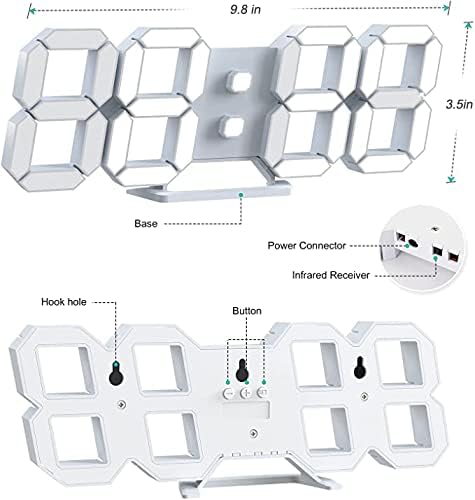
Изображение 3.2: Вид сзади view and dimensions of the clock, highlighting the power connector, infrared receiver, and mounting options.
- Отображать: Large 3D LED digits for time, date, and temperature.
- База: Removable stand for desk placement.
- Разъем питания: USB port for power input.
- Инфракрасный приемник: Для сигналов дистанционного управления.
- Hook Holes: Для настенного монтажа.
- Кнопки управления: Located on the back for basic settings (Power, Up, Down, Set).
4. Настройка
4.1 Подключение питания
- Connect the provided USB power cable to the power connector on the back of the clock.
- Подключите другой конец USB-кабеля к стандартному USB-адаптеру питания (не входит в комплект) или к USB-порту компьютера.
- Часы включатся и отобразят время.
The clock is powered by the USB cable only. A built-in battery serves to record time settings when power is disconnected, ensuring settings are retained for 4-8 hours.

Image 4.1: Explanation of the clock's power and memory function.
4.2 Варианты размещения
The clock can be used as a desk clock or a wall clock.
- Размещение на столе: Attach the fixed bracket to the bottom of the clock. The angle of the bracket can be adjusted for optimal viewинж.
- Настенный монтаж: Remove the fixed bracket if attached. Use the installation slots (hook holes) on the back of the clock to hang it securely on a wall using appropriate fasteners (not included).

Image 4.2: The clock configured for wall mounting and desk placement.
5. Инструкция по эксплуатации
The clock's functions are primarily controlled using the included remote control. Basic settings can also be adjusted via the buttons on the back of the clock.
5.1 Установка времени и даты
- Нажмите ВРЕМЯ button on the remote control to enter time setting mode.
- Используйте UP и ВНИЗ arrows to adjust the hour.
- Нажимать ВРЕМЯ again to move to minute setting, then use UP и ВНИЗ для настройки.
- Продолжайте нажимать ВРЕМЯ для переключения между настройками года, месяца и дня, регулируя каждую из них с помощью UP и ВНИЗ.
- Нажимать ВРЕМЯ Ещё раз или подождите несколько секунд, пока настройки сохранятся автоматически.
5.2 12/24-часовой формат
Для переключения между 12-часовым и 24-часовым форматами времени нажмите кнопку 12/24ч кнопку на пульте дистанционного управления.

Изображение 5.1: Примерample of 12-hour and 24-hour time display.
5.3 Установка будильника
- Нажмите ТРЕВОГА button on the remote control to enter alarm setting mode.
- Используйте UP и ВНИЗ arrows to set the desired alarm hour.
- Нажимать ТРЕВОГА again to move to minute setting, then use UP и ВНИЗ для настройки.
- Нажимать ТРЕВОГА one last time or wait for the settings to save.
- Чтобы включить/выключить будильник, нажмите кнопку ТРЕВОГА button briefly outside of setting mode. An alarm icon will appear/disappear on the display.
5.4 Функция повтора
Когда прозвучит сигнал будильника, нажмите кнопку SNOOZE button on the remote control to temporarily silence the alarm. The alarm will sound again after a set interval (typically 5-10 minutes).

Image 5.2: The snooze alarm function in use.
5.5. Регулировка яркости
The clock features both automatic and manual brightness control.
- Автоматическая яркость: The built-in sensor automatically adjusts the display brightness based on ambient light conditions.
- Ручная регулировка яркости: Нажмите ЯРКИЙ button on the remote control to cycle through different brightness levels (e.g., high, medium, low).

Image 5.3: Automatic brightness adjustment based on ambient light.

Image 5.4: Manual adjustment through three brightness levels.
5.6 Отображение температуры
The clock automatically displays the ambient temperature. No manual adjustment is typically required for this function.
6. Техническое обслуживание
To ensure the longevity and optimal performance of your WISE TIGER LED Digital Alarm Clock, follow these maintenance guidelines:
- Уборка: Для протирки дисплея и... используйте мягкую сухую ткань.asing. Avoid abrasive cleaners, solvents, or spray cleaners directly on the clock.
- Власть: Always use the provided USB cable for power. Ensure the power source is stable.
- Среда: Храните часы вдали от экстремальных температур, прямых солнечных лучей и высокой влажности.
- Дистанционное управление: Store the remote control in a safe place to prevent loss or damage. Ensure batteries are replaced when needed (typically 2 Lithium Ion batteries, included).
7. Поиск Неисправностей
If you encounter issues with your clock, refer to the following common problems and solutions:
| Проблема | Возможная причина | Решение |
|---|---|---|
| Часы не включаются | Нет питания или плохое соединение | Убедитесь, что USB-кабель надежно подключен и источник питания включен. Попробуйте использовать другой USB-порт или адаптер. |
| Пульт дистанционного управления не работает | Remote batteries are dead or remote is out of range/blocked | Replace remote control batteries. Ensure remote is pointed at the clock's infrared receiver (refer to Image 3.2) and within 8 meters. Remove any obstructions. |
| Время неточное | Time was not set precisely | Reset the time carefully, ensuring you set it at the exact second of the desired time. |
| Display is too dim or too bright | Brightness setting needs adjustment | Нажмите ЯРКИЙ button on the remote to cycle through manual brightness levels. Check if automatic brightness is functioning correctly in different light conditions. |
| Будильник не звучит | Сигнализация не сработала или настроена неправильно. | Ensure the alarm is set and activated (alarm icon visible). Verify the alarm time is correct. |
8. Технические характеристики
| Особенность | Деталь |
|---|---|
| Бренд | Мудрый ТИГР |
| Номер модели | СК-LED1302 |
| Тип дисплея | Цифровой |
| Цвет | Белый |
| Размеры продукта | 9.7 дюймов (Ш) x 3.5 дюйма (В) |
| Источник питания | Проводной электрический (USB) |
| Батарея памяти | 2 Lithium Ion batteries (included), retains settings for 4-8 hours |
| Тип крепления | Wall Mount, Desk Mount |
| Особые возможности | Adjustable Brightness, Alarm Clock, Temperature Display, Date Display, 12/24 Hour Format |
| Материал | Акрилонитрил-бутадиен-стирол |
| Вес товара | 0.317 унций (приблизительно 9 граммов) |
| СКП | 728990655931 |
9. Гарантия и поддержка
Для получения информации о гарантии или технической поддержке обратитесь к упаковке продукта или свяжитесь с продавцом, у которого был приобретен товар. Сохраните чек в качестве подтверждения покупки.