
1. Введение и окончаниеview
The Siemens 6ED1052-1HB08-0BA1 is a Programmable Logic Controller (PLC) control module designed for industrial automation applications. This module facilitates the control and monitoring of various processes and machinery by executing programmed logic. It operates with both 24 V/DC and 24 V/AC power supplies, offering versatility for different system requirements. This manual provides essential information for the safe and effective installation, operation, and maintenance of the module.
2. Информация по технике безопасности
Важные инструкции по технике безопасности:
- Монтаж, эксплуатация и техническое обслуживание должны выполняться исключительно квалифицированным персоналом.
- Always disconnect power to the module and associated equipment before performing any installation, wiring, or maintenance tasks.
- Ensure proper grounding of the system to prevent electrical shock.
- Соблюдайте все местные и национальные электротехнические нормы и правила техники безопасности.
- Do not operate the module if it appears damaged or if any components are missing.
- Защитите модуль от влаги, пыли и экстремальных температур.
3. Содержимое упаковки
Убедитесь, что в вашей посылке присутствует следующий предмет:
- 1 x Siemens 6ED1052-1HB08-0BA1 PLC Control Module
4. Особенности продукта
The Siemens 6ED1052-1HB08-0BA1 PLC Control Module offers the following key features:
- High-quality construction for industrial environments.
- Reliable performance for critical automation tasks.
- Versatile power input: compatible with 24 V/DC and 24 V/AC systems.
- Designed for seamless integration into Siemens automation solutions.
5. Настройка и установка
Proper installation is crucial for the module's functionality and safety. Refer to the image below for a visual reference of the product.
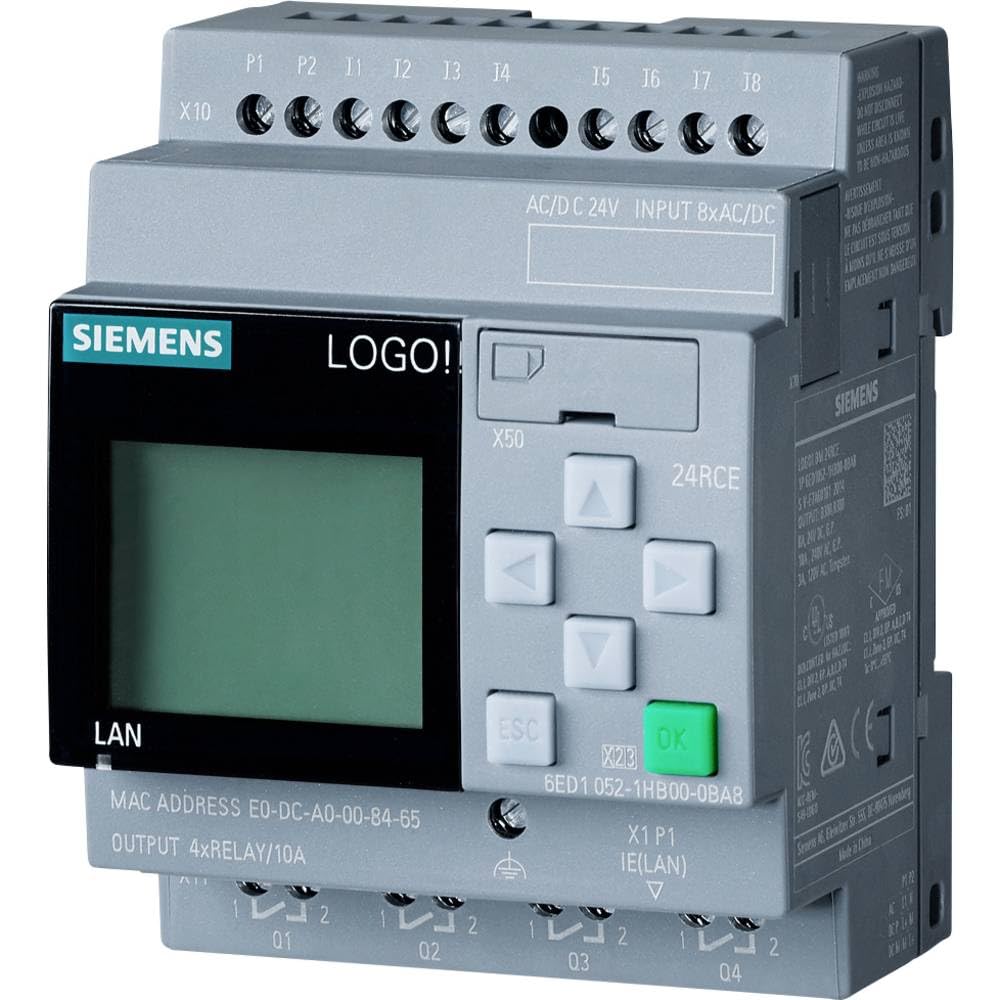
Image: Siemens 6ED1052-1HB08-0BA1 PLC Control Module, front view, showing terminals and indicators.
5.1 Монтаж
- Select a suitable mounting location within an electrical enclosure, ensuring adequate ventilation and protection from environmental factors.
- Mount the module securely onto a DIN rail or panel using appropriate fasteners.
5.2 Подключение
Осторожность: Перед подключением проводов убедитесь, что все источники питания отключены.
- Источник питания: Connect the 24 V/DC or 24 V/AC power supply to the designated power terminals on the module. Observe correct polarity for DC connections.
- Входные данные: Wire your sensors, switches, and other input devices to the module's input terminals according to your application's design.
- Выходы: Connect actuators, relays, and other output devices to the module's output terminals.
- Коммуникация: Connect any necessary communication cables (e.g., Ethernet, MPI) to the respective ports for programming and network integration.
5.3 Конфигурация программного обеспечения
After physical installation, the module requires programming using Siemens engineering software (e.g., TIA Portal or STEP 7). Refer to the specific software documentation for detailed instructions on creating, downloading, and debugging PLC programs.
6. Инструкция по эксплуатации
Once the module is installed and programmed, follow these general steps for operation:
- Включение питания: Apply power to the module. Observe the status indicators for proper initialization.
- Загрузка программы: If not already done, download your PLC program to the module using the engineering software.
- Режим работы: Switch the module to RUN mode (either via software or a physical switch if available) to begin executing the programmed logic.
- Мониторинг: Use the engineering software to monitor the status of inputs, outputs, and internal variables to verify correct operation.
For detailed programming and operational procedures, consult the comprehensive documentation provided with your Siemens engineering software.
7. Техническое обслуживание
Regular maintenance helps ensure the longevity and reliable operation of your PLC module.
- Визуальный осмотр: Periodically inspect the module for any signs of physical damage, loose connections, or overheating.
- Уборка: Use a soft, dry cloth to gently clean the exterior of the module. Do not use liquid cleaners or solvents. Ensure power is off before cleaning.
- Экологический контроль: Maintain the operating environment within the specified temperature and humidity ranges to prevent premature failure.
- Обновления прошивки: Проверьте поддержку Siemens website for any available firmware updates for your module. Follow the provided instructions carefully for any update procedures.
8. Поиск Неисправностей
If you encounter issues with your Siemens PLC control module, consider the following troubleshooting steps:
- Нет питания: Убедитесь, что источник питания правильно подключен и обеспечивает указанную мощность.tage (24 V/DC or 24 V/AC). Check fuses or circuit breakers.
- Модуль не отвечает: Ensure the communication cable is securely connected. Check the network settings in your engineering software.
- Input/Output Errors: Verify wiring to sensors and actuators. Check the status indicators on the module and use the software's diagnostic tools to identify faulty I/O points.
- Program Errors: Review your PLC program for logic errors. Use the debugging features of your engineering software.
- Индикаторы состояния: Consult the module's technical documentation for the meaning of specific LED indicators, which can provide clues about the module's status or errors.
If the problem persists after attempting these steps, contact Siemens technical support or a qualified service technician.
9. Технические характеристики
| Спецификация | Ценить |
|---|---|
| Модель | 6ED10521HB080BA1 |
| Номер детали | 6ED10521HB080BA1 |
| Бренд | СИМЕНС |
| Vol входtage | 24 V/DC, 24 V/AC |
| Цвет | Белый |
| Производитель | Сименс |
| Страна происхождения | Италия |
| Включенные компоненты | 1 шт. |
| Количество единиц | 1.0 Количество |
10. Гарантия и поддержка
Specific warranty information for the Siemens 6ED1052-1HB08-0BA1 PLC Control Module is not provided in this document. For details regarding warranty coverage, terms, and conditions, please refer to the official Siemens product documentation or contact your authorized Siemens distributor or customer support.
For technical assistance, product inquiries, or to report issues, please visit the official Siemens support webсайте или обратитесь в их отдел обслуживания клиентов.


