
Creative X4
Руководство пользователя Creative Sound Blaster X4
Model: X4 | Brand: Creative
Введение
Welcome to the user manual for your Creative Sound Blaster X4. This external USB Digital-to-Analog Converter (DAC) and amplifier is designed to elevate your audio experience across various platforms, including PC, Mac, and gaming consoles. It features advanced surround sound technologies, intelligent communication tools, and versatile connectivity to deliver high-fidelity audio for all your entertainment and communication needs.
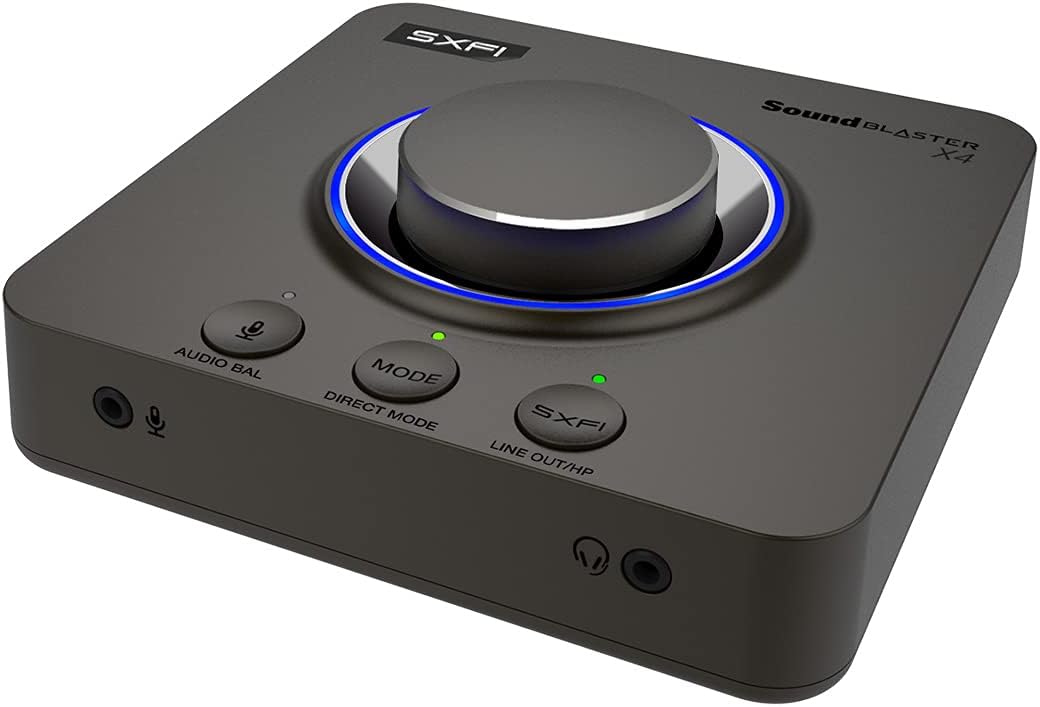
The Creative Sound Blaster X4, a versatile external audio device.
Содержимое упаковки
Ensure all the following items are included in your Sound Blaster X4 package:
- Sound Blaster X4 Unit
- Кабель USB-C — USB-A
- Оптический кабель
- Quick Start Guide (User Guide available online)

Contents typically found in the Sound Blaster X4 package.
Настраивать
Подключение к вашему устройству
The Sound Blaster X4 offers versatile connectivity options:
- Соединение USB-C: Connect the Sound Blaster X4 to your PC, Mac, PS4, PS5, or Nintendo Switch using the provided USB-C to USB-A cable. This connection provides both power and audio data.
- Optical-in Connection: For devices supporting optical output, connect an optical cable from your device's optical out port to the Sound Blaster X4's optical-in port.

Connecting the Sound Blaster X4 to a laptop via USB-C.

Rear ports of the Sound Blaster X4, including optical and USB.
Установка драйверов и программного обеспечения
For full functionality and customization, download and install the Креативное приложение from the official Creative website. The app provides access to all audio settings, EQ modes, and communication features.
Operating the Sound Blaster X4
Контролируетview
The Sound Blaster X4 features intuitive controls for easy access to key functions:
- Ручка регулировки громкости: Large, central knob for precise volume adjustments.
- Direct Mic Mute Button: Mutes/unmutes your microphone instantly.
- Кнопка режима: Cycles through three customizable EQ modes.
- Кнопка SXFI: Toggles Super X-Fi and SXFI BATTLE Mode on/off.
- Audio Balance Feature: Adjusts volume levels between two audio sources (SPDIF / Optical / USB) via the volume knob.
- Direct Mode Button: Activates Direct Mode for pure, unprocessed audio.
- Speaker (Line-out) and Headphones Switch Button: Seamlessly switch audio output between speakers and headphones without unplugging.
Front panel controls of the Sound Blaster X4.
Audio Balance Feature
The Audio Balance feature allows you to quickly adjust the volume mix between two different audio sources. This is particularly useful for balancing game audio with voice chat during online communication.
Demonstration of the Sound Blaster X4's audio balance feature.
Основные характеристики
Surround Sound Technologies
Experience immersive audio with multiple surround sound options:
- 7.1 Discrete Surround: Supports up to 7.1 discrete channels for multi-channel speaker systems.
- Super X-Fi: Headphone holography technology that recreates the soundstage of a multi-speaker system in your headphones.
- Акустический двигатель: Sound Blaster's renowned surround virtualization for both speakers and headphones.
- Dolby Digital Live: Real-time encoding of any audio source into Dolby Digital for single-cable connection to your home theater system.

Sound Blaster X4's multiple surround sound technologies.
SmartComms Kit
The SmartComms Kit simplifies your online communication experience on Windows 10:
- VoiceDetect: Automatically mutes and unmutes your microphone as you speak, eliminating the need for manual control.
- NoiseClean: Two-way noise cancellation that removes static background noise from both your environment and the other parties' audio.

SmartComms Kit and CrystalVoice for enhanced communication.
Наушники Ampпожизненнее
The Sound Blaster X4 functions as a powerful headphone amplifier, capable of driving studio-grade headphones with impedance up to 600Ω, ensuring high-quality audio output.

High-resolution audio support and powerful headphone ampлификация.
Игровые возможности
Gain a competitive edge with specialized gaming modes:
- SXFI BATTLE Mode: Designed for FPS games, this mode provides accurate audio cues and depth, allowing you to pinpoint enemy locations.
- Режим разведки: Enhances important in-game audio cues like footsteps and weapon reloads, helping you hear beyond what you see.
Связность
The Sound Blaster X4 offers a comprehensive set of I/O connectors:
- Порт USB-C: For power and data connection to PC, Mac, and consoles.
- Оптический вход: For digital audio input from various devices.
- Optical-out: For digital audio output to external speakers or receivers.
- Line-in / Line-out: Analog connections for various audio sources and outputs.
- Headset-in: Dedicated port for connecting headsets.
- Microphone-out: Для подключения внешнего микрофона.

Подробный view of the Sound Blaster X4's seven I/O connectors.
Креативное приложение
The Creative App provides full audio customization on Windows PC via USB, and quick EQ and audio tweaks on Android and iOS via Bluetooth. It allows you to:
- Select between various Sound Modes (Gaming, Music, Movies, etc.).
- Access and configure Super X-Fi, Acoustic Engine, SmartComms Kit, CrystalVoice, Scout Mode, Encoder, and Mixer settings.
- Customize and save your own EQ modes.

The Creative App interface for comprehensive audio control.
Минимальные системные требования
| Категория | ОС Windows | macOS |
|---|---|---|
| Процессор | Intel® Core™ i3 or AMD® equivalent | Intel, AMD, or 100% compatible motherboard |
| Операционная система | Microsoft Windows 11, Windows 10 version 1703, 32 / 64-bit or later | macOS версии 10.15 или новее |
| БАРАН | 4 ГБ ОЗУ | 4 ГБ ОЗУ |
| Место на жестком диске | 4 ГБ свободного места на жестком диске | 4 ГБ свободного места на жестком диске |
| USB-порт | USB 2.0 / USB 3.0 порт | USB 2.0 / USB 3.0 порт |
Note: SmartComms Kit, Scout Mode, CrystalVoice, and Sound Blaster Acoustic Engine's features are only accessible via the Creative App, downloadable on PC and Mac.
Совместимость
| Особенность | ПК с Windows | macOS | PS5 | PS4 | Нинтендо Свитч |
|---|---|---|---|---|---|
| Super X-Fi and SXFI BATTLE Mode | ✓ | ✓ | ✓ | ✓ | ✓ |
| Discrete 7.1 / 5.1 Virtual 7.1 / 5.1 | ✓ | ✓ | |||
| Dolby Digital Live Encoding | via Optical-out cable | ||||
| Баланс звука | ✓ | ✓ | via HDMI to optical converter | via Optical cable | |
| Programmable EQ Modes | ✓ | ✓ | ✓ | ✓ | ✓ |
| Прямой режим | ✓ | ✓ | ✓ | ✓ | ✓ |
| Кнопка отключения микрофона | ✓ | ✓ | ✓ | ✓ | ✓ |
| SmartComms Kit | Windows 10 Ver 1703 or later | ||||
| CrystalVoice | Windows 10 Ver 1703 or later | Ver 10.14 (Intel-based Mac) | |||
| Scout Mode | Windows 10 Ver 1703 or later | Ver 10.14 (Intel-based Mac) | |||
| Акустический двигатель | ✓ | ✓ | |||
| Креативное приложение | Windows 10 Ver 1703 or later | Ver 10.14 (Intel-based Mac) | via Bluetooth from mobile devices |
Поиск неисправностей
If you encounter any issues with your Sound Blaster X4, please refer to the following common solutions:
- Нет звука на выходе:
- Ensure the USB-C cable is securely connected to both the Sound Blaster X4 and your device.
- Verify that the correct audio output device (Sound Blaster X4) is selected in your operating system's sound settings.
- Check the volume levels on the Sound Blaster X4, your operating system, and your connected headphones/speakers.
- If using optical connection, ensure the optical cable is correctly inserted and the source device is outputting audio via optical.
- Проблемы с микрофоном:
- Confirm the microphone is properly plugged into the Sound Blaster X4's microphone input.
- Check that the microphone is not muted on the device or in your operating system's sound settings.
- Adjust microphone gain settings within the Creative App.
- Искаженный звук:
- Убедитесь, что все кабели надежно подключены и не повреждены.
- Try reducing the volume level on both the Sound Blaster X4 and your source device.
- Update the Sound Blaster X4 firmware and drivers via the Creative App.
- If using Direct Mode, ensure no other audio effects are enabled that might cause distortion.
- Устройство не распознано:
- Try connecting the Sound Blaster X4 to a different USB port on your computer.
- Restart your computer and the Sound Blaster X4.
- Reinstall the Creative App and drivers.
Обслуживание
To ensure the longevity and optimal performance of your Sound Blaster X4, follow these maintenance guidelines:
- Уборка: Для протирки устройства используйте мягкую сухую ткань. Избегайте использования жидких чистящих средств или абразивных материалов.
- Хранилище: Когда устройство не используется, храните его в прохладном, сухом месте, вдали от прямых солнечных лучей и экстремальных температур.
- Умение обращаться: Избегайте падений устройства и сильных ударов. Не пытайтесь разбирать устройство, так как это аннулирует гарантию.
- Уход за кабелем: Handle cables gently. Avoid bending or crimping them excessively, which can damage internal wires.
Технические характеристики
- Размеры продукта: 5.16 x 5.16 x 1.61 дюйма
- Вес товара: 1.37 фунта
- Производитель: Творческие лаборатории
- ASIN: B0953LL5R6
- Страна происхождения: Китай
- Номер модели товара: X4
- Дата первой доступности: 17 мая 2021 г.
- Совместимые устройства: Personal Computer, Laptop, Gaming Console, Speaker, Headphone, Ampпожизненнее
- Бренд: Творческий
- Аппаратный интерфейс: USB
- Режим аудиовыхода: Surround, Dolby Digital
- Платформа: Не зависит от машины
Гарантия и поддержка
For detailed warranty information and technical support, please refer to the official Creative Labs webсайт или руководство пользователя в формате PDF.
Руководство пользователя (PDF): Скачать руководство пользователя
Creative Support: Посетите Страница поддержки Creative Часто задаваемые вопросы, информация о водителях и контактные данные.