
1. Введение
This manual provides detailed instructions for the setup, operation, and maintenance of your new Richmat Wireless Remote Control. This remote is designed to operate specific adjustable bed bases from Mlily, Bedtech, and Mattress Firm. Please read this manual thoroughly before use to ensure proper functionality.
Важное примечание о совместимости:
- This remote is compatible only with Mlily, Bedtech, or Mattress Firm 3000 Richmat bases that originally featured a remote identical to the ones pictured (white or black versions).
- Minor button label variations may exist (e.g., M3 button as a flat button, flat button as under bed light, anti-snore as TV lounge on certain Classic Brands remotes). These are functional equivalents.
- This remote will NOT work if your original remote had a Bluetooth logo in the bottom right corner.
- This remote will NOT work if your original remote had a flashlight button on the top row or other button icons/words not listed here.
2. Информация по технике безопасности
- Держите пульт дистанционного управления подальше от воды и чрезмерной влаги.
- Do not expose the remote to direct sunlight or extreme temperatures.
- Do not attempt to disassemble or repair the remote control yourself. Contact qualified service personnel.
- Храните батареи в недоступном для детей месте. При проглатывании немедленно обратитесь за медицинской помощью.
- Утилизируйте использованные батареи в соответствии с местным законодательством.
3. Содержимое упаковки
Upon opening your package, please verify that you have received the following item:
- Richmat Wireless Remote Control (White or Black version)
4. Продукт закончилсяview и элементы управления
The Richmat Wireless Remote Control provides a clear layout for operating your adjustable bed base. You may receive either a white or black version of the remote, both offering identical functionality.

Figure 1: White and Black Remote Control Versions. You will receive one of these two versions based on current inventory. Both versions function identically.
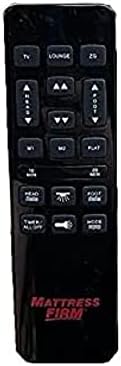
Figure 2: White Remote Control (Example with Mlily branding). This image displays the button layout and functions.

Figure 3: Black Remote Control (Example with Mattress Firm branding). This image displays the button layout and functions.
Функции кнопок:
- TV / LOUNGE / ZG (Zero Gravity): Preset positions for watching TV, lounging, or achieving a zero-gravity posture.
- HEAD UP/DOWN Arrows: Отрегулируйте изголовье кровати вверх или вниз.
- FOOT UP/DOWN Arrows: Отрегулируйте положение изножья кровати вверх или вниз.
- М1 / М2: Memory preset buttons to save and recall your favorite bed positions.
- ПЛОСКИЙ: Возвращает кровать в полностью горизонтальное положение.
- 10 мин / 20 мин: Timer buttons for massage functions (if applicable to your base).
- HEAD / FOOT Massage: Activates or adjusts massage intensity for the head or foot sections.
- Таймер / Все выключено: Turns off all active functions, including massage and under-bed lighting.
- LIGHT (Under Bed Light): Toggles the under-bed lighting on or off.
- РЕЖИМ: Cycles through different massage modes (if applicable).
Note: Button labels and specific functions may vary slightly depending on the adjustable base model. Refer to your adjustable base's manual for full details on its features.
5. Инструкции по настройке и сопряжению
To use your new Richmat Wireless Remote Control, it must first be paired with your adjustable bed base. The pairing process is typically straightforward.
5.1. Установка аккумулятора
- Найдите батарейный отсек на задней стороне пульта дистанционного управления.
- Откройте крышку аккумуляторного отсека.
- Insert the required batteries (typically AAA, check markings inside the compartment) according to the polarity indicators (+ and -).
- Плотно закройте крышку батарейного отсека.
5.2. Сопряжение пульта дистанционного управления
The exact pairing procedure may vary slightly depending on your adjustable bed base model. Generally, the steps involve:
- Обеспечить питание: Make sure your adjustable bed base is plugged into a working power outlet.
- Locate Pairing Button: Find the pairing button on the control box of your adjustable bed base. This box is usually located under the bed frame, near the head or foot end. It may be labeled "PAIR," "SYNC," or have a small button.
- Activate Pairing Mode on Base: Press and hold the pairing button on the control box for approximately 3-5 seconds until you hear a beep or see an indicator light flash. This indicates the base is in pairing mode.
- Activate Pairing Mode on Remote: While the base is in pairing mode (within 10-20 seconds), press and hold the "FLAT" button on your new remote control. Some remotes may require pressing and holding the "HEAD UP" and "FOOT DOWN" buttons simultaneously, or a dedicated "PAIR" button if present.
- Подтвердите сопряжение: Release the button(s) on the remote when the indicator light on the control box stops flashing or you hear another beep, signifying successful pairing.
- Тестовая функциональность: Test all remote functions (head/foot adjustment, flat, presets) to ensure proper operation.
If you encounter difficulties, refer to the original instruction manual for your specific adjustable bed base model for precise pairing instructions.
6. Инструкция по эксплуатации
Once paired, your Richmat Wireless Remote Control allows you to easily adjust your bed to your desired comfort position.
- Adjusting Head/Foot: Нажмите и удерживайте ГОЛОВОЙ ВВЕРХ/ВНИЗ or FOOT UP/DOWN arrows to move the respective sections. Release the button when the desired position is reached.
- Ровное положение: Нажмите ПЛОСКИЙ кнопка для возвращения кровати в полностью горизонтальное положение.
- Предустановленные позиции: Нажимать TV, БЕЗДЕЛЬНИЧАТЬ, или ZG (Zero Gravity) to move the bed to these pre-programmed comfort positions.
- Saving Memory Presets (M1/M2):
- Adjust the bed to your desired position.
- Нажмите и удерживайте M1 or M2 button for approximately 3 seconds until the bed slightly moves or the remote indicates the position is saved.
- To recall a saved position, simply press the M1 or M2 кнопка.
- Massage Functions (if applicable):
- Нажимать HEAD Massage or FOOT Massage to activate the massage for the respective section. Press again to cycle through intensity levels or modes.
- Используйте 10 МИН or 20 МИН buttons to set a timer for the massage function.
- Нажимать РЕЖИМ to change massage patterns.
- Под освещением кровати: Нажмите СВЕТ button to turn the under-bed light on or off.
- Все выключить: Нажимать Таймер / Все выключено to stop all active functions.
7. Техническое обслуживание
7.1. Замена батареи
When the remote control's range decreases or buttons become unresponsive, it's time to replace the batteries.
- Откройте крышку батарейного отсека на задней стороне пульта дистанционного управления.
- Извлеките старые батареи.
- Insert new batteries (e.g., AAA) ensuring correct polarity (+ and -).
- Плотно закройте крышку батарейного отсека.
- Утилизируйте старые батареи ответственно в соответствии с местными правилами.
7.2. Уборка
Для очистки пульта дистанционного управления используйте мягкую сухую ткань. Не используйте жидкие чистящие средства, аэрозоли или абразивные материалы, так как они могут повредить поверхность пульта или его внутренние компоненты.
8. Поиск Неисправностей
| Проблема | Возможная причина | Решение |
|---|---|---|
| Пульт не отвечает. |
|
|
| Bed base only moves in one direction or partially. |
|
|
| Дальность действия пульта дистанционного управления недостаточна. |
|
|
If troubleshooting steps do not resolve the issue, please refer to the support section for further assistance.
9. Технические характеристики
- Номер модели: 685650227221
- Производитель: Ричмат
- Совместимые устройства: Mlily, Bed Tech, or Mattress Firm 3000 Richmat adjustable bases (specific models HJH55, Classic Brands Innova NU203CB, and others featuring identical remote as pictured).
- Максимальное количество поддерживаемых устройств: 1 (one remote per base)
- Варианты цвета: White, Silver (Black)
- Особая особенность: Эргономичный дизайн
10. Информация о гарантии
Specific warranty details for this Richmat Wireless Remote Control are not provided in the product information. Please refer to the documentation that came with your adjustable bed base or contact the original seller/manufacturer of the remote for warranty terms and conditions.
11. Поддержка клиентов
If you require further assistance, have questions, or need to report an issue that cannot be resolved using the troubleshooting guide, please contact the seller or manufacturer of your adjustable bed base or the remote control.
For purchases made through Amazon, you may contact the seller, UTAH RUSTIC FURNITURE, via your Amazon order history for support.