
Sharp OZJONG
SHARP Digital Alarm Clock with AccuSet
Model: OZJONG
Введение
The SHARP Digital Alarm Clock with AccuSet is designed for effortless timekeeping. Featuring automatic time setting, a clear LED display, and user-friendly controls, this clock is ideal for any bedroom. Its AccuSet technology ensures the time is always accurate, eliminating the need for manual adjustments, making it perfect for seniors, children, or anyone seeking a hassle-free alarm clock solution.

Рисунок 1: Передняя часть view of the SHARP Digital Alarm Clock with green LED display.
Основные характеристики
- Автоматическая установка времени AccuSet: The clock is pre-programmed to automatically set the correct time, removing the need for manual adjustments. Simply select your time zone.
- Быстрая корректировка летнего времени: A convenient switch allows for easy adjustment for Daylight Savings Time (+1 hour) or Standard Time (-1 hour).
- Регулировка яркости (высокая/низкая): Adjust the brightness of the LED display to your preference, ensuring comfortable viewдень или ночь.
- Запасная батарея: A pre-installed CR2032 button cell battery provides backup for time settings during power outages, ensuring continuous accuracy.
- Выбор часового пояса: Easily select your local time zone from the options provided at the bottom of the clock.

Figure 2: Diagram illustrating the key features and functionalities of the alarm clock.
Руководство по настройке
- Распаковка: Аккуратно извлеките будильник из упаковки.
- Battery Installation (Pre-installed): The CR2032 button cell battery for backup is pre-installed in a screw-secured cabinet at the bottom of the clock. This battery is designed to last for several years. No immediate action is required for initial setup.
- Выбор часового пояса: Before plugging in the clock, locate the time zone selection switch at the bottom of the unit. Select your correct time zone (e.g., EST, CST, MST, PST). The default time zone is Eastern Standard Time.
- Подключение питания: Plug the clock into an approved electrical source. The AccuSet feature will automatically program the correct time based on your selected time zone.
- Daylight Savings Time (DST) Adjustment: If applicable, slide the DST switch at the bottom of the clock to "ON" to add one hour (+1 hr) for Daylight Savings Time. For Standard Time, slide the switch to "OFF" to subtract one hour (-1 hr).

Figure 3: Top panel controls for setting time, alarm, and adjusting display.
Инструкция по эксплуатации
Установка будильника
- Нажмите ТРЕВОГА button once. The alarm time will appear on the display.
- Пока отображается время будильника, нажмите кнопку ЧАС кнопку для настройки времени будильника.
- Нажмите МИНУТА кнопку для настройки минут будильника.
- Для включения или выключения сигнализации нажмите кнопку. БУДИЛЬНИК ВКЛ / ВЫКЛ button. An alarm indicator light (usually a small LED) will illuminate when the alarm is active.
- To return to the current time display, press the ВРЕМЯ button or wait a few seconds for it to revert automatically.
Использование функции повтора
Когда зазвонит будильник, нажмите большую кнопку SNOOZE button located on the top of the clock. This will temporarily silence the alarm for a set period (typically 9 minutes), allowing for extra rest. The alarm will sound again after the snooze period ends.
Adjusting Display Brightness (Dimmer Control)
The clock features a High/Low dimmer control to adjust the display brightness. Locate the ДИММЕР ВЫСОКИЙ/НИЗКИЙ button on the top panel. Press this button to toggle between high and low brightness settings to suit your environment and preference.

Figure 4: Illustration of the High & Low Display Dimmer Control.
Обслуживание
- Уборка: To clean the clock, use a soft, dry cloth. Do not use abrasive cleaners or solvents, as they may damage the finish.
- Замена батареи: The CR2032 backup battery is designed for long-term use. If the clock loses time during a power outage after several years, it may be time to replace the battery. This is located in a screw-secured compartment at the bottom of the clock.
- Размещение: Place the clock on a stable, flat surface. Avoid placing it in direct sunlight, near heat sources, or in areas with high humidity.
Поиск неисправностей
| Проблема | Возможная причина | Решение |
|---|---|---|
| Clock does not display time after plugging in. | Not connected to power, or power outlet is not active. | Убедитесь, что шнур питания надежно подключен к работающей электрической розетке. |
| Время неверное. | Incorrect time zone selected, or DST switch is set incorrectly. | Verify the time zone switch at the bottom of the clock is set to your local zone. Check the DST switch position. |
| Сигнализация не срабатывает. | Alarm is not activated, or alarm volume is too low (if adjustable). | Ensure the alarm is turned ON using the ALARM ON/OFF button. Check for an alarm indicator light. |
| Экран слишком яркий или слишком тусклый. | Требуется отрегулировать яркость. | Нажмите кнопку DIMMER HI/LO для переключения между уровнями яркости. |
| Clock loses time during power outage. | Запасной аккумулятор разряжен. | Replace the CR2032 backup battery located in the compartment at the bottom of the clock. |
Технические характеристики
| Особенность | Деталь |
|---|---|
| Бренд | Острый |
| Номер модели | OZJONG |
| Цвет | Black - Green Led |
| Тип дисплея | Цифровой |
| Особые возможности | Alarm, Daylight Saving, Auto Dimmable |
| Размеры продукта | 5.5 дюймов (Ш) x 2.6 дюйма (В) |
| Источник питания | Проводной электрический, с питанием от батареи |
| Резервная батарея | CR2032 (предустановлен) |
| Материал | Пластик |
| Вес товара | 9.9 унции |
| Тип крепления | Настольный |
| СКП | 049353006079 |
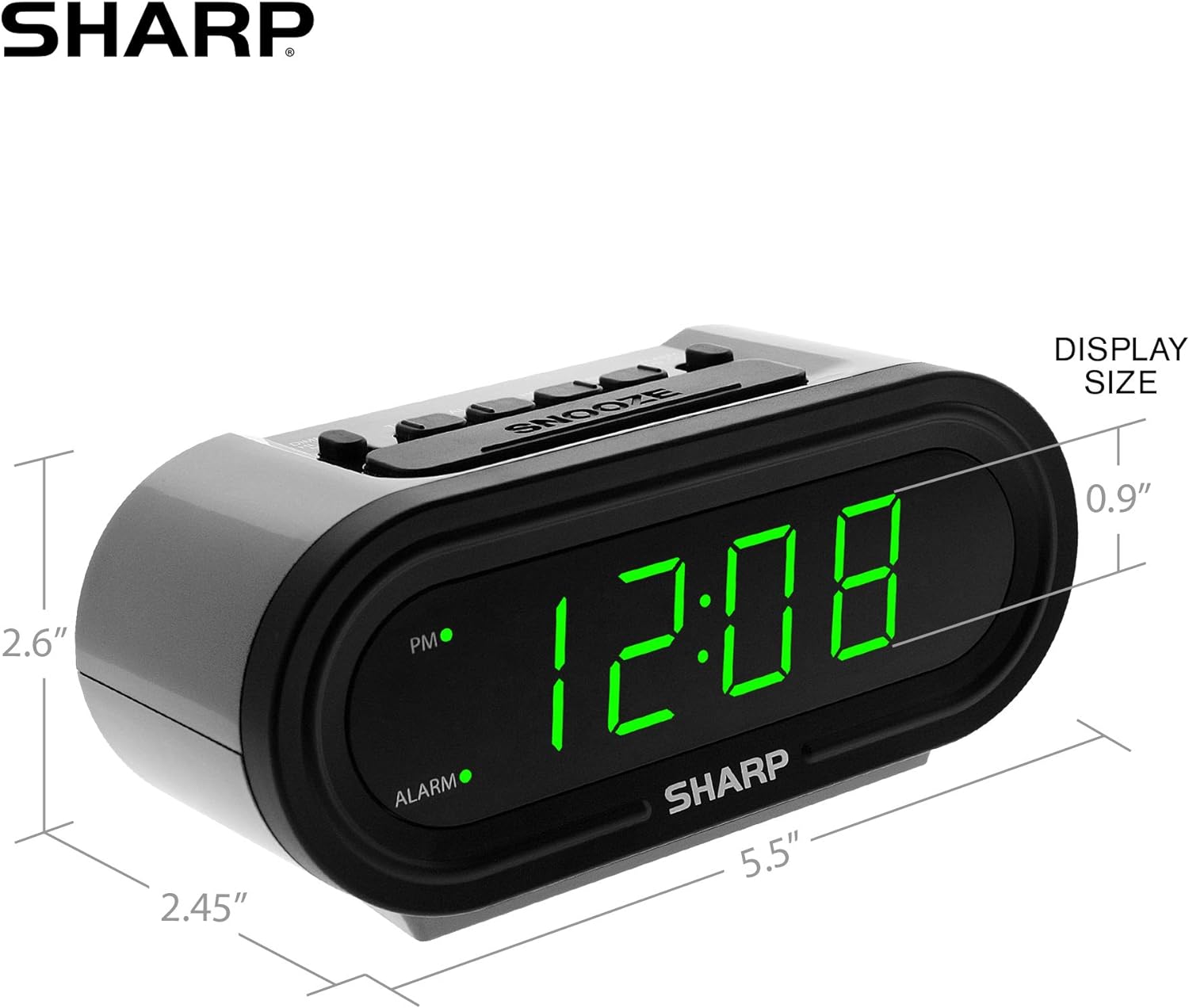
Рисунок 5: Размеры изделия для удобства.
Гарантия и поддержка
For warranty information or technical support, please refer to the contact details provided in your product packaging or visit the official Sharp webсайт. Сохраните чек о покупке на случай гарантийных претензий.
Ask a question about this manual
Ask about setup, troubleshooting, compatibility, parts, safety, or missing instructions. Manuals+ will review the question and use this page’s manual context to help answer it.