
1. Введение
Welcome to the Lumos Ultra Smart Bike Helmet instruction manual. The Lumos Ultra is designed to enhance your cycling safety and visibility with integrated smart lighting features. This helmet combines advanced protection with innovative technology to provide a superior riding experience for adults, including men and women, whether for road cycling or daily commutes.
Lumos was founded with the mission to improve cyclist safety, ensuring riders are seen by motorists from all angles, especially at night. This manual will guide you through the features, setup, operation, and maintenance of your new Lumos Ultra helmet.
2. Информация по технике безопасности
Your safety is paramount. The Lumos Ultra Smart Bike Helmet is equipped with advanced safety features and complies with rigorous standards.
- MIPS Head Protection: MIPS (Multi-Directional Impact Protection System) is an additional layer of protection designed to reduce rotational forces that can result from certain impacts. This system allows the helmet to absorb rotational impact force, providing enhanced safety for your head.
- Согласие: This helmet complies with the U.S. CPSC Safety Standard for Bicycle Helmets for Persons Age 5 and Older.
- Always ensure the helmet is properly fitted and securely fastened before every ride.
- Regularly inspect your helmet for any signs of damage. If the helmet has sustained an impact, even if no visible damage is present, it should be replaced.
3. Продукт закончилсяview
The Lumos Ultra helmet integrates cutting-edge technology into a sleek design. Key components include:
- Корпус шлема: Constructed from durable Polycarbonate (PC) outer material with Expanded Polystyrene (EPS) inner material for impact absorption.
- Встроенные светодиодные фонари: Яркие передние и задние светодиодные фары для кругового обзора.
- Беспроводной пульт дистанционного управления: A handlebar-mounted remote for controlling turn signals.
- Регулируемая система посадки: Обеспечивает плотное и комфортное прилегание к голове различных размеров.
- Порт зарядки USB Type-C: Для удобной подзарядки.

Figure 3.1: Lumos Ultra Smart Bike Helmet with included remote and smartphone app interface.
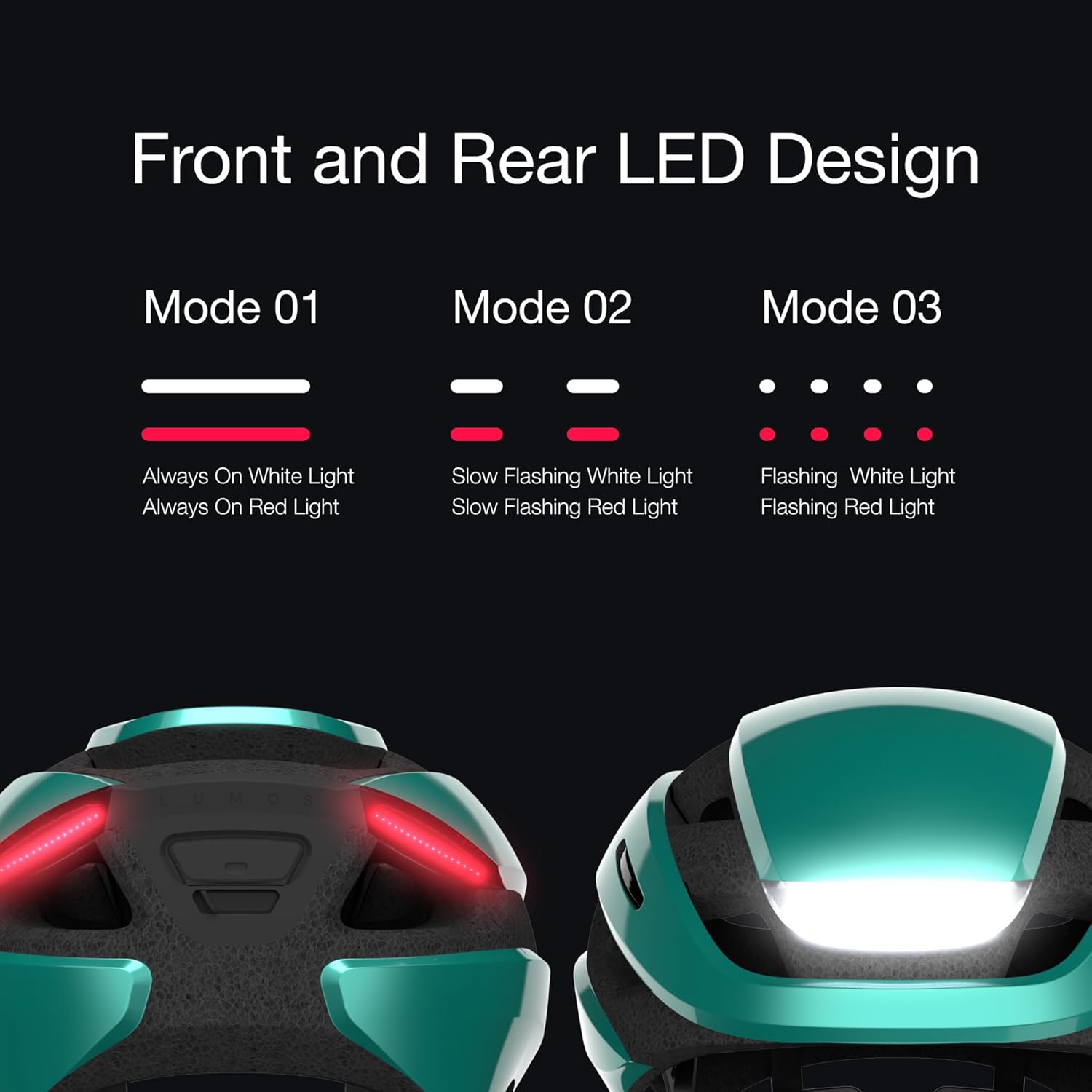
Figure 3.2: Front and Rear LED Light Design Modes.
4. Настройка
4.1 Первоначальная зарядка
Before first use, fully charge your Lumos Ultra helmet. The helmet uses a Universal USB Type-C charging cable.
- Connect the provided USB Type-C cable to the charging port on the helmet.
- Connect the other end to a USB power source (e.g., computer, wall adapter).
- A full charge takes approximately 2 hours. The battery can last up to 10 hours depending on usage.
4.2 Fitting Your Helmet
Proper fit is crucial for safety and comfort. The Lumos Ultra features an adjustable dial fit system.
- Наденьте шлем на голову, убедившись, что он сидит ровно и закрывает лоб.
- Adjust the rear dial until the helmet feels snug but comfortable, without excessive pressure points.
- Fasten the chin strap, ensuring it is tight enough so the helmet does not move freely, but not so tight as to cause discomfort.

Figure 4.1: Lumos Ultra Helmet Size Guide.
4.3 Подключение приложения к смартфону
Download the Lumos App from your device's app store to customize settings and track rides.
- Искать "Lumos App" on the Apple App Store or Google Play Store.
- Install the app and follow the on-screen instructions to pair your helmet via Bluetooth.
- Through the app, you can customize LED patterns, adjust brightness, and synchronize lights with other helmets using the Team Sync feature.

Figure 4.2: Lumos App Interface for Customization and Battery Check.
5. Инструкция по эксплуатации
5.1 Работа светодиодной подсветки
The helmet features bright front and rear LED lights for enhanced visibility.
- Press the power button on the helmet to turn the lights on/off and cycle through different light modes (e.g., Always On, Slow Flashing, Flashing).
- Adjust light patterns and brightness via the Lumos smartphone app.
5.2 Указатели поворота
The integrated turn signals are controlled by the wireless handlebar-mounted remote.
- Mount the wireless remote securely on your handlebar.
- Press the left button on the remote to activate the left turn signal.
- Press the right button on the remote to activate the right turn signal.
- The turn signals will automatically deactivate after a short period or can be manually turned off by pressing the corresponding button again.

Figure 5.1: Wirelessly Activated Turn Signals.
5.3 Конструкция, защищённая от атмосферных воздействий
The Lumos Ultra helmet is designed to withstand various weather conditions.
- The helmet is fully sealed and weatherproof, with a PX6 rating, allowing you to ride confidently in rain or shine.

Figure 5.2: Key Features of the Lumos Ultra Helmet.
Видео 5.1: Официальная видеопрезентация продуктаasing the Lumos Ultra Smart Bike Helmet's features and use.
6. Техническое обслуживание
To ensure the longevity and optimal performance of your Lumos Ultra helmet, follow these maintenance guidelines:
- Уборка: Используйте мягкий, damp cloth and mild soap to clean the helmet shell and straps. Avoid harsh chemicals or abrasive materials.
- Хранилище: Храните шлем в прохладном, сухом месте, вдали от прямых солнечных лучей и экстремальных температур.
- Уход батареи: For optimal battery life, avoid fully discharging the helmet frequently. Charge it regularly, especially if storing for extended periods.
- Инспекция: Periodically check all components, including straps, buckles, and the fit system, for wear or damage.
7. Поиск Неисправностей
If you encounter issues with your Lumos Ultra helmet, try the following solutions:
| Проблема | Возможная причина | Решение |
|---|---|---|
| Свет не включается/выключается | Разряженная батарея; Неисправность | Charge the helmet fully; Try resetting by holding the power button for 10 seconds. |
| Turn signals not working | Remote not paired; Remote battery low | Ensure remote is paired via the app; Replace remote battery (CR2032). |
| Helmet not connecting to app | Bluetooth off; App issue; Helmet off | Ensure Bluetooth is enabled on your device; Restart the app and helmet; Try re-pairing. |
| Короткое время работы батареи | Frequent use of high brightness; Old battery | Reduce brightness settings; Contact support for battery replacement options. |
8. Технические характеристики
Detailed technical specifications for the Lumos Ultra Smart Bike Helmet:
| Особенность | Деталь |
|---|---|
| Бренд | Люмос |
| Название модели | Ультра |
| Номер модели | 220012021 |
| Цвет | Aquamarine with MIPS |
| Возрастной диапазон | Взрослый |
| Размер | XL (24"-25-1/2" / 61 to 65cm) |
| Внешний материал | Поликарбонат (ПК) |
| Внутренний материал | Вспененный полистирол |
| Вес товара | 380 грамм |
| Специальная характеристика | Перезаряжаемый |
| Срок службы батареи | До 10 часов |
| Время зарядки | Приблизительно 2 часов |
| Водостойкость | PX6 Rating (Weatherproof) |
| СКП | 810059473164 |
| Дата первой доступности | 14 марта 2023 г. |

Figure 8.1: Lumos Ultra Helmet Detailed Specifications.
9. Гарантия и поддержка
9.1 Lumos Accident Replacement Policy
Lumos offers an Accident Replacement Policy for helmets purchased directly from Lumos. If your helmet is involved in a road accident that causes any impact, Lumos offers a 30% discount to repurchase a new helmet.
To get your helmet replaced in 3 steps:
- Contact Lumos customer support team.
- Share what happened (requires five proofs of damaged helmet).
- Use the code to repurchase the helmet.

Figure 9.1: Lumos Accident Replacement Policy.
9.2 Поддержка клиентов
For further assistance, technical support, or warranty inquiries, please contact Lumos customer support:
- Электронная почта: support@lumoshelmet.co
- Lumos App: Download the Ride Lumos APP via iOS/Android Store for free for updates and support.