
Введение
This manual provides comprehensive instructions for the safe and effective use of your SelfieShow 61-inch Extendable Selfie Stick Tripod, Model LDP-L05. Please read this manual thoroughly before operating the device and retain it for future reference.
Что включено
В комплект входят следующие предметы:
- 1x Tripod Selfie Stick
- 1x Universal Phone Holder
- 1x GoPro Adapter
- 1x Wireless Remote Shutter
SelfieShow provides a 1-year hassle-free warranty and 24-hour friendly customer service for this product.
Продукт болееview
The SelfieShow LDP-L05 is a versatile accessory designed for capturing photos and videos with enhanced stability and flexibility. It functions as both an extendable selfie stick and a stable tripod.

Figure 1: SelfieShow 61-inch Selfie Stick Tripod in various configurations.
Основные компоненты и характеристики:
- Selfie Stick Tripod Combo: The device integrates a phone holder and a camera quick release plate. The phone clip is adjustable to accommodate devices between 6.5-10cm. A standard 1/4-inch screw allows for camera mounting.
- Удлиняемая длина: The stick extends from 13.2 inches to 61.4 inches, offering a longer reach than standard models for wider shots and group photos.
- Регулируемое вращение: Features a 225° neck rotation and a 360° head rotation, allowing for flexible angle adjustments for optimal shooting.
- Беспроводной пульт дистанционного управления затвором: A pocket-sized wireless remote control enables easy photo and video capture from up to 30 feet away. It offers fast response and stable connection, compatible with most smartphones without requiring app downloads.
- Широкая совместимость: The universal phone holder fits most smartphones (with or without a case) and is compatible with various iPhone and Android models. The 1/4-inch screw allows mounting of digital cameras, DSLRs, SLRs, action cameras (like GoPro), webкамеры и видеокамеры.

Рисунок 2: Подробная информация view of the tripod's components and features.

Figure 3: The tripod's adjustable height settings.

Figure 4: Illustrates the 360° panoramic shooting feature.

Figure 5: Demonstrates the swivel panning head's range of motion.

Figure 6: The wireless remote control in use.
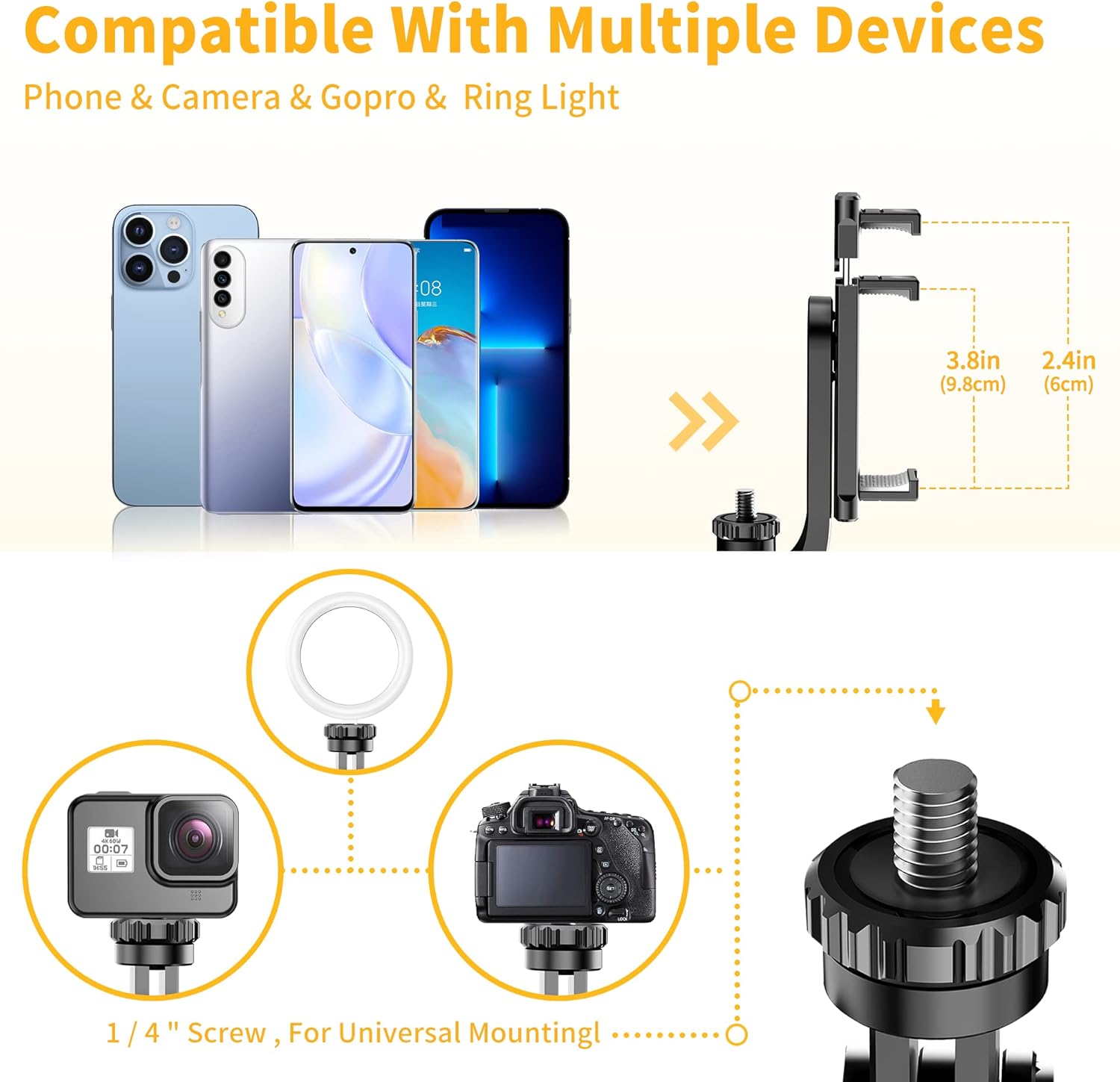
Figure 7: Compatibility with multiple devices.
Инструкции по установке
1. Разворачивание штатива:
- Крепко держите ручку.
- Слегка потяните нижнюю часть ручки вниз, чтобы освободить ножки штатива.
- Spread the three legs outwards until they form a stable base.
2. Attaching Your Device:
- Для смартфонов: Extend the universal phone holder to fit your smartphone securely. Ensure the phone is centered and stable within the holder.
- For Cameras/GoPro: If using a camera or GoPro, remove the phone holder (if attached) and screw your device onto the 1/4-inch screw mount. Ensure it is tightened securely.
3. Pairing the Wireless Remote Shutter:
- Locate the wireless remote shutter, typically integrated into the handle. Slide it out to detach.
- Turn on the remote by pressing and holding the power button until an indicator light (usually blue) flashes.
- На смартфоне перейдите в настройки Bluetooth и выполните поиск доступных устройств.
- Select the device named "Selfie" or similar (refer to remote for exact name) to pair. The indicator light will stop flashing once successfully paired.
- The remote is now ready to use for capturing photos and videos.
Video 1: Demonstration of the SelfieShow 61-inch Selfie Stick Tripod's setup and features, including remote pairing and extension.
Инструкция по эксплуатации
1. Использование в качестве селфи-палки:
- Убедитесь, что ножки штатива сложены и надежно закреплены в ручке.
- Удлините стержень из алюминиевого сплава до нужной вам длины.
- Adjust the phone holder or camera to the desired angle using the 225° neck rotation and 360° head rotation.
- Use the wireless remote shutter to capture photos or start/stop video recording.
2. Использование в качестве штатива:
- Unfold the tripod legs as described in the Setup section, ensuring a stable base on a flat surface.
- Extend the rod to the required height.
- Position your device using the adjustable head for optimal framing.
- Utilize the wireless remote shutter for hands-free operation.

Figure 8: Various usage scenarios for the tripod.
Видео 2: Оверview of the SelfieShow Selfie Stick Tripod's features and operational modes.
Обслуживание
- Очищайте устройство мягкой сухой тканью. Избегайте использования агрессивных химикатов или абразивных материалов.
- Храните штатив в прохладном, сухом месте, вдали от прямых солнечных лучей и экстремальных температур.
- Ensure all screws and connections are tightened before each use to maintain stability.
- If the remote control battery needs replacement, refer to the remote's specific instructions for battery type and replacement procedure.
Поиск неисправностей
Пульт дистанционного управления не подключается:
- Убедитесь, что пульт дистанционного управления заряжен или в нём установлена новая батарейка.
- Убедитесь, что Bluetooth включен на вашем смартфоне.
- Make sure the remote is within the 30-foot operating range.
- Попробуйте отменить сопряжение пульта и повторно выполнить его сопряжение в настройках Bluetooth вашего телефона.
Неустойчивость штатива:
- Убедитесь, что ножки штатива полностью выдвинуты и зафиксированы в нужном положении на ровной, устойчивой поверхности.
- Check that your device is securely mounted and balanced on the holder.
- Avoid extending the rod to its maximum length in windy conditions or on uneven terrain.
Phone Holder Not Gripping Securely:
- Ensure your phone's dimensions are within the specified range (6.5-10cm).
- Check for any obstructions or debris in the phone holder's grip pads.
Технические характеристики
| Особенность | Деталь |
|---|---|
| Размеры продукта | 2.95 x 1.48 x 13.23 дюйма |
| Вес товара | 12.5 унции (355 граммов) |
| Номер модели | LDP-L05 |
| Аккумуляторы | Требуется 1 литий-металлическая батарея (входит в комплект) |
| Бренд | SelfieShow |
| Цвет | Black (with handle) |
| Совместимые устройства | Smartphone, Digital Camera, DSLR, SLR, Action Camera, Gopro, Webcam, Camcorder |
| Специальная характеристика | Remote Control, Portable |
| Материал | Акрилонитрилбутадиенстирол (АБС), нержавеющая сталь |
| Максимальный вес | 3 Килограмма |
| Максимальная высота | 149 сантиметров (приблизительно 61 дюймов) |
| Тип головки штатива | Шаровые головки |
Гарантия и поддержка
Your SelfieShow 61-inch Extendable Selfie Stick Tripod is covered by a 1-year hassle-free warranty. For any inquiries, technical assistance, or warranty claims, please contact SelfieShow customer service. Our team is available 24 hours to provide friendly support.