
1. Введение
The Blink Mini is a compact indoor plug-in smart security camera designed for monitoring your home. It offers 1080p HD video, infrared night vision, motion detection, and two-way audio capabilities, allowing you to stay connected to your indoor environment from anywhere via the Blink Home Monitor app.
2. Продукт закончилсяview
2.1 Основные характеристики
- HD-видео 1080p: Запись и view clear video during the day and with infrared HD night vision after dark.
- Двустороннее аудио: Communicate with people and pets in your home directly from your smartphone.
- Обнаружение движения: Receive alerts on your smartphone when motion is detected. Customizable motion detection zones are available.
- Indoor Chime Functionality: Use the Mini as an indoor plug-in chime for a Blink Video Doorbell, providing real-time alerts when the doorbell is pressed.
- Гибкие варианты хранения: Save and share clips with a Blink Subscription Plan (30-day free trial included) or locally with a Sync Module 2 (sold separately).
- Интеграция с Алексой: Compatible with Alexa-enabled devices for voice control of live view, arming, and disarming.
2.2 Что в коробке
- Blink Mini camera (quantity dependent on package)
- 1 stand (attached per camera)
- 2 крепежных винта (на камеру)
- 1 USB cable (per camera)
- 1 power adapter (per camera)
2.3 Компоненты продукта

Рисунок 1: Blink Mini camera highlighting its core features.

Рисунок 2: Blink Mini camera demonstrating two-way audio functionality with a smart display.
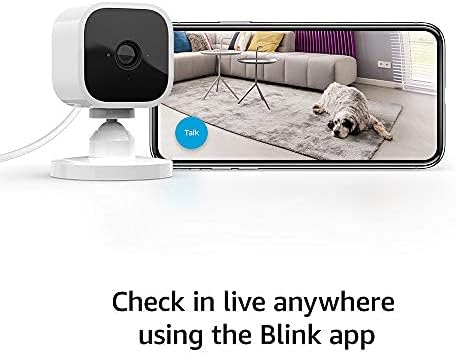
Рисунок 3: Monitoring live view from the Blink Mini camera using the Blink app on a smartphone.
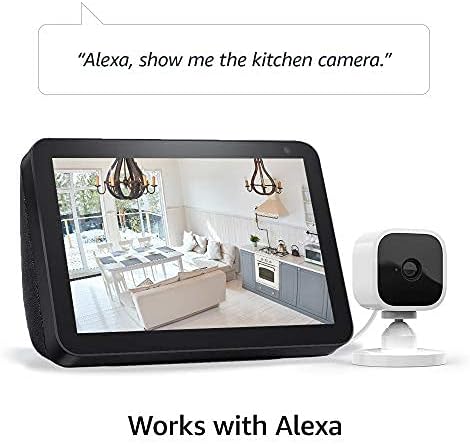
Рисунок 4: Blink Mini camera integration with Alexa for voice control and live viewна совместимых устройствах.
3. Настройка
Setting up your Blink Mini camera is a straightforward process. Ensure you have a stable 2.4 GHz Wi-Fi connection available.
3.1 Начальные шаги настройки
- Загрузите приложение Blink Home Monitor: Искать "Blink Home Monitor" in your smartphone's app store (iOS 17, Android 10, or Fire OS 8 or newer required) and install it.
- Завести аккаунт: Откройте приложение и следуйте инструкциям на экране, чтобы создать новую учетную запись Blink или войти в существующую.
- Добавить устройство: In the app, tap the "+" icon to add a new device and select "Blink Mini Camera."
- Отсканируйте QR-код: Use your phone's camera to scan the QR code located on the back of your Blink Mini camera.
- Plug In the Camera: Connect the provided USB cable to the camera and the power adapter, then plug the adapter into a standard electrical outlet. The camera's blue LED will begin to flash.
- Подключитесь к Wi-Fi: Follow the app's instructions to connect your Blink Mini to your 2.4 GHz Wi-Fi network. Ensure your Wi-Fi has a minimum 2 Mbps upload speed.
- Расположите камеру: Place the camera in your desired indoor location. The attached stand allows for flexible positioning on flat surfaces or mounting to a wall using the included screws.
4. Инструкция по эксплуатации
Once set up, your Blink Mini camera provides various monitoring and interaction features through the Blink Home Monitor app.
4.1 Прямой эфир View и двустороннее аудио
- To access live video, open the Blink Home Monitor app and tap the camera icon next to your Mini camera.
- Во время живого view, tap the microphone icon to enable two-way audio. Speak into your phone to communicate through the camera's speaker.
4.2 Обнаружение движения
- Enable motion detection in the camera settings within the Blink app to receive alerts when movement is detected.
- Customize motion detection zones to focus on specific areas and reduce unwanted notifications. Adjust sensitivity settings as needed.
4.3 Видеозапись и хранение
- Video clips triggered by motion or initiated by live view можно спасти.
- A Blink Subscription Plan provides cloud storage for video clips. A 30-day free trial is typically included with new devices.
- Alternatively, you can save clips locally to a USB drive when connected to a Blink Sync Module 2 (sold separately).
4.4 Интеграция с Alexa
- Enable the Blink skill in the Alexa app.
- Link your Blink account to your Alexa account.
- Use voice commands such as "Alexa, show me [camera name]" to view live feeds on compatible Echo Show devices, or "Alexa, arm [system name]" to activate motion detection.
5. Техническое обслуживание
Regular maintenance ensures optimal performance and longevity of your Blink Mini camera.
5.1 Очистка
- Аккуратно протрите объектив и корпус камеры мягкой, сухой, безворсовой тканью.
- Avoid using liquid cleaners, aerosols, or abrasive solvents, as these can damage the camera.
5.2 Обновления программного обеспечения
- Blink regularly releases software updates to improve performance, add features, and enhance security.
- Ensure your camera is connected to Wi-Fi and powered on to receive automatic updates.
- Refer to the Blink support page for information specific to your device's software security updates.
6. Поиск Неисправностей
If you encounter issues with your Blink Mini, try the following troubleshooting steps:
- Камера в автономном режиме: Check the power connection and ensure your Wi-Fi network is active and stable. Restart your Wi-Fi router if necessary.
- Плохое качество видео: Ensure the camera lens is clean. Check your Wi-Fi signal strength in the app; a weak signal can affect video quality.
- Обнаружение движения не работает: Verify that motion detection is enabled in the app settings. Adjust sensitivity and ensure motion zones are correctly configured.
- Проблемы с двусторонней аудиосвязью: Check your smartphone's microphone and speaker settings. Ensure the camera's speaker is not obstructed.
- Приложение не отвечает: Close and reopen the Blink Home Monitor app. If the issue persists, restart your smartphone.
- Сброс камеры: If problems persist, you may need to reset the camera. Refer to the Blink support page for specific instructions on how to perform a factory reset.
7. Технические характеристики
| Особенность | Деталь |
|---|---|
| Поле view | 110° диагональ |
| Разрешение камеры | 1080p HD video (day), infrared HD night vision (dark) |
| Camera frame rate | До 30 кадров в секунду |
| Размер | 2 дюйма x 1.9 дюйма x 1.4 дюймов (50 мм x 49 мм x 36 мм) |
| Масса | 1.7 унции (48 грамма) |
| Процессор | Immedia Proprietary – AC1002B, 4 ядра / 200 МГц |
| Власть | 2 meter micro USB and power adapter, electrical rating: 100-240V 50/60 HZ 0.15A |
| Wi-Fi-подключение | Supports 2.4 Ghz 802.11g/n; requires minimum 2 Mbps upload speed. Does not support ad-hoc or paywall networks. |
| Доступные цвета | Белый, Черный |
| Minimum smartphone requirements | iOS 17, Android 10, Fire OS 8 only |
| Блинк-приложение | Blink домашний монитор |
| Аудио | Вывод звука на динамики и двусторонняя аудиозапись |
| светодиоды | One blue LED to indicate activity (optional) |
| Поколение | 1st generation – 2020 release |
8. Гарантия и поддержка
8.1 Информация о гарантии
The Blink Mini camera includes a 1 года ограниченной гарантии и обслуживания. Use of Blink cameras is subject to the terms found on the official Blink webсайт.
8.2 Поддержка клиентов
For additional information, detailed guides, or technical assistance, please visit the official Blink Mini support page. You can typically find a link to the support page within the Blink Home Monitor app or on the Blink webсайт.