
Введение
The SANWA Multi Device Bluetooth Keyboard with Touchpad (Model GSKBBT066) is designed for versatile use across various operating systems and devices. This compact, rechargeable keyboard features a built-in touchpad, multi-device switching capabilities, and convenient shortcut keys, enhancing productivity and entertainment experiences.
Настраивать
1. Зарядка клавиатуры
Before initial use, fully charge the keyboard. Connect the provided USB charging cable to the keyboard's charging port and a USB power source. A full charge typically takes approximately 2 hours and provides up to 30 hours of constant use.

Image: The SANWA Bluetooth keyboard connected via USB cable to a wall adapter for charging.
2. Сопряжение с устройствами
The keyboard supports connection to up to three Bluetooth devices simultaneously. Use the dedicated pairing buttons to switch between connected devices.
- Убедитесь, что клавиатура заряжена и включена.
- Нажмите Fn key and one of the device selection keys (1, 2, или 3) simultaneously to select a channel. The corresponding LED will blink.
- Нажмите Вкладка key labeled 'Pairing' to enter pairing mode. The selected channel's LED will blink rapidly.
- На вашем устройстве (ноутбуке, планшете, смартфоне) включите Bluetooth и выполните поиск доступных устройств.
- Select 'SANWA GSKBBT066' from the list of found devices.
- Следуйте инструкциям на экране для завершения процесса сопряжения.
- Чтобы переключиться между сопряженными устройствами, просто нажмите Fn + 1, Fn + 2, или Fn + 3.

Image: A close-up of the keyboard showing the 'Fn' key, 'Tab' (Pairing) key, and the device selection LEDs (1, 2, 3).
Video: An instructional video demonstrating the features and usage of the SANWA Bluetooth Rechargeable Keyboard with Touchpad.
Инструкция по эксплуатации
Keyboard Layout and Typing
The keyboard features a standard QWERTY layout with comfortable pantograph scissor-structure keys, designed for sensitive response and reduced typing noise. The layout is optimized for efficient typing.

Изображение: сверху вниз view of the SANWA Bluetooth keyboard, showcasing его полный макет.

Image: Close-up of the keyboard keys, illustrating the pantograph scissor-structure for comfortable typing.
Сочетания клавиш
The keyboard includes 20 practical shortcut keys for quick access to various functions and media controls. These keys are typically activated by pressing the Fn key in combination with the corresponding function key (F1-F12) or dedicated media keys.
- Ф1: Яркость вниз
- Ф2: Яркость вверх
- Ф3: Функция поиска
- Ф4: Задача View
- Ф5: Switch to Desktop
- Ф6: Переключение приложений
- Ф7: Немой
- Ф8: Объем -
- Ф9: Объем +
- Ф10: Предыдущая песня
- Ф11: Воспроизведение/Пауза
- Ф12: Следующая песня
- Dedicated keys for Virtual Keyboard, Input Language Switch, and Open Browser.
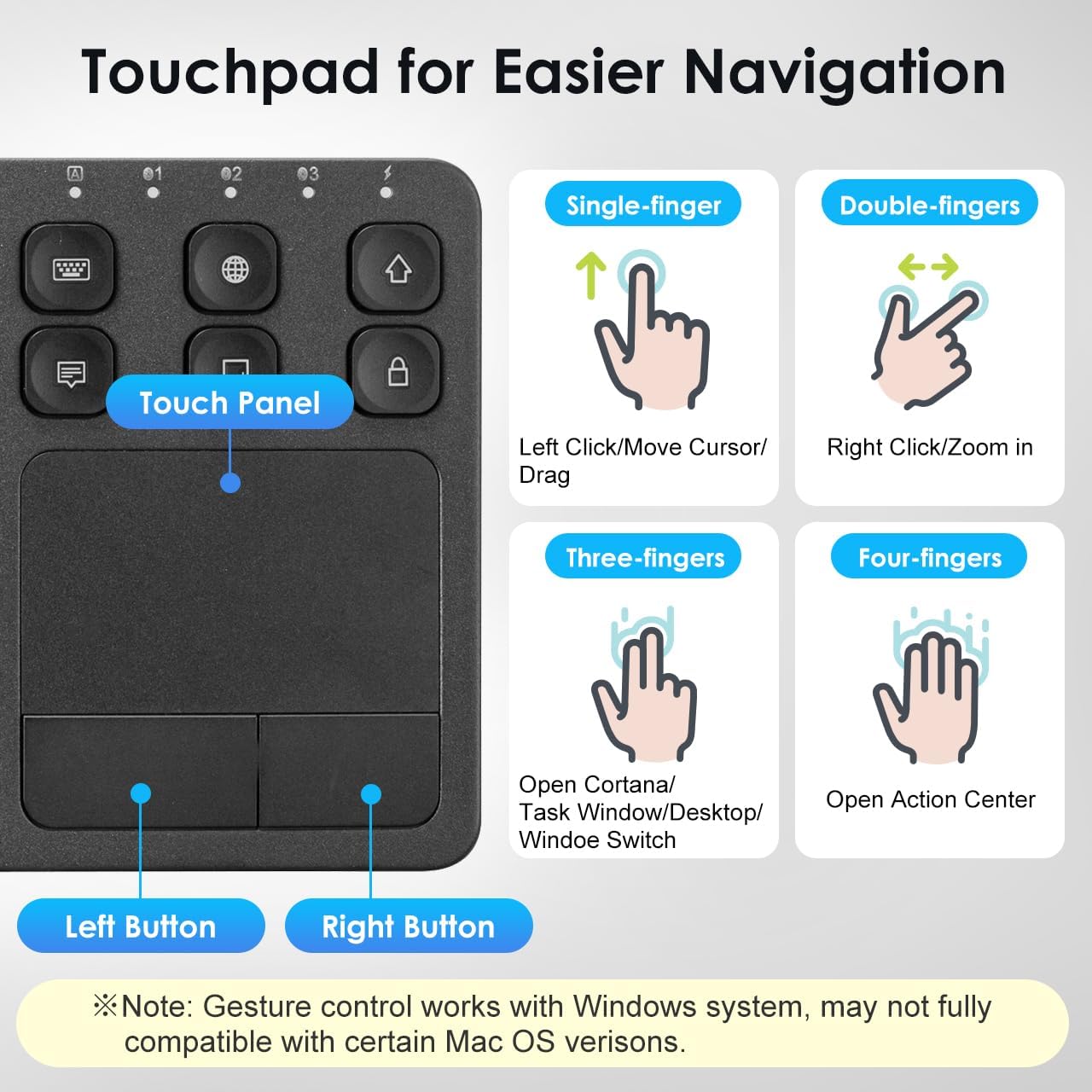
Image: The keyboard layout with icons indicating the functions of the shortcut keys.
Touchpad Functionality and Gestures (Windows System)
The integrated multi-touch touchpad provides effortless navigation. It supports various finger gestures, primarily optimized for Windows systems. Note that gesture compatibility may vary with certain macOS versions.

Изображение: Подробный view of the touchpad and its gesture guide.
| Жест | Функция |
|---|---|
| Single-finger tap/drag | Left Click / Move Cursor / Drag |
| Касание двумя пальцами | Щелкните правой кнопкой мыши |
| Сведение двух пальцев | Увеличить / Уменьшить |
| Прокрутка двумя пальцами | Страница вверх/страница вниз |
| Касание тремя пальцами | Open Cortana / Task Window / Desktop / Window Switch |
| Касание четырьмя пальцами | Открыть Центр поддержки |
Совместимость
The SANWA Bluetooth Keyboard with Touchpad is broadly compatible with a range of operating systems and devices, making it a versatile tool for various computing needs.
- Операционные системы: Windows 13/11/10/8.1/8/7/XP/Vista/98/2000/Me, macOS 10.12-10.15, Android 7.0-10, iPad OS13, iOS13 and later versions.
- Совместимые устройства: Desktop computers, laptops, cell phones, tablets, Mac, iPad, iPhone, Android TV BOX, Smart TVs, HTPC.
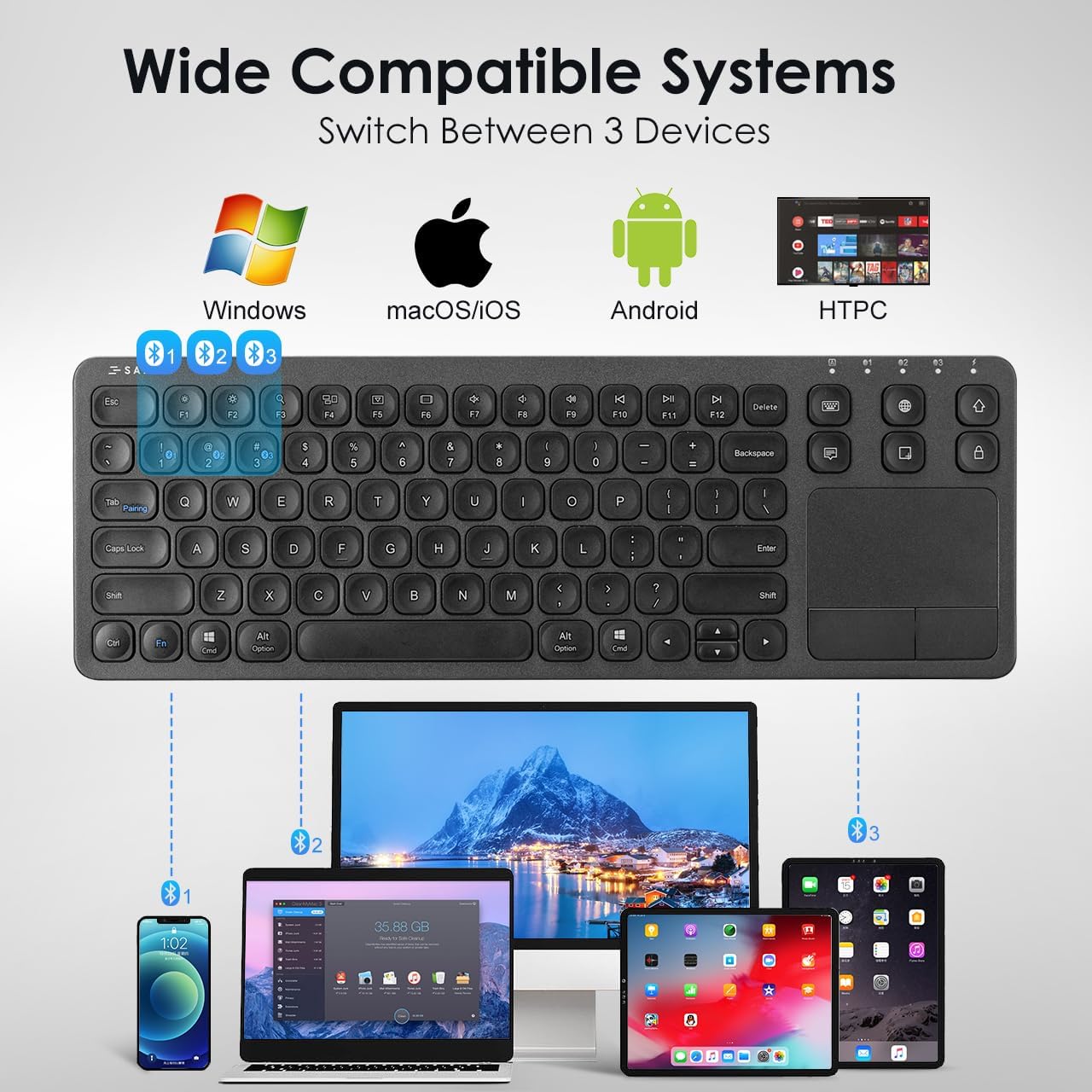
Image: The keyboard shown connected to a smartphone, laptop, and tablet, demonstrating multi-device compatibility.
Информация о зарядке и батарее
The keyboard is equipped with a built-in rechargeable Lithium Polymer battery. To ensure optimal performance and longevity, adhere to the following guidelines:
- Время зарядки: Полная зарядка занимает примерно 2 часа.
- Время работы: Up to 30 constant hours on a full charge.
- Энергосбережение: The keyboard features an auto-sleep function after a period of inactivity to conserve battery. Press any key to wake it up.
- Индикатор зарядки: Refer to the keyboard's LED indicators for charging status.
Image: The SANWA Bluetooth keyboard connected via USB cable to a wall adapter for charging, with text indicating 30 hours work time and 2 hours full charge.
Уход и обслуживание
To maintain the performance and appearance of your SANWA keyboard, follow these simple care instructions:
- Уборка: Для очистки клавиатуры и тачпада используйте мягкую, сухую, безворсовую ткань. Для удаления стойких загрязнений слегка протрите поверхность.ampСмочите ткань водой или мягким чистящим раствором. Избегайте использования агрессивных химикатов и абразивных материалов.
- Хранилище: Храните клавиатуру в прохладном, сухом месте, вдали от прямых солнечных лучей и экстремальных температур.
- Избегайте жидкостей: Do not expose the keyboard to liquids. In case of accidental spills, power off the keyboard immediately and allow it to dry completely before reuse.
- Обращаться с осторожностью: Не допускайте падения клавиатуры и сильных ударов по ней.
Поиск неисправностей
If you encounter issues with your SANWA Bluetooth Keyboard, refer to the following common problems and solutions:
| Проблема | Решение |
|---|---|
| Keyboard does not connect or pair. | Ensure the keyboard is charged and powered on. Verify Bluetooth is enabled on your device. Re-enter pairing mode on the keyboard and try pairing again. Ensure no other devices are interfering with the Bluetooth signal. |
| Typing is unresponsive or delayed. | Check battery level and charge if necessary. Ensure the keyboard is within the effective Bluetooth range (up to 32.8ft). Reconnect the Bluetooth connection. |
| Touchpad is not working correctly. | Ensure your device's operating system fully supports touchpad gestures. Some macOS versions may have limited gesture compatibility. Clean the touchpad surface. Restart the keyboard and device. |
| Keyboard frequently disconnects or goes to sleep. | The keyboard has an auto-sleep function to save power. Press any key to wake it up. Ensure the keyboard is not too far from the connected device. Some users report that the sleep function cannot be disabled, which is a design characteristic. |
| Two-finger scrolling is jumpy or unpredictable. | This can be a known characteristic for some users, especially with certain iPadOS versions. Consider using the arrow keys for navigation if scrolling is inconsistent. |
Технические характеристики продукта
| Особенность | Деталь |
|---|---|
| Бренд | SANWA |
| Номер модели | ГСКББТ066 |
| Технология связи | Bluetooth |
| Описание клавиатуры | Многофункциональный |
| Специальная характеристика | Touchpad, shortcuts, ultra-thin |
| Цвет | Черный |
| Размеры продукта | 14.72 дюйма (Д) x 5.08 дюйма (Ш) x 0.69 дюйма (В) (37.39 x 12.90 x 1.75 см) |
| Вес товара | 15.4 унции (436.54 грамма) |
| Аккумуляторы | 1 литий-полимерный аккумулятор (входит в комплект) |
| Производитель | ПОСТАВКА САНВА |

Image: A diagram illustrating the length, width, and thickness of the ultra-slim keyboard.
Гарантия и поддержка
For warranty information, technical support, or customer service inquiries, please refer to the official SANWA webна сайте или обратитесь к продавцу. Сохраните чек о покупке для предъявления гарантийных претензий.