
1. Продукт закончилсяview
The WISE TIGER EP-AC2939 is a 1200Mbps AC Dual Band WiFi Extender designed to expand your existing Wi-Fi coverage. It functions as a wireless repeater and access point, boosting internet Wi-Fi for up to 32 devices and covering areas up to 1500 sq. ft. This device is compatible with any AC router, gateway, or access point, supporting both 2.4GHz (up to 300Mbps) and 5GHz (up to 867Mbps) bands.
Equipped with dual external 6 dBi antennas, it extends Wi-Fi coverage 360 degrees, ensuring reliable data transmission throughout your home or office. The integrated 100Mbps Ethernet port allows it to function as a wireless adapter for wired devices. A smart signal indicator assists in finding the optimal placement for maximum Wi-Fi coverage.

Image: The EP-AC2939 extender highlighting its dual-band capabilities (2.4GHz at 300Mbps and 5GHz at 867Mbps) and its capacity to connect up to 32 devices, including phones, pads, laptops, game consoles, desktops, and TVs.
2. Содержимое упаковки
- 1 x WISE TIGER EP-AC2939 WiFi Extender
- 1 х Адаптер питания
- 1 х Руководство пользователя

Image: The EP-AC2939 WiFi Extender displayed alongside its retail packaging and the included user manual, illustrating the complete product package.
3. Компоновка устройства
The EP-AC2939 features a compact design with adjustable external antennas for optimal signal reception. Key components include:
- Светодиод питания: Указывает состояние питания.
- Светодиод процессора: Отображает активность системы.
- Светодиод 5G: Indicates 5GHz band activity.
- Светодиод 2.4G: Indicates 2.4GHz band activity.
- Индикатор локальной сети: Указывает на активность порта Ethernet.
- Кнопка WPS: Для быстрой настройки с маршрутизаторами, поддерживающими WPS.
- Кнопка сброса: To restore factory default settings (use a pin to press and hold).
- Порт Ethernet: For wired device connectivity.
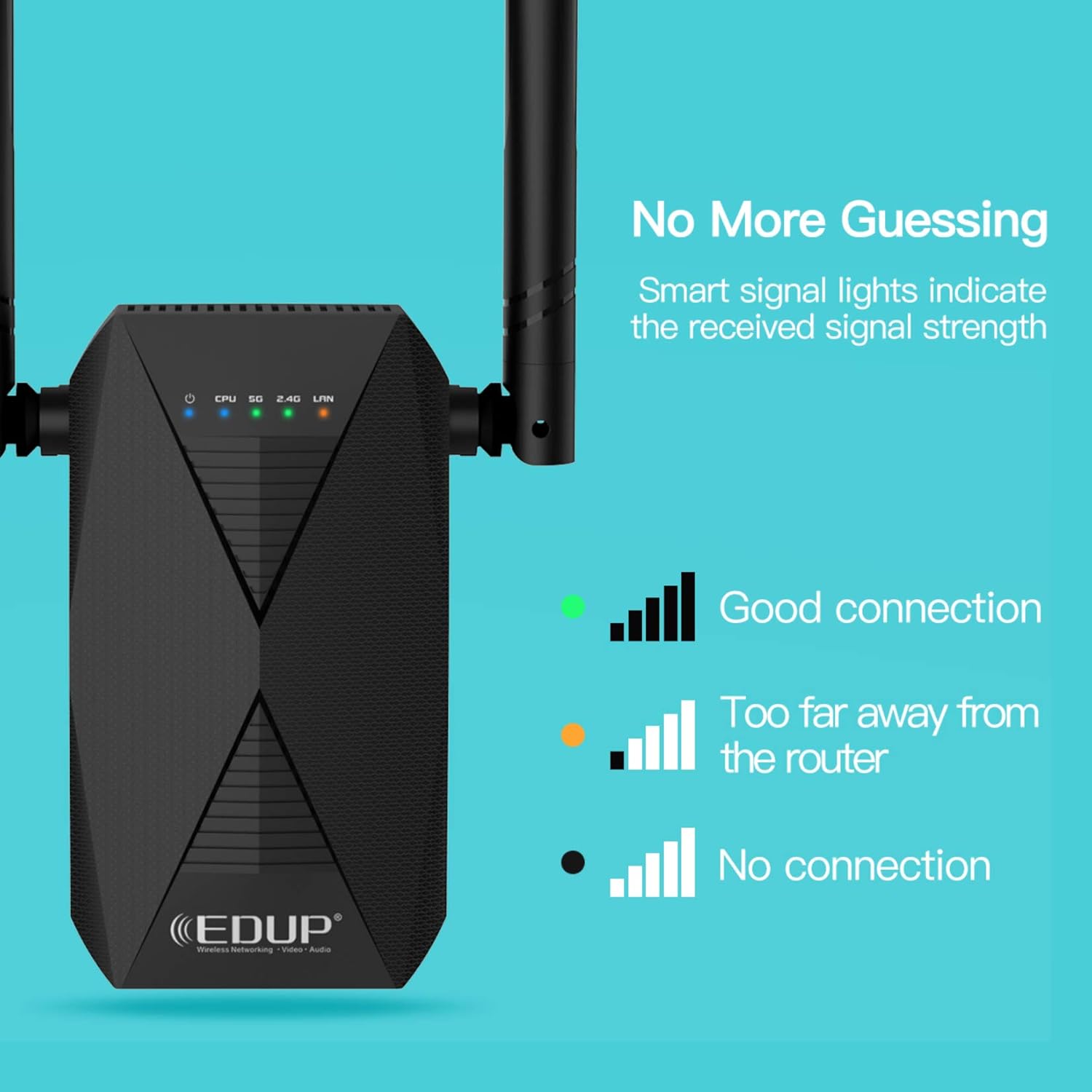
Image: Close-up of the EP-AC2939 WiFi Extender showing its signal indicator lights. A green light indicates a good connection, an orange light indicates being too far from the router, and no light indicates no connection.
4. Руководство по установке
There are two primary methods to set up your WISE TIGER EP-AC2939 WiFi Extender: using the WPS button or through a web браузер.
4.1. Метод WPS (Wi-Fi Protected Setup)
- Подключите ретранслятор к электрической розетке рядом с основным маршрутизатором.
- Wait for the CPU LED to turn solid blue.
- Press the 2.4G or 5G button on the extender (depending on which band you want to extend).
- В течение 2 минут нажмите кнопку WPS на вашем основном роутере.
- The extender's 2.4G/5G LED should turn solid green, indicating a successful connection.
- Relocate the extender to a desired location within the range of your main router's Wi-Fi signal. Use the signal indicator lights to find an optimal spot.

Image: A visual guide demonstrating the WPS one-key connection process. It shows pressing the 2.4G or 5G button on the extender, then the router's WPS button, and finally placing the extender in a desired location.
4.2. Web Метод браузера
For detailed visual instructions on setting up via web browser, please refer to the video below:
Video: Official setup guide for the AC1200 WiFi Range Extender, demonstrating the steps to configure the device using a web browser interface. This video is provided by Wise Tiger LLC.
Пошаговая инструкция:
- Включите питание и подключитесь: Plug the extender into an electrical outlet. On your mobile device or computer, connect to the extender's open Wi-Fi network (e.g., "WiFi_EXT" or "WiFi_EXT_5G").
- Страница настройки доступа: Откройте web браузер и введите
192.168.0.254в адресной строке. - Choose Repeater Mode: На странице настроек выберите «Режим ретранслятора».
- Select Primary Network: Choose the 2.4GHz or 5GHz original Wi-Fi network you wish to extend from the list.
- Введите пароль: Type the password for your original Wi-Fi network. You can choose to keep the SSID and password the same or modify them for the extended Wi-Fi.
- Соединять: Click "Connect" to apply the settings. The extender will restart.
- Проверить соединение: After the extender restarts, check your device's Wi-Fi settings to confirm that the extended Wi-Fi network is available and connected successfully.
5. Режимы работы
The WISE TIGER EP-AC2939 WiFi Extender supports two operational modes:
5.1. Режим репитера
In Repeater Mode, the extender wirelessly connects to your existing router's Wi-Fi network and re-transmits the signal, effectively extending its range. This mode is ideal for eliminating Wi-Fi dead zones and improving signal strength in areas with weak coverage.
5.2 Режим точки доступа (AP)
In Access Point Mode, the extender connects to your router via an Ethernet cable and transforms your wired network connection into a wireless access point. This is useful for adding Wi-Fi capability to a wired-only network or creating a new Wi-Fi network in a specific area.
6. Optimal Placement and Signal Indicator
The smart signal indicator lights on the extender help you find the best location for optimal Wi-Fi coverage. After initial setup, you can relocate the extender to a suitable spot. Observe the indicator lights to ensure a strong connection:
- Зеленый свет: Indicates a good connection to the main router.
- Оранжевый свет: Indicates the extender is too far from the main router, suggesting relocation closer to the router.
- Нет света: Indicates no connection to the main router.
Place the extender roughly halfway between your router and the Wi-Fi dead zone. Avoid placing it near large metal objects, concrete walls, or other devices that may cause interference.
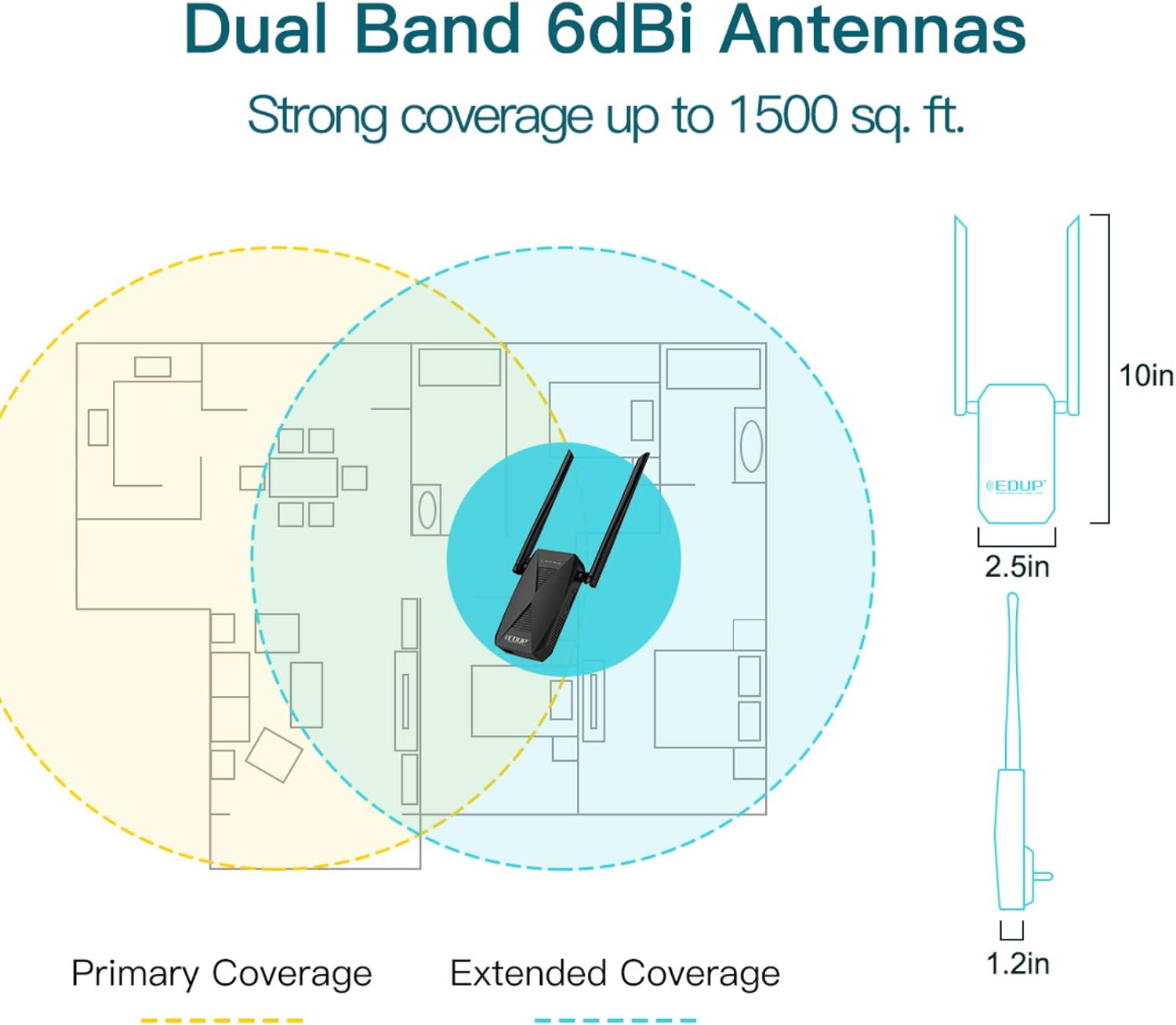
Image: A floor plan diagram showing how the EP-AC2939 WiFi Extender extends network coverage. It illustrates the primary coverage area of the main router and the significantly expanded coverage provided by the extender, reaching up to 1500 sq. ft.
7 Проводное подключение
The EP-AC2939 features a 100Mbps Ethernet port, allowing you to connect wired devices such as desktop computers, gaming consoles, or smart TVs directly to the extender. This provides a stable and fast wired connection for devices that require it, while still extending your wireless network.

Image: The EP-AC2939 WiFi Extender with a clear indication of its 100/10M Ethernet port, designed for connecting wired devices to the network.
8. Технические характеристики
| Особенность | Деталь |
|---|---|
| Тип беспроводной связи | 802.11ac |
| Бренд | Мудрый ТИГР |
| Ряд | ЕР-AC2939 |
| Вес товара | 9.5 унции |
| Размеры упаковки | 8 x 6 x 2 дюйма |
| Цвет | Черный |
| Производитель | WISE TIGER LLC |
| Стандарт беспроводной связи | 802.11ac |
| Скорость передачи данных | 1200 мегабит в секунду |
| Класс диапазона частот | Двухдиапазонный |
9. Поиск Неисправностей
- Нет питания: Убедитесь, что удлинитель надежно подключен к исправной электрической розетке. Проверьте, горит ли светодиодный индикатор питания.
- Невозможно подключиться к Wi-Fi ретранслятора: Verify that the extender is powered on. Try resetting the extender to factory defaults by pressing the reset button for 5-10 seconds with a pin, then re-attempt setup.
- Слабый сигнал от усилителя сигнала: Relocate the extender closer to your main router. Use the smart signal indicator lights to find an optimal position (green light indicates good signal). Ensure there are no major obstructions between the router and the extender.
- Extended Wi-Fi Not Visible: Ensure the extender is powered on and configured correctly. If you modified the SSID during setup, search for the new network name.
- Низкая скорость в расширенной сети: The extender's performance depends on the signal strength from your main router. Try optimizing the extender's placement. Ensure your main router is providing adequate speed.
- Сбой настройки WPS: If WPS setup fails, try the web browser method for configuration. Ensure your router's WPS function is enabled and working correctly.
- Прерывистое соединение: Check for potential interference from other electronic devices (microwaves, cordless phones). Ensure the extender is not placed in an area with excessive network traffic or physical obstructions.
10. Информация по технике безопасности
- Не подвергайте устройство воздействию воды или влаги.
- Не пытайтесь самостоятельно разобрать или отремонтировать устройство.
- Используйте только прилагаемый адаптер питания.
- Держите устройство вдали от источников тепла и прямых солнечных лучей.
- Обеспечьте достаточную вентиляцию вокруг устройства.
11. Гарантия и поддержка
For warranty information and technical support, please refer to the documentation included with your product or visit the official WISE TIGER webсайт. Сохраните чек о покупке на случай гарантийных претензий.