
1. Введение
The Korg SoundLink MW-1608 is a 16-channel hybrid mixer designed for a wide range of audio applications, including studio recording and live sound reinforcement. This mixer integrates both analog and digital processing to provide comprehensive control over audio signals. It features high-quality components such as HiVolt microphone preamps, Velvet Sound AD/DA converters, and ALPS faders.
Key functionalities include per-channel 3-band equalizers, 1-knob compressors, mute groups, a dedicated monitor section, feedback suppression, all-XLR speaker outputs, a built-in spectrum analyzer, and a suite of Korg digital effects. This manual provides essential information for the proper setup, operation, maintenance, and troubleshooting of your MW-1608 mixer.
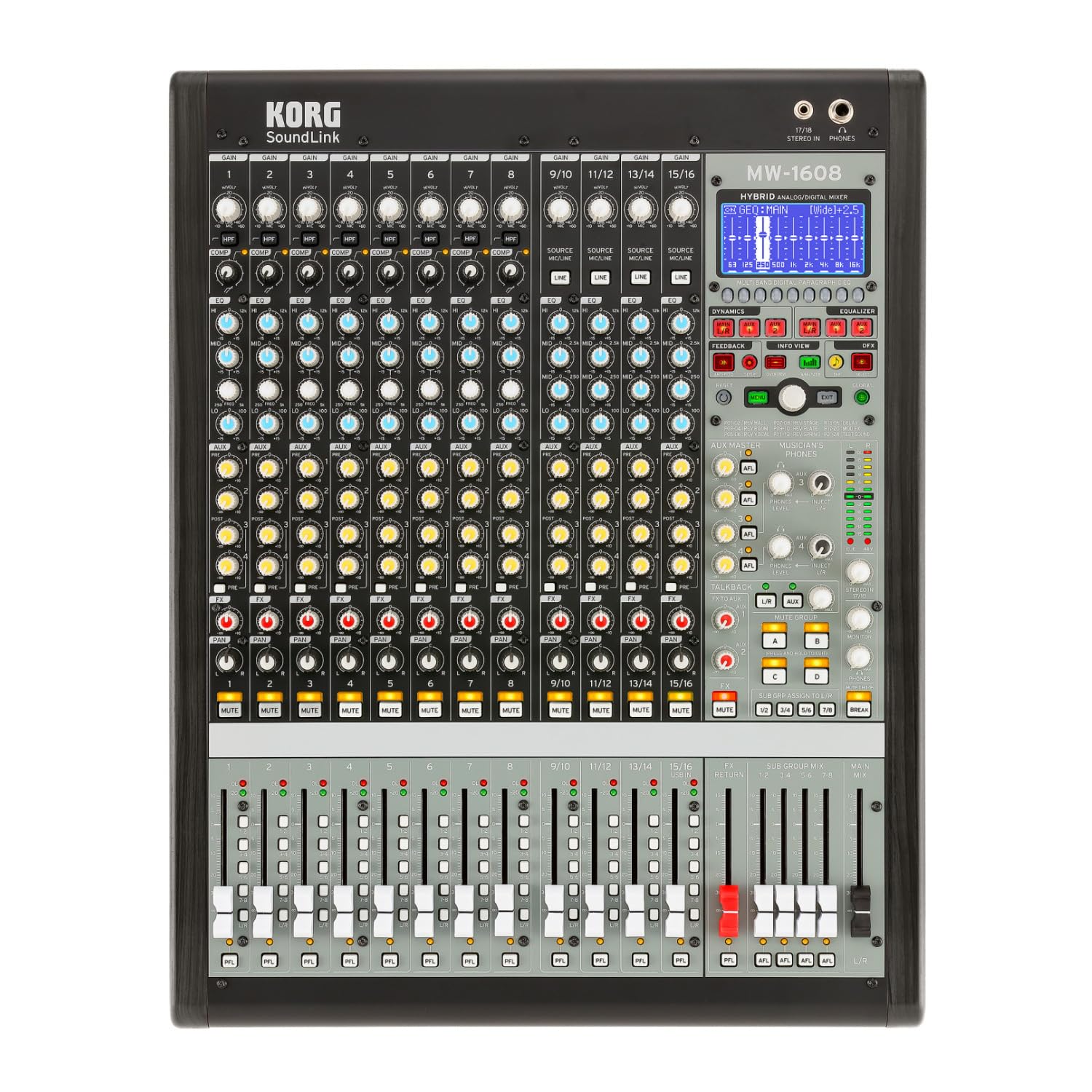
Рисунок 1: Передняя часть view of the Korg SoundLink MW-1608 mixer, showing the control surface with faders, knobs, and display.
2. Настройка
Before operating the Korg SoundLink MW-1608, ensure all connections are made correctly and securely. This section outlines the basic steps for setting up your mixer.
2.1 Распаковка и размещение
- Carefully remove the mixer from its packaging. Retain all packaging materials for future transport or storage.
- Place the mixer on a stable, flat surface with adequate ventilation. Avoid placing it near heat sources or in direct sunlight.
- Ensure sufficient space around the unit for cable connections and heat dissipation.
2.2 Подключение питания
- The MW-1608 operates on a "Corded Electric" power source.
- Connect the supplied AC power cord to the mixer's power input on the rear panel.
- Plug the other end of the power cord into a suitable electrical outlet. Ensure the power switch is in the OFF position before connecting.
2.3 Аудиоподключения
The MW-1608 offers various input and output options. Refer to the rear panel diagram below for connection points.

Рисунок 2: Сзади view of the Korg SoundLink MW-1608 mixer, showing various input and output connectors.
- Микрофонные входы: Connect microphones to the XLR inputs (channels 1-12, 15/16, 13/14, 11/12, 9/10, 7, 6, 5, 4, 3, 2, 1) using balanced XLR cables.
- Линейные входы: Connect line-level devices (e.g., keyboards, media players) to the 1/4-inch TRS or RCA line inputs.
- Основные выходы: Подключите основные колонки или источник питания. amplifier to the MAIN OUT (XLR L/R) connectors. The mixer features "XLR" output connector type.
- Дополнительные выходы: Use the AUX OUT (XLR) connectors for monitor mixes or external effects processors.
- Результаты работы группы: Utilize the GROUP OUT (XLR) for sub-mixes.
- USB-соединение: The USB port allows for connection to a computer for recording or playback.
3. Инструкция по эксплуатации
В этом разделе представлен болееview of the Korg SoundLink MW-1608's operational features and controls.
3.1 канала управления
- Входной коэффициент усиления: Adjust the input sensitivity for each channel to achieve optimal signal levels.
- 3-полосный эквалайзер: Each channel features a 3-band equalizer for tone shaping. Adjust the HIGH, MID, and LOW frequency bands as needed.
- Компрессор с одной ручкой: Engage and adjust the built-in compressor on individual channels to control dynamics and add punch.
- Дополнительные посылы: Route channel signals to auxiliary outputs for monitor mixes or external effects.
- Управление панорамированием: Position the channel's signal within the stereo field.
- Кнопка выключения звука: Отключает вывод звука на канал.
- Фейдер канала: Регулирует уровень громкости отдельного канала в основном миксе.
3.2 Основной раздел
- Main Mix Faders: Control the overall output level of the stereo main mix.
- Групповые фейдеры: Adjust the output levels of the 8-bus groups.
- Раздел мониторинга: Provides control over headphone and control room outputs. The "Musician's Phone Feature" allows for dedicated monitoring.
- Цифровые эффекты: Access and apply Korg's studio-quality digital effects to your mix.
- Подавление обратной связи: Utilize the integrated feedback suppression system to prevent unwanted audio feedback.
- Анализатор спектра: The built-in spectrum analyzer provides visual feedback on the frequency content of your audio.
4. Техническое обслуживание
Proper maintenance ensures the longevity and optimal performance of your Korg SoundLink MW-1608 mixer.
- Уборка: Для протирки внешней поверхности миксера используйте мягкую сухую ткань. Для удаления стойких загрязнений слегка протрите поверхность сухой тканью.amp Можно использовать ткань, смоченную мягким мылом, а затем сухую. Избегайте использования абразивных чистящих средств и растворителей.
- Защита от пыли: Когда миксер не используется, накрывайте его пылезащитным чехлом, чтобы предотвратить скопление пыли и мусора на элементах управления и внутри устройства.
- Условия окружающей среды: Operate and store the mixer in a clean, dry environment. Avoid extreme temperatures, high humidity, and direct exposure to liquids.
- Управление кабелями: Убедитесь, что кабели аккуратно уложены и не подвергаются натяжению, чтобы предотвратить повреждение разъемов и портов.
5. Поиск Неисправностей
This section addresses common issues you might encounter with your MW-1608 mixer. If the problem persists after attempting these solutions, contact Korg customer support.
- Нет питания:
- Ensure the power cord is securely connected to both the mixer and a working electrical outlet.
- Проверьте выключатель питания на задней панели.
- Проверьте работоспособность электрической розетки, подключив к ней другое устройство.
- Нет звука на выходе:
- Проверьте все соединения входных и выходных кабелей.
- Ensure channel faders, group faders, and main mix faders are raised.
- Убедитесь, что каналы не отключены.
- Проверьте настройки усиления для каждого входного канала.
- Убедитесь, что подключены колонки или ampУстройства включены и функционируют.
- Искаженный звук:
- Reduce input gain levels if the signal is clipping (indicated by peak LEDs).
- Check for damaged cables or faulty connectors.
- Ensure output levels are not overdriving connected devices.
- Channel or Group Functionality Issues:
- Verify routing assignments for channels to groups or main mix.
- Ensure mute buttons are disengaged for relevant channels/groups.
- Check if any effects or processing are inadvertently applied.
6. Технические характеристики
| Особенность | Деталь |
|---|---|
| Номер модели | MW-1608 |
| Бренд | КОРГ |
| Количество каналов | 16 |
| Технология связи | Вспомогательный |
| Тип выходного разъема | XLR |
| Источник питания | Проводной электрический |
| Вес товара | 3.41 фунта |
| Размеры продукта (Д x Ш x В) | 18.9 x 7.36 x 20.91 дюйма |
| ASIN | B08FSYXMW9 |
7. Гарантия и поддержка
For detailed warranty information, please refer to the warranty card included with your product or visit the official Korg webсайт. Условия гарантии могут различаться в зависимости от региона.
For technical support, service, or additional product information, please visit the official Korg support website or contact their customer service department. Keep your product's model number (MW-1608) and serial number (if applicable) ready when seeking support.
Официальный Korg Webсайт: www.korg.com