
1. Введение
The KETOTEK DC 6.5-100V 20A Voltmeter Ammeter is a versatile 4-in-1 digital multimeter designed for measuring voltage, current, active power, and energy consumption in DC electrical systems. This device is suitable for indoor use and can monitor batteries, solar systems, electric bike generators, and other DC applications. It features a large LCD with backlight, voltage alarm function, energy reset, and power-off data storage. An integrated shunt simplifies installation.
2. Содержимое упаковки
Пожалуйста, проверьте наличие всех предметов в упаковке:
- 1 x KETOTEK DC Voltmeter Ammeter (Model: KT-D132)
- 1 х Руководство пользователя
3. Особенности продукта
- Измерение 4-в-1: Одновременно отображает громкостьtage, current, active power, and energy.
- Широкий диапазон измерений: DC 6.5-100В об.tage, 0-20A current, 0-2kW active power, and 0-9999kWh energy.
- ЖК-дисплей: Large, clear LCD with blue backlight for easy readability.
- Томtage Тревога: User-configurable voltage alarm threshold with flashing display.
- Energy Reset Function: Allows resetting accumulated energy data.
- Хранение данных: Automatically saves data when power is off.
- Integrated Shunt: No external shunt required for current measurement up to 20A.

Image 1: The KETOTEK DC Voltmeter Ammeter displaying its four measurement parameters: voltage, current, power, and energy, along with their respective ranges.

Image 2: Visual representation of the meter's key functions: backlight control, voltage alarm, energy reset, and power-off data saving.
4. Технические характеристики
| Параметр | Ценить |
|---|---|
| Бренд | КЕТОТЕК |
| Модель | КТ-Д132 |
| Стиль | Постоянный ток 20 А |
| Томtage Диапазон измерения | 6.5 В - 100 В постоянного тока |
| Диапазон измерения тока | 0A - 20A |
| Диапазон измерения активной мощности | 0W - 2kW |
| Диапазон измерения энергии | 0kWh - 9999kWh |
| Минимальный рабочий объемtage | 6.5 Вольта постоянного тока |
| Максимальный рабочий объемtage | 100 Вольта постоянного тока |
| Источник питания | Battery Powered (from measured circuit) |
| Тип дисплея | ЖК-дисплей с подсветкой |
| Размеры (Д x Ш x В) | 8.5 х 5 х 2.4 см |
| Вес товара | 100 грамм |
| Цвет | Черный |
| Согласие | CE, 3C, FCC |
| СКП | 723260104911 |
| Номер детали производителя | KT-0132 |
Примечание: The 20A current rating is for short-term loads. For continuous operation exceeding 15A, consider a higher amperage version (e.g., 50A or 100A) to prevent damage to the device.

Image 3: Detailed dimensions of the KETOTEK DC Voltmeter Ammeter (Model KT-D132).
5. Меры предосторожности
- Это устройство предназначено для только для использования в помещении. Do not use it outdoors.
- Ensure the load does not exceed the rated voltage and current of the device (DC 6.5-100V, 20A).
- Always connect the device according to the provided wiring diagram. Incorrect wiring can lead to product damage or malfunction.
- If you intend to use a different connection method, consult with a qualified professional or contact customer support first.
- Держите устройство вдали от воды, влаги и экстремальных температур.
- Не пытайтесь разбирать или модифицировать устройство.
6. Установка и подключение
The KETOTEK DC Voltmeter Ammeter features an integrated shunt, simplifying the wiring process. Follow the diagram below for correct installation.
Схема электропроводки
Connect the power supply and load as shown in the diagram. The device measures voltage across its input terminals and current through the integrated shunt.

Image 4: Wiring diagram for the KETOTEK DC Voltmeter Ammeter (Model KT-D132). Connect the positive and negative terminals of the DC input to the power supply, and the load in series with the current measurement path.
- Connect the positive terminal of your DC power supply to the '+' (DC input) terminal of the meter.
- Connect the negative terminal of your DC power supply to the '-' (DC input) terminal of the meter.
- Connect the positive terminal of your load to the '+' (Load) terminal of the meter.
- Connect the negative terminal of your load to the '-' (Load) terminal of the meter.
- Перед подачей питания убедитесь, что все соединения надежно закреплены и выполнены правильно.
7. Инструкция по эксплуатации
The device operates automatically once connected to a DC power source within its specified voltage range. The LCD will display voltage, current, power, and energy simultaneously.
Функции кнопок
The meter features a single button on the right side of the display for various functions:
- Короткое нажатие: Включает/выключает подсветку.
- Длительное нажатие (3 секунды): Resets the accumulated energy (kWh) data. The energy value will flash, then reset to 0.
- Длительное нажатие (5 секунды): Enters the voltage alarm setting mode.
Томtage Настройка будильника
Чтобы установить громкостьtage alarm threshold:
- Press and hold the button for 5 seconds until the voltage value on the display starts flashing. This indicates you are in alarm setting mode.
- Short press the button to adjust the voltage alarm threshold. Each short press will increment the value.
- Once the desired threshold is set, press and hold the button again for 3 seconds to save the setting and exit the alarm mode.
- Если измеренный объемtage falls below the set alarm threshold, the display will flash to indicate a low voltagе состояние.
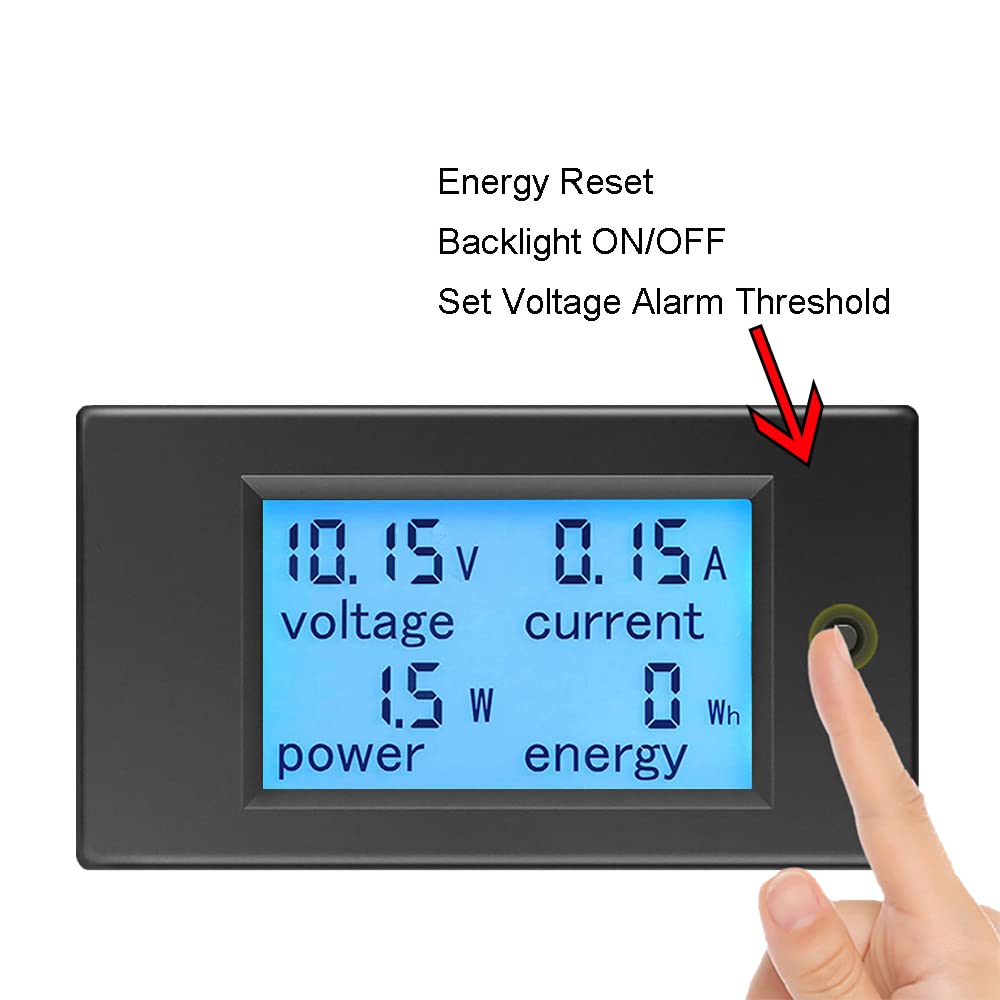
Image 5: Demonstrates the interaction with the control button for backlight, energy reset, and voltage alarm settings.
8. Техническое обслуживание
- Держите устройство в чистоте и сухости. Используйте мягкую сухую ткань для протирки дисплея и...asing.
- Избегайте использования абразивных чистящих средств или растворителей.
- Храните устройство в прохладном сухом месте, когда оно не используется.
- Регулярно проверяйте надежность соединения проводов и наличие признаков износа.
9. Поиск Неисправностей
- Нет дисплея:
- Check if the DC input voltage is within the 6.5V-100V range. The device requires at least 6.5V to power on.
- Проверьте правильность и надежность всех соединений проводки.
- Ensure the power supply is active.
- Неправильные показания:
- Confirm the wiring matches the diagram precisely. Incorrect current path can lead to inaccurate readings.
- Ensure the load current does not exceed 20A for continuous operation. Overloading can affect accuracy or damage the device.
- Проверьте надежность соединений и наличие поврежденных проводов.
- Energy (kWh) Not Resetting:
- Ensure you are pressing and holding the button for approximately 3 seconds until the energy value flashes and resets.
- Томtage Alarm Not Working:
- Verify the alarm threshold is set correctly by entering the alarm setting mode (long press for 5 seconds).
- Убедитесь, что измеренное значение громкости соответствует действительности.tage is actually below the set threshold.
10. Гарантия и поддержка
KETOTEK products are manufactured to high-quality standards. For warranty information, please refer to the terms and conditions provided at the time of purchase or contact your retailer. If you encounter any issues or require technical assistance, please contact KETOTEK customer support through the official website or your purchase platform. Provide your product model (KT-D132) and a detailed description of the issue for efficient support.