
Введение
This manual provides detailed instructions for the installation, operation, and maintenance of your XVIM 8CH 1080P Home Security Camera System. Please read this manual thoroughly before using the product to ensure proper setup and functionality. Keep this manual for future reference.
Продукт болееview
The XVIM 8CH 1080P Home Security Camera System includes an 8-channel Digital Video Recorder (DVR) with a 1TB hard drive and four 2MP HD outdoor IP66 waterproof cameras. The system is designed for reliable surveillance with features such as night vision and remote access capabilities.

Изображение: Оверview of the XVIM 1080P HD Security Camera System, showing a camera and a smartphone displaying live view.
Характеристики камеры
- Металлический корпус IP66: Durable and weatherproof construction.
- HD-объектив 3.6 мм: Обеспечивает угол 75° viewугол наклона.
- ИК-фильтр: Ensures clear day and night vision.
- 24 светодиода: Offers up to 65ft night vision range.

Image: Diagram highlighting key camera features: IP66 metal housing, 3.6mm HD lens, IR-cut filter, and 24 LEDs.
Дневное и ночное наблюдение
The cameras are equipped with an IR-Cut filter and infrared LEDs to provide clear surveillance both during the day and at night. During the day, images are colorful and high definition. At night, the cameras automatically switch to infrared mode for clear black and white vision in low-light conditions.
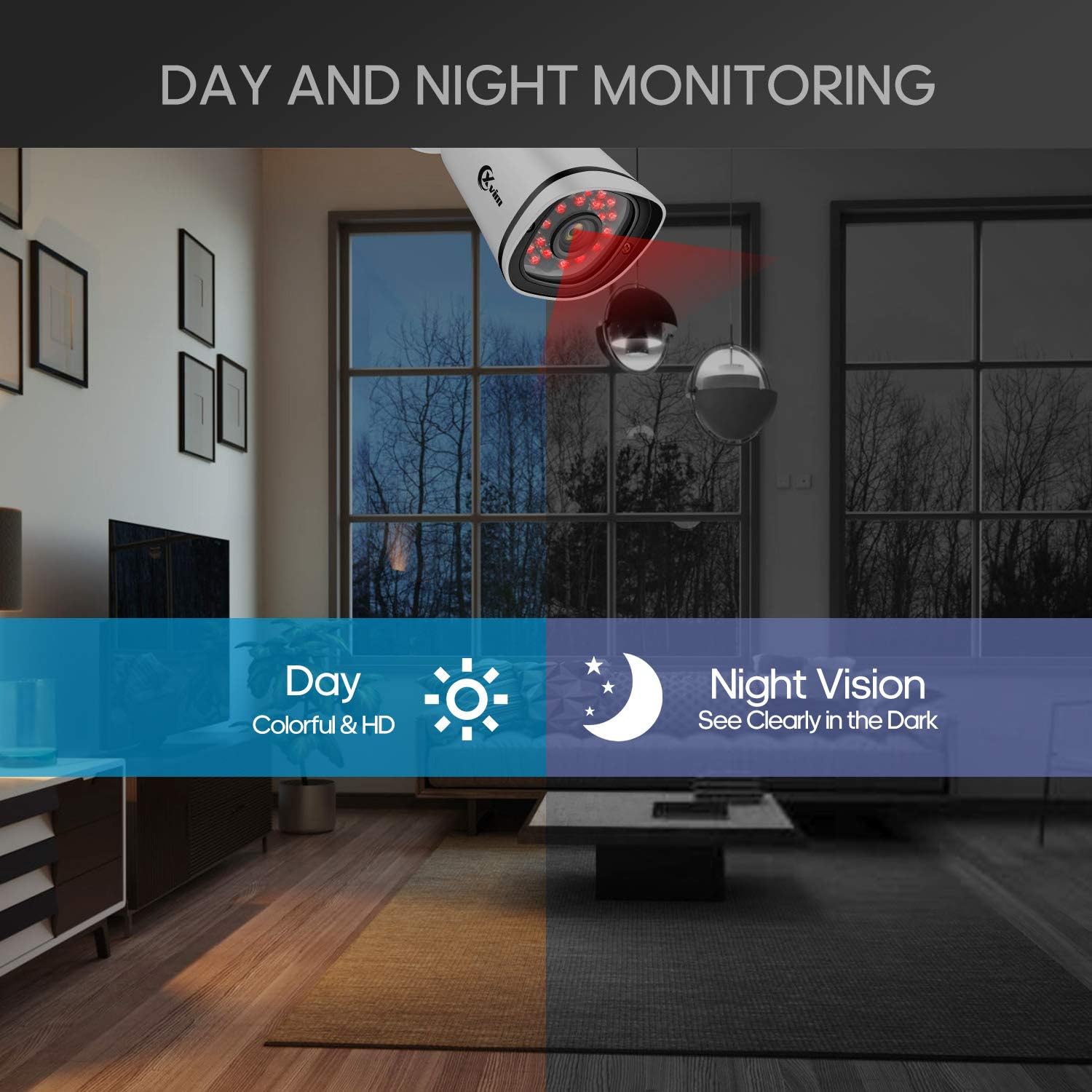
Image: Illustration showing the camera's ability to monitor both during the day (colorful HD) and at night (clear vision in the dark).
Водонепроницаемая конструкция
The cameras feature an IP66-rated metal housing, ensuring they are protected against dust and powerful water jets, making them suitable for outdoor installation in various weather conditions.
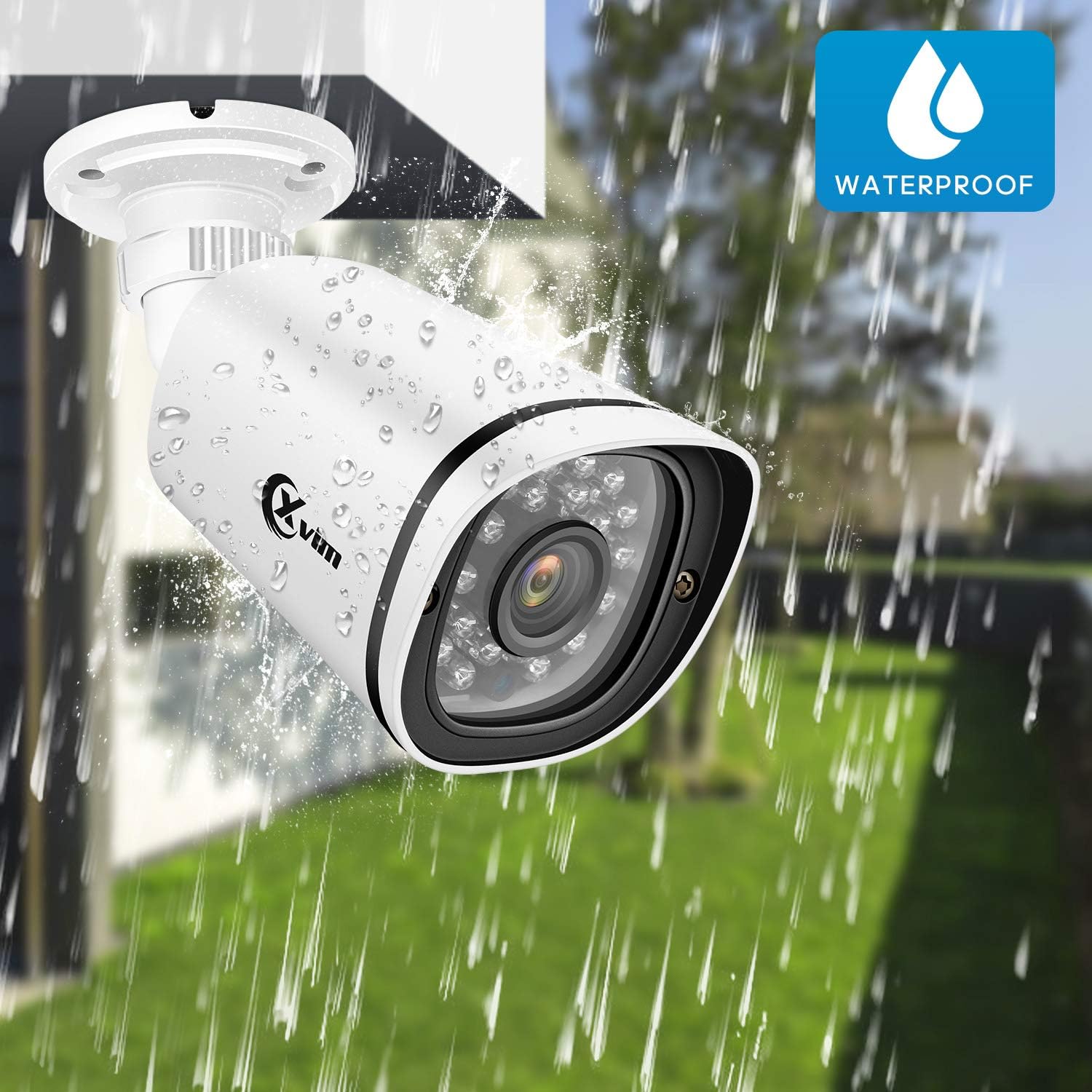
Image: An XVIM camera being sprayed with water, illustrating its waterproof design.
DVR Back Panel Overview
The DVR unit provides multiple ports for connecting cameras, a monitor, audio input/output, and network connectivity. Familiarize yourself with the ports before installation.
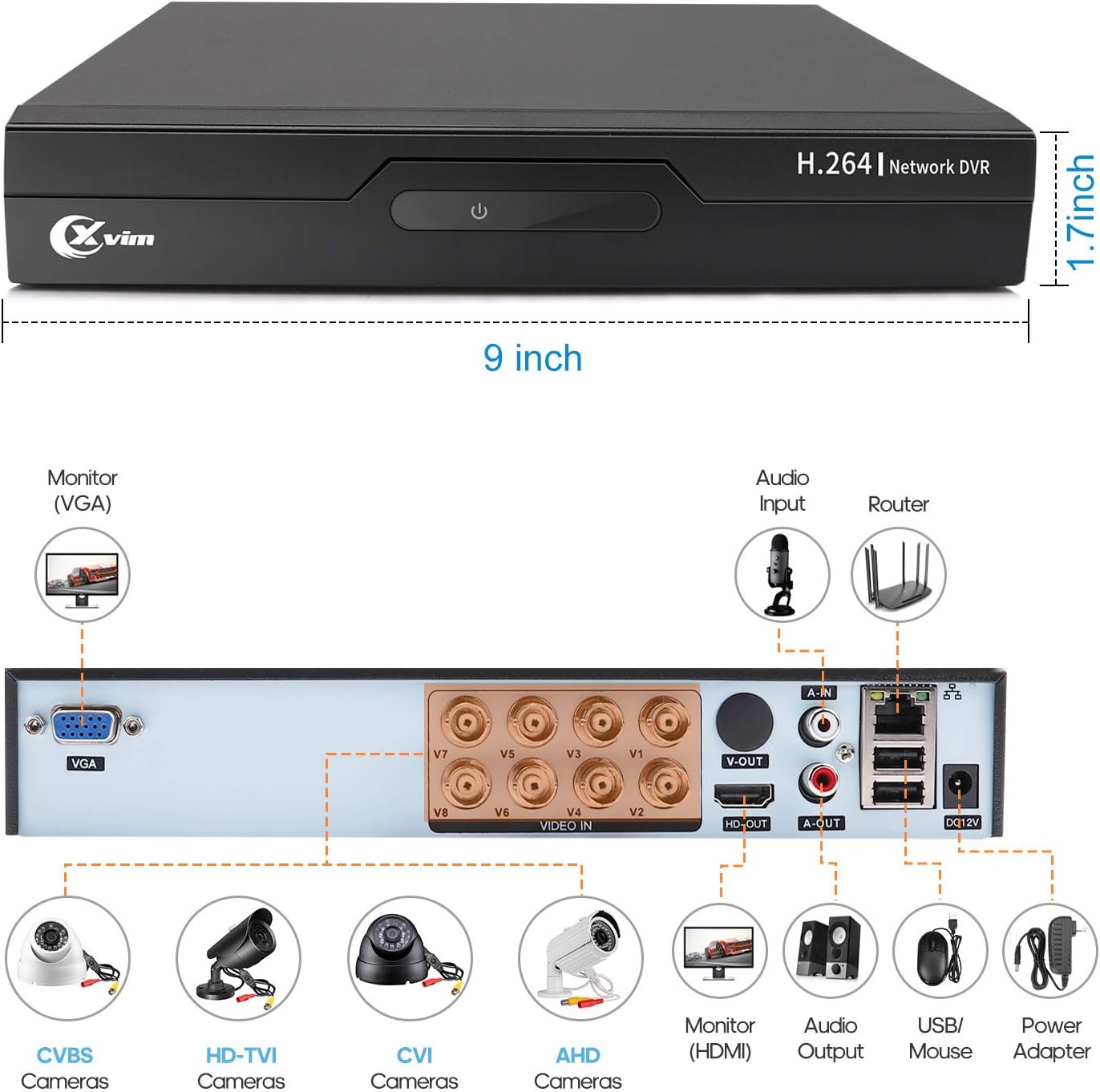
Image: Diagram of the DVR's back panel, showing ports for VGA, HDMI, video input (BNC), audio input/output, USB, and power.
Инструкции по установке
- Подключите камеры к DVR: Connect each camera to the corresponding video input (BNC) port on the DVR using the provided cables. Ensure secure connections.
- Подключите DVR к монитору: Connect the DVR to a monitor using either the VGA or HDMI port.
- Подключение видеорегистратора к сети: Для удалённого доступа подключите видеорегистратор к маршрутизатору с помощью кабеля Ethernet.
- Подключите питание: Connect the power adapters to the cameras and the DVR, then plug them into a power outlet. The system will power on automatically.
- Начальная настройка: Follow the on-screen prompts on your monitor to complete the initial DVR setup, including setting up a password and configuring basic settings.
- Настройка мобильного приложения:
- Download the "XVR Pro" app from your smartphone's app store.
Скачать для Android
Загрузить для iOS - Register for an account within the app.
- Add your DVR device by scanning the QR code displayed on the DVR's monitor or by manually entering the device ID.
- После добавления вы можете view your cameras remotely from anywhere.
- Download the "XVR Pro" app from your smartphone's app store.

Image: Step-by-step guide for connecting the system components and setting up the XVR Pro mobile application.
Инструкция по эксплуатации
Жить View
После успешной настройки вы можете view жить фуtage from your cameras on the connected monitor or through the XVR Pro mobile app. The DVR interface allows you to switch between single-camera view и многокамерная сетка view.
Режимы записи
Система поддерживает различные режимы записи:
- Ручная запись: Start and stop recording manually via the DVR interface.
- Запись при обнаружении движения: Configure the system to record automatically when motion is detected in specified areas. This helps conserve hard drive space.
- Запланированная запись: Установите конкретное время для непрерывной записи.
Refer to the DVR's on-screen menu for detailed configuration of recording schedules and motion detection zones.
Удаленный доступ
The XVR Pro app enables you to:
- View Прямая трансляция с камер из любой точки мира, где есть подключение к интернету.
- Воспроизведение записанной footage хранится на видеорегистраторе.
- Получайте оповещения об обнаружении движения.
- Control certain DVR settings remotely.
Camera Mode Switching (OSD Menu)
Each camera features an OSD (On-Screen Display) button on its cable, allowing you to switch between different video modes (Analog, AHD, TVI, CVI) to ensure compatibility with various DVRs. To access the OSD menu and switch modes:
- Analog (CVBS) Mode: Нажмите кнопку OSD Вверх в течение 5 секунд.
- Режим AHD: Нажмите кнопку OSD Влево в течение 5 секунд.
- Режим TVI: Нажмите кнопку OSD направо в течение 5 секунд.
- Режим CVI: Нажмите кнопку OSD Вниз в течение 5 секунд.
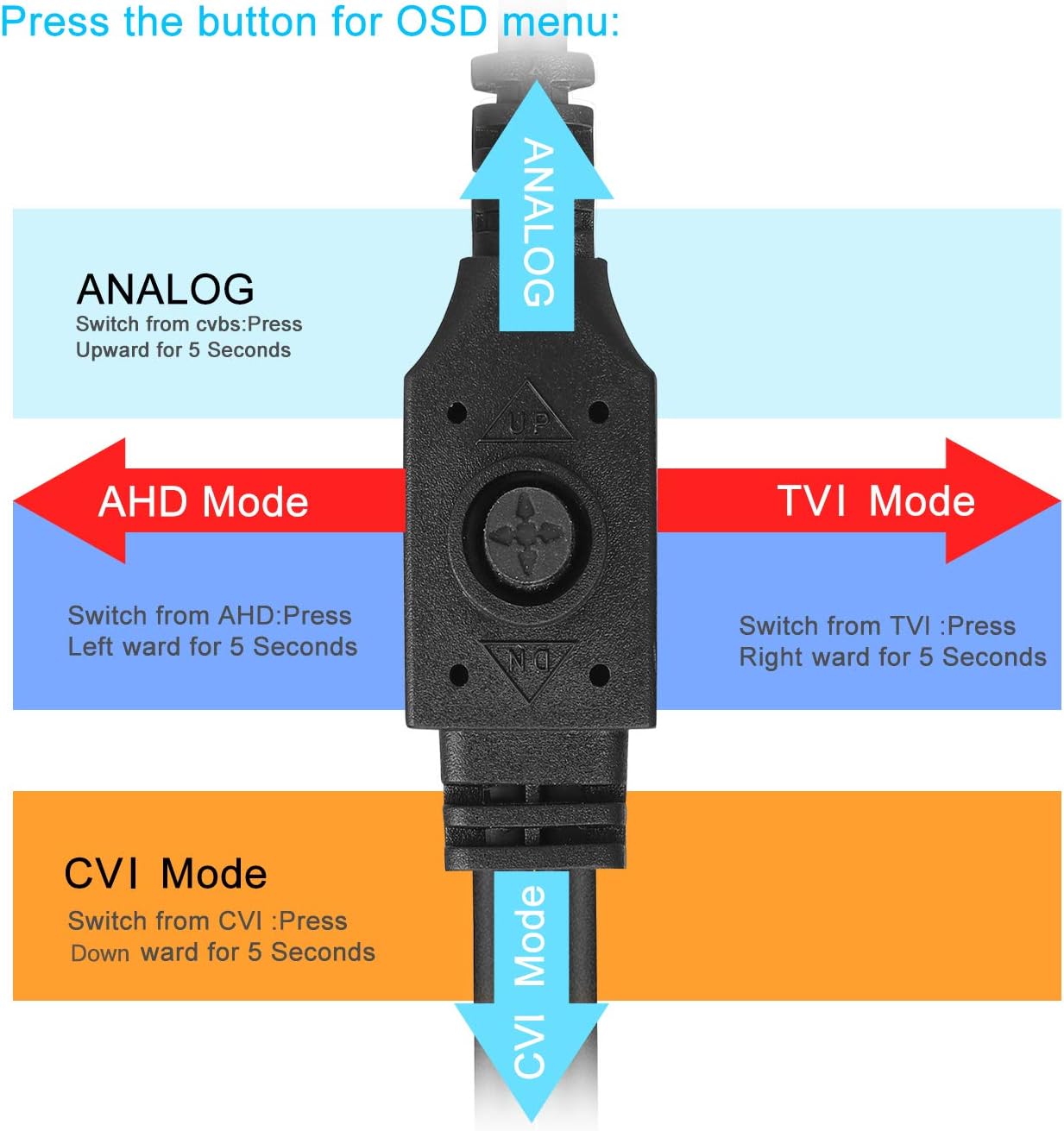
Image: Diagram illustrating how to use the OSD button on the camera cable to switch between Analog, AHD, TVI, and CVI video modes.
Обслуживание
- Очистка камеры: Регулярно очищайте линзы камеры мягкой тряпкой.amp Для обеспечения чёткого изображения используйте ткань. Избегайте использования абразивных чистящих средств.
- Проверка кабеля: Periodically check all cables and connections for wear, damage, or loose connections.
- Вентиляция DVR: Ensure the DVR unit has adequate ventilation to prevent overheating. Keep vents clear of obstructions.
- Управление жестким диском: Жесткий диск объемом 1 ТБ автоматически перезапишет самые старые файлы.tagКогда файл заполнится, регулярно создавайте резервные копии важных записей при необходимости.
- Обновления прошивки: Check the XVIM official webНа этом сайте вы найдете все доступные обновления прошивки для вашего видеорегистратора, которые обеспечат оптимальную производительность и безопасность.
Поиск неисправностей
Нет видеоизображения
- Check all power connections for the DVR and cameras.
- Verify that the monitor is correctly connected to the DVR via VGA or HDMI and is set to the correct input source.
- Убедитесь, что кабели камеры надежно подключены к видеовходам видеорегистратора.
- If a specific camera has no video, try switching its video mode using the OSD button (refer to "Camera Mode Switching" section).
Проблемы с удалённым доступом
- Confirm the DVR is connected to your router and has internet access.
- Проверьте подключение вашего роутера к Интернету.
- Ensure the XVR Pro app is updated to the latest version.
- Verify that the device ID is correctly added in the app and your login credentials are correct.
Плохое ночное зрение
- Убедитесь, что объектив камеры чистый и на нем нет препятствий.
- Check for strong light sources near the camera that might interfere with the infrared LEDs.
DVR Not Recording
- Check the hard drive status in the DVR's system settings. Ensure it is detected and functioning.
- Verify that recording schedules or motion detection settings are correctly configured.
- Ensure there is sufficient hard drive space (though the system typically overwrites old footagд).
If you encounter persistent issues not covered here, please contact XVIM customer support for assistance.
Технические характеристики
| Бренд | XVII |
| Номер модели | US-D8-4AHD7-1T-203 |
| Технология связи | Проводной |
| Разрешение видеозахвата | 1080p |
| Особые возможности | Image, Motion Sensor, Night Vision, Waterproof |
| Количество каналов | 4 (cameras included, DVR supports 8 channels) |
| Емкость памяти | 1 ТБ (жесткий диск) |
| Источник питания | Проводной электрический |
| Размеры изделия (Д x Ш x В) | 13.94 x 11.85 x 6.93 дюйма |
| Диапазон ночного видения | 85 футов |
| Режим записи | Manual, Motion Detection |
| аппаратный интерфейс | USB 3.0 Тип B |
| Тип объектива | Зафиксированный |
| Видеовход | BNC, RCA (CVBS) |
| Viewугол наклона | 81 градусов |
Гарантия и поддержка
XVIM products are designed for reliability and performance. For specific warranty details, please refer to the warranty card included with your product or visit the official XVIM website. For technical support, troubleshooting assistance, or any inquiries, please contact XVIM customer service through their official channels.
Интернет-ресурсы: For additional support, FAQs, and software downloads, please visit the XVIM Store on Amazon or the official XVIM webсайт.