
Введение
Welcome to your new Gembird GHS-U-5.1-01 USB 5.1 Surround Headset. This manual provides essential information for setup, operation, and maintenance to ensure optimal performance and an immersive audio experience.
Содержимое упаковки
Пакет должен содержать следующие элементы:
- Gembird GHS-U-5.1-01 USB 5.1 Surround Headset

Image: Retail packaging for the Gembird GHS-U-5.1-01 USB 5.1 Surround Headset, showing the headset inside a clear window.
Продукт болееview
The Gembird GHS-U-5.1-01 is a USB headset designed for immersive audio experiences with 5.1 surround sound. It features an adjustable microphone, built-in volume control, comfortable ear pads, and an adjustable headband for extended use.
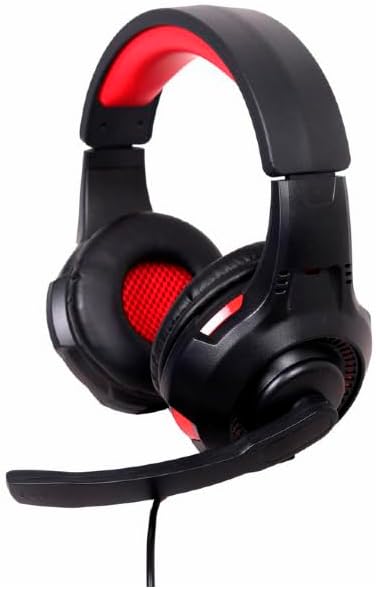
Изображение: под углом view of the Gembird GHS-U-5.1-01 USB 5.1 Surround Headset, showcasing its black and red design with the microphone boom extended.
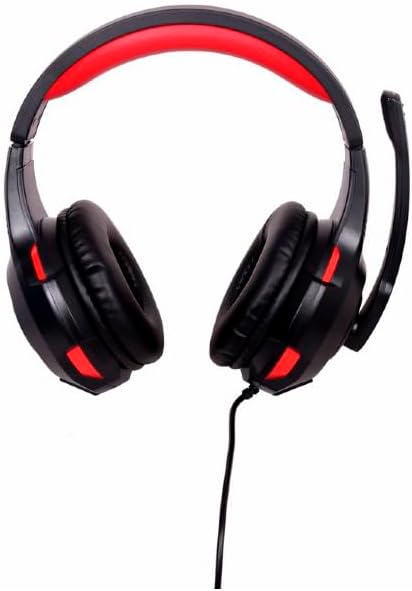
Изображение: Спереди view of the Gembird GHS-U-5.1-01 USB 5.1 Surround Headset, highlighting the adjustable headband and earcups.

Image: Close-up of the in-line control unit for the Gembird GHS-U-5.1-01 headset, showing volume up/down and microphone mute buttons.
Настраивать
Подключение гарнитуры
The Gembird GHS-U-5.1-01 headset connects via a standard USB port.
- Найдите свободный порт USB на вашем компьютере.
- Подключите USB-разъем гарнитуры к USB-порту.
- Ваша операционная система должна автоматически обнаружить и установить необходимые драйверы. Этот процесс может занять несколько минут.
- Once installed, the headset will be ready for use as an audio input and output device.
Audio Settings Configuration
For optimal 5.1 surround sound experience, you may need to configure your computer's audio settings.
- Окна: Go to "Sound Settings" (right-click speaker icon in taskbar) > "Sound Control Panel" > "Playback" tab. Select the Gembird headset, click "Configure," and choose "5.1 Surround."
- MacOS: Go to "System Preferences" > "Sound" > "Output" tab. Select the Gembird headset.
Инструкция по эксплуатации
Регулятор громкости
The headset features an in-line remote control for easy volume adjustment.
- Используйте "+" кнопка увеличения громкости.
- Используйте "-" кнопку, чтобы уменьшить громкость.
Использование микрофона
The adjustable microphone boom allows for precise positioning.
- Position the microphone approximately 1-2 inches from your mouth for clear voice capture.
- Use the microphone mute button on the in-line remote to toggle the microphone on or off.
Регулировка комфорта
Adjust the headband to fit comfortably on your head. The ear pads are designed for extended use.
Обслуживание
To ensure the longevity and performance of your headset, follow these maintenance guidelines:
- Уборка: Use a soft, dry cloth to wipe the headset. Do not use harsh chemicals or abrasive cleaners.
- Хранилище: Store the headset in a clean, dry place away from extreme temperatures.
- Уход за кабелем: Во избежание повреждений не допускайте резких перегибов и чрезмерного натяжения USB-кабеля.
Поиск неисправностей
Нет звука или микрофон не работает
- Проверьте USB-подключение: Ensure the USB connector is fully inserted into the port. Try a different USB port.
- Проверьте уровень громкости: Verify that the volume on the in-line control, your computer's system volume, and application-specific volumes are not muted or set too low.
- Проверьте настройки звука: Confirm that the Gembird headset is selected as the default playback and recording device in your computer's sound settings.
- Перезагрузить компьютер: Sometimes a simple restart can resolve driver or software conflicts.
Проблемы с качеством звука
- Обновление драйвера: Убедитесь, что драйверы вашей операционной системы обновлены.
- Качество источника: Poor audio quality may stem from the audio source itself. Test with different audio fileс или приложений.
Технические характеристики
| Название модели | СГС-У-5.1-01 |
| Связность | Проводной USB-кабель |
| Форм-фактор | На ухо |
| Цвет | Черный |
| Материал | Алюминий (корпус) |
| Масса | 0.4 Килограмма |
| Дополнительные возможности | Adjustable microphone boom, Built-in volume control, Comfortable ear pads, Adjustable headband |
Информация о гарантии
This Gembird headset comes with a 24 Month Manufacturer Guarantee. Please retain your proof of purchase for warranty claims. For detailed warranty terms and conditions, refer to the documentation provided with your product or contact Gembird customer support.
Поддерживать
If you encounter issues not covered in this manual or require further assistance, please visit the official Gembird website or contact their customer support for technical assistance.