
HUBSAN HUBSAN ZINO 2 PLUS
Hubsan Zino 2+ Drone Instruction Manual
Model: HUBSAN ZINO 2 PLUS
Introduction to the Hubsan Zino 2+ Drone
The Hubsan Zino 2+ is a high-performance GPS RC drone equipped with a 4K 60fps camera and a 3-axis gimbal, designed for both aerial photography and recreational flight. It offers advanced features such as 10KM FPV transmission, extended flight time, and intelligent flight modes to enhance your flying experience.
This manual provides essential information for the safe and effective operation, maintenance, and troubleshooting of your Hubsan Zino 2+ drone. Please read it thoroughly before your first flight.

Figure 1: The Hubsan Zino 2+ drone package contents, including the drone, remote control, two batteries, a carrying bag, and a set of lens filters.
Руководство по настройке
1. Распаковка и идентификация компонентов
Осторожно извлеките все компоненты из упаковки. Убедитесь, что все перечисленные ниже предметы присутствуют:
- ZINO 2 RC Drone
- Дистанционное управление
- 2 x Blade sets (total 8 blades)
- 2 x винта для лезвий
- Зарядное устройство
- Отвертка
- Remote Control USB Charging Cable
- Battery (3800mAh 4s)
- Руководство на английском языке
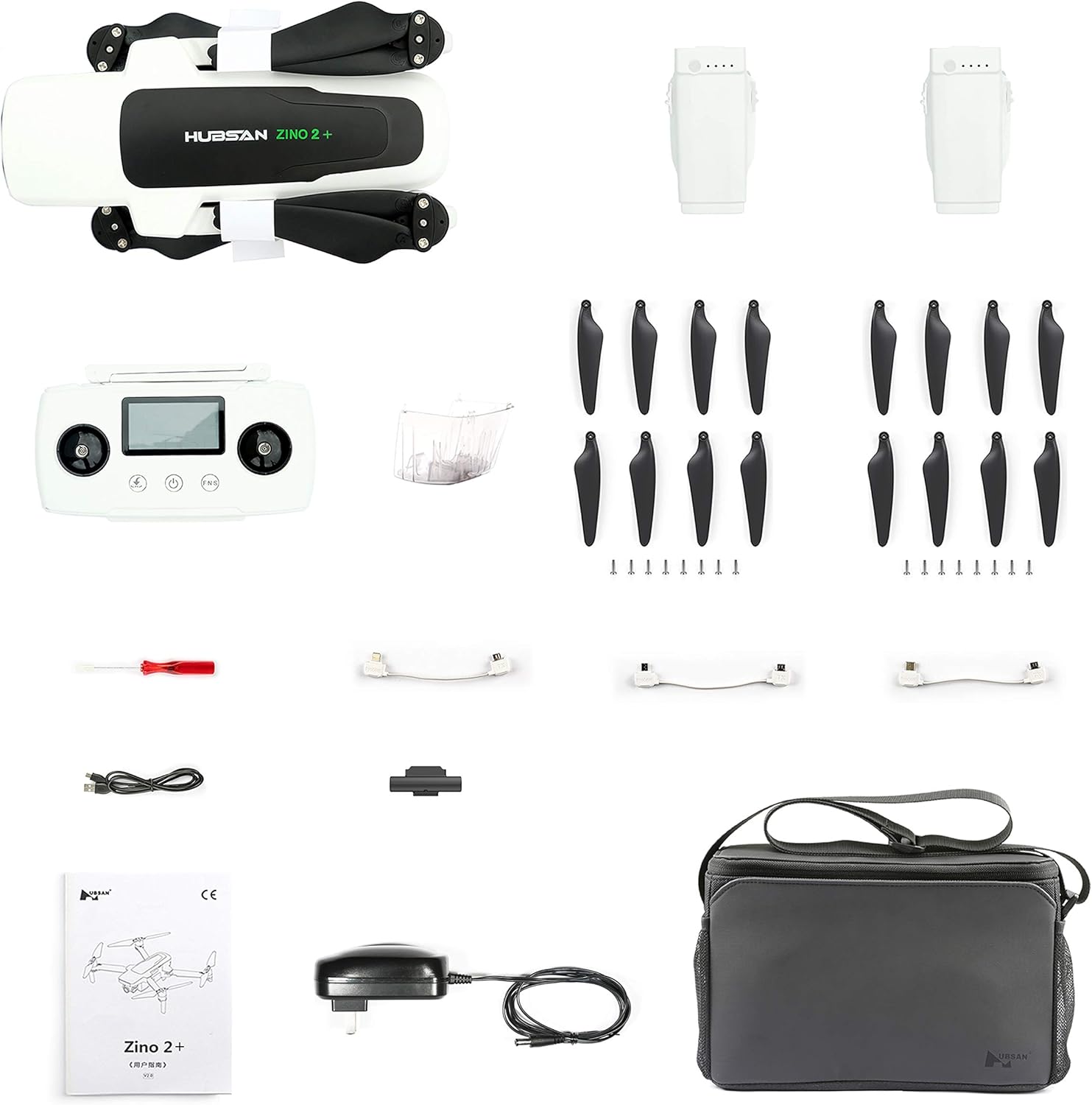
Figure 2: All included components of the Hubsan Zino 2+ drone, neatly arranged for inspection.
2. Зарядка батареи
Before initial use, fully charge the drone battery and the remote control. The intelligent charger supports charging up to three batteries simultaneously. The drone battery can also function as a power bank for external power supply.
- Подключите зарядное устройство к розетке.
- Connect the drone battery(ies) to the charger.
- Connect the remote control to the charger using the USB charging cable.
- Monitor the charging indicators until all batteries are fully charged.
3. Установка пропеллера
Attach the propellers to the drone arms using the provided screws and screwdriver. Ensure propellers are securely fastened and correctly oriented according to the markings on the drone and propellers.

Figure 3: The Hubsan Zino 2+ drone with its arms and propellers unfolded, ready for flight.
The drone features a foldable design for portability. When preparing for flight, gently unfold the arms until they lock into place. For storage, fold the arms back into the compact position.

Figure 4: The Hubsan Zino 2+ drone in its folded, compact state, ideal for transport.
Инструкция по эксплуатации
1. Предполетный контрольный список
- Убедитесь, что аккумуляторы дрона и пульта дистанционного управления полностью заряжены.
- Убедитесь, что гребные винты надежно закреплены и не повреждены.
- Check that the 3-axis gimbal is free from obstructions and moves smoothly.
- Выберите для полета открытую, свободную от препятствий, людей и запрещенного воздушного пространства площадку.
- Включите пульт дистанционного управления, а затем дрон.
- Connect your mobile device to the remote control and launch the companion app for real-time FPV and flight data.

Figure 5: The remote control for the Hubsan Zino 2+ drone, showing its integrated display and control sticks.
2. Calibration and GPS Lock
Perform compass and IMU calibration as instructed by the app before each flight, especially when flying in a new location. Wait for a strong GPS signal lock (GPS+GLONASS+OPTICAL positioning) before takeoff to ensure stable flight and accurate return-to-home functionality.
3. Взлет и посадка
- Автоматический взлет: Use the one-key takeoff function in the app or on the remote control. The drone will ascend to a safe hovering altitude.
- Ручной взлет: Push both control sticks down and outwards to start the motors, then slowly push the left stick up to ascend.
- Автоматическая посадка: Use the one-key landing or Return Home (RTH) function. The drone will return to its takeoff point and land automatically.
- Ручная посадка: Slowly pull the left stick down to descend. Ensure the landing area is clear.
4. Flight Modes and Intelligent Functions
The Hubsan Zino 2+ offers various intelligent flight modes:
- Режим Headless: Simplifies flight by eliminating the need to orient the drone relative to the pilot.
- Image Tracking: The drone will automatically follow a selected subject.
- Orbiting: The drone will circle a point of interest.
- Панорама: Captures multiple images to stitch into a wide panoramic shot.
- Гиперлапс: Creates dynamic time-lapse videos.
- Съемка при слабом освещении: Optimized settings for improved performance in low light conditions.
- Vision Auxiliary Landing: Assists with precise landings.
Video 1: A sample video demonstrating the 4K 60fps camera capabilities of the Hubsan Zino 2+ drone, showcasing aerial footagв различных условиях.
Обслуживание
1. Послеполетный осмотр
- Inspect propellers for any cracks, bends, or debris. Replace damaged propellers immediately.
- Check the drone body and landing gear for any signs of damage.
- Ensure the gimbal and camera are clean and free from dust or dirt.
- Verify battery contacts are clean and free of corrosion.
2. Уход за аккумулятором и его хранение
- Храните батареи в прохладном, сухом месте, вдали от прямых солнечных лучей и экстремальных температур.
- Do not fully discharge batteries for long-term storage; maintain a charge level of approximately 50-60%.
- Avoid overcharging or over-discharging batteries.
3. Обновления прошивки
Regularly check for and install firmware updates via the companion app. Updates often include performance improvements, bug fixes, and new features.
Поиск неисправностей
Распространенные проблемы и решения:
- Дрон не включается: Ensure battery is fully charged and correctly inserted. Check for any physical damage to the battery or drone.
- Потеря сигнала/соединения: Ensure remote control is fully charged. Fly within the specified 10KM FPV range. Avoid areas with strong electromagnetic interference. Re-pair the drone and remote control if necessary.
- Неустойчивый полет/дрейф: Perform compass and IMU calibration. Ensure GPS lock is acquired before takeoff. Check propellers for damage or incorrect installation.
- Низкое качество камеры: Ensure the camera lens is clean. Check camera settings in the app (resolution, bitrate). Verify sufficient lighting conditions.
- Проблемы с подключением приложения: Ensure your mobile device's operating system is up to date. Reinstall the app if problems persist. Check USB cable connection between mobile device and remote control.
For persistent issues, contact Hubsan customer support or refer to the official Hubsan webсайт с подробными руководствами по устранению неполадок.
Технические характеристики
| Особенность | Деталь |
|---|---|
| Бренд | ХУБСАН |
| Название модели | HUBSAN ZINO 2 PLUS |
| Возрастной диапазон (Описание) | Adult (Manufacturer recommended age: 14 - 14 years) |
| Цвет | Белый |
| Разрешение видеозахвата | 3840*2160 4K (Max Bitrate: 60Mbps) |
| Технология связи | USB, Wi-Fi |
| Уровень мастерства | Средний |
| Вес товара | 910 грамма (2.01 фунта) |
| Емкость аккумулятора | 3800 миллиamp Hours (4s battery) |
| Формат захвата видео | МП4 |
| Тип управления | Дистанционное управление |
| Тип носителя | SD |
| Материал | Пластик |
| Состав аккумуляторной батареи | Литий-ионный |
| Разрешение видеовыхода | 1280x720 Pixels (FPV) |
| Технология оптических датчиков | CMOS (Sony 1/2.3 inch) |
| Max FPV Distance | 10 KM (Remote Control), 8 KM (Image Transmission) |
| Время полета | Up to 33 minutes (cruising), 31 minutes (hovering) |
Гарантия и поддержка
For warranty information, technical support, or service inquiries, please refer to the official HUBSAN webили обратитесь в службу поддержки напрямую. Сохраните чек о покупке для предъявления гарантийных претензий.
Включенные компоненты: 2 x Blade, 2 x Blade Screw, Battery, Charger, English Manual, Remote Control, Remote Control USB Charging Cable, Screwdriver, ZINO 2 RC Drone.
Ask a question about this manual
Ask about setup, troubleshooting, compatibility, parts, safety, or missing instructions. Manuals+ will review the question and use this page’s manual context to help answer it.