1. Введение
The Roccat Vulcan 122 is a high-performance mechanical gaming keyboard designed for precision and durability. It features Roccat's unique Titan switches, advanced AIMO RGB lighting, and a robust aluminum construction. This manual provides detailed instructions for setting up, operating, maintaining, and troubleshooting your keyboard.

Image: The Roccat Vulcan 122 keyboard shown with a Roccat mouse and headset, demonstrating its vivid, dynamic lighting synergy with AIMO.
Основные характеристики:
- Unique design with lowered keycaps and reduced reaction time.
- RGB lighting with configurable LED effects and adjustable AIMO effects.
- High-quality and resistant design with robust materials and an anodized aluminum surface.
- Advanced anti-ghosting with N-Key Rollover (NKRO).
- Programmable macro keys and ROCCAT Easy-Shift[+].
2. Настройка
2.1 Подключение клавиатуры
To connect your Roccat Vulcan 122 keyboard:
- Распакуйте клавиатуру и все принадлежности к ней.
- Plug the USB connector from the keyboard into an available USB port on your computer.
- Операционная система автоматически обнаружит и установит необходимые драйверы.
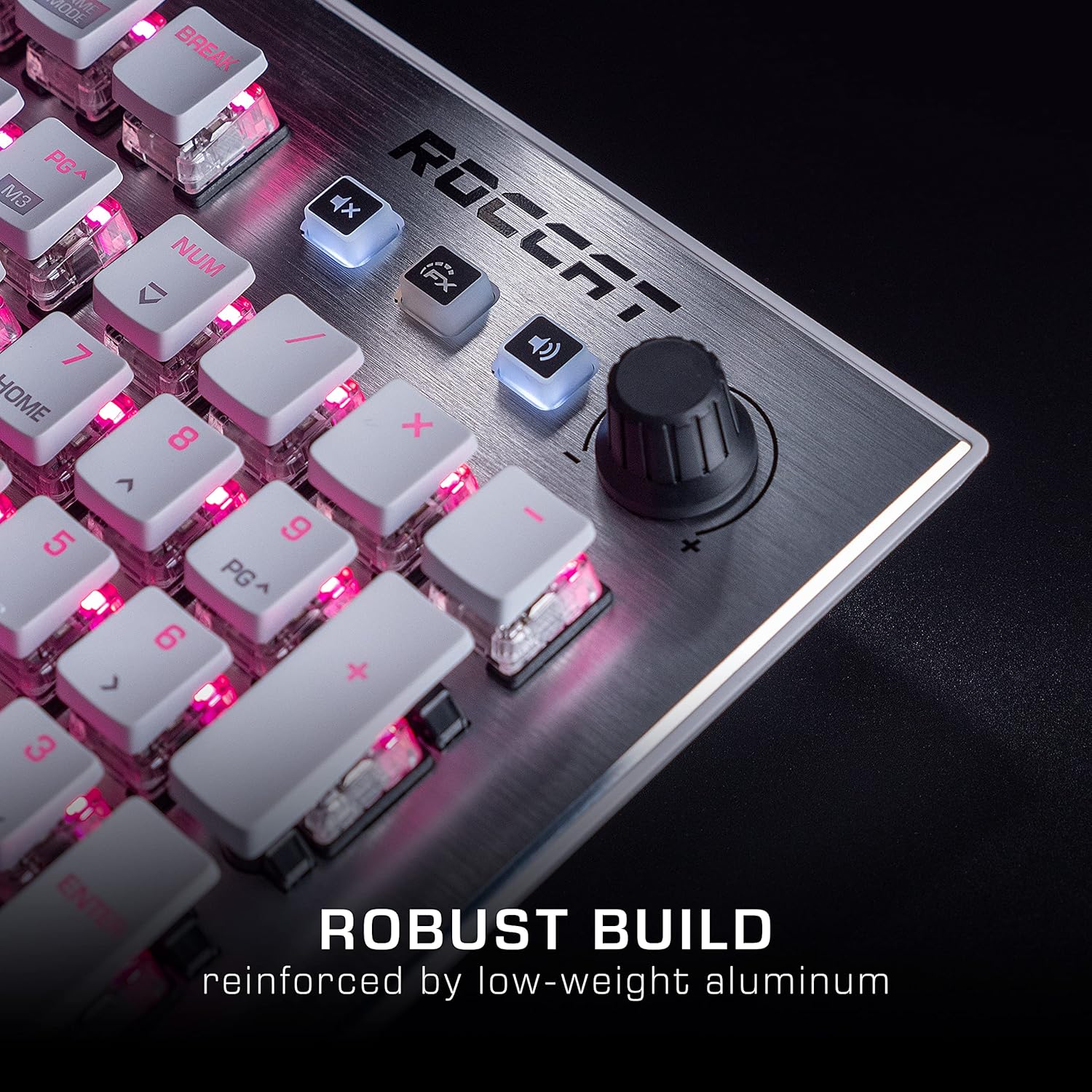
Image: The Roccat Vulcan 122 keyboard shown with its detachable wrist rest, ready for connection.
2.2 Software Installation (ROCCAT Swarm)
For full functionality and customization, install the ROCCAT Swarm software:
- Посетите официальный сайт ROCCAT. webсайт (www.roccat.com) и перейдите в раздел поддержки.
- Download the latest version of the ROCCAT Swarm software for your operating system.
- Запустите установщик и следуйте инструкциям на экране.
- After installation, launch ROCCAT Swarm to configure your keyboard settings, lighting, and macros.
3. Работа с клавиатурой
3.1 Стандартные ключевые функции
The Vulcan 122 functions as a standard QWERTY keyboard. All alphanumeric keys, function keys (F1-F12), navigation keys, and the numeric keypad operate as expected.
3.2 Управление мультимедиа
The keyboard features dedicated media controls for convenient audio management.
- Ручка регулировки громкости: Located in the upper right corner, rotate to adjust system volume.
- Кнопка выключения звука: Нажмите, чтобы отключить/включить звук.
- Кнопка эффекта: Cycles through lighting effects or other programmable functions.

Изображение: крупный план view of the mixer-style media controls on the Roccat Vulcan 122, including the volume knob and dedicated function keys.
3.3 RGB Lighting Customization (AIMO)
The Vulcan 122 features advanced RGB lighting with Roccat's AIMO intelligent lighting system. Use the ROCCAT Swarm software to:
- Выберите один из множества предустановленных световых эффектов.
- Customize individual key illumination.
- Adjust brightness and speed of effects.
- Synchronize lighting with other AIMO-compatible devices.
3.4 Programmable Macro Keys and Easy-Shift[+]
The keyboard includes programmable macro keys and the Easy-Shift[+] function, allowing you to assign secondary functions to keys.
- Use the ROCCAT Swarm software to record and assign macros to designated keys.
- Easy-Shift[+] allows you to double the number of assignable functions by holding down the Easy-Shift[+] key (usually Caps Lock by default, configurable in Swarm) and pressing another key.
3.5 Anti-Ghosting with NKRO
The Vulcan 122 features advanced anti-ghosting technology with N-Key Rollover (NKRO), ensuring that every key press is registered accurately, even when multiple keys are pressed simultaneously.

Image: A hand demonstrating typing on the Roccat Vulcan 122 keyboard, emphasizing the ergonomic design of the keys for comfortable use.
4. Техническое обслуживание
4.1 Чистка клавиатуры
To ensure the longevity and optimal performance of your Vulcan 122 keyboard, regular cleaning is recommended.
- Перед чисткой отсоедините клавиатуру от компьютера.
- Используйте мягкую, безворсовую ткань, слегкаampened with water or a mild cleaning solution to wipe the keycaps and surface. Avoid harsh chemicals.
- For dust and debris between keys, use compressed air. The raised keycap design makes cleaning easier.
- Перед повторным подключением клавиатуры убедитесь, что она полностью высохла.

Image: A close-up of the Roccat Vulcan 122 keyboard keys, illustrating their design which facilitates easy cleaning and resistance to dust and liquids.
5. Поиск Неисправностей
If you encounter issues with your Roccat Vulcan 122 keyboard, refer to the following common problems and solutions:
- Клавиатура не отвечает:
- Убедитесь, что USB-кабель надежно подключен к клавиатуре и компьютеру.
- Попробуйте подключить клавиатуру к другому USB-порту.
- Перезагрузите компьютер.
- Check if the keyboard is disabled in your operating system's device manager.
- RGB-подсветка не работает или работает неправильно:
- Ensure the ROCCAT Swarm software is installed and up to date.
- Проверьте настройки освещения в программном обеспечении Swarm.
- Perform a firmware update for the keyboard via Swarm.
- Ключи не регистрируются или не регистрируются:
- Clean the affected keys as described in the Maintenance section.
- Убедитесь, что прошивка клавиатуры обновлена до последней версии.
- Проверьте клавиатуру на другом компьютере, чтобы исключить системные проблемы.
- ROCCAT Swarm software not detecting keyboard:
- Убедитесь, что клавиатура правильно подключена.
- Restart the Swarm software and your computer.
- Переустановите программное обеспечение ROCCAT Swarm.
- Проверьте наличие конфликтующего программного обеспечения или драйверов.
6. Технические характеристики
| Особенность | Деталь |
|---|---|
| Бренд | ROCCAT |
| Название модели | Вулкан 122 |
| Номер модели | ROC-12-940-BN |
| Описание клавиатуры | Механический |
| Тип переключателя | Тактильный |
| Материал | Алюминий |
| Особые возможности | Подсветка |
| Совместимые устройства | Laptop (PC) |
| Поддержка операционной системы | Windows 10, Windows 7, Windows 8 |
| Размеры продукта | 46.2 х 23.5 х 3.2 см |
| Вес товара | 1.15 кг |

Изображение: взорванный view diagram illustrating the components of a Roccat Titan Tactile mechanical switch, highlighting its design for swift and precise response.
7. Гарантия и поддержка
7.1 Информация о гарантии
Your Roccat Vulcan 122 keyboard is covered by a manufacturer's warranty. The specific terms and duration of the warranty may vary by region and retailer. Please retain your proof of purchase for warranty claims. For detailed warranty information, refer to the warranty card included with your product or visit the official ROCCAT webсайт.
7.2 Техническая поддержка
For technical assistance, driver updates, or further inquiries, please visit the official ROCCAT support page:
Часто задаваемые вопросы, руководства по устранению неполадок и контактную информацию службы поддержки клиентов можно найти на их сайте. webсайт.