
1. Продукт закончилсяview
The TP-Link Archer T4U Plus is an AC1300 Dual Band Wireless USB Adapter designed to provide high-speed Wi-Fi connectivity for desktop computers. It supports the 802.11ac Wi-Fi standard, offering speeds of up to 867 Mbps on the 5 GHz band and 400 Mbps on the 2.4 GHz band. Equipped with dual high-gain antennas and a USB 3.0 interface, it aims to enhance wireless range and data transfer efficiency.

The TP-Link Archer T4U Plus USB WiFi Adapter, featuring two high-gain antennas and a USB 3.0 cable for connection to a computer.
2. Содержимое упаковки
Убедитесь, что ваш пакет содержит следующие предметы:
- AC1300 Dual Antennas High-Gain Wireless USB Adapter (Archer T4U Plus)
- Кабель USB 3.0 длиной 1 метр
- Краткое руководство по установке
- Resource CD (for drivers)
3. Инструкции по настройке
3.1 Установка оборудования
- Распакуйте адаптер: Carefully remove the Archer T4U Plus adapter and its USB cable from the packaging.
- Подключите USB-кабель: Connect one end of the provided 1-meter USB 3.0 cable to the USB 3.0 port on the Archer T4U Plus adapter.
- Подключиться к компьютеру: Plug the other end of the USB 3.0 cable into an available USB 3.0 port on your desktop computer. For optimal performance, use a USB 3.0 port (typically blue inside).
- Установите адаптер: Place the adapter in a location that allows for good signal reception, ideally away from obstructions. The adjustable antennas can be rotated and angled for best performance.

The Archer T4U Plus adapter shown connected to a USB port via its included cable, illustrating its desktop placement.
3.2 Установка драйвера
The Archer T4U Plus requires drivers to function correctly. Drivers can be installed via the included Resource CD or by downloading them from the TP-Link webсайт.
For Windows Operating Systems (Windows 11/10/8.1/8/7/XP):
- Использование компакт-диска с ресурсами: Insert the Resource CD into your computer's CD-ROM drive. Follow the on-screen instructions to install the drivers.
- Загрузка с TP-Link Webсайт: If your computer lacks a CD-ROM drive, visit the official TP-Link support website, search for "Archer T4U Plus", and download the latest drivers for your specific Windows version. Run the downloaded installer and follow the prompts.
- Автоматическая установка (Windows 10/11): In some cases, Windows 10 or 11 may automatically detect and install the necessary drivers upon connecting the adapter. Verify installation in Device Manager under "Network Adapters".
For Mac OS (10.15 and earlier):
- Загрузка с TP-Link Webсайт: Посетите официальную поддержку TP-Link website, search for "Archer T4U Plus", and download the latest drivers for your Mac OS version.
- Установите драйверы: Откройте загруженный file and follow the installation instructions. You may need to restart your computer after installation.
4. Инструкция по эксплуатации
4.1 Подключение к беспроводной сети
Once the drivers are successfully installed, you can connect to a Wi-Fi network:
- Настройки доступа к сети:
- Окна: Нажмите на значок Wi-Fi в системном трее (в правом нижнем углу экрана).
- Mac OS: Нажмите на значок Wi-Fi в строке меню (в правом верхнем углу экрана).
- Выберите сеть: Появится список доступных беспроводных сетей. Выберите нужную сеть (SSID).
- Введите пароль: При появлении запроса введите пароль Wi-Fi (ключ безопасности) вашей сети.
- Соединять: Нажмите кнопку «Подключиться», чтобы установить беспроводное соединение.
4.2 Работа в двух диапазонах
The Archer T4U Plus supports both 2.4 GHz and 5 GHz Wi-Fi bands. You can choose the band that best suits your needs:
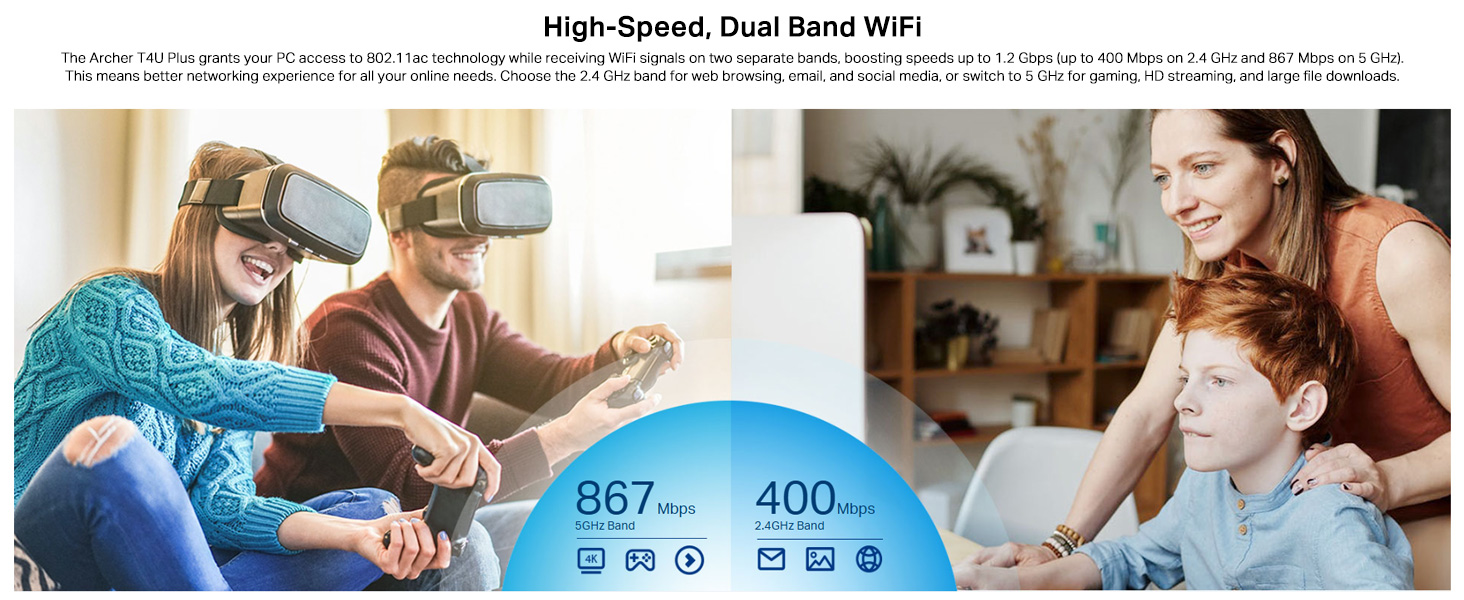
- Диапазон 2.4 ГГц: Offers broader coverage and better penetration through walls, suitable for general internet use like web просмотр и электронная почта.
- Диапазон 5 ГГц: Provides faster speeds and less interference, ideal for bandwidth-intensive activities such as online gaming, HD video streaming, and large file переводы.
Your router may broadcast separate SSIDs for each band (e.g., "MyWiFi_2.4GHz" and "MyWiFi_5GHz"). Select the appropriate network from the available list.

An image illustrating the dual-band capabilities of the adapter, showing 867 Mbps on the 5GHz band for activities like 4K streaming and gaming, and 400 Mbps on the 2.4GHz band for web просмотр и электронная почта.
4.3 Enhanced Coverage and MU-MIMO
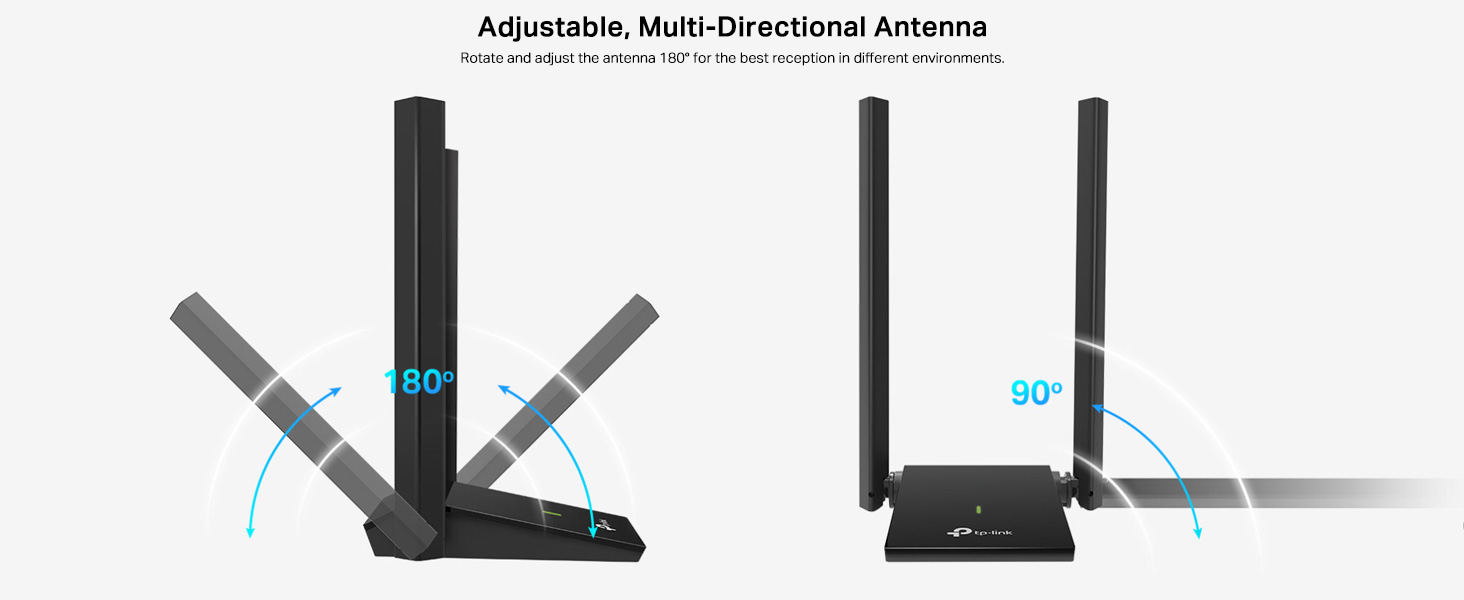
The dual high-gain antennas are designed to improve signal transmission and reception, extending your wireless coverage. For optimal performance, adjust the antennas to point towards your wireless router.
Illustrates the flexibility of the adapter's antennas, which can be rotated 180 degrees and adjusted 90 degrees for optimal signal reception.
The adapter also supports MU-MIMO technology. When used with a compatible MU-MIMO router, this technology allows the adapter to communicate with multiple devices simultaneously, improving network throughput and efficiency.
A visual representation of MU-MIMO technology, showing how the Archer T4U Plus adapter, when paired with a compatible router, can communicate with multiple devices simultaneously for improved network efficiency.
5. Техническое обслуживание
- Обновляйте драйверы: Регулярно проверяйте поддержку TP-Link. webСайт с новейшими драйверами для обеспечения оптимальной производительности и совместимости.
- Очистите устройство: Для очистки адаптера используйте мягкую сухую ткань. Избегайте использования жидких чистящих средств или растворителей.
- Правильное размещение: Ensure the adapter is placed in a well-ventilated area and not covered, to prevent overheating.
- Безопасное соединение: Ensure the USB cable is securely connected to both the adapter and your computer to prevent intermittent disconnections.
6. Поиск Неисправностей
- Нет подключения к Wi-Fi:
- Убедитесь, что адаптер правильно подключен к USB-порту.
- Verify that the drivers are correctly installed. Check Device Manager (Windows) or System Information (Mac OS) for the adapter's status.
- Перезагрузите компьютер и маршрутизатор.
- Попробуйте подключиться к другому USB-порту.
- Низкая скорость Wi-Fi:
- Ensure you are connected to the 5 GHz band if available and your router supports it, for faster speeds.
- Отрегулируйте антенны адаптера для лучшего приема сигнала.
- Сведите к минимуму физические препятствия между адаптером и маршрутизатором.
- Проверьте наличие помех от других устройств (например, микроволновых печей, беспроводных телефонов).
- Обновите драйверы вашего адаптера до последней версии.
- Частые отключения:
- Убедитесь, что USB-кабель не ослаблен.
- Попробуйте другой USB-порт, предпочтительно USB 3.0.
- Проверьте наличие обновленных драйверов.
- Убедитесь, что адаптер не перегревается.
- Проблемы с установкой драйверов:
- Disable any antivirus or firewall software temporarily during installation.
- Download drivers directly from the official TP-Link webсайт для вашей конкретной операционной системы.
- For Linux users, specific driver installation steps may be required, often involving command-line instructions. Refer to community forums or TP-Link's support for detailed guidance.
7. Технические характеристики
| Особенность | Описание |
|---|---|
| Бренд | TP-Link |
| Номер модели | Арчер Т4У Плюс |
| аппаратный интерфейс | USB 3.0 |
| Беспроводной стандарт | 802.11ac |
| Скорость передачи данных | 1300 Mbps (867 Mbps on 5GHz, 400 Mbps on 2.4GHz) |
| Антенны | Двойные высокоэффективные антенны 5 дБи |
| Операционные системы | Windows 11/10/8.1/8/7/XP, Mac OS 10.15 and earlier |
| Размеры (Д x Ш x В) | 8.4Д x 15.6Ш x 1.9В сантиметров |
| Вес товара | 100 грамм |
| Цвет | Черный |
8. Гарантия и техническая поддержка
8.1 Информация о гарантии
Этот продукт поставляется с 3-летняя гарантия производителя. Сохраните чек о покупке для предъявления гарантийных претензий.
8.2 Техническая поддержка
For technical assistance, driver downloads, or further inquiries, please contact TP-Link support:
- TP-Link India Private Limited
- Адрес: Зеленый промышленный парк, Донгри Пада, Поман, Каман-Бхиванди-роуд, Восток Васаи, Палгар, Махараштра - 401208
- Бесплатный номер телефона: 1800 2094 168
- Поддержка по электронной почте: support.in@tp-link.com
- Производитель: TP-Link Corporation, South Building, No.5 Keyuan Road, Central Zone, Science & Technology Park, Nanshan, Shenzhen, P.R. China
For the most up-to-date support information and resources, please visit the official TP-Link webсайт.


