
1. Продукт закончилсяview
The Symcode 2D Bluetooth Ring Barcode Scanner is a wearable, wireless, and compact device designed for efficient barcode reading. Its ring design allows for comfortable wear on the finger, enhancing user satisfaction and productivity. This scanner supports a wide range of 1D and 2D barcodes and offers versatile connectivity options for various operating systems and devices.

Figure 1: Symcode 2D Bluetooth Ring Barcode Scanner
2. Содержимое упаковки
При открытии упаковки, пожалуйста, убедитесь, что все перечисленные ниже предметы присутствуют и находятся в хорошем состоянии:
- 1 x Mini Barcode Scanner
- 1 руководство пользователя на английском языке
- 1 х USB-кабель
- 1 x Charger Head
- 1 x Приёмник для мобильного телефона 4.0 (Bluetooth-адаптер)

Рисунок 2: Содержимое упаковки
3. Особенности
- Дизайн носимого кольца: Allows for comfortable use on the finger, left or right, increasing satisfaction and comfort during extended use.
- Двойное беспроводное подключение: Supports both 2.4G Wireless (via dongle) and Bluetooth 4.0 for flexible connection to various devices.
- Широкая совместимость: Compatible with Microsoft Windows XP/7.0/8.0/10, Android, and iOS devices.
- Расширенная поддержка штрихкодов: Scans 1D codes (UPC, EAN, Code128, Code39, Code11, Interleaved 2 of 5, Codabar, etc.) and 2D codes (PDF417, Data Matrix, QR Code, etc.).
- Большое расстояние передачи: Up to 30 feet (10m) for Bluetooth and up to 492ft (150m) in barrier-free environments for 2.4G wireless.
- Два режима загрузки: Supports Instant Upload Mode (synchronous data upload) and Storage Mode (stores up to 50,000 barcodes in 512KB memory for later upload).
- Длительный срок службы аккумулятора: Provides up to 6 hours of continuous scanning and a standby time of up to 720 hours. Fully recharges in approximately 1.5 hours.
4. Настройка
4.1 Зарядка сканера
Before initial use, fully charge the scanner using the provided USB cable and charger head. Connect the USB cable to the scanner's charging port and the other end to a power source. The charging indicator light will show the charging status.

Рисунок 3: Информация о батарее
4.2 Подключение к устройству
The scanner offers two primary connection methods: 2.4G Wireless via dongle and Bluetooth 4.0.
4.2.1 2.4G Wireless Connection (via Dongle)
- Plug the 2.4G wireless receiver (dongle) into an available USB port on your laptop, PC, or POS system.
- Включите сканер штрихкодов. Он должен автоматически подключиться к адаптеру.
- A successful connection will be indicated by a specific sound or light on the scanner.
4.2.2 Подключение Bluetooth 4.0
- Убедитесь, что Bluetooth включен на вашем мобильном телефоне, планшете или компьютере.
- Включите сканер штрих-кода.
- On your device, search for available Bluetooth devices. The scanner should appear as "Barcode Scanner HID" or similar.
- Select the scanner to pair. A successful connection will be indicated by a specific sound or light on the scanner.

Figure 4: Wireless Connection Options

Рисунок 5: Дальность передачи
Video 1: Demonstrates unboxing, product rotation, and connecting the scanner to a laptop and mobile device via Bluetooth for scanning.
5. Инструкция по эксплуатации
5.1 Ношение сканера
The ring scanner is designed to be worn on your finger. Adjust the strap for a comfortable and secure fit. The scanner head can be rotated 180 degrees to accommodate different scanning angles and user preferences.

Figure 6: 180 Degree Rotation
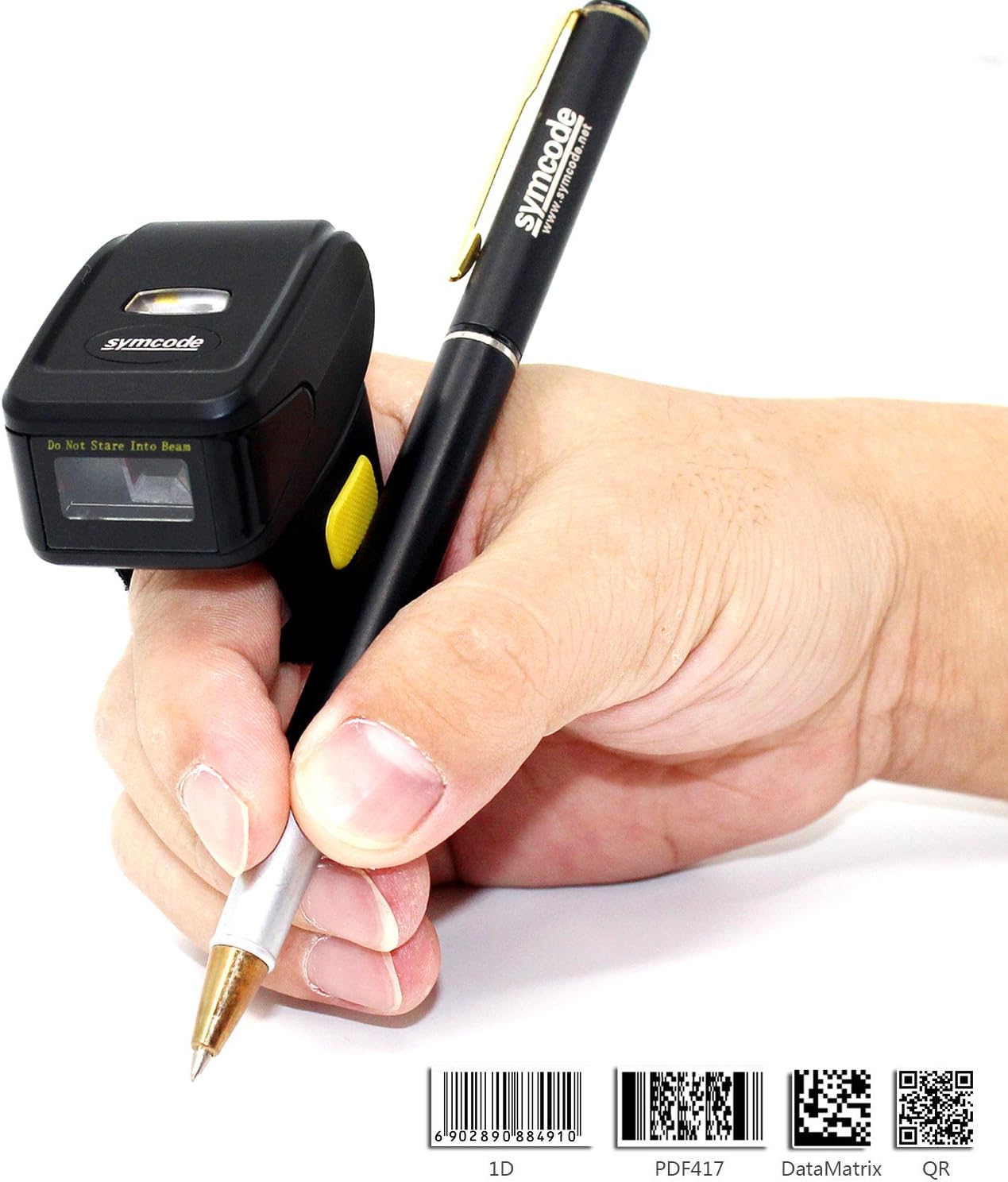
Figure 7: Ergonomic Use
5.2 Сканирование штрихкодов
Once connected, point the scanner's laser at the barcode you wish to scan and press the trigger button. The scanner will emit a beep and/or flash to indicate a successful scan. The scanned data will appear on your connected device.
5.3 Режимы загрузки
Сканер поддерживает два режима загрузки данных:
- Режим мгновенной загрузки: Data is synchronously uploaded to your device as soon as a barcode is scanned. This is ideal for real-time inventory management or POS systems.
- Режим хранения: Barcode data is stored in the scanner's internal memory (up to 512KB, capable of holding over 50,000 barcodes). This mode is useful when working out of range of your device. Data can be uploaded later when a connection is re-established. Refer to the included user manual for specific instructions on switching between modes and uploading stored data.

Рисунок 8: Два режима загрузки
6. Технические характеристики
| Особенность | Деталь |
|---|---|
| Номер модели | MJ-R30CB-2D |
| Источник света | видимый лазер 650 нм |
| Скорость сканирования | 100 ± 10 сканирований/секунду |
| Точность чтения | 0.10 мм (4мил) |
| Интерфейс | Mobile phone wireless 4.0 (Bluetooth) |
| Аккумулятор | DC 3.7V, 360mA Li-ion battery (1 Lithium Ion battery included) |
| Память | 512КБ |
| Поддерживаемые ОС | Microsoft Windows XP/7.0/8.0/10, Android, iOS |
| Расстояние чтения | 2.5-600 мм (100% UPC/EAN) |
| Поддерживаемые типы штрих-кодов | Codabar, Code 11, Code 93, MSI, Code 128, UCC/EAN-128, Code 39, EAN-8, EAN-13, UPC-A, ISBN, Industrial 25, Interleaved 25, Standard 25, 2/5 Matrix, GS1 DataBar (formerly RSS) variants, PDF417, Data Matrix (ECC200, ECC000, 050, 080, 100, 140), QR Code |
| Сканирующий микроскоп | 10мм-250мм |
| Угол сканирования | Крен: ±35 градусов / Тангаж: ±65 градусов / Рыскание: ±50 градусов |
| Коэффициент битовых ошибок | 1 / 5 миллион |
| Мощность Voltage | 5V |
| Эффективность безопасности | CE и Rohs |
| Размеры | 150mm x 50mm x 65mm (Product: 1.81 x 1.97 x 1.38 inches) |
| Масса | 95 г (4.4 унции) |
7. Техническое обслуживание
Для обеспечения долговечности и оптимальной работы сканера штрихкодов Symcode следуйте этим рекомендациям по техническому обслуживанию:
- Уборка: Для очистки внешней поверхности сканера используйте мягкую сухую ткань. Для очистки окна сканера используйте салфетку для чистки объектива, чтобы избежать царапин. Не используйте абразивные чистящие средства или растворители.
- Хранилище: Храните сканер в прохладном, сухом месте, защищенном от прямых солнечных лучей и экстремальных температур.
- Уход батареи: Avoid fully discharging the battery frequently. Recharge the scanner when the battery low indicator appears. If storing for an extended period, charge the battery to about 50% and recharge every few months.
- Умение обращаться: Обращайтесь со сканером осторожно. Избегайте падений и сильных ударов, так как это может повредить внутренние компоненты.
8. Поиск Неисправностей
Если у вас возникли проблемы со сканером, пожалуйста, воспользуйтесь следующими распространенными шагами по устранению неполадок:
- Сканер не включается: Ensure the battery is charged. Connect the scanner to the charger and try again.
- После сканирования данные не передаются: Verify that the scanner is properly connected to your device (Bluetooth or 2.4G wireless). Check the device's input settings to ensure it's ready to receive data.
- Невозможно подключиться через Bluetooth: Ensure the scanner is in pairing mode. On your device, try forgetting the scanner and re-pairing. Make sure no other Bluetooth devices are interfering.
- Низкая эффективность сканирования: Ensure the barcode is clean and not damaged. Adjust the distance and angle of the scanner to the barcode. Check for sufficient lighting.
- Некорректный вывод данных: Verify the scanner's configuration settings. You may need to scan specific configuration barcodes from the full user manual to adjust settings like prefix/suffix or data format.
For more detailed troubleshooting or issues not covered here, please consult the comprehensive user manual included in your package or contact Symcode customer support.
9. Гарантия и поддержка
Symcode products are designed for reliability and performance. For information regarding product warranty, please refer to the warranty card included with your purchase or visit the official Symcode website. For technical support, product inquiries, or service requests, please contact Symcode customer service through the channels provided on their official webсайте или упаковке продукта.
Visit the official Symcode Store for more products and support: Symcode Amazon Store
Additional resources may be available on the manufacturer's webсайт: www.cnlhwood.com