Введение
This manual provides detailed instructions for the installation, operation, and customization of your ECOELER YM2108 In-Wall PIR Motion Sensor Light Switch. Please read this manual thoroughly before installation and use to ensure proper function and safety.
Основные характеристики:
- Hands-free lighting control with motion detection.
- UL Certified, FCC Listed, and California Title 24 Compliant.
- Compatible with 300W LED, 300W CFL, and 600W incandescent light bulbs.
- Supports Occupancy (OCC) and Vacancy (VAC) modes for flexible control.
- Adjustable time delays, sensitivity, and light level sensing.
- Requires a neutral wire for stable and reliable connection.
Информация по безопасности
ПРЕДУПРЕЖДЕНИЕ: To prevent severe injury or death from electric shock, always turn off the power at the circuit breaker or fuse box before wiring. It is highly recommended to consult a qualified electrician to determine if you have the proper wiring for this device.
This automatic light switch requires a neutral wire for proper operation. Ensure your electrical setup includes a neutral wire before attempting installation.
Содержимое упаковки
Перед началом установки убедитесь, что все компоненты присутствуют:
- ECOELER YM2108 Motion Sensor Switch
- Настенная пластина
- 4 винтов
- 4 Terminal Caps
- Руководство пользователя (этот документ)

Figure 1: Included accessories for the ECOELER YM2108 Motion Sensor Switch.
Установка
Для безопасной и правильной установки выполните следующие действия:
- Выключите питание: Locate the circuit breaker or fuse box controlling the light switch you intend to replace. Turn off the power to that circuit. Verify power is off using a voltagе тестер.
- Удалить старый переключатель: Осторожно снимите существующую настенную панель и открутите старый выключатель от электромонтажной коробки. Отсоедините провода от старого выключателя, запомнив их соединения.
- Определите провода: Identify the Hot (Black), Load (Red), Neutral (White), and Ground (Green or bare copper) wires from your electrical box.
- Подключите новый выключатель: Connect the wires from the electrical box to the corresponding wires on the ECOELER YM2108 switch using the provided terminal caps. Ensure all connections are secure.
- Black wire from box to Black wire on switch (Hot).
- Red wire from box to Red wire on switch (Load to power light or fan).
- White wire from box to White wire on switch (Neutral - required).
- Green or bare copper wire from box to Green wire on switch (Ground).
- Установите переключатель: Аккуратно вставьте проводной выключатель в монтажную коробку. Закрепите его прилагаемыми винтами.
- Установите настенную пластину: Прикрепите новую настенную панель поверх выключателя.
- Восстановить мощность: Снова включите питание с помощью автоматического выключателя.

Figure 2: Wiring Guide for ECOELER YM2108 Motion Sensor Switch. A neutral wire is required.
Режимы работы
The ECOELER YM2108 switch offers two primary operation modes: Occupancy (OCC) and Vacancy (VAC). These modes can be selected via a switch located on the device.
- Occupancy (OCC) Mode: In this mode, the lights automatically turn ON when motion is detected and automatically turn OFF when the space becomes unoccupied after a set time delay. This is ideal for high-traffic areas where hands-free operation is desired.
- Режим вакансии (VAC): In this mode, the lights must be manually turned ON. They will then automatically turn OFF when no motion is detected for the set time delay. This mode is suitable for rooms where manual activation is preferred, but automatic shut-off is desired for energy saving.
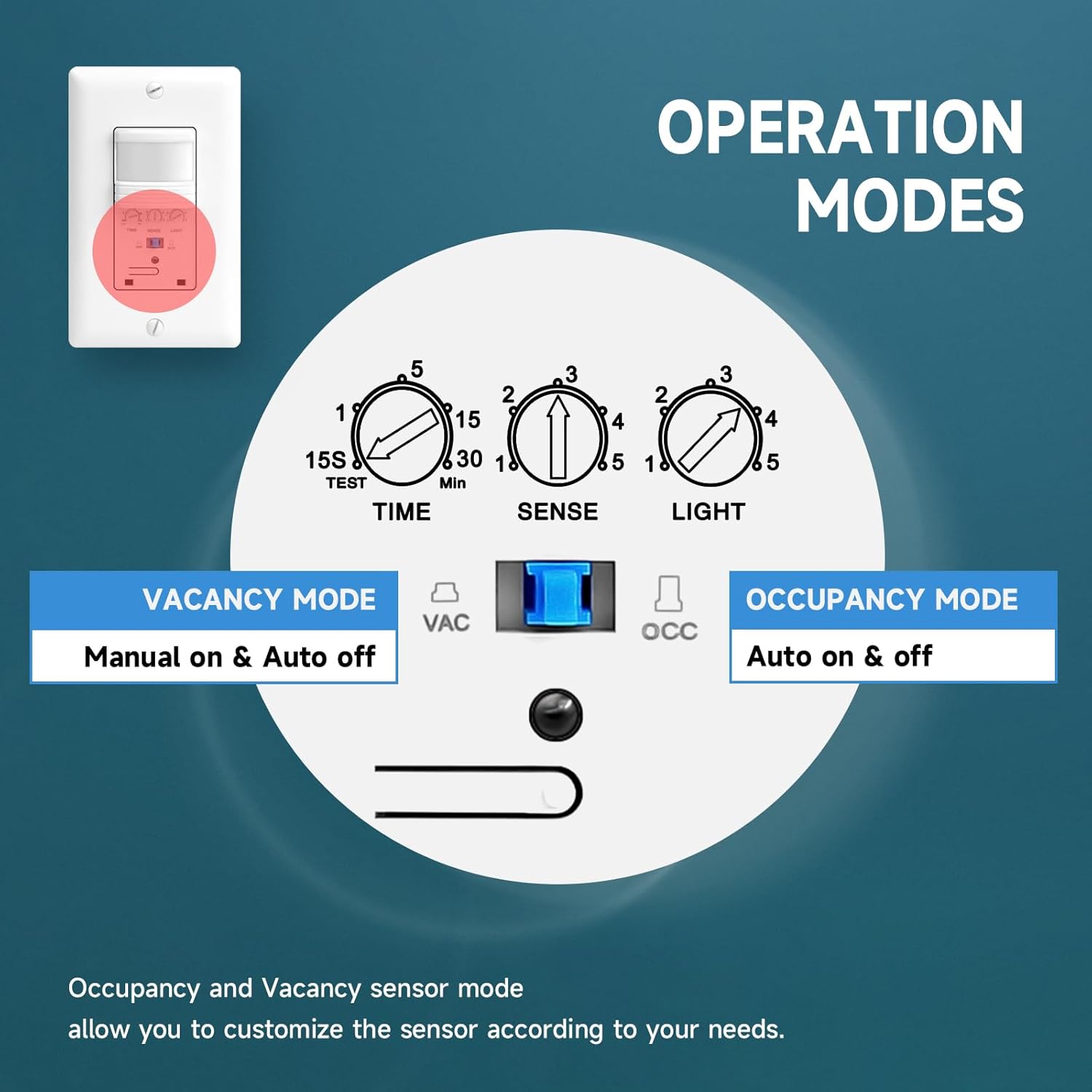
Figure 3: Operation Modes and adjustable settings for the ECOELER YM2108.
Настройка
The ECOELER YM2108 allows for fine-tuning of its performance to suit your specific needs. Adjustments are made using small rotary potentiometers on the switch face.
- Adjustable Time Delay (TIME): This setting determines how long the lights remain on after the last detected motion. It can be adjusted from 15 seconds to 30 minutes.
- Adjustable Sensitivity (SENSE): This controls the range and responsiveness of the motion sensor. Adjusting this can prevent false triggers or ensure detection in larger areas.
- Adjustable Light Level (LIGHT): This feature allows you to set the ambient light threshold at which the sensor will activate the lights. For example, you can set it so lights only turn on if the room is already dark, saving energy during daylight hours. Setting it to '5' typically disables the ambient light sensor, allowing lights to turn on regardless of existing light.
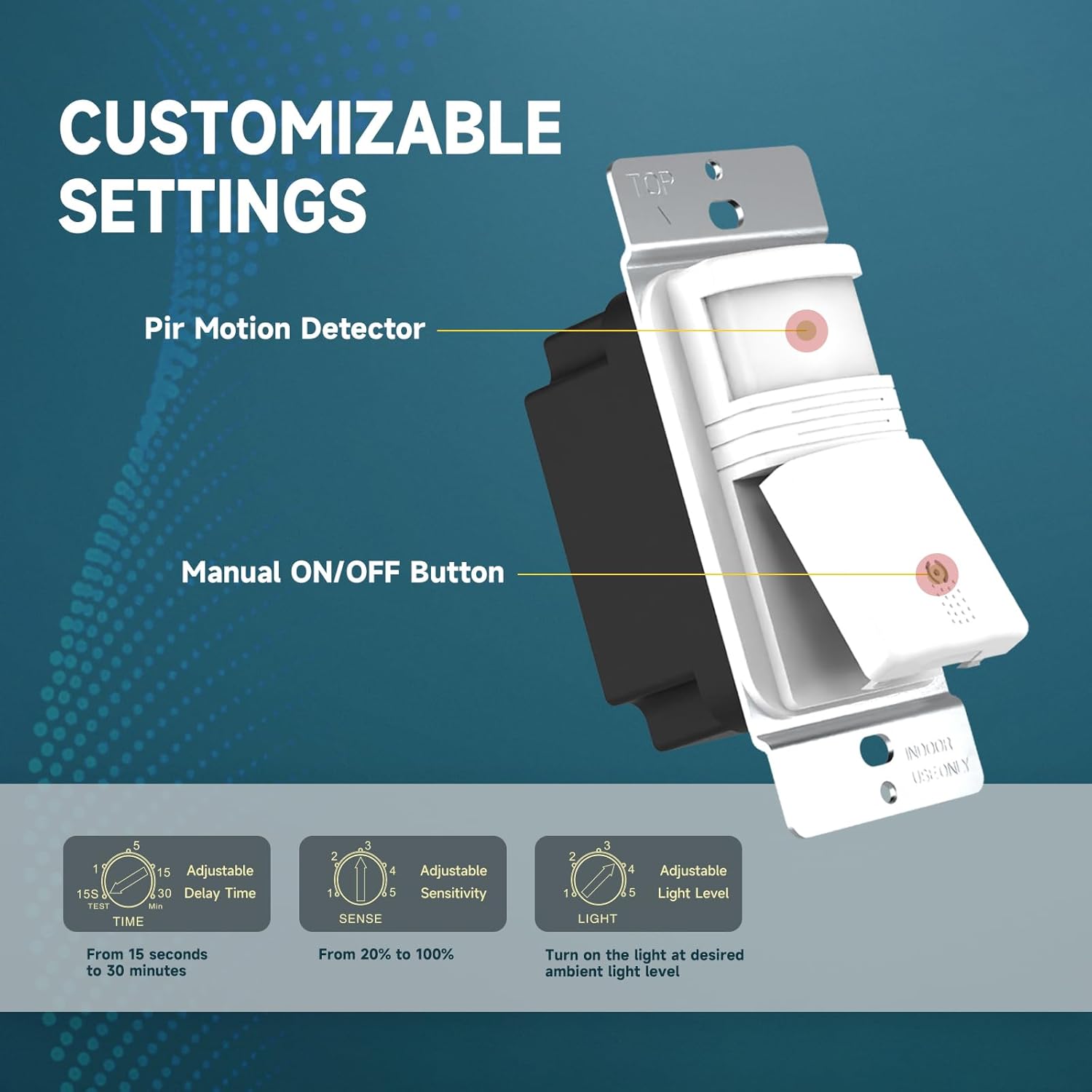
Figure 4: Customizable settings on the ECOELER YM2108 switch.
Технические характеристики
| Номер модели | YM2108 |
| Режим работы | ВКЛ-ВЫКЛ-ВКЛ |
| Текущий рейтинг | 15 Amps |
| Рабочий объемtage | 120 вольт (переменный ток) |
| Совместимые устройства | CFL, LED, Incandescent bulbs |
| Макс Ватtage | 300W LED, 300W CFL, 600W Incandescent |
| Тип крепления | Настенное крепление |
| Метод контроля | Sensor (Motion Detection) |
| Размеры (Д x Ш x В) | 4.72 x 2.87 x 2.24 дюйма |
| Рабочая температура | от 32°F до 131°F (от 0°C до 55°C) |
| Международный рейтинг защиты | IP54 |
| Сертификаты | UL Certified, FCC Listed, California Title 24 Compliant |
Поиск неисправностей
- Свет не включается: Verify that the power is on at the circuit breaker. Check all wiring connections for tightness and correctness, especially the neutral wire. Ensure the ambient light sensor (LIGHT setting) is not preventing activation if the room is already bright. Adjust sensitivity (SENSE) if motion is not being detected.
- Lights not turning off: Ensure there is no continuous motion within the sensor's field of view. Check the time delay (TIME) setting; the lights will remain on for this duration after the last detected motion.
- False triggers (lights turn on without motion): Reduce the sensitivity (SENSE) setting. Ensure the sensor is not exposed to drafts, heat sources, or direct sunlight, which can cause false detections.
- Нестабильная работа: Confirm the switch is set to the desired OCC or VAC mode. Ensure the sensor lens is clean and unobstructed.
If issues persist after following these steps, please contact customer support or a qualified electrician.
Обслуживание
The ECOELER YM2108 Motion Sensor Light Switch requires minimal maintenance. Periodically, gently wipe the sensor lens with a soft, dry cloth to remove dust or debris that may obstruct its field of view. Do not use abrasive cleaners or solvents, as these can damage the device.
Гарантия и поддержка
Этот продукт поставляется с Ограниченная гарантия сроком на 1 года, covering manufacturing defects under normal use. In case of a defect, a replacement or refund may be available. For support or warranty claims, please contact the seller via Amazon.
Визуальные изображения продукта