
1. Введение
This manual provides instructions for the Zerone Universal Remote Control, designed as a replacement for various Haier TV models. It is compatible with Haier HTR-A18M, 55D3550, 40D3500M, and 48D3500 series televisions. This remote control offers direct access to digital TV functions without complex programming.

Image 1.1: The Zerone Universal Remote Control in use, demonstrating its compatibility with Haier HTR-A18M, 55D3550, 40D3500M, and 48D3500 TV models.
2. Настройка
2.1 Установка аккумулятора
Для работы пульта дистанционного управления требуются две (2) батарейки типа ААА (не входят в комплект). Для установки батареек выполните следующие действия:
- Найдите батарейный отсек на задней стороне пульта дистанционного управления.
- Нажмите на защелку и сдвиньте крышку батарейного отсека.
- Вставьте две батарейки типа AAA, убедившись, что положительный (+) и отрицательный (-) полюса правильно совпали с отметками внутри отсека.
- Сдвиньте крышку батарейного отсека на место до надежного щелчка.
The remote is ready for use immediately after battery installation; no additional programming is required for compatible Haier TV models.

Изображение 2.1: Подробно view of the remote control, highlighting the battery compartment for AAA battery installation.
3. Инструкция по эксплуатации
3.1 Основные функции
This remote control provides standard functions for your Haier TV. Point the remote directly at your television's infrared receiver for optimal performance.
- Кнопка питания (U): Включение и выключение телевизора.
- ВходВыбирает источники видеовхода (HDMI, AV и т. д.).
- Кнопки с цифрами (0-9): Прямой выбор канала.
- ГРОМКОСТЬ +/-: Регулирует громкость вверх или вниз.
- СН +/-: Переключение каналов вверх или вниз.
- MUTE: Отключает или включает звук телевизора.
- МЕНЮ: Открывает доступ к главному меню телевизора.
- Кнопки навигации (Вверх, Вниз, Влево, Вправо, ОК): Осуществляет навигацию по меню и подтверждает выбор.
- НАЗАД / ВЫХОД: Возвращает на предыдущий экран или выходит из текущего меню.
- ОТОБРАЖАТЬ: Shows current channel information.
- SAP / AUDIO: Выбор языка или режима аудио.
- СПАТЬ: Устанавливает таймер сна.
- PICTURE / WIDE: Adjusts picture mode or aspect ratio.
- CH.LIST / FAVORITE: Accesses channel list or favorite channels.
- Media Control Buttons (Play, Pause, Fast Forward, Rewind): Управляет воспроизведением мультимедиа.
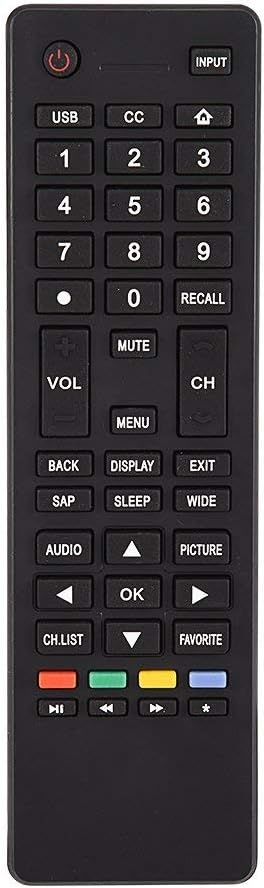
Изображение 3.1: оконченоview of the remote control's button layout for easy identification of functions.
3.2 Рабочий диапазон
The remote control has a stable signal transmission distance of up to 10 meters (33 feet). Actual remote distance may vary depending on environmental factors and the specific model of your TV.
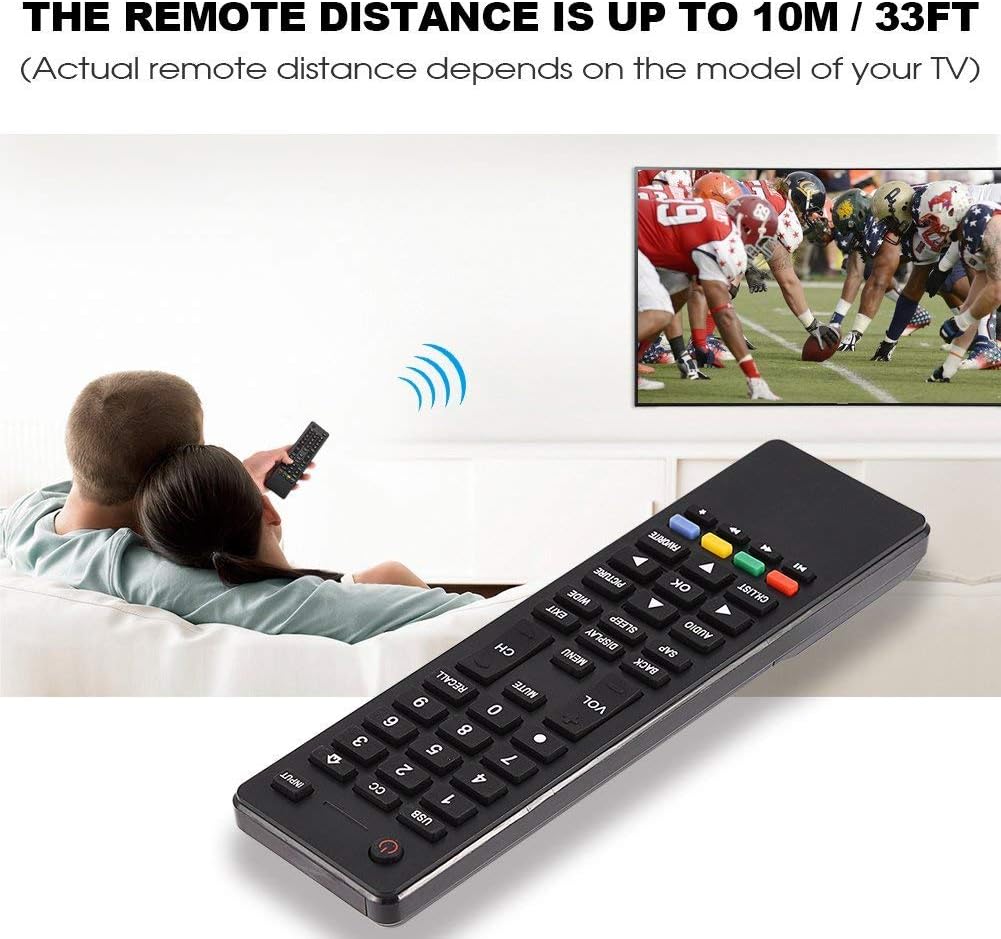
Image 3.2: Visual representation of the remote control's effective operating distance to the television.
4. Техническое обслуживание
4.1 Очистка
Для очистки пульта дистанционного управления используйте мягкую сухую ткань. Для удаления стойких загрязнений слегка протрите поверхность.ampen the cloth with water or a mild cleaning solution. Avoid using harsh chemicals or abrasive cleaners, as these can damage the remote's surface or internal components.
4.2 Уход за аккумулятором
- Замените батарейки, если пульт дистанционного управления начнет работать медленно или перестанет функционировать.
- Не смешивайте старые и новые батареи или батареи разных типов.
- Если пульт дистанционного управления не будет использоваться в течение длительного времени, извлеките из него батарейки, чтобы предотвратить утечку.
- Утилизируйте использованные батареи ответственно в соответствии с местными правилами.
5. Поиск Неисправностей
5.1 Пульт дистанционного управления не отвечает
- Проверьте батареи: Ensure batteries are inserted correctly with the correct polarity (+/-) and are not depleted. Replace with fresh AAA batteries if necessary.
- Линия прямой видимости: Make sure there are no obstructions between the remote control and the TV's infrared sensor.
- Расстояние: Confirm you are within the effective operating range (up to 10 meters / 33 feet).
- Совместимость с ТВ: Verify that your TV model is listed as compatible (Haier HTR-A18M, 55D3550, 40D3500M, 48D3500).
5.2 Buttons Not Working Correctly
- Чистый пульт: Dust or debris under buttons can cause malfunction. Refer to the Maintenance section for cleaning instructions.
- Проверка батареи: Weak batteries can lead to inconsistent button responses. Replace batteries.
6. Технические характеристики
| Особенность | Деталь |
|---|---|
| Бренд | Зерон |
| Совместимые устройства | Haier HTR-A18M, 55D3550, 40D3500M, 48D3500 TVs |
| Технология связи | Инфракрасный |
| Максимальный диапазон | 10 метра (33 фута) |
| Тип батареи | 2 x AAA (не входит в комплект) |
| Тип контроллера | Кнопка управления |
| Материал | АБС |
| Номер модели | Zerone9rnag3b5y4-cr |
| СКП | 647213811490 |

Image 6.1: Physical dimensions of the Zerone Universal Remote Control.
7. Информация о гарантии
This product is offered as an Amazon Renewed item. Amazon Renewed products are professionally inspected and tested to work and look like new. If you are not satisfied with your purchase, renewed products are eligible for replacement or refund under the Amazon Renewed Guarantee.
Additionally, the manufacturer provides a 90-дневная ограниченная гарантия. For specific details regarding the terms and conditions of this warranty, please refer to the documentation provided at the time of purchase or contact customer support.
8. Поддержка клиентов
If you encounter any issues or have questions regarding your Zerone Universal Remote Control that are not addressed in this manual, please contact the seller or Amazon Renewed customer service for assistance.
For Amazon Renewed Guarantee claims, please visit the Amazon Renewed program page or contact Amazon customer support directly.