
Острый
Инструкция по эксплуатации атомных часов Sharp
Модель: 8541848315
Введение
The Sharp Atomic Clock provides precise timekeeping and temperature monitoring for your home or office. Featuring a large, easy-to-read display, this clock automatically synchronizes with the atomic time signal (WWVB) broadcast from Fort Collins, Colorado, ensuring accuracy without manual adjustments. It also includes a wireless outdoor sensor to display both indoor and outdoor temperatures.
Характеристики продукта
- Atomic Time Accuracy: Automatically synchronizes with the WWVB atomic time signal for precise timekeeping.
- Jumbo 3" Easy-to-Read Numbers: Large digital display for clear visibility of time, date, and temperature.
- Indoor/Outdoor Temperature Display: Monitors both indoor ambient temperature and outdoor temperature via a wireless sensor.
- Беспроводной наружный датчик: Transmits outdoor temperature data to the main unit.
- Питание от батареи: Operates on batteries for flexible placement (batteries not included).
- Автоматическая корректировка летнего времени: Automatically adjusts for daylight saving time changes.
- Выбираемые часовые пояса: Allows selection of various US time zones.
- 12/24-часовой формат: Возможность отображения времени в 12-часовом или 24-часовом формате.
- Celsius/Fahrenheit Display: Переключайтесь между единицами измерения температуры — Цельсия и Фаренгейта.
Содержимое упаковки
Перед началом настройки убедитесь, что все необходимые компоненты присутствуют.
- Sharp Atomic Clock Main Unit
- Беспроводной датчик наружного освещения
- Руководство по эксплуатации
Note: Batteries are not included. The main unit requires 2 AA batteries, and the outdoor sensor requires 2 AA batteries.
Настраивать
1. Установка аккумулятора
- Откройте батарейный отсек на задней панели основного блока часов.
- Insert 2 AA batteries, observing the correct polarity (+ and -).
- Закройте крышку батарейного отсека.
- Open the battery compartment on the wireless outdoor sensor.
- Insert 2 AA batteries into the outdoor sensor, observing the correct polarity.
- Close the outdoor sensor's battery compartment cover.
2. Начальная синхронизация и настройки
After battery installation, the clock will attempt to receive the WWVB atomic time signal and connect to the outdoor sensor. This process may take several minutes or up to 24 hours depending on your location and environmental interference.
- Часовой пояс: Press the "TIME ZONE" button (often labeled "UP TIME ZONE") on the back of the clock to cycle through available time zones (PST, MST, CST, EST). Select your desired time zone.
- 12/24-часовой формат: Press the "12/24" button to switch between 12-hour and 24-hour display.
- Цельсия / Фаренгейта: Press the "°C/°F" button to toggle between Celsius and Fahrenheit temperature display.
- Outdoor Sensor Pairing: If the outdoor temperature does not appear, press the "CHANNEL" button on the main unit to search for the sensor signal. Ensure the outdoor sensor is within range and not obstructed.
For optimal signal reception, place the clock away from large metal objects, electronic devices, and areas with heavy concrete or brick walls. The outdoor sensor should be placed in a shaded, dry location, protected from direct sunlight and precipitation, for accurate readings.
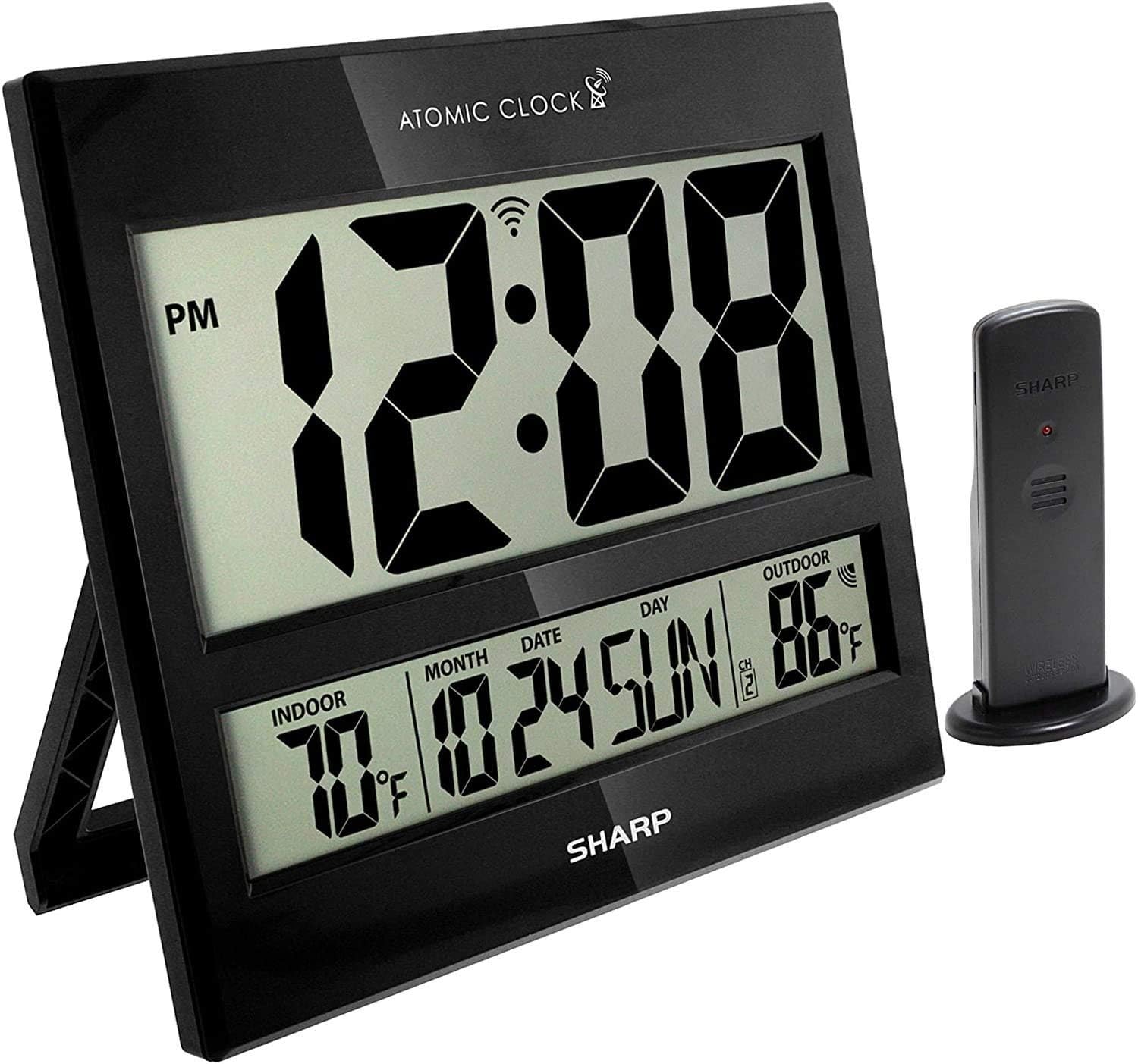
Image: The Sharp Atomic Clock main unit displaying time, indoor temperature, date, and outdoor temperature, alongside its wireless outdoor sensor.
Операция
Отображение информации
The clock's large LCD screen displays the following information:
- Время: Current time in selected 12-hour or 24-hour format.
- Индикатор PM: Displays "PM" for afternoon hours in 12-hour format.
- Атомный сигнальный индикатор: Shows the status of the WWVB atomic time signal reception.
- Температура в помещении: Current temperature measured by the main unit.
- Month/Date/Day: Актуальная информация календаря.
- Температура наружного воздуха: Current temperature measured by the wireless outdoor sensor.
- Канал наружных датчиков: Indicates the channel the outdoor sensor is transmitting on.
- Индикатор низкого заряда батареи: An icon will appear when batteries are low and need replacement.
Функции кнопок (задняя панель)
| Кнопка | Функция |
|---|---|
| КАЛЕНДАРЬ | Press and hold for 2 seconds to manually set calendar (Year, Month, Date, Language). Use UP/DOWN buttons to change values. |
| ВРЕМЯ | Press and hold for 2 seconds to manually set time (DST ON/OFF, Hour, Minute). Use UP/DOWN buttons to change values. |
| 12/24 | Switches between 12-hour and 24-hour time display. |
| КАНАЛ | Press to switch between outdoor sensor channels (1, 2, 3). Press and hold for 2 seconds to pair with the outdoor sensor. |
| ° C / ° F | Переключает отображение температуры между градусами Цельсия и Фаренгейта. |
| ВОЛНА | Initiates a manual search for the WWVB atomic time signal. |
| ПЕРЕЗАГРУЗИТЬ | Resets the clock to factory default settings. Requires a pointed object (e.g., paperclip). |
| UP / TIME ZONE | Increases values during manual setting. Press to cycle through time zones. |
| ВНИЗ | Decreases values during manual setting. |
Обслуживание
- Замена батареи: Replace batteries in both the main unit and outdoor sensor when the low battery indicator appears on the display. Always replace all batteries at the same time with new ones.
- Уборка: Протрите часы и датчик мягкой сухой тканью. Не используйте абразивные чистящие средства или растворители.
- Размещение наружного датчика: Periodically check the outdoor sensor's location to ensure it remains protected from extreme weather conditions, direct sunlight, and moisture.
Поиск неисправностей
- Clock not syncing with atomic time:
- Ensure the clock is placed away from electronic interference (TVs, computers, microwaves).
- Try placing the clock near a window facing Fort Collins, Colorado (if applicable to your region).
- Press the "WAVE" button to initiate a manual signal search.
- Для первоначальной синхронизации может потребоваться до 24 часов.
- Outdoor temperature not displaying or incorrect:
- Check batteries in the outdoor sensor.
- Ensure the outdoor sensor is within the effective transmission range (typically up to 100 feet, line of sight).
- Нажмите кнопку "CHANNEL" на главном устройстве, чтобы восстановить соединение.
- Verify the outdoor sensor is placed in a location protected from direct sunlight and rain, which can affect readings.
- Дисплей тусклый или пустой:
- Replace all batteries in the main unit with fresh ones.
- Убедитесь, что батареи вставлены с соблюдением правильной полярности.
- Неверное время или дата:
- Убедитесь, что выбран правильный часовой пояс.
- Check if Daylight Saving Time (DST) setting is correct for your region.
- If atomic signal is not received, manually set the time and date using the "TIME" and "CALENDAR" buttons.
Технические характеристики
| Особенность | Деталь |
|---|---|
| Бренд | Острый |
| Номер модели | 8541848315 |
| СКП | 049353998732 |
| Цвет | Черный глянец |
| Тип дисплея | Цифровой LCD |
| Специальная характеристика | Atomic Time Synchronization (WWVB), Indoor/Outdoor Temperature |
| Размеры продукта | 13"W x 1.5"H (Main Unit) |
| Источник питания | Питание от батареи |
| Количество требуемых батарей | Main Unit: 2 AA; Outdoor Sensor: 2 AA |
| Материал | Пластик |
| Тип крепления | Настенное крепление / Настольная подставка |
| Использование внутри и снаружи помещений | Indoor (Main Unit), Outdoor (Sensor) |
Гарантия и поддержка
Sharp products are manufactured to high-quality standards. For warranty information, technical support, or service inquiries, please refer to the contact information provided with your product packaging or visit the official Sharp webСохраните чек о покупке в качестве подтверждения покупки для предъявления гарантийных претензий.
Ask a question about this manual
Ask about setup, troubleshooting, compatibility, parts, safety, or missing instructions. Manuals+ will review the question and use this page’s manual context to help answer it.