
Введение
The DieHard DH137 is a 10A 12V battery charger designed for use with standard, AGM, and Gel batteries. This device is engineered to monitor and maintain the battery's charge level, automatically resuming charging if the battery's voltage drops. Key features include reverse hook-up protection, multi-stage charging for enhanced precision and safety, and extended battery life. It comes equipped with 50 Amp clamps suitable for both top-mount and side-mount battery posts.
Важная информация по безопасности
Перед использованием данного изделия всегда внимательно читайте и усвойте все предупреждения и инструкции по технике безопасности. Несоблюдение этих инструкций может привести к поражению электрическим током, пожару или серьезным травмам.
- Использовать только в хорошо проветриваемых помещениях.
- При работе с аккумуляторами надевайте защитные очки и защитную одежду.
- Хранить в недоступном для детей месте.
- Не подвергайте зарядное устройство воздействию дождя или влаги.
- Перед подключением или отключением аккумулятора убедитесь, что зарядное устройство отключено от источника питания.
- Avoid dropping metal tools onto the battery. This could short-circuit the battery or other electrical parts, which may cause an explosion.
- This charger is not intended for use as a power supply.
Продукт болееview
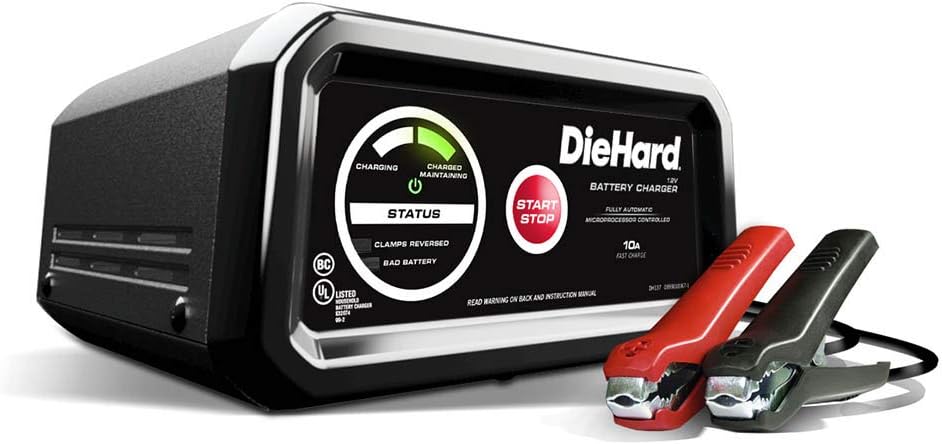
Figure 1: The DieHard DH137 10 Amp Battery Charger, showcasing its main unit and the red and black 50 Amp clamps.

Рисунок 2: Наклонный view of the DieHard DH137 charger, highlighting its compact design and integrated handle.
The DieHard DH137 features a robust casing with a clear control panel. The panel includes LED indicators for charging status, battery maintenance, reverse hook-up, and bad battery detection. A prominent START/STOP button controls the charging process. The unit is equipped with heavy-duty 50 Amp clampдля надежного соединения с клеммами батареи.
- Светодиодные индикаторы: Provide visual feedback on the charging status (Charging, Charged/Maintaining, Clamps Reversed, Bad Battery).
- Кнопка СТАРТ / СТОП: Initiates and terminates the charging cycle.
- 50 Amp Clamps: Прочный клamps for connecting to battery posts.
- USB-порт: For charging small electronic devices (2.1A MAX).
Настраивать
Before connecting the charger, ensure the battery terminals are clean and free of corrosion. Position the charger on a stable, non-flammable surface away from the battery to allow for proper ventilation.
- Verify the battery type (Standard, AGM, Gel) matches the charger's capabilities.
- Ensure the charger's AC power cord is unplugged from the electrical outlet.
- Подключите красный положительный (+) cl.amp к положительной (+) клемме аккумулятора.
- Подключите черный минус (-) cl.amp to the negative (-) battery terminal. If connecting to a vehicle, connect the negative clamp to the vehicle chassis or engine block, away from the battery and fuel line.
- Убедитесь, что все соединения защищены.
Инструкция по эксплуатации

Figure 3: The DieHard DH137 charger positioned on the engine bay of a vehicle, ready for connection.

Figure 4: A user connecting the red positive clamp of the DieHard DH137 to the positive terminal of a car battery.
The DieHard DH137 features fully automatic, microprocessor-controlled charging. Once connected, it will assess the battery and begin the appropriate charging stage.
- Подключение к электросети: Plug the charger's AC power cord into a standard 120V AC electrical wall outlet.
- Начать зарядку: Нажмите СТАРТ/СТОП button. The charger will begin its diagnostic and charging cycle.
- Статус монитора: Обратите внимание на светодиодные индикаторы:
- Solid green LED: Indicates the battery is fully charged and in maintenance mode.
- Solid yellow LED: Indicates charging is in progress.
- Flashing red LED: Indicates reverse hook-up. Disconnect and re-connect clampправильно.
- Solid red LED: Indicates a bad battery.
- Мульти-Stagе Зарядка: The charger automatically progresses through various stages (desulfation, bulk charge, absorption, float) to optimize battery performance and longevity.
- Reverse Hook-up Protection: Если клamps are connected incorrectly, the charger will not operate and the red LED will flash, preventing damage to the battery or charger.
- USB-зарядка: To use the USB port, plug your device into the USB port. The USB ON/OFF and Battery Status LED will illuminate. When finished, press the button to turn off the USB.
- Завершение: Once the green LED is solid, the battery is fully charged. You may leave the charger connected for long-term maintenance.
- Отключение: First, unplug the AC power cord from the outlet. Then, disconnect the negative (-) clamp, за которым следует положительный (+) clamp.
Важные примечания:
- The charger will automatically monitor and maintain the battery when fully charged, resuming continuous charging if the battery becomes discharged.
- This unit is a battery charger/maintainer, not a jump starter. It is designed for charging over time, not for instant starting of a dead battery.
Обслуживание
Proper maintenance ensures the longevity and optimal performance of your DieHard DH137 battery charger.
- Уборка: Disconnect the charger from all power sources and batteries before cleaning. Wipe the case and clamps with a dry cloth. Do not use solvents or abrasive cleaners.
- Хранилище: Храните зарядное устройство в прохладном, сухом месте, когда оно не используется. Убедитесь, что...amps are clean and not touching each other.
- Уход за кабелем: Inspect the AC power cord and battery cables for any damage (cuts, fraying, exposed wires) before each use. Do not use the charger if any cables are damaged.
Поиск неисправностей
| Проблема | Возможная причина | Решение |
|---|---|---|
| Зарядное устройство не включается. | Отсутствие питания от сети переменного тока; неисправная розетка; внутренняя неисправность. | Check AC outlet; ensure charger is properly plugged in. If problem persists, contact support. |
| Flashing red LED (Clamps Reversed). | Аккумулятор clampподключены неправильно. | Disconnect AC power, then disconnect clamps. Re-connect red clamp к положительному (+) и черному цветуamp на отрицательный (-). |
| Solid red LED (Bad Battery). | Battery is severely sulfated, short-circuited, or damaged. | The charger cannot charge this battery. Have the battery professionally tested or replaced. |
| Charger not reaching full charge (green LED). | Battery is very large, deeply discharged, or has internal issues. | Allow more time for charging. If it never reaches full charge, the battery may be compromised. |
Технические характеристики
- Бренд: DieHard
- Модель: ДХ137
- Выход Voltage: 12 Вольт
- Зарядка Ampярость: 10 Amp
- Совместимые типы батарей: Standard, AGM, Gel
- Вес товара: 1.6 унции
- Размеры продукта: 8.75 x 4.75 x 9.5 дюйма
- Производитель: Schumacher Electric Corp.
- Функции: Мульти-сtage charging, Reverse hook-up protection, LED indicators, USB charging port.
Гарантия и поддержка
For detailed warranty information, please refer to the warranty card included with your product or visit the official DieHard webСохраните чек о покупке в качестве подтверждения покупки на случай предъявления гарантийных претензий.
For technical support, troubleshooting assistance, or to inquire about replacement parts, please contact Schumacher Electric Corp. customer service. Contact details can typically be found in the product packaging or on the manufacturer's webсайт.
Note: The provided JSON data includes information about optional protection plans (2-Year Protection Plan, 3-Year Protection Plan, Complete Protect) which are separate from the manufacturer's standard product warranty. Please consult the terms and conditions of these plans for details.