
1. Введение
This manual provides essential information for the safe and effective use of your Sigma 60-600mm F4.5-6.3 DG OS HSM Camera Lens. Please read this manual thoroughly before using the lens and keep it for future reference. This lens is designed to offer a versatile focal range from 60mm to 600mm, suitable for various photographic applications, including wildlife, sports, and landscapes.
2. Продукт закончилсяview
The Sigma 60-600mm F4.5-6.3 DG OS HSM is a high-performance super-telephoto zoom lens. It features a robust construction, optical stabilization, and advanced optical elements to deliver high image quality across its extensive zoom range.

Figure 2.1: Sigma 60-600mm F4.5-6.3 DG OS HSM Camera Lens with lens hood.
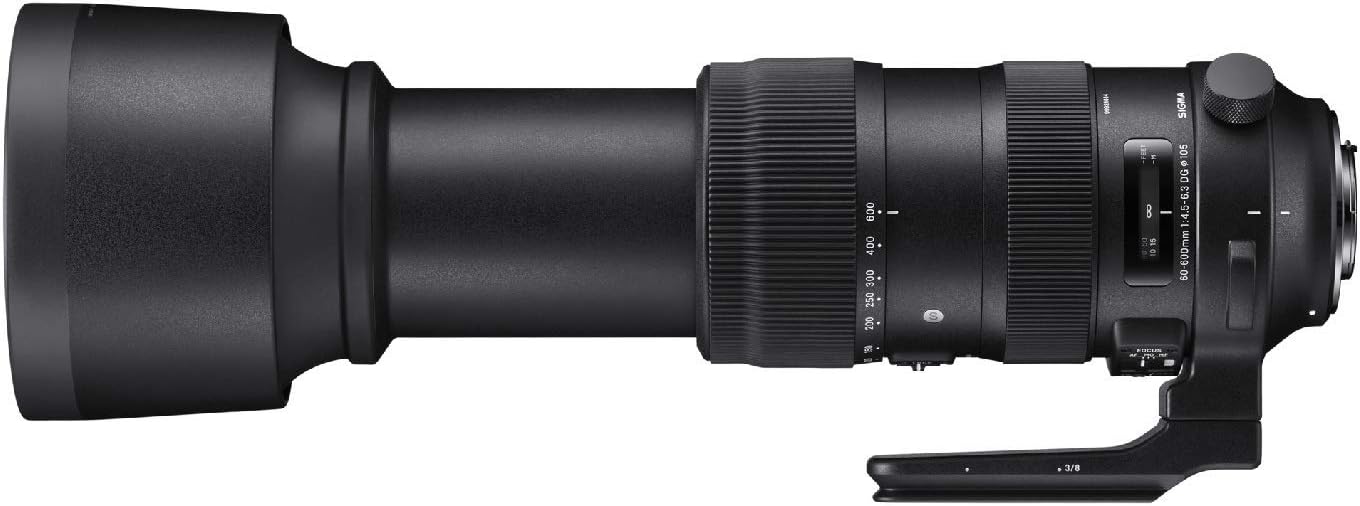
Рисунок 2.2: Сторона view of the lens highlighting control switches.

Figure 2.3: Detached lens hood.
3. Настройка и установка
3.1 Крепление объектива к камере
- Align the lens mount index mark with the corresponding mark on your camera body.
- Rotate the lens clockwise (for Canon EF mount) until it clicks into place. Ensure it is securely locked.
- Для отсоединения нажмите кнопку фиксации объектива на корпусе камеры и поверните объектив против часовой стрелки.
3.2 Прикрепление бленды объектива
- Совместите красную точку на бленде с красной точкой на передней части объектива.
- Twist the lens hood clockwise until it locks into position.
- To remove, twist counter-clockwise.
3.3 Использование штативного крепления
The lens includes a tripod collar for stable mounting on a tripod or monopod, especially recommended due to the lens's weight. The collar allows for rotation of the camera without detaching the lens, facilitating quick changes between horizontal and vertical orientations.
4. Управление объективом
4.1 Масштабирование
Rotate the zoom ring to adjust the focal length between 60mm and 600mm. The lens also supports push-pull zooming for rapid focal length changes.
4.2 Фокусировка
- Автофокус (АФ): Set the FOCUS mode switch to 'AF'. The lens will automatically focus when the camera's shutter button is half-pressed.
- Ручная фокусировка (MF): Set the FOCUS mode switch to 'MF'. Rotate the focus ring to manually adjust focus.
- Manual Override (MO): This mode allows for manual focus adjustment even when the lens is set to autofocus, providing fine-tuning capability.
4.3 Ограничитель фокусировки
The focus limiter switch allows you to restrict the autofocus range, which can improve autofocus speed when shooting subjects within a specific distance. Options typically include FULL (full range), 6m - ∞ (6 meters to infinity), and 6m - 2.6m (6 meters to 2.6 meters).
4.4 Оптическая стабилизация (ОС)
The Intelligent OS system minimizes camera shake, providing up to 4 stops of stabilization. Set the OS switch to 'ON' for handheld shooting. Different OS modes may be available for various shooting scenarios (e.g., Mode 1 for general use, Mode 2 for panning shots).
4.5 Zoom Lock Switch
Use the zoom lock switch to secure the lens at a desired focal length, preventing zoom creep during transport or when shooting at a fixed focal length.
5. Техническое обслуживание и уход
- Keep the lens caps on when not in use to protect the front and rear elements.
- Clean lens surfaces with a soft, lint-free cloth and a specialized lens cleaning solution. Avoid harsh chemicals.
- Храните линзы в прохладном, сухом месте, вдали от прямых солнечных лучей и экстремальных температур.
- The lens features a dust and splash-proof construction, but it is not fully waterproof. Avoid exposing it to heavy rain or submersion.
6. Поиск Неисправностей
- Объектив не фокусируется: Ensure the camera is set to the correct focus mode (AF/MF) and the lens's focus mode switch matches. Check the focus limiter setting.
- Размытые изображения: Verify that the optical stabilization (OS) is enabled for handheld shots. Check shutter speed and aperture settings. Ensure the lens and camera are clean.
- Zoom ring stiff: Ensure the zoom lock switch is disengaged. If the issue persists, contact customer support.
7. Технические характеристики
| Особенность | Спецификация |
|---|---|
| Бренд | Сигма |
| Название модели | 730954 |
| Тип объектива | Суперзум |
| Совместимые крепления | Канон ЭФ |
| Минимальное фокусное расстояние | 60 миллиметра |
| Максимальное фокусное расстояние | 600 миллиметра |
| Максимальная диафрагма | f/22 |
| Минимальная диафрагма | f/32 |
| Тип фокусировки | Автофокус |
| Стабилизация изображения | Оптический |
| Размер фотофильтра | 105 миллиметра |
| Вес товара | 4 фунта |
| Уровень водонепроницаемости | Водостойкий |
| Производитель | Корпорация Сигма в Америке |
8. Гарантия и поддержка
На данный товар распространяется гарантия производителя. Подробную информацию о гарантии см. в документации, прилагаемой к вашей покупке, или на официальном сайте компании Sigma. website. For technical support, service, or inquiries, please contact Sigma Corporation of America customer service.