
1. Введение
This manual provides instructions for the safe and efficient operation of your RCF MS1033 Home CD Player. The MS1033 is a dual sound source unit, featuring two independent sections for simultaneous use. It includes a CD player with anti-shock mechanics and electronics, capable of playing audio tracks and MP3 files from CD, CD-R, and CD-R/W discs. Additionally, it features an MP3 player that supports USB flash drives and Secure Digital (SD) cards, including Multimedia Cards.
Перед использованием устройства внимательно ознакомьтесь с данным руководством и сохраните его для дальнейшего использования.
2. Важные инструкции по технике безопасности
- Не подвергайте прибор воздействию дождя или влаги.
- Не закрывайте вентиляционные отверстия.
- Не устанавливайте вблизи источников тепла, таких как радиаторы, обогреватели, печи или другие приборы (включая amp(жирообразующие вещества), которые вырабатывают тепло.
- Берегите шнур питания от наступания и защемления.
- Используйте только те насадки/аксессуары, которые указаны производителем.
- Отключайте прибор от сети во время грозы или если он не используется в течение длительного времени.
- По всем вопросам обслуживания обращайтесь к квалифицированному персоналу.
3. Содержимое упаковки
Проверьте наличие всех предметов в упаковке:
- RCF MS1033 Домашний CD-плеер
- Силовой кабель
- Руководство пользователя (этот документ)
Note: The product specifications mention "Included components: cd/mps". This refers to the player unit itself and essential accessories.
4. Элементы управления и функции
Familiarize yourself with the various controls and features of your RCF MS1033.
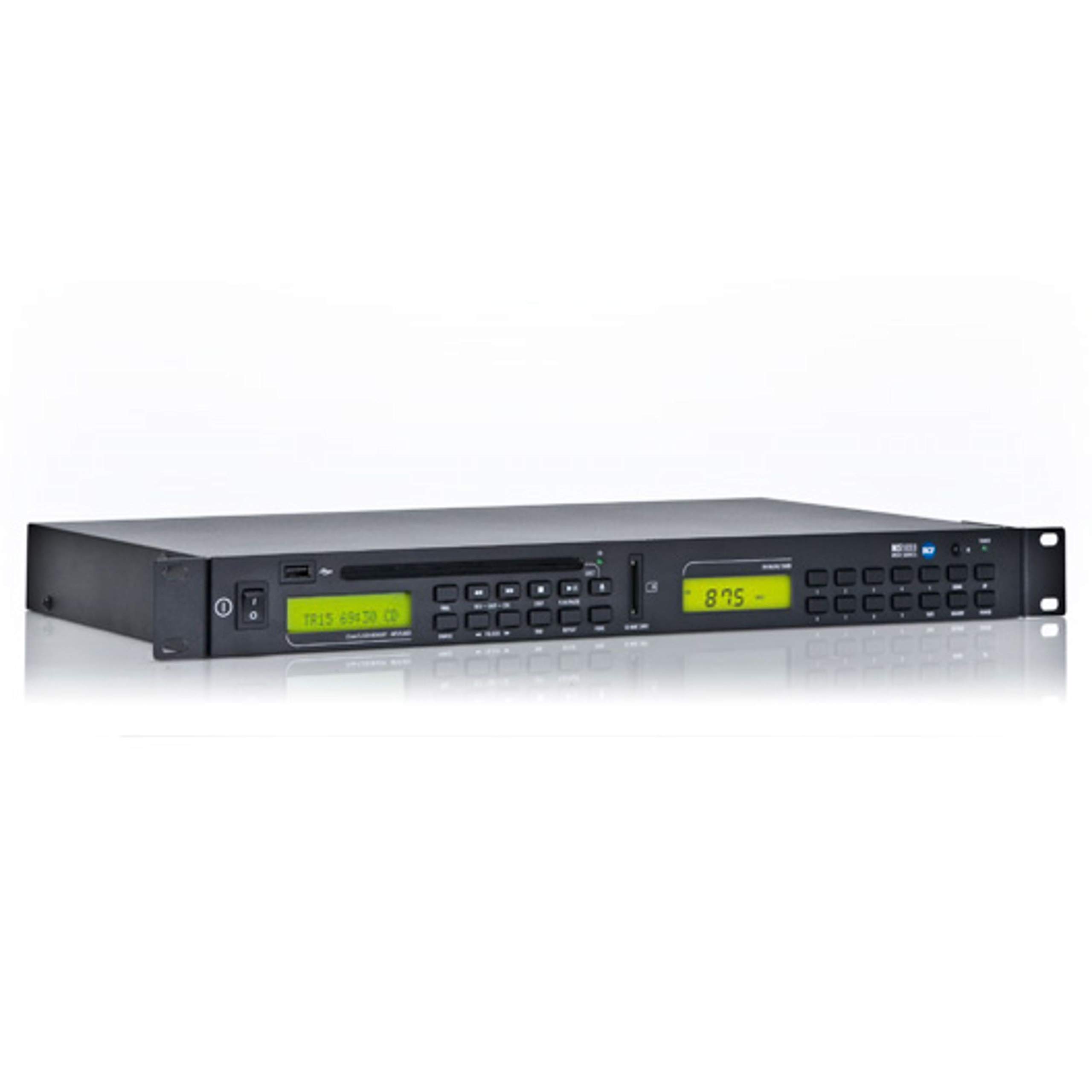
Figure 1: Front panel of the RCF MS1033 Home CD Player. This image displays the main unit with its CD tray, digital display, and various control buttons for playback and source selection.
4.1 Передняя панель
- Лоток для компакт-дисков: For inserting audio CDs, CD-R, and CD-R/W discs.
- Экран дисплея: Shows track information, playback status, and source selection.
- USB-порт: Для подключения USB-флешек для воспроизведения MP3-файлов. files.
- Слот для SD-карты: For inserting SD/MMC cards to play MP3 files.
- Кнопки управления: Play/Pause, Stop, Skip Forward/Backward, Folder Navigation, Source Select.
4.2 Задняя панель
- Аудиовыход (RCA): Подключается к ampприемник или передатчик.
- Потребляемая мощность: Подключается к источнику питания переменного тока.
5. Настройка
5.1 Распаковка
Аккуратно извлеките устройство из упаковки. Сохраните упаковочные материалы для дальнейшей транспортировки или хранения.
5.2 Размещение
Place the RCF MS1033 on a stable, flat surface. Ensure adequate ventilation around the unit. Avoid placing it near heat sources or in direct sunlight.
5.3 Подключение к источнику питания
- Ensure the unit's power switch (if present) is in the OFF position.
- Connect the power cable to the power input on the rear of the MS1033.
- Вставьте другой конец кабеля питания в подходящую розетку переменного тока.
5.4 Подключение к аудиосистеме
- Locate the RCA audio output jacks on the rear of the MS1033.
- Connect an RCA audio cable (not included) from these outputs to an available audio input on your amplifier or receiver (e.g., "CD IN", "AUX IN").
- Ensure the connections are secure and correctly matched (red to red, white to white).
6. Инструкция по эксплуатации
6.1 Включение/выключение питания
Press the Power button on the front panel or remote control (if included) to turn the unit ON or OFF.
6.2 Воспроизведение компакт-дисков
- Press the "CD" source button (if available) or ensure the unit is in CD mode.
- Press the "Eject" button to open the CD tray.
- Place a CD (audio CD, CD-R, CD-R/W with audio or MP3 files) onto the tray with the label side facing up.
- Press the "Eject" button again or gently push the tray to close it.
- The unit will read the disc. Playback should start automatically or by pressing the "Play" button.
- Use "Play/Pause", "Stop", and "Skip" buttons to control playback.
6.3 Воспроизведение с USB/SD-карты
- Вставьте USB-флешку в USB-порт или карту SD/MMC в слот для SD-карты.
- Press the "USB/SD" source button (if available) or ensure the unit is in USB/SD mode.
- The unit will scan the device for MP3 files.
- Use the navigation buttons to browse folders and select tracks.
- Press "Play" to start playback.
6.4 Dual Sound Source Operation
The RCF MS1033 features two independent sections. This allows for simultaneous playback from different sources if your amplifier or mixer has multiple inputs. Consult your amplifier's manual for connecting and managing multiple audio inputs.
7. Техническое обслуживание
7.1 Очистка
Disconnect the power cord before cleaning. Use a soft, dry cloth to clean the exterior of the unit. Do not use liquid cleaners or aerosol cleaners.
7.2 Обращение с дисками
- Всегда держите диски за края.
- Держите диски в чистоте и без царапин.
- Храните диски в футлярах, когда они не используются.
7.3 USB/SD Card Care
- Always safely remove USB drives and SD cards from the unit when not in use or before powering off.
- Avoid exposing storage devices to extreme temperatures or moisture.
8. Поиск Неисправностей
| Проблема | Возможная причина | Решение |
|---|---|---|
| Нет электричества | Шнур питания не подключен; Розетка питания неактивна. | Check power cord connection; Test power outlet with another device |
| Нет звука | Аудиокабели не подключены; выбран неправильный вход ampпожизненнее; Amplifier volume too low | Проверьте подключение аудиокабеля; выберите правильный вход на amplifier; Increase ampменьший объем |
| Диск не воспроизводится | Диск вставлен неправильно; Диск загрязнен или поцарапан; Формат диска не поддерживается | Reinsert disc correctly; Clean or replace disc; Ensure disc is CD, CD-R, CD-R/W with audio or MP3 files |
| USB/SD не воспроизводится | Device not inserted correctly; Files are not MP3 format; Device not recognized | Reinsert USB/SD; Ensure files are MP3; Try a different USB/SD device |
9. Технические характеристики
| Особенность | Деталь |
|---|---|
| Модель | MS1033 |
| Бренд | РЦФ |
| Размеры продукта | 6 x 8 x 7 дюйма |
| Вес товара | 8 фунта |
| Технология связи | USB |
| Специальная характеристика | CD-R/RW Compatible |
| Поддерживаемые форматы дисков | CD, CD-R, CD-R/W (Audio tracks and MP3 files) |
| Поддерживаемые цифровые медиа | USB Flash Drives, SD Cards, Multimedia Cards (MP3 fileтолько с) |
10. Гарантия и поддержка
For warranty information and technical support, please refer to the official RCF website or contact your local RCF dealer. Keep your purchase receipt as proof of purchase.
Примечание: Конкретные условия гарантии могут различаться в зависимости от региона и продавца.

