
1. Введение
The DROK LD25 USB Load Tester is an intelligent temperature-controlled electronic load module designed for testing USB and Type-C power sources and cables. It features high power, high current, and high voltage capabilities, along with intelligent control for precise measurements. This device is ideal for verifying charger output capacity, testing cable quality, and performing bulk aging tests.
It provides a constant current discharge task up to 4A, 25V, and 25W, offering a user-friendly interface and robust performance for diverse testing requirements.
2 Важная информация по безопасности
ПРЕДУПРЕЖДЕНИЕ: This product does not have reverse connection protection. The input polarity cannot be reversed. Reversing the input polarity will cause permanent damage to the product and it cannot be repaired. Always ensure correct polarity before connecting the device.
Убедитесь, что рабочий объемtage, current, and power do not exceed the rated maximums to prevent damage to the device or the power source being tested.
3. Характеристики и компоненты продукта
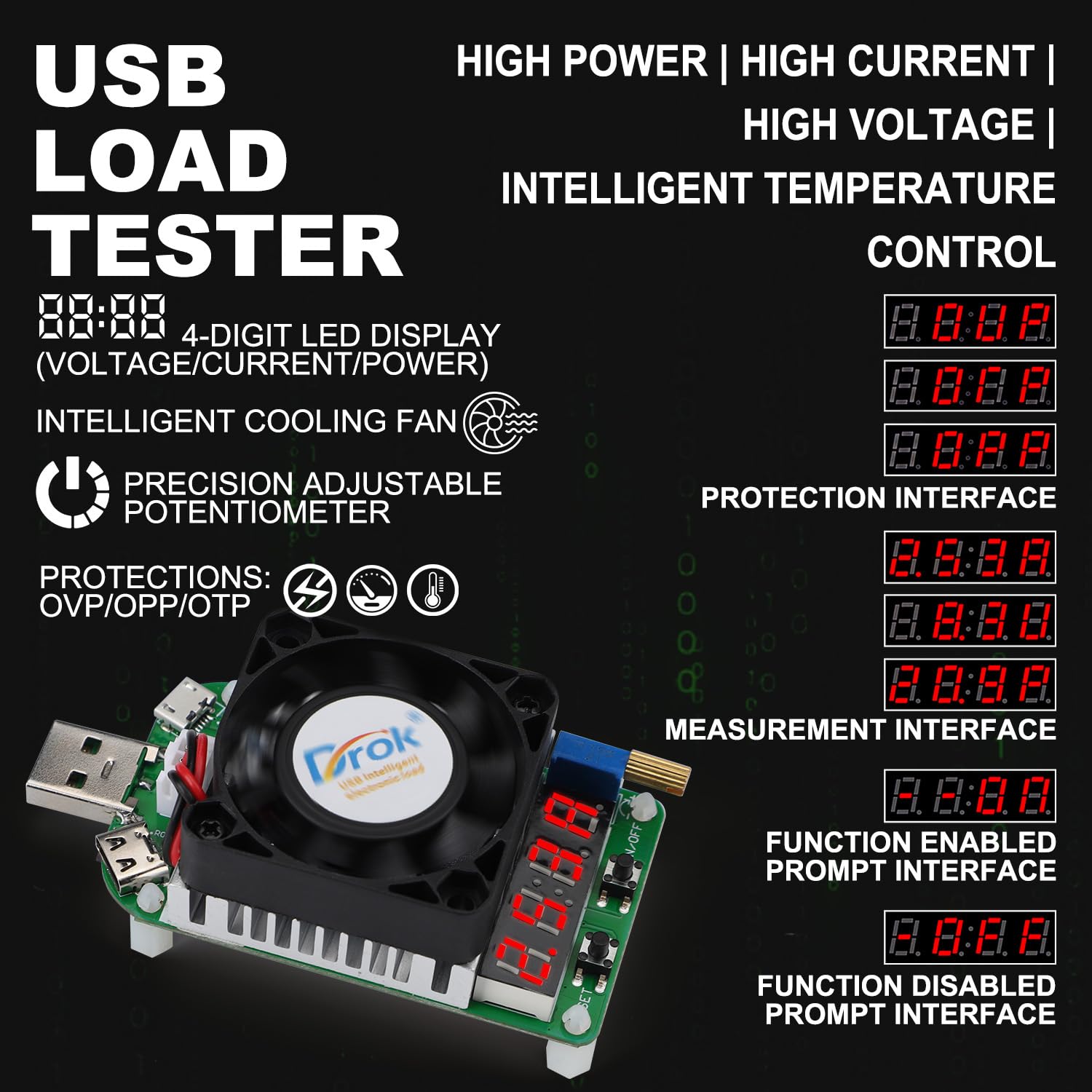

- 4-Digit LED Digital Display: Показывает объемtagзначения e, тока и мощности.
- Интеллектуальный вентилятор охлаждения: Oil bearing fan with intelligent temperature control, speed up to 5800±10% RPM. Activates automatically when current exceeds 2A or temperature exceeds 40°C.
- Precision Adjustable Potentiometer: Allows fine-tuning of the output current.
- USB-разъем (штекер): For connecting to USB power sources.
- Micro USB Port (Max. Current: 2A): For testing Micro USB cables and devices.
- Type-C Port (Max. Current: 4A): For testing Type-C cables and devices.
- Клавиша ВКЛ/ВЫКЛ: Short press to toggle the load output on or off. Long press to set the default boot state (output on or off) for future use.
- УСТАНОВИТЬ ключ: Short press to cycle through the display modes: Voltage (V), Current (A), and Power (W). Long press to enter the protection setting menu.
- Full Aluminum Heat Sink: Efficient heat dissipation for stable operation.
- Функции защиты: Повышенная громкостьtage protection (OVP), Over-power protection (OPP), Over-temperature protection (OTP).
4. Технические характеристики

| Параметр | Ценить |
|---|---|
| Номинальный рабочий объемtage | DC 4-25.0V |
| Максимальная мощность разряда | 25 Вт |
| Номинальный рабочий ток | 0.25-4.00A (Min. 0.05A when fan is off) |
| Скорость вентилятора | Oil bearing intelligent temperature control fan, 5800±10% RPM |
| Constant Current Resolution | ± (1% + 3 цифр) |
| Метод рассеивания тепла | Intelligent temperature control fan + Aluminum heat sink |
| Рабочая температура | -10℃~+40℃ |
| Регулируемый потенциометр | Precision multiloop adjustable potentiometer |
| Режим отображения | 4-bit LED tube |
| Порты расширения | Micro USB port, Type-C port |
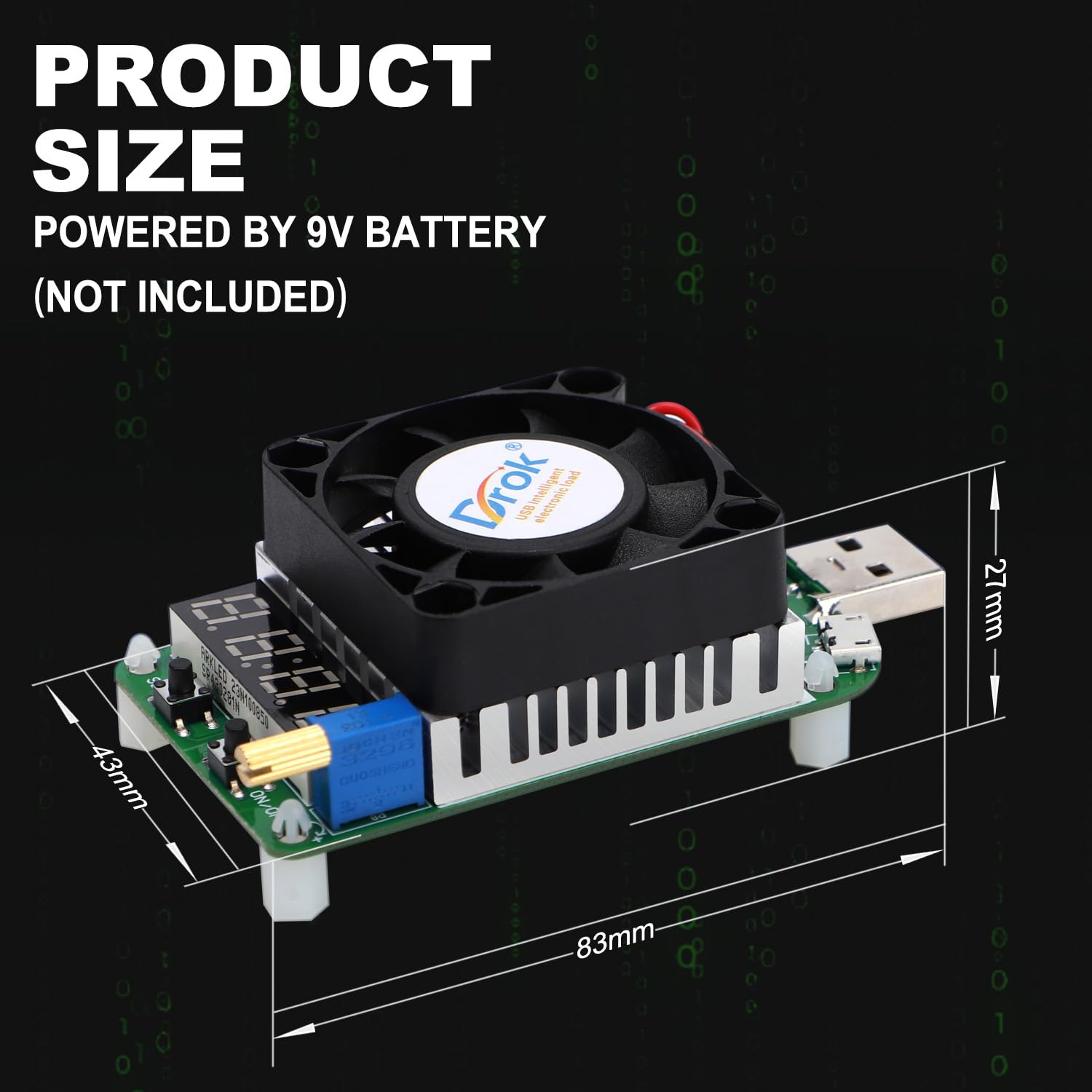
| Размеры продукта | 84 х 41 х 28 мм |
| Вес продукта | 57 г |
5. Настройка
- Подготовка источника питания: Ensure the power source (e.g., USB charger, power bank) you intend to test is within the operating voltagДиапазон постоянного тока 4-25.0 В.
- Connect the Load Tester:
- For standard USB power sources: Plug the USB male port of the LD25 directly into the USB output port of your charger or power bank.
- For Micro USB or Type-C cables/devices: Connect the Micro USB or Type-C port of the LD25 to the respective cable or device.
- Проверить соединение: Once connected, the 4-digit LED display should illuminate, indicating the device is powered on. If it does not power on, check the connection and ensure the power source is active.
- Initial Current Setting: Before applying a load, ensure the adjustable potentiometer is set to a low current or off position to avoid sudden high current draw.
6. Инструкция по эксплуатации
6.1 Основные операции
- Включение/выключение питания:
- Короткое нажатие Клавиша ВКЛ / ВЫКЛ to toggle the load output on or off.
- Долгое нажатие Клавиша ВКЛ / ВЫКЛ to set the default boot state (output on or off) for future use.
- Регулировка тока: Поверните Регулируемый потенциометр to increase or decrease the discharge current. The current value will be displayed on the LED screen. Adjust gradually to the desired load.
- Режимы отображения: Короткое нажатие SET ключ to cycle through the display modes: Voltage (В), ток (А) и мощность (Вт).
- Setting Protection Modes: Долгое нажатие SET ключ to enter the protection setting menu. Refer to Section 7 for details on protection functions.
6.2 Intelligent Cooling Fan Operation
The intelligent cooling fan will automatically activate under the following conditions to maintain optimal operating temperature:
- When the discharge current exceeds 2A.
- When the internal temperature of the device exceeds 40°C.
The fan supports continuous 25W discharge and ensures uninterrupted operation by efficiently dissipating heat.

7. Функции защиты и устранение неполадок
The LD25 USB Load Tester incorporates several protection mechanisms to ensure safe operation and prevent damage to the device and connected equipment.
- OVP (превышение громкости)tagе Защита):
- Активируется, если входной уровень громкостиtage exceeds 25V (up to 30V).
- The digital display will show "OVP".
- Осторожность: Томtages exceeding 30V can cause permanent damage.
- OTP (защита от перегрева):
- Activates if the load temperature exceeds 80°C.
- The device will stop working, and the digital display will show "OTP".
- OPP (защита от перегрузки по мощности):
- Activates if the discharge power exceeds 25W.
- The device will stop working, and the digital display will show "OPP".
When a protection condition is met, the device will halt operation. To resume, address the underlying issue (e.g., reduce voltage, allow cooling, reduce power draw) and then manually or automatically reset the load as configured.
8. Приложения
The DROK LD25 USB Load Tester is a versatile tool for various testing scenarios:
- Charger Testing: Measure the actual output current capacity of USB chargers and power banks.
- Cable Quality Testing: Evaluate the quality and performance of Micro USB and Type-C charging cables by observing voltagПадение под нагрузкой.
- Bulk Aging Tests: Suitable for factory quality control and aging tests of chargers and power supplies.
- Power Delivery Verification: Confirm stable power output from various USB power sources.

9. Техническое обслуживание
To ensure the longevity and accurate performance of your DROK LD25 USB Load Tester:
- Уборка: Для очистки устройства используйте мягкую сухую ткань. Не используйте жидкие чистящие средства или растворители.
- Хранилище: Храните устройство в прохладном, сухом месте, вдали от прямых солнечных лучей и экстремальных температур.
- Умение обращаться: Не роняйте устройство и не подвергайте его сильным ударам.
- Вентиляция: Ensure the cooling fan and heat sink are free from dust and obstructions to maintain efficient heat dissipation.