
1. Введение
The DinoFire X16-DF-US is a rechargeable wireless presentation clicker designed to enhance your presentations. It offers a reliable 2.4GHz wireless connection, a bright red laser pointer, and intuitive controls for seamless navigation through slides. This manual provides detailed instructions for setup, operation, maintenance, and troubleshooting to ensure optimal performance of your device.

Image 1: DinoFire X16-DF-US Rechargeable Wireless Presentation Clicker. This image displays the sleek, black design of the presentation remote with its control buttons and red laser light emitting from the front.
2. Содержимое упаковки
Пожалуйста, проверьте наличие всех предметов в упаковке:
- 1 x Wireless Presenter Remote Control
- 1 х беспроводной USB-приемник
- 1 х USB-кабель для зарядки
- 1 x Руководство пользователя (этот документ)
3. Продукт закончилсяview
Familiarize yourself with the components and controls of your DinoFire presentation clicker.

Image 2: Detailed diagram of the DinoFire X16-DF-US presentation clicker. This image shows multiple views of the device, highlighting the 'Light Hole', 'Manage Volume' buttons, 'Page UP' and 'Page Down' buttons, 'Play/Full Screen' and 'Black Screen' functions, 'Charing Port', 'USB Receiver', 'Pointer Button', 'Switch on/off' slider, 'Switch Windows' button, 'Open the Hyperlink' button, and 'Select Hyperlink' button.
- Light Hole: Emits the red laser pointer.
- Manage Volume: Adjusts system volume (buttons labeled '+' and '-').
- Страница вверх: Navigates to the previous slide.
- Листать вниз: Navigates to the next slide.
- Play/Full Screen: Single press for Play, Press and Hold for Full Screen.
- Черный экран: Single press for Black Screen, Press and Hold for Black Screen.
- Порт зарядки: Micro USB port for recharging the device.
- USB-приемник: Stores securely within the presenter via magnetism.
- Pointer Button: Включает красный лазерный указатель.
- Включение/выключение: Power slider to turn the device on or off.
- Переключить окна: Long press the TAB key button to switch between open windows.
- Open the Hyperlink: Double press the dedicated hyperlink button to open a selected hyperlink.
- Select Hyperlink: Single press the dedicated hyperlink button to select a hyperlink.
4. Настройка
4.1 Charging the Presenter
The DinoFire X16-DF-US features a built-in rechargeable battery. Before first use, or when the low power indicator flashes, charge the device using the provided USB cable.
- Connect the micro USB end of the charging cable to the charging port on the side of the presenter.
- Подключите стандартный USB-разъем кабеля к источнику питания USB (например, USB-порту компьютера, сетевому адаптеру USB).
- A full charge typically takes about one hour. The device can operate for more than one week on a single charge, depending on usage.

Image 3: The DinoFire X16-DF-US presentation clicker connected to a laptop via a USB charging cable. This image illustrates the charging process, highlighting the micro USB port on the device and the USB-A connector plugged into a laptop.
4.2 Подключение USB-приемника
The wireless receiver is stored magnetically within the presenter for convenience and to prevent loss.
- Gently pull out the USB receiver from the bottom end of the presenter.
- Вставьте USB-приемник в свободный USB-порт вашего компьютера или ноутбука.
- Система автоматически обнаружит и установит необходимые драйверы. Ручная установка драйверов не требуется.

Изображение 4: Крупный план view of the DinoFire X16-DF-US presentation clicker showing the magnetic storage for the USB receiver. The image demonstrates how the mini USB receiver is securely stored within the presenter's body, preventing it from being easily lost.
4.3 Включение/выключение питания
Locate the ON/OFF switch on the side of the presenter. Slide it to the 'ON' position to power on the device before use, and to 'OFF' when not in use to conserve battery.
5. Инструкция по эксплуатации
The DinoFire X16-DF-US offers a range of functions to control your presentation effectively.
5.1 Basic Presentation Controls
- Page Up (▲ button): Press to move to the previous slide.
- Page Down (▼ button): Press to move to the next slide.
- Play/Full Screen (□ button): Single press to start/resume presentation. Press and hold to enter full screen mode.
- Black Screen (□ button): Single press to black out the screen. Press and hold to black out the screen.
5.2 дополнительных функции
- Hyperlink Control:
- Single press the dedicated hyperlink button to select a hyperlink.
- Double press the dedicated hyperlink button to open the selected hyperlink.
- Регулятор громкости: Use the '+' and '-' buttons on the side of the presenter to adjust the system volume.
- Переключить окна: Long press the 'TAB' button (often integrated with another function button) to switch between open application windows on your computer.

Image 5: The DinoFire X16-DF-US presentation clicker demonstrating the 'Switch Windows' function. The image shows the presenter in front of a computer screen displaying multiple open application windows, illustrating the ability to switch between them.
5.3 Laser Pointer Operation
Press and hold the dedicated pointer button (often marked with a sun or star icon) to activate the red laser pointer. Release the button to turn it off.

Image 6: Close-up of the DinoFire X16-DF-US presentation clicker emitting a bright red laser beam. The image also includes a warning symbol against pointing the laser at eyes, emphasizing laser safety.
Safety Warning: Do not point the laser beam directly at people's eyes or at highly reflective surfaces. The laser is bright and can cause temporary vision impairment or eye damage.
The red laser light is effective against most backgrounds but is not recommended for use on LED, LCD, or TV screens.
5.4 Совместимость
The DinoFire X16-DF-US is widely compatible with various operating systems and presentation software:
- Операционные системы: Windows 2003, XP, Windows Vista, Windows 7, 8, 10, Linux, Android, Mac OS.
- Программное обеспечение: Microsoft PowerPoint, Keynote, Google Slides, Prezi, MS Word, Excel, ACD See, and web браузеров.
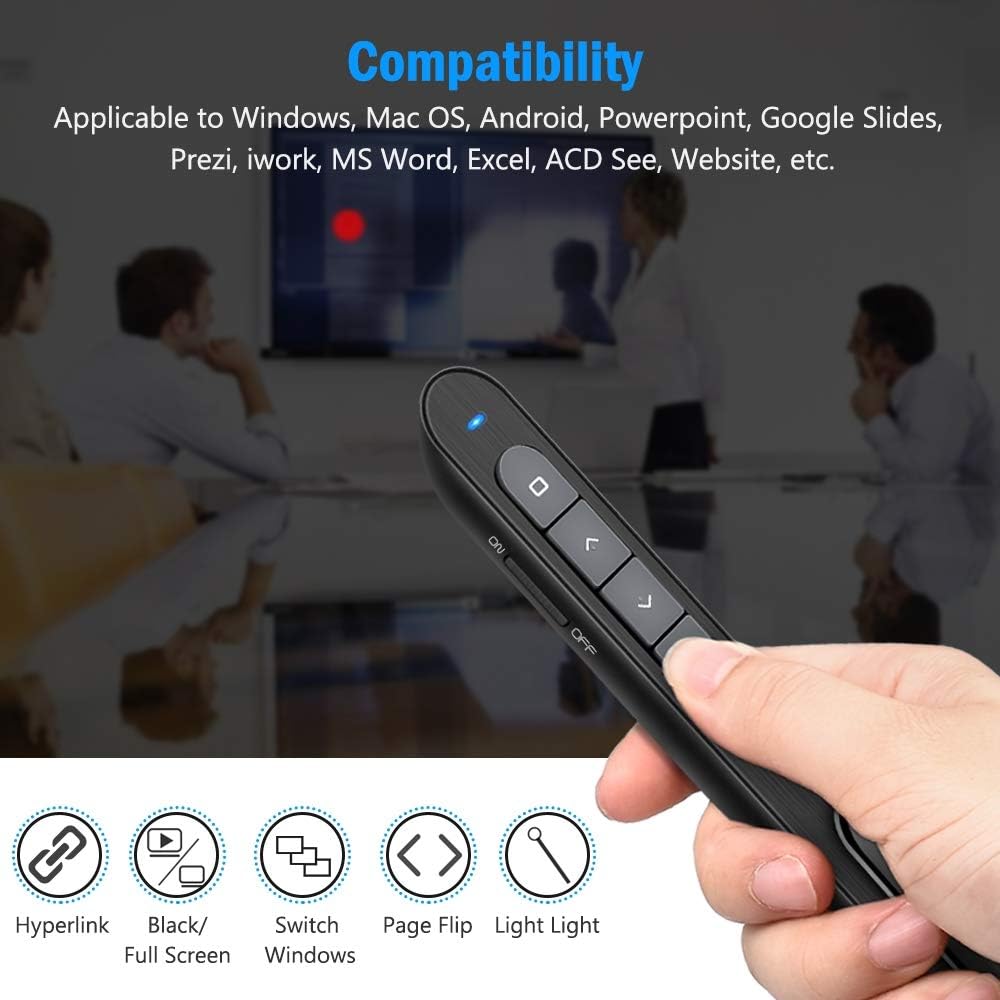
Image 7: The DinoFire X16-DF-US presentation clicker shown with various compatibility icons. This image highlights the device's compatibility with Windows, Mac OS, Android, PowerPoint, Google Slides, Prezi, iWork, MS Word, Excel, ACD See, and general website navigation.
5.5 Wireless Control Range
The presenter operates on a 2.4GHz RF frequency, providing a wireless control range of up to 100 feet (30 meters). The red laser light has a range of over 300 feet (90 meters).

Image 8: A person using the DinoFire X16-DF-US presentation clicker in a large room, pointing at a projected screen. The image emphasizes the long control range of the device, indicating a presenter control range of over 328ft and a red light range of over 656ft.
6. Техническое обслуживание
6.1 Уход за аккумулятором
- Полностью зарядите устройство перед первым использованием.
- Чтобы продлить срок службы аккумулятора, не допускайте его частой полной разрядки.
- Если устройство не используется в течение длительного времени, храните его в прохладном, сухом месте.
6.2 Очистка
Протирайте устройство мягкой сухой тканью. Не используйте едкие химикаты или абразивные чистящие средства.
6.3 USB Receiver Storage
Always store the USB receiver inside the magnetic compartment of the presenter when not in use to prevent loss.
7. Поиск Неисправностей
- Presenter not responding:
- Ensure the presenter is powered on (ON/OFF switch).
- Проверьте, надежно ли USB-приемник подключен к USB-порту компьютера.
- Verify the presenter's battery level. Recharge if the low power indicator is flashing.
- Попробуйте подключить USB-приемник к другому USB-порту.
- Перезагрузите компьютер.
- Laser pointer not working:
- Убедитесь, что устройство для проведения презентации включено.
- Press and hold the laser pointer button firmly.
- Проверить уровень заряда батареи.
- Индикатор низкой мощности:
- When the indicator light flashes continuously, it signifies low battery. Please charge the device immediately.
- The device will enter auto-sleep mode if unused for approximately 5 minutes to save energy.
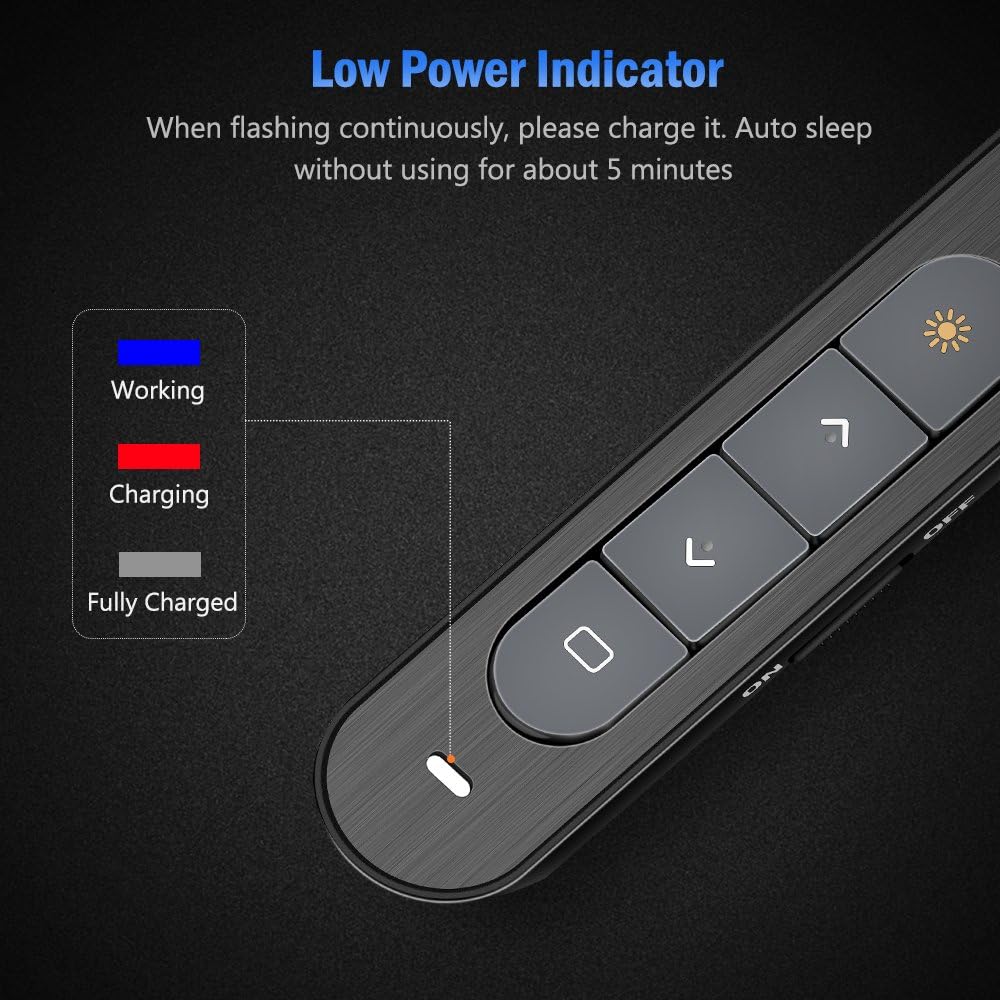
Image 9: Close-up of the DinoFire X16-DF-US presentation clicker showing the low power indicator light. The image displays a legend for the indicator light colors: blue for 'Working', red for 'Charging', and gray for 'Fully Charged', along with a visual representation of the indicator flashing when low on power.
8. Технические характеристики
| Особенность | Спецификация |
|---|---|
| Номер модели | X16-DF-US |
| Технологии | Радиочастота (RF) |
| Частота | 2.4ГГц |
| Дистанция управления | До 100 футов (30 м) |
| Цвет лазерного луча | Красный |
| Laser Light Distance | Over 300ft (90m) |
| Максимальная мощность лазера | <5 мВт |
| Тип батареи | 160 мАч литий-полимерн. |
| Время зарядки | Приблизительно 1 час |
| Рабочий объемtage | 1.5В |
| Сонный ток | Меньше 10uA |
| Размеры | 5.5 х 0.8 х 0.8 дюйма (прибл.) |
| Вес товара | 1.76 унции |
| Версия USB | USB 1.1, совместим с USB 2.0, USB 3.0 |
| Совместимые операционные системы | Windows 2003/XP/Vista/7/8/10, Mac OS, Linux, Android |
9. Гарантия и поддержка
DinoFire offers a commitment to product quality. If the USB receiver is lost within one year of purchase, a free replacement may be provided. For further support or inquiries, please refer to the DinoFire official webсайт или свяжитесь с их службой поддержки.