
1. Введение
Спасибо за покупкуasing the Sharp HT-SB140MT 2.0 150W Soundbar. This soundbar is designed to enhance your audio experience, providing clear and powerful sound for your television, music, and other media. With its sleek design and versatile connectivity options, including Bluetooth, HDMI ARC/CEC, Optical, and Auxiliary inputs, it integrates seamlessly into any home entertainment setup. This manual provides essential information for safe and effective use, including setup, operation, maintenance, and troubleshooting.
2. Информация по технике безопасности
- Источник питания: Убедитесь, что источник питания vol.tage matches the requirements specified on the soundbar. Use only the provided power cable.
- Вентиляция: Do not block any ventilation openings. Maintain adequate space around the soundbar for proper airflow.
- Вода и влага: Do not expose the soundbar to dripping or splashing water. Do not place objects filled with liquids, such as vases, on the apparatus.
- Нагревать: Do not place the soundbar near heat sources such as radiators, heat registers, stoves, or other apparatus (including amp(жирообразующие вещества), которые вырабатывают тепло.
- Уборка: Unplug the soundbar from the power outlet before cleaning. Use a dry, soft cloth for cleaning. Do not use liquid cleaners or aerosol cleaners.
- Обслуживание: Не пытайтесь ремонтировать этот продукт самостоятельно. Поручите все обслуживание квалифицированному обслуживающему персоналу.
- Аккумуляторы: The remote control uses a CR2 battery. Ensure correct polarity when inserting batteries. Do not mix old and new batteries.
3. Содержимое упаковки
Пожалуйста, проверьте наличие всех предметов в упаковке:
- Sharp HT-SB140MT Soundbar
- Дистанционное управление
- Силовой кабель
- Руководство пользователя (этот документ)
4. Продукт закончилсяview

Рисунок 4.1: Передняя часть View
The front of the soundbar features the Sharp logo and LED indicators for source selection and status. Control buttons for power, input, and volume are located on the top panel.
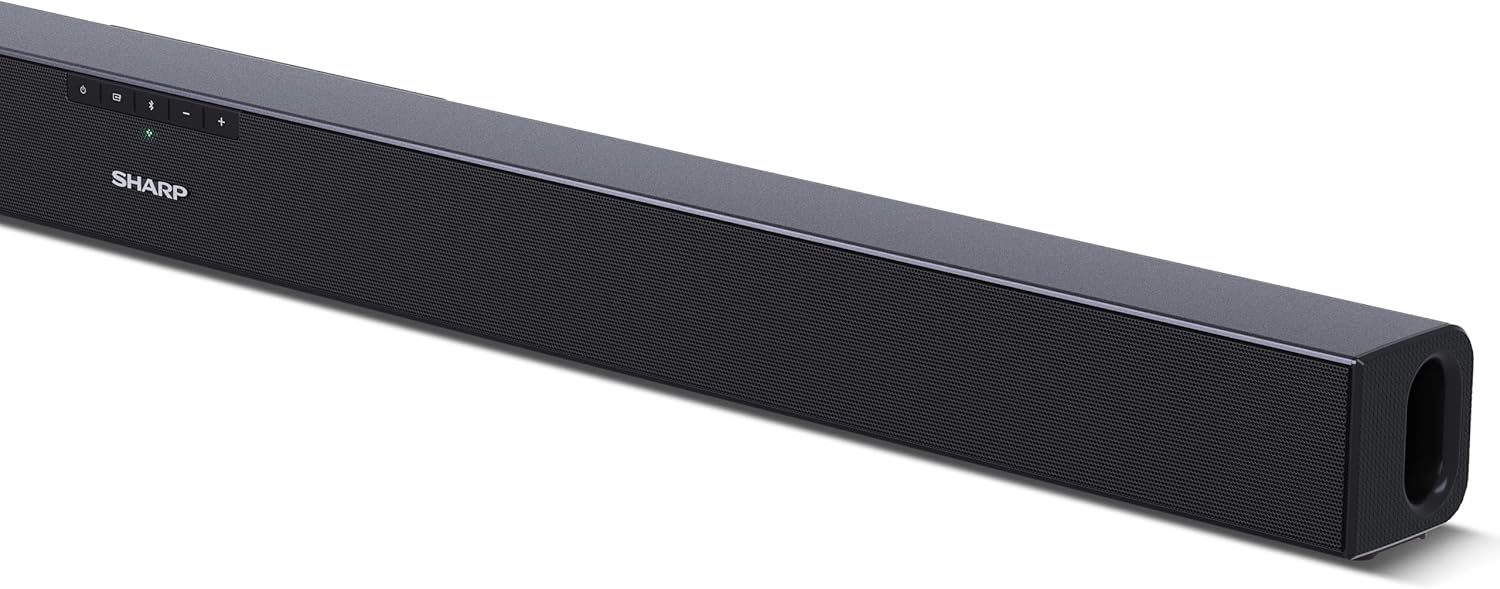
Рисунок 4.2: Сзади View (Связи)
The rear panel provides all necessary connection ports: HDMI ARC, Optical (S/PDIF), and Auxiliary (3.5mm) input, along with the power input.

Рисунок 4.3: Дистанционное управление
The included remote control allows for convenient operation of the soundbar, including power, input selection, volume, bass, and treble adjustments.
5. Настройка
5.1 Размещение
The Sharp HT-SB140MT Soundbar can be placed on a flat surface, such as a TV stand, or wall-mounted. Its slim profile of 6 cm allows it to fit easily under most TV screens without obstructing the view.

Figure 5.1: Soundbar Placement
The soundbar is ideally positioned directly in front of your television for optimal sound projection.
5.2 Подключение к телевизору
Выберите один из следующих способов подключения:
- HDMI ARC/CEC (Recommended): Connect an HDMI cable (not included) from the HDMI ARC port on your TV to the HDMI ARC port on the soundbar. This allows your TV remote to control the soundbar's volume and power. Ensure HDMI ARC/CEC is enabled in your TV's settings.
- Digital Optical Audio (S/PDIF): Connect an optical cable (not included) from the Optical Out port on your TV to the OPTICAL IN port on the soundbar. Select the Optical input on the soundbar.
- Вспомогательное оборудование (AUX): Connect a 3.5mm audio cable (not included) from the headphone jack or AUX Out port on your TV to the AUX IN port on the soundbar. Select the AUX input on the soundbar.
5.3 Подключение питания
After connecting the audio cable, plug the power cable into the soundbar's power input and then into a wall outlet (220-240V / 50Hz).
6. Инструкция по эксплуатации
6.1 Включение/выключение питания
Нажмите кнопку питания на звуковой панели или пульте дистанционного управления, чтобы включить или выключить устройство.
6.2 Выбор источника
Press the Input button on the soundbar or the remote control repeatedly to cycle through the available input sources: HDMI ARC, Optical, AUX, and Bluetooth. The LED indicator on the soundbar will change to reflect the selected source.
6.3 Регулировка громкости
Для регулировки уровня звука используйте кнопки увеличения громкости (+) и уменьшения громкости (-) на саундбаре или пульте дистанционного управления.
6.4 Сопряжение по Bluetooth
Чтобы подключить Bluetooth-устройство:
- Select Bluetooth input on the soundbar. The Bluetooth LED indicator will flash, indicating pairing mode.
- На вашем смарт-устройстве (смартфоне, планшете и т. д.) включите Bluetooth и выполните поиск доступных устройств.
- Select "SHARP HT-SB140MT" from the list of devices.
- Once connected, the Bluetooth LED indicator will stop flashing and remain solid. You can now stream audio wirelessly to the soundbar.
6.5 Звуковые режимы (эквалайзер)
The soundbar features an equalizer with different sound modes to optimize audio for various content types. Use the EQ button on the remote control to cycle through these modes (e.g., Movie, Music, News). You can also adjust Bass and Treble levels using dedicated buttons on the remote.
7. Техническое обслуживание
7.1 Очистка
To clean the soundbar, unplug it from the power outlet. Use a soft, dry, lint-free cloth to wipe down the surfaces. Do not use abrasive cleaners, waxes, or solvents as they may damage the finish.
7.2 Хранение
If you plan to store the soundbar for an extended period, disconnect it from the power supply and store it in a cool, dry place, away from direct sunlight and extreme temperatures.
8. Поиск Неисправностей
Если у вас возникли проблемы с вашей звуковой панелью, ознакомьтесь со следующими распространенными проблемами и решениями:
| Проблема | Возможная причина | Решение |
|---|---|---|
| Нет звука из саундбара. | Саундбар выключен или отключен. Выбран неправильный источник входного сигнала. Кабели подключены неправильно. Неправильные настройки вывода звука на телевизоре. | Убедитесь, что звуковая панель включена и звук не отключен. Select the correct input source (HDMI ARC, Optical, AUX). Check all cable connections (HDMI, Optical, AUX). Verify your TV's audio output settings are set to external speakers or the correct digital output. |
| Устройство Bluetooth не может подключиться. | Саундбар не находится в режиме сопряжения. Устройство вне диапазона. Помехи от других устройств. | Ensure the soundbar is in Bluetooth input mode and the LED is flashing. Поднесите ваше Bluetooth-устройство ближе к саундбару (на расстояние не более 10 метров). Turn off other Bluetooth devices nearby. Try unpairing and re-pairing. |
| Пульт дистанционного управления не работает. | Battery is low or inserted incorrectly. Затруднение доступа между пультом и саундбаром. Пульт дистанционного управления неисправен. | Replace the CR2 battery and ensure correct polarity. Remove any obstructions between the remote and the soundbar's sensor. Если проблемы не исчезнут, обратитесь в службу поддержки клиентов. |
9. Технические характеристики
| Название модели | ХТ-СБ140(МТ) |
| Тип динамика | Саундбар |
| Конфигурация каналов объемного звука | 2.0 |
| Максимальная выходная мощность динамика | 150 Вт |
| Частотная характеристика | 60 Гц |
| Технология связи | Bluetooth, HDMI ARC/CEC, Digital Optical Audio (S/PDIF), 3.5mm Auxiliary (AUX) |
| Технология беспроводной связи | Bluetooth |
| Максимальная дальность действия (Bluetooth) | 10 метра |
| Метод контроля | Дистанционное управление |
| Источник питания | AC (Сеть) |
| Vol входtage | Вольт 220-240 |
| Цвет | Черный |
| Материал | Пластик, Металл |
| Тип крепления | Настенное крепление, Настольный |
| Размеры продукта (Д x Ш x В) | 95 х 6 х 6 см |
| Вес товара | 1.5 Килограмма |
| Включенные компоненты | Дистанционное управление |
| Требуется батарея | 1 батарея CR2 |
| Водонепроницаемый | Нет |
| Наличие запасных частей | 5 года |
| Обновления программного обеспечения гарантированы до | Информация недоступна. |
10. Гарантия и поддержка
The Sharp HT-SB140MT Soundbar comes with a Limited Warranty. Please refer to the warranty card included in your package for specific terms and conditions. Spare parts are available for up to 5 years from the date of purchase.
For technical support, service, or warranty claims, please contact Sharp customer service through their official website or the contact information provided in your product documentation. When contacting support, please have your product model number (HT-SB140(MT)) and purchase details ready.