
BenQ EX3501R
BenQ EX3501R Ultrawide Curved Gaming Monitor User Manual
Model: EX3501R
1. Настройка
1.1 Распаковка монитора
Осторожно извлеките все компоненты из упаковки. Убедитесь, что все перечисленные ниже предметы присутствуют:
- BenQ EX3501R Monitor
- Подставка для монитора (основание и горловина)
- Адаптер питания
- Шнур питания
- HDMI-кабель
- Кабель DisplayPort
- Кабель USB-C
- Руководство пользователя (этот документ)
1.2 Сборка подставки
Чтобы прикрепить подставку к монитору, выполните следующие действия:
- Положите монитор экраном вниз на мягкую чистую ткань, чтобы не поцарапать его.
- Прикрепите подставку к задней панели монитора. Убедитесь, что она надежно зафиксирована со щелчком.
- Connect the stand base to the neck, tightening any screws as indicated in the quick start guide.

Рисунок 1: Передняя часть view of the BenQ EX3501R monitor with its stand.
1.3 Подключение кабелей
Connect the necessary cables to the monitor and your computer. The monitor supports various input options:
- Власть: Подключите адаптер питания к монитору, а затем к розетке.
- Видео вход: Use either the HDMI, DisplayPort, or USB-C cable to connect your computer to the monitor.
- USB-C: The USB-C port supports video, data transfer, and power delivery, allowing for a single-cable connection with compatible devices.
- USB 3.0 Порты: Utilize the integrated USB 3.0 ports for connecting peripherals.
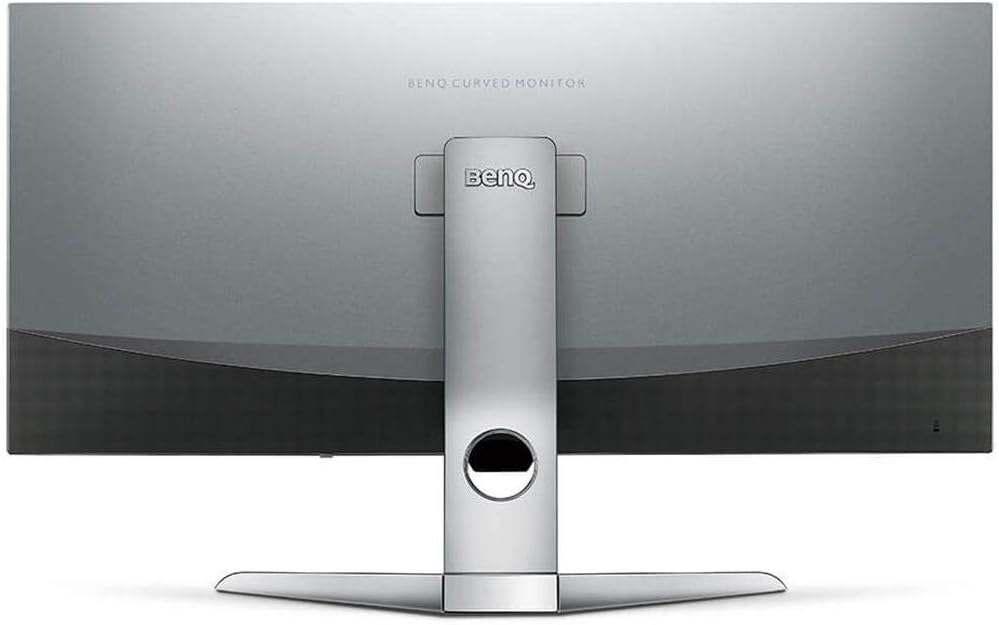
Рисунок 2: Сзади view of the monitor displaying the connectivity ports.
2. Работа с монитором
2.1 Включение/выключение питания
Чтобы включить или выключить монитор, нажмите кнопку питания, обычно расположенную в правом нижнем углу монитора. Индикатор питания загорится, когда монитор будет активен.
2.2 Навигация по экранному меню (OSD)
Use the joystick or buttons located on the monitor's underside to navigate the On-Screen Display (OSD) menu. This menu allows you to adjust various settings such as brightness, contrast, color modes, and input sources.
2.3 Display Features and Eye-Care Technology
The BenQ EX3501R incorporates several technologies designed to enhance viewопыт и снижение нагрузки на глаза:
- Интеллектуальная система управления яркостью Plus (BI+): This patented technology automatically senses ambient lighting conditions and adjusts the screen's brightness and color temperature to provide optimal viewing comfort and protect your eyes during extended use.
- Низкий уровень синего света: Filters out harmful blue light emissions to reduce eye fatigue. Multiple levels of blue light reduction are available.
- ZeroFlicker™: Eliminates screen flickering at all brightness levels, further reducing eye strain and discomfort.
- HDR (расширенный динамический диапазон): Offers enhanced brightness and contrast, bringing greater detail and vibrancy to HDR video content.
Видео 1: Оверview of BenQ's Eye-Care technology, including Low Blue Light, ZeroFlicker, and Brightness Intelligence Plus, demonstrating how these features work to reduce eye strain and adjust screen settings automatically based on ambient light.
2.4 Разрешение и частота обновления
The monitor features a QHD (3440x1440) resolution and a 100Hz refresh rate, providing a smooth and detailed visual experience. The 21:9 ultrawide aspect ratio offers ample screen space for multitasking, such as viewing multiple documents side-by-side without needing a second monitor.
2.5 AMD FreeSync
For a fluid gaming experience, the monitor supports AMD FreeSync technology, which synchronizes the monitor's refresh rate with your graphics card's frame rate to eliminate screen tearing and stuttering.
3. Техническое обслуживание
3.1 Очистка монитора
To maintain optimal performance and appearance, regularly clean your monitor:
- Экран: Аккуратно протрите экран мягкой безворсовой тканью. Для удаления стойких пятен используйте специальное чистящее средство для мониторов, нанеся его на ткань, а не непосредственно на экран.
- Экстерьер: Use a soft, dry cloth to wipe dust and debris from the monitor casing and stand.
Avoid using abrasive cleaners, waxes, or solvents as they can damage the monitor's surface.
3.2 Общие советы по уходу
- Do not block ventilation openings on the monitor.
- Не размещайте монитор под прямыми солнечными лучами или рядом с источниками тепла.
- Обращайтесь с монитором осторожно, чтобы не допустить его физического повреждения.
4. Поиск Неисправностей
If you encounter issues with your BenQ EX3501R monitor, refer to the following common troubleshooting steps:
4.1 Нет изображения или черный экран
- Убедитесь, что кабель питания надежно подключен к монитору и розетке.
- Verify that the video cable (HDMI, DisplayPort, or USB-C) is firmly connected to both the monitor and your computer.
- Проверьте, выбран ли правильный источник входного сигнала в экранном меню монитора.
- Перезагрузите компьютер.
4.2 Flickering or Unstable Image
- Ensure the ZeroFlicker™ feature is enabled in the OSD menu.
- Проверьте, нет ли ослабленных соединений видеокабеля.
- Обновите драйверы видеокарты до последней версии.
- If using AMD FreeSync, ensure it is properly configured in your graphics card settings.
4.3 Color or Brightness Issues
- Отрегулируйте параметры яркости, контрастности и цвета с помощью экранного меню.
- Enable or disable Brightness Intelligence Plus (B.I.+) to see if it resolves the issue.
- Выполните сброс до заводских настроек через экранное меню.
5. Технические характеристики
Key technical specifications for the BenQ EX3501R monitor:
| Особенность | Спецификация |
|---|---|
| Размер экрана | 35 дюйма |
| Максимальное разрешение экрана | 3440 x 1440 Pixels (QHD Ultrawide) |
| Соотношение сторон | 21:9 |
| Частота обновления | 100 Гц |
| Кривизна | 1800Р |
| Тип панели | VA (Вертикальное выравнивание) |
| Связность | USB-C, HDMI, DisplayPort |
| Особые возможности | AMD FreeSync, Brightness Intelligence Plus, Low Blue Light, ZeroFlicker |
| Вес товара | 21.3 фунта |
| Размеры продукта | 6.88 x 3.47 x 12.93 дюйма |
6. Гарантия и поддержка
6.1 Гарантия на продукт
The BenQ EX3501R monitor typically comes with a 3-year manufacturer's warranty. Please refer to the warranty card included in your product packaging for specific terms and conditions, or visit the official BenQ webсайт для получения подробной информации о гарантии.
6.2 Поддержка клиентов
For further assistance, technical support, or warranty claims, please contact BenQ customer service. You can find contact information and support resources on the official BenQ webсайт: www.benq.com/en-us/support.html
Ask a question about this manual
Ask about setup, troubleshooting, compatibility, parts, safety, or missing instructions. Manuals+ will review the question and use this page’s manual context to help answer it.