
1. Введение
This manual provides essential information for the safe and efficient operation of your Lenco L-30BK Belt Drive Turntable. Please read these instructions thoroughly before using the device and retain them for future reference. The Lenco L-30BK is designed for playing vinyl records at 33 and 45 RPM, featuring a built-in preamplifier and USB connectivity for digitizing your vinyl collection.
2. Информация по технике безопасности
- Источник питания: Убедитесь, что источник питания vol.tage соответствует требованиям, указанным на устройстве. Используйте только прилагаемый адаптер питания.
- Вода и влага: Не подвергайте устройство воздействию дождя, влаги, капель/брызг жидкостей. Не ставьте на устройство предметы, наполненные жидкостью, например, вазы.
- Вентиляция: Обеспечьте достаточную вентиляцию. Не закрывайте вентиляционные отверстия.
- Нагревать: Держите устройство вдали от источников тепла, таких как радиаторы, обогреватели, печи или другие приборы (включая amp(жирообразующие вещества), которые вырабатывают тепло.
- Уборка: Перед чисткой отключите устройство от розетки. Используйте мягкую сухую ткань. Не используйте жидкие или аэрозольные чистящие средства.
- Обслуживание: Не пытайтесь ремонтировать этот продукт самостоятельно. Поручите все обслуживание квалифицированному обслуживающему персоналу.
- Размещение: Place the turntable on a stable, level surface to prevent vibrations and ensure proper playback.
3. Содержимое упаковки
Пожалуйста, убедитесь, что все перечисленные ниже предметы входят в комплект:
- Lenco L-30BK Turntable Unit
- Пылезащитный чехол
- блюдо
- Приводной ремень
- Слипмат
- Адаптер переменного тока
- USB-кабель
- Аудиокабель RCA
- Руководство по эксплуатации
- Pick-up Needle (pre-installed on cartridge)
4. Продукт закончилсяview
Familiarize yourself with the components of your Lenco L-30BK turntable.

Рисунок 4.1: Передний view of the Lenco L-30BK Turntable with the dust cover open, revealing the main components including the platter, tonearm, and control buttons.

Рисунок 4.2: Rear panel connections of the Lenco L-30BK, including RCA audio outputs (L/R), USB port, DC12V power input, and the main power switch.
Ключевые компоненты:
- Блюдо: The circular platform where records are placed.
- Тонарм: Содержит картридж и иглу, которая считывает канавки пластинки.
- Картридж и стилус: Converts physical vibrations into electrical signals. The L-30BK features a Movable Magnet Sensor (MMC) with an individually replaceable stylus.
- Селектор скорости: Switch to select between 33 and 45 RPM playback speeds.
- Автоматическое отключение: Automatically stops the platter rotation at the end of a record.
- Пылезащитный чехол: Защищает проигрыватель от пыли, когда он не используется.
- RCA Audio Outputs (L/R): Для подключения к внешнему устройству ampактивные колонки или динамики.
- USB-порт: For connecting to a computer to digitize vinyl records.
- Входное напряжение постоянного тока 12 В: Для подключения адаптера питания.
5. Настройка
5.1 Распаковка и размещение
- Аккуратно извлеките проигрыватель из упаковки.
- Place the unit on a stable, level surface, away from direct sunlight, heat sources, and excessive dust or vibrations.
- Install the dust cover by aligning its hinges with the slots on the back of the turntable.

Рисунок 5.1: The Lenco L-30BK Turntable with its protective dust cover closed, ready for placement.
5.2 Установка диска и ремня
- Поместите тарелку на шпиндель поворотного стола.
- Locate the drive belt, typically found underneath the platter or separately packaged.
- Carefully stretch the drive belt around the motor pulley and the inner rim of the platter. Ensure the belt is not twisted.
- Положите коврик поверх блюда.
5.3 Аудиоподключение
The L-30BK has a built-in preamplifier, allowing direct connection to most audio systems.
- Connect the RCA audio cable (red for right channel, white for left channel) from the AUDIO OUT jacks on the rear of the turntable to the LINE IN or AUX IN jacks on your ampактивные колонки или динамики.
5.4 Подключение питания
- Connect the DC12V power adapter to the DC12V POWER input on the rear of the turntable.
- Подключите адаптер питания к подходящей розетке.
5.5 USB Connection (for Digitization)
- To digitize your vinyl records, connect the USB cable from the USB port on the rear of the turntable to an available USB port on your computer (PC or Mac).
6. Инструкция по эксплуатации
6.1 Включение/выключение питания
- Flip the ON/OFF switch on the rear panel to the 'ON' position to power on the turntable.
- Flip the switch to 'OFF' when not in use.
6.2 Воспроизведение пластинки
- Поместите пластинку на проигрыватель, убедившись, что она расположена по центру.
- Select the appropriate speed (33 or 45 RPM) using the speed selector switch. For 45 RPM singles, place the included adapter on the spindle if needed.
- Поднимите тонарм с помощью рычага подъема.
- Вручную установите тонарм на нужную начальную канавку пластинки.
- Gently lower the tonearm using the cueing lever. The stylus will descend onto the record, and playback will begin.
- At the end of the record, the auto shut-off function will stop the platter rotation. Lift the tonearm and return it to its rest.

Рисунок 6.1: Proper technique for lowering the tonearm onto a record for playback.
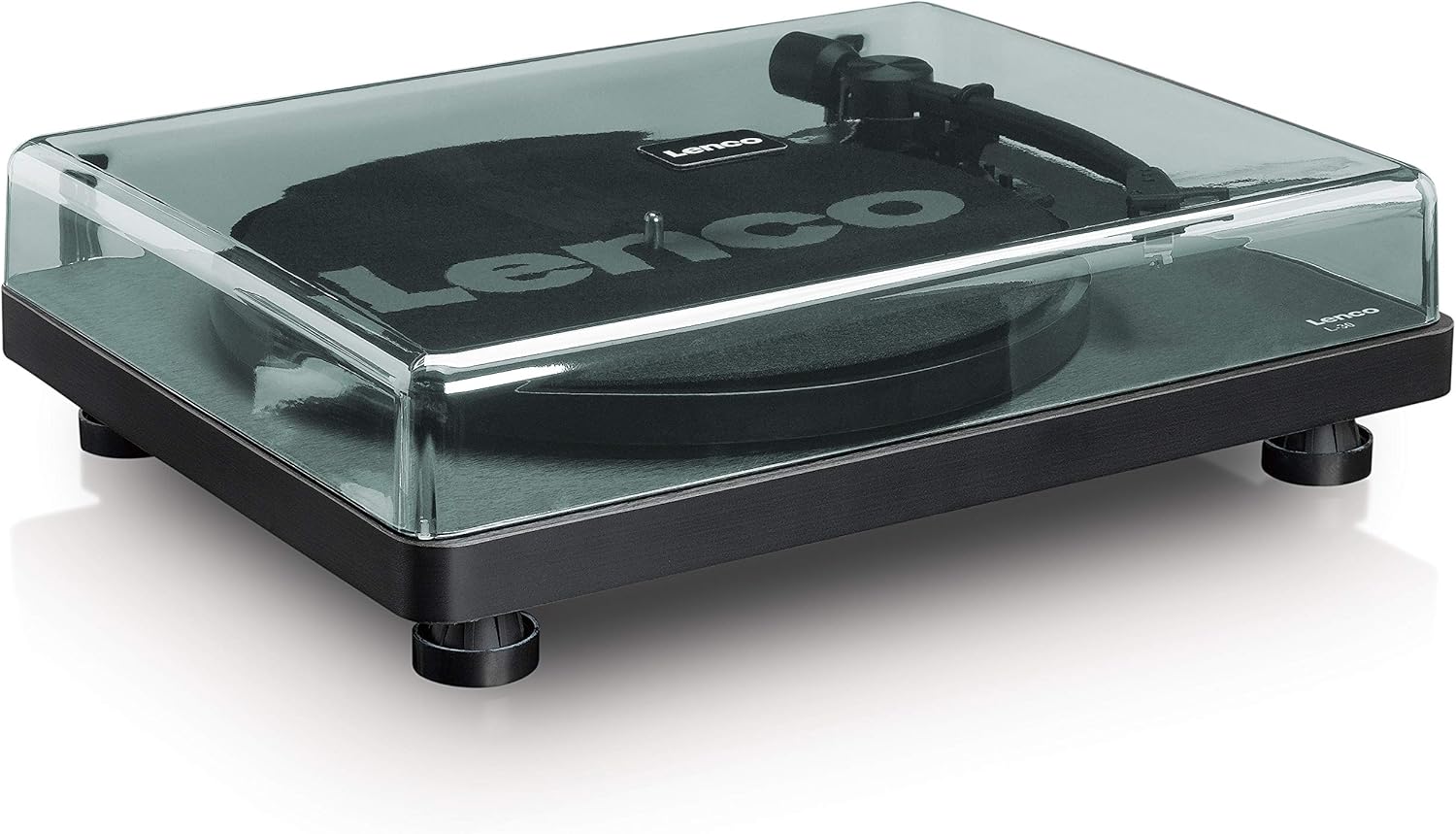
Рисунок 6.2: Подробный view of the Movable Magnet Sensor (MMC) cartridge and stylus assembly.
6.3 Оцифровка записей через USB
The L-30BK allows you to convert your vinyl records into digital audio fileс использованием компьютера.
- Подключите проигрыватель к компьютеру с помощью прилагаемого USB-кабеля.
- Download and install audio recording software such as Audacity (available online for free) on your computer.
- Open the recording software and select the USB Audio Device as the input source.
- Start recording in the software, then begin playing your record on the turntable as described in section 6.2.
- Once the record finishes, stop the recording in the software and save your digitized audio file.
7. Техническое обслуживание
7.1 Очистка проигрывателя
- Always unplug the turntable from the power outlet before cleaning.
- Use a soft, dry, lint-free cloth to wipe the cabinet and dust cover.
- Не используйте абразивные чистящие средства, воски или растворители, так как они могут повредить отделку.
7.2 Stylus Care and Replacement
- The stylus is a delicate component. Avoid touching it with your fingers.
- Clean the stylus regularly using a soft brush, gently brushing from back to front.
- The stylus should be replaced after approximately 300-500 hours of playback, or if you notice a degradation in sound quality.
- To replace the stylus, carefully pull the old stylus assembly forward and down from the cartridge. Insert the new stylus assembly by pushing it upwards and backwards into the cartridge until it clicks into place.
8. Поиск Неисправностей
If you encounter problems with your turntable, refer to the following common issues and solutions:
| Проблема | Возможная причина | Решение |
|---|---|---|
| Нет электричества | Адаптер питания не подключен; выключатель питания выключен; розетка неисправна. | Ensure power adapter is securely connected; Turn power switch to 'ON'; Test wall outlet with another device. |
| Нет звука или низкая громкость | RCA-кабели подключены неправильно; Amplifier/speakers off or volume low; Input selected incorrectly on ampпожизненнее. | Check RCA cable connections; Turn on amplifier/speakers and adjust volume; Select correct input source on your audio system. |
| Искаженный звук | Dirty stylus; Damaged stylus; Dirty record; Turntable not on a stable surface. | Clean the stylus; Replace the stylus if damaged; Clean the record; Ensure turntable is on a stable, level surface. |
| Пропуск записи | Dirty or scratched record; Stylus worn or damaged; Turntable not level; External vibrations. | Clean the record; Replace the stylus; Ensure turntable is level; Place turntable away from sources of vibration. |
| Проблемы с записью на USB-накопитель | USB cable not connected; Incorrect input selected in software; Software not installed. | Check USB cable connection; Select 'USB Audio Device' as input in recording software; Install Audacity or similar software. |
9. Технические характеристики
| Название модели | Л-30БК |
| Бренд | Ленко |
| Тип привода | Ремень безопасности |
| Скорости | 33 1/3, 45 об / мин |
| Предварительноampпожизненнее | Встроенный |
| Тип картриджа | Movable Magnet Sensor (MMC) |
| Связность | USB, RCA Audio Out |
| Автоматическое отключение | Да |
| Диаметр диска | 300 мм |
| Материал | Wood (Enclosure) |
| Цвет | Черный |
| Вес товара | 3.28 Килограмма |
| Размеры (Д x Ш x В) | 41Д x 32Ш x 12В см |
| Отношение сигнал / шум | 60 дБ |
| Томtage | 240 Вольт |
| Источник питания | Проводной электрический |
10. Гарантия и поддержка
Lenco products are manufactured to high quality standards. In the event of a defect, your product is covered by the terms of the warranty in your country of purchase. For detailed warranty information, please refer to the warranty card included with your product or visit the official Lenco website. For technical support or service inquiries, please contact Lenco customer service through their official channels.