
Propel Zipp Nano 2.0
Propel Zipp Nano 2.0 Drone User Manual
Model: Zipp Nano 2.0
Бренд: Propel
1. Введение
This manual provides essential information for the safe and effective operation of your Propel Zipp Nano 2.0 Drone. Please read this manual thoroughly before operating the drone to ensure proper usage and to prevent damage or injury.
The Propel Zipp Nano 2.0 is a high-performance 2.4 GHz indoor/outdoor drone designed for stable flight and exciting aerial maneuvers. It features a built-in 6-axis gyroscopic chip for stability, multiple speed settings, and the ability to perform 360-degree stunt rolls.
2. Меры предосторожности
Always prioritize safety when operating the drone. Failure to follow these guidelines may result in injury or damage to the drone or property.
- Не запускайте дрон вблизи людей, животных или препятствий.
- Keep hands, hair, and loose clothing away from rotating propellers.
- Перед каждым полетом убедитесь, что дрон полностью заряжен.
- Не летайте при сильном ветре или неблагоприятных погодных условиях.
- Supervise children during operation. This product contains small parts and is not suitable for children under 3 years due to choking hazard.
- Do not attempt to modify or repair the drone yourself. Contact customer support for assistance.

Image: Back of the product packaging, highlighting features and a warning about small parts.
3. Содержимое упаковки
Проверьте наличие всех предметов в посылке:
- Propel Zipp Nano 2.0 Drone (Red)
- 2.4 GHz Digital Remote Control
- USB-кабель для зарядки
- Spare Replacement Parts (Propellers)

Image: The Propel Zipp Nano 2.0 Drone and its remote control visible within the clear retail packaging.
4. Настройка
4.1 Зарядка аккумулятора дрона
The drone is powered by an internal rechargeable battery. Use the provided USB charging cable to charge the drone.
- Подключите меньший конец USB-кабеля для зарядки к зарядному порту дрона.
- Подключите толстый конец USB-кабеля для зарядки к источнику питания USB (например, USB-порту компьютера, сетевому адаптеру USB).
- Индикатор зарядки на USB-кабеле будет гореть во время зарядки и гаснуть после полной зарядки.
- Зарядка обычно занимает около 30–45 минут. Не перезаряжайте.
4.2 Установка батареек в пульт дистанционного управления
The remote control requires 2 "AAA" batteries (not included).
- Найдите батарейный отсек на задней стороне пульта дистанционного управления.
- Откройте крышку батарейного отсека.
- Insert 2 "AAA" batteries, ensuring correct polarity (+/-).
- Плотно закройте крышку батарейного отсека.

Image: The remote control for the Propel Zipp Nano 2.0 Drone, showing its various buttons and joysticks.
4.3 Сопряжение дрона и пульта дистанционного управления
Чтобы установить соединение между дроном и пультом дистанционного управления:
- Установите дрон на ровную ровную поверхность.
- Turn on the drone by sliding the power switch. The drone's LED lights will flash.
- Включите пульт дистанционного управления.
- Нажмите левый джойстик (газ) до упора вверх, а затем потяните его до упора вниз.
- The drone's LED lights will turn solid, indicating successful pairing.
5. Управление дроном
5.1 Управление полетом
Ознакомьтесь с расположением и функциями пульта дистанционного управления:
- Левый джойстик (газ/рыскание):
- Push up to increase altitude (throttle).
- Push down to decrease altitude.
- Нажимайте влево/вправо, чтобы повернуть дрон (рыскание).
- Правый джойстик (тангаж/крен):
- Нажимайте вверх/вниз, чтобы двигаться вперед/назад (наклон).
- Нажимайте влево/вправо, чтобы двигаться влево/вправо (перекатываться).
- Кнопка быстрого доступа: Cycles through 3 different speed settings (slow, medium, high).
- Кнопка для трюков: Press to initiate 360-degree stunt rolls (see 5.4).
- T-Mode Button: Activates T-Mode for beginner pilots, providing more stable and controlled flight.
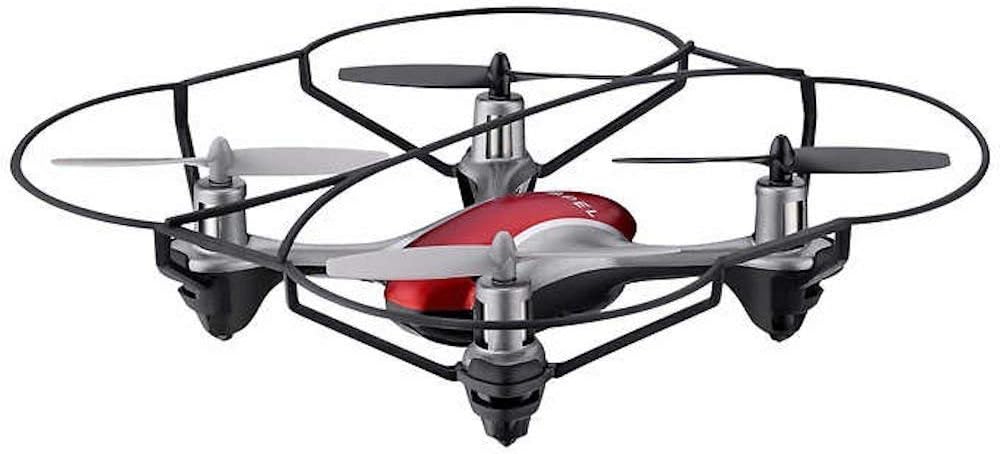
Image: The Propel Zipp Nano 2.0 Drone, showcasing компактная конструкция и защита пропеллеров.
5.2 Взлет и посадка
- Снимать: After pairing, slowly push the left joystick (throttle) up to lift off.
- Посадка: Slowly pull the left joystick (throttle) down until the drone lands gently.
5.3 Удержание высоты
The Zipp Nano 2.0 features an air pressure sensor that helps lock altitude in mid-air, making it easier to control and hover stably.
5.4 360-Degree Stunt Rolls
To perform a stunt roll:
- Ensure the drone is flying at a sufficient height (at least 6-8 feet).
- Press the dedicated Stunt Button on the remote control.
- Immediately push the right joystick in the desired direction (forward, backward, left, or right) to execute the roll.

Изображение: под углом view of the Propel Zipp Nano 2.0 Drone, highlighting its sleek design and protective frame.
6. Техническое обслуживание
- Уборка: Use a soft, dry cloth to clean the drone and remote control. Do not use harsh chemicals or water.
- Замена пропеллера: If propellers become damaged, replace them with the provided spare parts. Carefully remove the damaged propeller and snap the new one into place, ensuring correct orientation.
- Хранилище: When not in use, store the drone and remote control in a cool, dry place away from direct sunlight.
7. Поиск Неисправностей
| Проблема | Возможная причина | Решение |
|---|---|---|
| Дрон не реагирует на дистанционное управление. | Not paired, low drone battery, low remote control batteries. | Повторно выполните сопряжение дрона и пульта дистанционного управления. Зарядите аккумулятор дрона. Замените батарейки в пульте дистанционного управления. |
| Дрон летает хаотично или дрейфует. | Неправильная калибровка на ровной поверхности, поврежденный пропеллер, сильный ветер. | Ensure drone is placed on a flat surface for pairing. Check for damaged propellers and replace if necessary. Fly in calm conditions. |
| Дрон не взлетает. | Low drone battery, propellers not spinning correctly. | Charge drone battery fully. Check for obstructions around propellers. |
8. Технические характеристики
| Особенность | Деталь |
|---|---|
| Бренд | Пропелл |
| Название модели | Propel 2.4 ghz (Zipp Nano 2.0) |
| Технология связи | Радиочастота (2.4 ГГц) |
| Рабочий диапазон | До 200 футов |
| Гироскоп | Built-in 6-axis gyroscopic chip |
| Настройки скорости | 3 (Slow, Medium, High) |
| Особые возможности | 360-degree stunt rolls, Altitude Hold, T-Mode for beginners |
| Тип(ы) материала | Plastic, Carbon Fibre |
| Размеры продукта | 13.97 х 3.81 х 13.97 см |
| Вес товара | 453.59 г (1 фунта) |
| Цвет | Красный |
| Уровень мастерства | Начинающий |
9. Гарантия и поддержка
Propel offers unlimited replacement parts for one year from the date of purchase. For warranty claims, technical support, or to order replacement parts, please refer to the contact information provided on the product packaging or the official Propel webсайт.
Сохраните чек о покупке в качестве подтверждения покупки для гарантийных целей.
Ask a question about this manual
Ask about setup, troubleshooting, compatibility, parts, safety, or missing instructions. Manuals+ will review the question and use this page’s manual context to help answer it.