
1. Введение
This manual provides essential information for the safe and effective operation, setup, and maintenance of your BMC RESmart GII Auto CPAP System E-20A-H with Humidifier. Please read this manual thoroughly before using the device and retain it for future reference. This device is intended for the treatment of Obstructive Sleep Apnea (OSA).
2. Информация по технике безопасности
Важные предупреждения о безопасности:
- Always disconnect the device from the power supply before cleaning or performing any maintenance.
- Не погружайте устройство в воду или любую другую жидкость.
- Use only accessories and parts recommended by BMC.
- Keep the device away from direct sunlight, heat sources, and sharp objects.
- Consult your physician or healthcare provider if you experience any unusual symptoms or discomfort during use.
- Это устройство не предназначено для жизнеобеспечения.
3. Продукт закончилсяview
The BMC RESmart GII Auto CPAP System E-20A-H is an intelligent device designed for the treatment of Obstructive Sleep Apnea. It features an integrated humidifier for enhanced comfort.
Ключевые компоненты:
- Основной блок: Houses the motor, control electronics, and display.
- Увлажнитель: Integrated unit with dual water chambers for efficient humidification.
- 3.5-дюймовый ЖК-дисплей: Provides real-time information and access to settings.
- Ручка управления: Для навигации по меню и настройки параметров.
- Отверстие для выпуска воздуха: Connects to the CPAP tubing.
- Вход питания: Для подключения адаптера питания.
- Слот для SD-карты: For compliance data storage and retrieval (iCode II).
- SpO2 Kit Port (Optional): For real-time blood oxygen saturation and pulse rate monitoring.
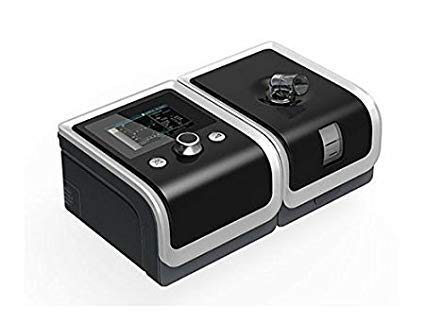
An image showing the BMC RESmart GII Auto CPAP device, featuring its main unit, control knob, and integrated humidifier. The device is black with a clear humidifier chamber visible.
4. Настройка
4.1 Распаковка
- Аккуратно извлеките все компоненты из упаковки.
- Inspect the device and accessories for any signs of damage. Do not use if damaged.
4.2 Подключение питания
- Connect the power adapter to the power inlet on the back of the device.
- Подключите шнур питания к подходящей электрической розетке.
4.3 Filling the Humidifier
- Open the humidifier chamber by sliding or lifting the cover.
- Fill the water chamber with distilled water up to the maximum fill line. Do not overfill.
- Плотно закройте камеру увлажнителя.
4.4 Connecting Tubing and Mask
- Connect one end of the CPAP tubing to the air outlet on the device.
- Connect the other end of the tubing to your prescribed CPAP mask.
- Fit the mask comfortably and securely according to its own instructions.
5. Инструкция по эксплуатации
5.1 Начало терапии
- Ensure the device is properly set up and connected.
- Наденьте маску.
- Press the Start/Stop button (usually the control knob) to begin therapy. The device will automatically start delivering air.
5.2 Настройка параметров
Use the control knob to navigate the menu on the 3.5-inch LCD display. Press the knob to select an option and rotate to adjust values.
- Диапазон давления: 4-20 cm H2O (Auto CPAP adjusts automatically within this range).
- Ramp Время: Adjusts the time (0-60 minutes) for the pressure to gradually increase to the prescribed level.
- Humidification Level: Select from Off or levels 1-5 to control the humidity output.
- Reslex: Pressure relief feature (Off/1/2/3) for exhalation comfort.
- Автоматическое включение / выключение: Can be enabled or disabled (Off by default).
5.3 Прекращение терапии
Press the Start/Stop button again to end therapy. The device will power down.
5.4 iCode II Data Retrieval
Compliance data is encoded by a QR code displayed on the device's screen. Use a compatible application to scan the QR code for quick data retrieval and monitoring.
6. Техническое обслуживание
Regular cleaning and maintenance are crucial for the optimal performance and longevity of your device.
6.1 Ежедневная уборка
- Humidifier Water Chamber: Empty any remaining water and rinse with distilled water. Allow to air dry.
- Маска: Wipe down the mask cushion with a damp cloth or specialized CPAP wipes.
6.2 Еженедельная уборка
- Humidifier Water Chamber: Wash with mild soap and warm water. Rinse thoroughly and allow to air dry completely.
- Трубка СИПАП: Wash with mild soap and warm water. Rinse thoroughly and hang to air dry.
- Воздушный фильтр: Inspect the reusable air filter (if applicable). If dirty, rinse under running water and allow to air dry. Replace disposable filters as recommended.
6.3 Общий уход
- Протрите внешнюю часть устройства рекламойamp cloth. Do not use abrasive cleaners or immerse the device.
- Replace air filters regularly as per manufacturer recommendations or if visibly dirty.
7. Поиск Неисправностей
Если у вас возникли проблемы, ознакомьтесь со следующими распространенными проблемами и решениями:
| Проблема | Возможная причина | Решение |
|---|---|---|
| Нет электричества | Шнур питания отсоединен; питание отключеноtage | Check power connections; Restore power supply |
| Air leak from mask | Mask not fitted correctly; Mask worn out | Adjust mask straps; Replace mask cushion or mask |
| Сухость во рту/горле | Humidifier off or set too low; Water chamber empty | Increase humidification level; Refill water chamber |
| Устройство шумное | Air filter dirty or blocked; Device on an uneven surface | Clean or replace air filter; Place device on a stable, flat surface |
| Pressure feels too high/low | Incorrect pressure setting; Ramp feature active | Consult your physician for pressure adjustments; Wait for ramp для завершения |
If the problem persists, contact your healthcare provider or the manufacturer's customer support.
8. Технические характеристики
| Особенность | Спецификация |
|---|---|
| Модель | E-20A-H |
| Режим | CPAP / Auto |
| Диапазон давления | 4-20 см вод. Ст. |
| Pressure Increment | 0.5 см вод. Ст. |
| Ramp Время | 0-60 минуты |
| Реслекс | Выкл. / 1/2/3 |
| Уровень звука | <30 дБА |
| Humidification Levels | Выкл. / 1–5 |
| Отображать | 3.5-дюймовый ЖК-дисплей |
| Размеры (ДxШxВ) | 170x196x118mm (device) / 290x196x134mm (with H60 humidifier) |
| Масса | <1.5kg (device) / <2.5kg (with H60 humidifier) |
| Источник питания | Input Range 100-240V AC, 50/60 Hz, 2.0 A max |
| Хранение данных | SD Card (iCode II) |
| Страна происхождения | Китай |
9. Гарантия и поддержка
For warranty information, please refer to the documentation provided with your purchase or contact your retailer. For technical support, service, or questions regarding your BMC RESmart GII Auto CPAP System, please contact the seller or the manufacturer directly.