
1. Введение
This manual provides essential information for the safe and efficient installation, operation, and maintenance of the MEAN WELL RSP-750-24 Single Output Power Supply. The RSP-750-24 is a 751.2W power supply providing a 24V output at 31.3A, featuring a Power Factor Correction (PFC) function. Please read this manual thoroughly before using the product.
2. Инструкции по технике безопасности
ВНИМАНИЕ: Риск поражения электрическим током. Установка и обслуживание должны выполняться только квалифицированным персоналом.
- Ensure the power supply is disconnected from the AC mains before any installation, wiring, or maintenance procedures.
- Убедитесь, что входной объемtage range matches the specifications of the power supply.
- Do not operate the unit in environments with excessive moisture, dust, or extreme temperatures outside the specified range.
- Ensure proper ventilation to prevent overheating. The unit relies on air cooling.
- Connect the protective earth (FG) terminal to ground to prevent electric shock.
- Не открывайте блок питания casinг. Внутри нет деталей, подлежащих обслуживанию пользователем.
3. Особенности
- Universal AC input / Full range (85~264VAC).
- Built-in active PFC function, PF>0.97.
- High efficiency, up to 92%.
- Защиты: Короткое замыкание / Перегрузка / Перегрузка по токуtagд / Перегрев.
- Выходная громкостьtage can be trimmed between 40 ~ 110% by 2 ~ 5.5VDC external control signal.
- Output current can be trimmed between 40 ~ 110% by 2 ~ 5.5VDC external control signal.
- Forced air cooling by built-in DC fan with speed control function.
- Built-in remote ON-OFF control.
- Built-in remote sense function.
4. Продукт закончилсяview
The MEAN WELL RSP-750-24 power supply is designed for industrial and scientific applications, providing stable and reliable DC power.
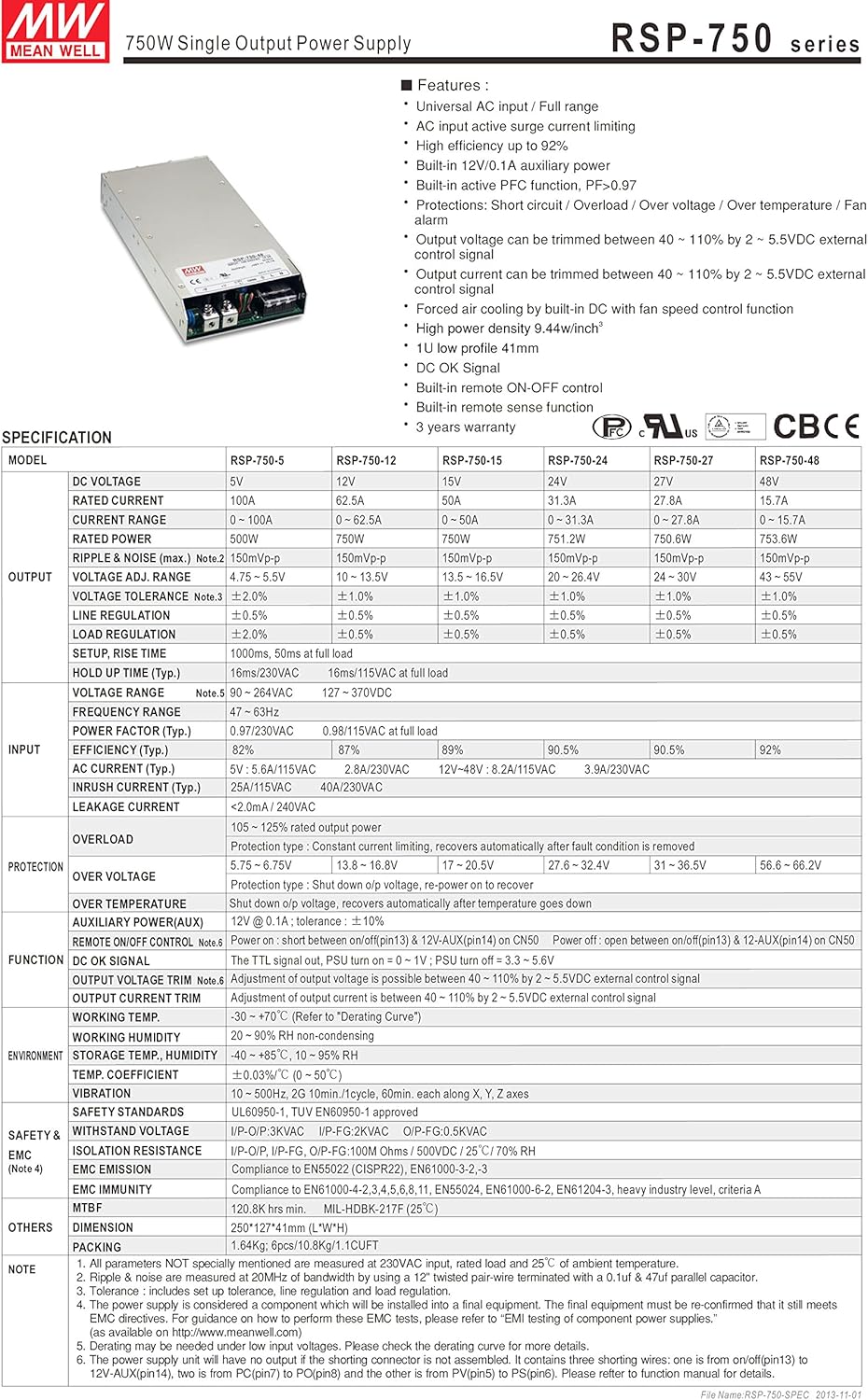
Рисунок 4.1: Передняя часть view of the RSP-750-24 power supply, showing the main casing и решетка вентилятора.
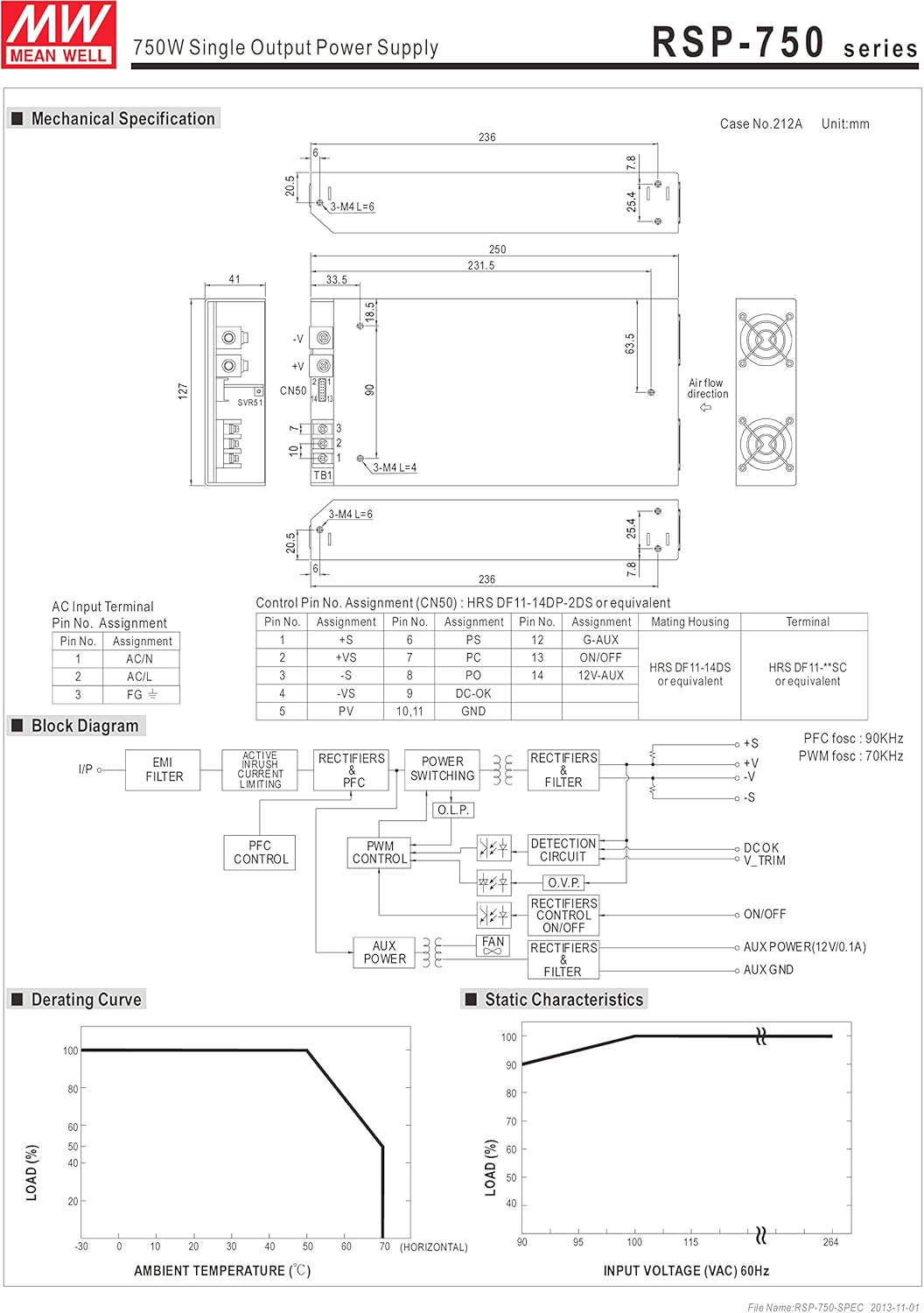
Рисунок 4.2: Сторона view illustrating the input and output terminals, along with control connectors.

Figure 4.3: Product label showing model number, electrical ratings, and general dimensions.
5. Установка и настройка
5.1 Механический монтаж
The RSP-750-24 unit measures 9.84 x 5 x 1.61 inches (250 x 127 x 41 mm) and weighs 3.61 pounds. Ensure adequate space for air circulation, especially around the fan intake and exhaust. Mount the unit securely using appropriate fasteners. Refer to the mechanical drawing for detailed mounting hole positions.

Figure 5.1: Mechanical specifications and terminal layout. Note the air flow direction for proper cooling.
5.2 AC Input Connection (TB1)
Connect the AC mains power to the input terminal block (TB1) as follows:
- Pin 1: AC/L (Live)
- Pin 2: AC/N (Neutral)
- Pin 3: FG (Frame Ground)
Ensure all connections are tight and use appropriate wire gauges for the current rating. The unit accepts a universal AC input range of 85~264VAC.
5.3 Подключение выхода постоянного тока
Connect the load to the DC output terminals. The RSP-750-24 provides a 24V DC output. Observe correct polarity (+V and -V). Use appropriate cabling for the 31.3A output current.
5.4 Control Pin CN50 Connection
The CN50 connector provides various control and monitoring functions. Refer to the pin assignment table below and the detailed function descriptions for proper connection.

Figure 5.2: Detailed function description for each pin on the CN50 control connector, including a basic wiring diagram for the shorting connector.
CN50 Pin Assignment:
| Номер контакта | Назначение | Описание функции |
|---|---|---|
| 1 | +S | Positive sensing. Connect to the positive terminal of the load. |
| 2 | +ПРОТИВ | Положительный объемtage trim signal. |
| 3 | -S | Negative sensing. Connect to the negative terminal of the load. |
| 4 | -ПРОТИВ | Отрицательный объемtage trim signal. |
| 5 | PV | Подключиться к внешнему источнику постоянного токаtagисточник для выходного томаtage trimming. |
| 6 | PS | Short connecting between PV (pin 5) and PS (pin 6) if output voltage TRIM function is not used. |
| 7 | PC | Подключиться к внешнему источнику постоянного токаtage source for output current trimming. |
| 8 | PO | Short connecting between PC (pin 7) and PO (pin 8) if output current TRIM function is not used. |
| 9 | ДК_ОК | Open collector signal, referenced to pin 10,11 (GND). Low when PSU turns on. |
| 10, 11 | Земля | Reference ground for negative terminal (-V). |
| 12 | G-ВСПОМОГАТЕЛЬНЫЙ | Вспомогательный объемtagе выходная земля. |
| 13 | ВКЛ/ВЫКЛ | Turns the output on and off by electrical dry contact between pin 13 (ON/OFF) and pin 14 (12V-AUX). |
| 14 | 12В-ВСПОМОГАТЕЛЬНЫЙ | Вспомогательный объемtage output (10.8~13.2V). |
5.5 Функция дистанционного включения/выключения
The PSU can be turned ON/OFF by using the "Remote ON/OFF" function via CN50 pins 13 (ON/OFF) and 14 (12V-AUX).
- SW close (Short): Блок питания включен
- SW open (Open): Блок питания выключен

Figure 5.3: Wiring diagrams for Remote ON/OFF control and DC_OK signal monitoring.
5.6 Remote Sense Function
The remote sensing function compensates for voltage drop across the load wiring, ensuring accurate voltage at the load terminals. Connect +S (pin 1) to the positive load terminal and -S (pin 3) to the negative load terminal. Ensure sense lines are twisted in pairs to minimize noise pickup.
5.7 выходной томtage Обрезка
Выходной объемtage of the RSP-750-24 can be trimmed between 40% and 110% of its rated value (24V) using an external DC source (2-5.5VDC) connected between PV (pin 5) and GND (pin 10, 11) on CN50.

Figure 5.4: Diagrams illustrating the connections and characteristics for Output Voltage TRIM and Output Current TRIM functions.
5.8 Output Current Trim
The output current of the RSP-750-24 can be trimmed between 40% and 110% of its rated value (31.3A) using an external DC source (2-5.5VDC) connected between PC (pin 7) and GND (pin 10, 11) on CN50.
6. Операция
6.1 Включение/выключение питания
Once all connections are secure and verified, apply AC input power. The unit will power on, and the fan will activate. To turn off the unit, remove AC input power or use the Remote ON/OFF function if configured.
6.2 DC_OK Signal Monitoring
The DC_OK signal (CN50 pin 9) is an open collector signal that indicates the output status of the PSU. It is low when the PSU output is within specification (ON) and high impedance when the PSU is off or in fault condition. This signal can be used for external monitoring or control systems.
- 0 ~ 1V: Блок питания включен
- 3.3 ~ 5.6V: Блок питания выключен
7. Техническое обслуживание
The RSP-750-24 power supply is designed for long-term reliability and requires minimal maintenance. However, regular checks can extend its lifespan and ensure optimal performance.
- Уборка: Periodically inspect the fan and ventilation openings for dust accumulation. Clean with compressed air or a soft brush to ensure unobstructed airflow.
- Вентиляция: Ensure the operating environment maintains adequate air circulation around the unit. Avoid blocking the fan or air vents.
- Соединения: Periodically check all input, output, and control wiring connections for tightness and signs of wear or corrosion.
8. Поиск Неисправностей
Если блок питания работает некорректно, выполните следующие основные проверки:
- Нет выходного томаtage:
- Verify AC input power is present and within the specified range (85-264VAC).
- Check all input and output wiring for correct connections and tightness.
- If using the Remote ON/OFF function, ensure it is configured correctly to turn the unit ON.
- Check for any short circuits or overloads on the output. Disconnect the load and test the power supply independently.
- Выход Voltagд Колебание:
- Ensure the load is stable and not drawing intermittent current spikes.
- If Remote Sense is used, verify the connections are correct and secure.
- Check for proper ventilation; overheating can cause instability.
- Перегрев:
- Ensure the fan is operating and not obstructed.
- Verify ambient temperature is within the specified operating range (-25°C to +70°C).
- Ensure the load is not exceeding the power supply's rated output. Refer to the derating curve in the specifications section.
If issues persist after performing these checks, contact MEAN WELL technical support or your distributor for further assistance.


