
1 Важная информация по безопасности
Read all instructions carefully before installation and use. Failure to follow these instructions may result in property damage, serious injury, or death. If you do not understand these instructions, or have doubts about the safety of the installation, contact a qualified installer.
- Грузоподъемность: This mount is designed for flat panel displays up to 32 inches. Do not exceed the maximum weight capacity specified by the manufacturer.
- Конструкция стены: Ensure the mounting surface can safely support the combined weight of the equipment and hardware. Use appropriate fasteners for the wall type (wood stud, concrete, brick, etc.).
- Профессиональная установка: For optimal safety, professional installation is recommended.
- Движущиеся части: Exercise caution when adjusting the tilt mechanism to avoid pinching or injury.
2. Содержимое упаковки
Verify that all components are present and undamaged before proceeding with installation. If any parts are missing or damaged, do not attempt to install and contact customer support.
- Flat Panel Wall Mount (FTR100)
- Mounting Hardware Kit (screws, washers, anchors - specific contents may vary)
- Инструкция по установке (этот документ)
3. Настройка и установка
This section provides step-by-step instructions for mounting your Chief FTR100 Tilting Hardware Mount.
3.1 Проверки перед установкой
- Identify the desired mounting location. Ensure there are no hidden electrical wires or plumbing.
- Confirm the wall type (wood stud, concrete, brick) and select appropriate mounting hardware.
- Measure the VESA mounting pattern on your flat panel display to ensure compatibility with the FTR100 mount.
3.2 Монтаж настенной панели
- Position the wall plate at the desired height and mark the drilling locations. Use a level to ensure accuracy.
- Drill pilot holes according to the recommended drill bit size for your chosen fasteners and wall type.
- Secure the wall plate to the wall using the provided mounting hardware. Ensure all screws are tightened securely.
3.3 Attaching the Display to the Mount
- Attach the display brackets to the back of your flat panel display using the appropriate screws from the hardware kit. Ensure they are securely fastened.
- Carefully lift the display and hook the display brackets onto the wall plate. The FTR100 utilizes a Q-Latch mounting system for secure attachment.
- Engage the Q-Latch mechanism to lock the display onto the wall plate. Refer to the specific latching instructions provided with the hardware kit.
- The mount can be used in either a horizontal or vertical orientation, depending on your display and application.
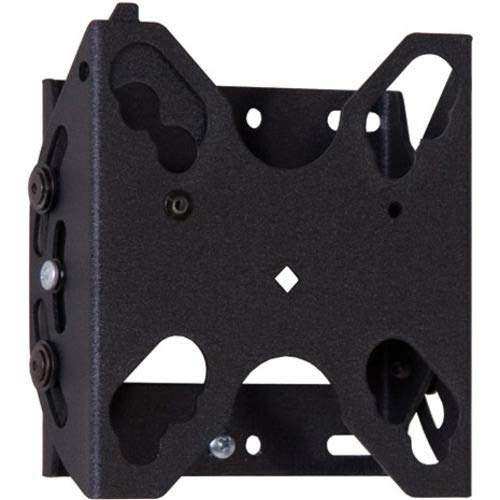
Рисунок 1: Chief FTR100 Tilting Hardware Mount. This image shows the overall design of the mount, including the wall plate and display brackets, ready for installation.
4. Эксплуатация монтировки
The Chief FTR100 mount allows for tilting adjustments to achieve optimal viewуглы.
4.1 Tilting the Display
Once the display is securely mounted, you can adjust its tilt angle. The FTR100 offers a maximum tilt angle of 15 degrees.
- Gently grasp the top or bottom edge of the display.
- Carefully push or pull the display to achieve the desired tilt angle. The mount is designed to hold the position once set.
- Avoid excessive force when tilting. If the display does not move smoothly, check for obstructions or consult the troubleshooting section.
5. Техническое обслуживание
Regular maintenance helps ensure the longevity and safe operation of your mount.
- Уборка: Для очистки крепления используйте мягкую сухую ткань. Избегайте абразивных чистящих средств или растворителей, которые могут повредить покрытие.
- Периодические проверки: Периодически проверяйте все крепежные винты и соединения, чтобы убедиться в их надежной фиксации. При необходимости подтяните их.
- Движущиеся части: The tilting mechanism is designed for smooth operation. If it becomes stiff, do not apply lubricants unless specifically recommended by Chief Mfg.
6. Поиск Неисправностей
This section addresses common issues you might encounter with your Chief FTR100 mount.
- Дисплей расположен неровно:
- Check the wall plate installation. Ensure it was installed using a level.
- Verify that the display brackets are evenly attached to the back of the display.
- Difficulty tilting the display:
- Убедитесь, что никакие кабели не препятствуют работе механизма наклона.
- Confirm the display weight is within the specified limits for the mount.
- Крепление кажется свободным:
- Immediately remove the display.
- Re-tighten all wall plate and display bracket screws. If the issue persists, consult a professional installer.
7. Технические характеристики
Detailed technical specifications for the Chief FTR100 Tilting Hardware Mount.
| Особенность | Спецификация |
|---|---|
| Бренд | Главный |
| Номер модели | FTR100 |
| Вес товара | 2.66 фунта |
| Размеры продукта | 2.87 x 6.02 x 9.29 дюйма |
| Тип крепления | Настенное крепление |
| Тип движения | Наклон |
| Материал | Металл |
| Цвет | Черный |
| Максимальный угол наклона | 15 градусов |
| Совместимые устройства | Monitor (Flat Panel Display up to 32") |
| Особые возможности | Tilting, Q-Latch Mounting System, Horizontal/Vertical Use |
8. Гарантия и поддержка
For warranty information, technical support, or to inquire about replacement parts, please contact Chief Manufacturing directly. Refer to the official Chief website or your purchase documentation for current contact details and warranty terms.
Производитель: Chief Mfg.
Webсайт: www.legrandav.com/products/chief (Это распространенное явление) URL for Chief products, please verify with official documentation)