
1. Введение
Thank you for choosing the BBC Jadel K100 Gaming Keyboard. This manual provides essential information for setting up, operating, maintaining, and troubleshooting your new keyboard. The Jadel K100 is designed for gaming, office, and daily home use, featuring multimedia keys and a mechanical suspension design for a responsive typing experience.
Перед использованием изделия внимательно ознакомьтесь с данным руководством, чтобы обеспечить его правильную работу и долговечность.
2. Содержимое упаковки
При распаковке убедитесь, что все предметы на месте:
- BBC Jadel K100 Gaming Keyboard
- Руководство пользователя (этот документ)
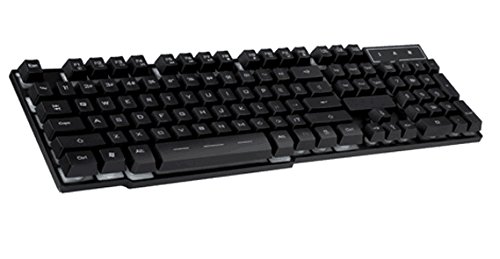
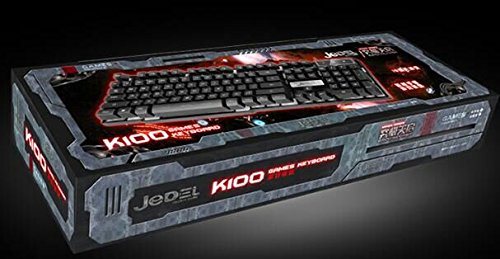
Image 1: The BBC Jadel K100 Gaming Keyboard, showcasing его дизайн и упаковка.
3. Настройка
Follow these steps to connect your BBC Jadel K100 Gaming Keyboard to your computer:
- Распакуйте клавиатуру: Осторожно извлеките клавиатуру из упаковки.
- Подключиться к компьютеру: Locate an available USB port on your laptop or desktop computer. Insert the USB connector of the keyboard firmly into the USB port.
- Установка драйвера: The keyboard is plug-and-play. Your operating system (Windows, macOS, Linux) should automatically detect and install the necessary drivers. This process may take a few moments.
- Проверить соединение: После установки драйверов клавиатура должна быть готова к использованию. Проверьте работу клавиатуры, набрав текст в текстовом редакторе или браузере.
Примечание: This keyboard is compatible with laptops and desktop computers running standard operating systems.
4. Инструкция по эксплуатации
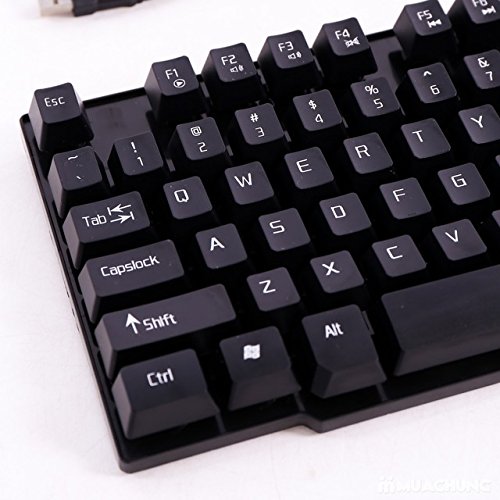
The Jadel K100 keyboard features a standard 104-key layout, including a numeric keypad and function keys. It also incorporates multimedia functions accessible via the FN ключ.
Изображение 2: Крупный план view of the BBC Jadel K100 keyboard's main keys, including Esc, Tab, Caps Lock, Shift, Ctrl, and Alt.
4.1. Standard Key Functions
All standard alphanumeric, symbol, and navigation keys operate as expected on a typical keyboard.
4.2. Multimedia Functions (FN Key)
The Jadel K100 includes an FN (Function) key, similar to those found on laptops, to access multimedia controls. To use these functions, press and hold the FN key, then press the corresponding function key (F1-F12) or other designated keys.
Common multimedia functions typically include:
- ФН + Ф1-Ф12: Control media playback (play/pause, stop, previous/next track), volume (mute, volume up/down), and other system functions (e.g., open default browser, email client, calculator). Refer to the keycap legends for specific functions.
Изображение 3: Подробно view of the BBC Jadel K100 keyboard's F-keys, which often include multimedia shortcuts when combined with the FN key.
4.3. Игровой опыт
The mechanical suspension design provides a tactile and responsive feel, enhancing the gaming experience. The keyboard is designed for durability and comfort during extended gaming sessions.
5. Техническое обслуживание
Правильный уход гарантирует долговечность и оптимальную работу вашей клавиатуры.
- Уборка:
- Перед чисткой отсоедините клавиатуру от компьютера.
- Используйте мягкую, безворсовую ткань, слегкаampСмочите водой или мягким чистящим раствором, чтобы протереть клавиши и поверхность.
- Для удаления пыли и мусора между клавишами используйте сжатый воздух.
- Избегайте использования едких химикатов, абразивных чистящих средств или распыления жидкостей непосредственно на клавиатуру.
- Хранилище: Если вы не используете клавиатуру в течение длительного времени, храните ее в прохладном, сухом месте, вдали от прямых солнечных лучей и экстремальных температур.
- Умение обращаться: Avoid dropping the keyboard or exposing it to excessive force, which can damage internal components or key mechanisms.
6. Поиск Неисправностей
If you encounter issues with your BBC Jadel K100 keyboard, refer to the following common problems and solutions:
| Проблема | Возможная причина | Решение |
|---|---|---|
| Клавиатура не отвечает | Ненадежное USB-соединение, неисправный USB-порт, проблема с драйвером. |
|
| Определенные клавиши не работают | Debris under keycap, physical damage, software conflict. |
|
| Мультимедийные клавиши не работают | Incorrect usage of FN key, software conflict. |
|
7. Технические характеристики
| Особенность | Деталь |
|---|---|
| Бренд | Би-би-си |
| Номер модели | Jadel K100 |
| Описание клавиатуры | Игровой |
| Количество ключей | 104 |
| Тип ключа | Механическая подвеска |
| Цвет | ЧЕРНЫЙ |
| Совместимые устройства | Ноутбук, настольный ПК |
| Связность | USB |
| Стиль | Современный |
| Ориентация руки | Двусторонний |
| Производитель | bbc |
8. Гарантия и поддержка
Specific warranty details for the BBC Jadel K100 Gaming Keyboard are not provided in this manual. For warranty information, please refer to the product packaging or contact your retailer at the point of purchase.
For technical support or further assistance, please contact the manufacturer or your retailer. Keep your purchase receipt as proof of purchase for any warranty claims.