
symcode MJ-8200-B
Symcode 2D QR Barcode Scanner User Manual
Model: MJ-8200-B
1. Продукт закончилсяview
The Symcode MJ-8200-B is an omnidirectional, hands-free 2D QR barcode scanner designed for efficient and accurate scanning of 1D and 2D barcodes from various surfaces, including labels, paper, mobile phone screens, and computer displays. Its plug-and-play USB interface ensures easy setup and compatibility with Windows, Linux, and other operating systems.
This scanner features CCD Optical Imaging Scanning Technology, which enhances its ability to read incomplete or fuzzy codes and codes displayed on screens. It offers both normal scanning mode and a 1D fast scanning mode, selectable via a top button for optimized performance.

Изображение 1.1: Вид спереди view of the Symcode MJ-8200-B 2D QR Barcode Scanner, showcasing its compact, hands-free design.
Основные характеристики:
- 2D/QR Barcode Scanning: Capable of reading 1D and 2D barcodes from physical labels and digital screens.
- CCD Optical Imaging Technology: Improves scanning accuracy for challenging barcodes, including those on screens or with imperfections.
- Управление без помощи рук: Designed for automatic scanning when a barcode is presented, allowing users to keep both hands free.
- Plug-and-Play USB Interface: No driver installation required for Windows, Linux, and other compatible systems.
- Двойные режимы сканирования: Switch between normal and 1D fast scanning modes using the top button.
- Прочная конструкция: Engineered to withstand drops from up to 5 feet (1.5 meters).
- Visual and Auditory Indicators: Features sound and LED indicators for power and operational status.
2. Содержимое упаковки
Перед началом установки убедитесь, что все необходимые компоненты присутствуют в комплекте:
- Symcode MJ-8200-B Barcode Scanner
- USB-кабель
- USB Interface Protection Cap
- Руководство пользователя (этот документ)

Image 2.1: Illustration of the Symcode MJ-8200-B package contents, showing the scanner, USB cable, and user manual.
3. Инструкции по настройке
The Symcode MJ-8200-B barcode scanner is designed for simple plug-and-play operation. No complex driver installation is typically required.
- Подключите USB-кабель: Insert the USB cable into the designated port on the back of the barcode scanner.
- Подключиться к компьютеру: Plug the other end of the USB cable into an available USB port on your computer (PC, laptop, or compatible device).
- Распознавание системы: Your operating system (Windows, Linux, etc.) should automatically detect and install the necessary generic drivers. This process may take a few moments.
- Готов к использованию: Once the scanner is recognized, it will typically emit a short beep and the indicator light will illuminate, signifying it is ready for scanning.

Изображение 3.1: Множественное views of the Symcode MJ-8200-B scanner, illustrating its design from different perspectives.
4. Инструкция по эксплуатации
4.1 Основные операции сканирования
The scanner operates automatically when a barcode is presented within its scanning window.
- Position Barcode: Place the barcode you wish to scan in front of the scanner's window.
- Автоматическое сканирование: The scanner will automatically detect the barcode and emit a successful scan beep, and the data will be transmitted to your connected computer as keyboard input.
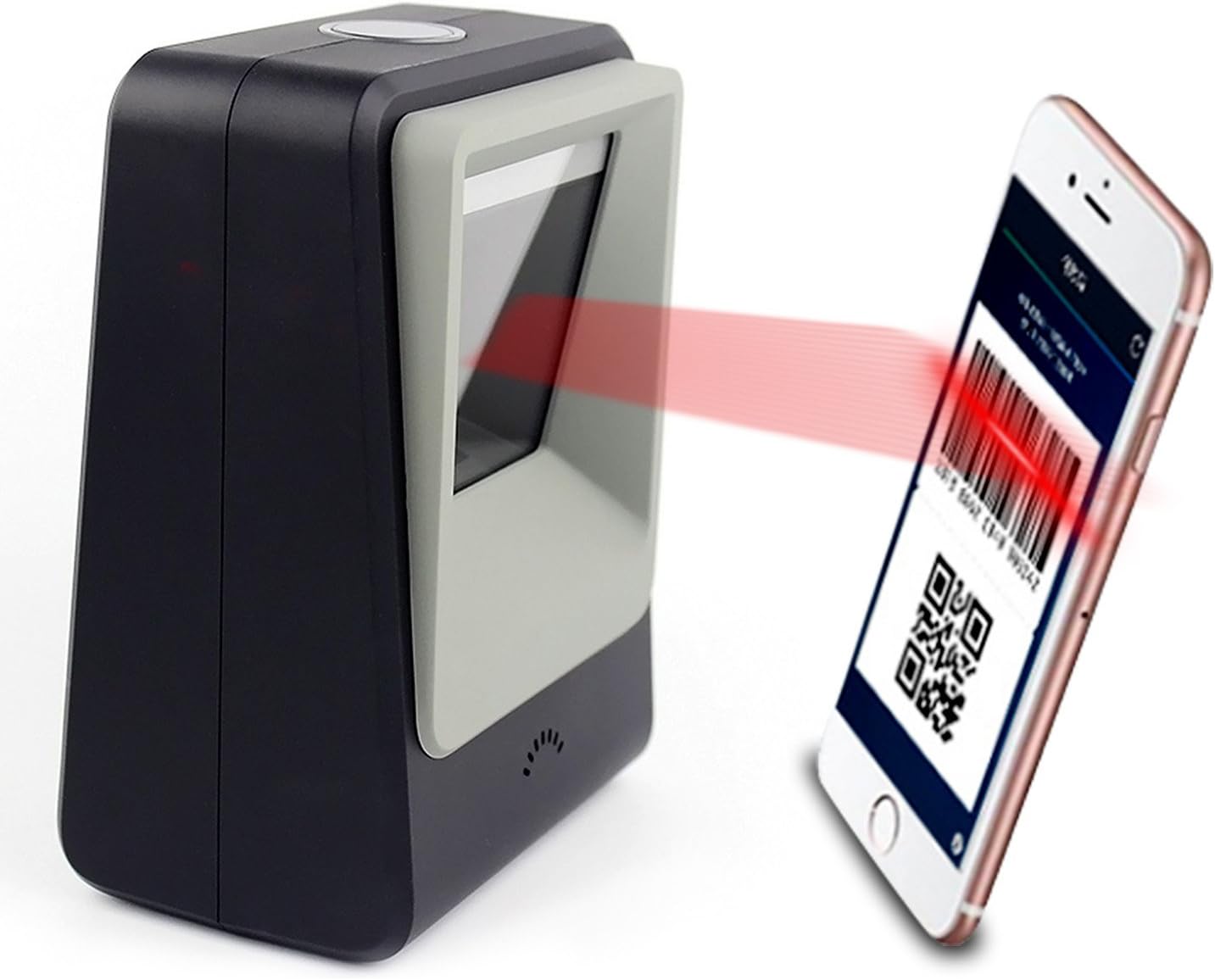
Image 4.1: The Symcode MJ-8200-B scanner actively scanning a QR code displayed on a smartphone screen, demonstrating its capability to read digital barcodes.
4.2 Режимы сканирования
The scanner features a top button that allows you to switch between two primary scanning modes:
- Normal Mode (Blue Light): This is the default mode, suitable for general 1D and 2D barcode scanning, including printed codes and screen codes. It provides sensitive and accurate performance for daily use.
- High Speed Mode (Yellow Light): For particularly difficult-to-scan printed codes, press the top button to activate this mode. It can significantly improve scanning accuracy for challenging barcodes.

Image 4.2: Close-up of the scanner's top button and indicator lights, showing the blue light for Normal Mode and yellow light for High Speed Mode.
4.3 Идентификация компонентов

Image 4.3: Detailed diagram identifying key components of the Symcode MJ-8200-B scanner, including LED lights, scan window, buzzer, and the switch button/indicator light.
- Switch Button/Indicator Light: Located on the top, used to change scanning modes and indicates operational status.
- Светодиодные фонари: Internal illumination for scanning.
- Окно сканирования: The area through which barcodes are read.
- зуммер: Обеспечивает звуковую обратную связь при успешном сканировании и изменении статуса.
5. Техническое обслуживание и уход
Для обеспечения долговечности и оптимальной работы сканера штрихкодов Symcode следуйте этим рекомендациям по техническому обслуживанию:
- Уборка: Regularly wipe the scanner's exterior and scan window with a soft, dry, lint-free cloth. For stubborn smudges on the scan window, a slightly damp cloth with mild, non-abrasive cleaner can be used, followed by immediate drying. Avoid harsh chemicals or abrasive materials.
- Умение обращаться: While the scanner is robust, avoid dropping it or subjecting it to excessive force.
- Среда: Operate and store the scanner in a clean, dry environment, away from extreme temperatures, direct sunlight, and excessive dust or moisture.
- Уход за кабелем: Не сгибайте и не пережимайте USB-кабель слишком сильно. При отсоединении всегда держитесь за штекер, а не за кабель.
6. Поиск Неисправностей
Если у вас возникли проблемы со сканером штрихкодов Symcode, ознакомьтесь со следующими распространенными проблемами и решениями:
| Проблема | Возможная причина | Решение |
|---|---|---|
| Сканер не распознан компьютером. | Ненадежное USB-соединение; неисправный USB-порт; проблема с драйверами. | Ensure USB cable is securely connected. Try a different USB port on your computer. Restart your computer. |
| Сканер не сканирует штрихкоды. | Barcode damaged or unreadable; incorrect scanning mode; scanner malfunction. | Ensure the barcode is clear and undamaged. Try switching between Normal and High Speed scanning modes. Verify the scanner's indicator light is on. |
| Отсканированные данные неверны или неполны. | Poor barcode quality; scanner not properly aligned; software issue. | Ensure the barcode is flat and well-lit. Try adjusting the angle or distance of the barcode from the scanner. Check your application software settings. |
| Сканер издает звуковой сигнал, но данные не передаются. | Application not in focus; incorrect keyboard layout setting. | Ensure the cursor is in the correct input field of your application. Check your computer's keyboard language settings. |
Если проблема не исчезнет после применения указанных решений, обратитесь в службу поддержки клиентов Symcode за дополнительной помощью.
7. Технические характеристики
| Особенность | Деталь |
|---|---|
| Номер модели | МДж-8200-Б |
| Размеры (Д x Ш x В) | 5.91 x 2.81 x 4.25 дюйма (150 мм x 71.5 мм x 108 мм) |
| Масса | 11.9 ounces (480g shipping weight) |
| Интерфейс | USB 2.0 |
| Источник света | 617nm LED (aimer); 6500K LEDs (illumination) |
| Датчик изображения | 640 * 480 CMOS |
| Процессор | ARM32-бит |
| Скорость сканирования | 200 раз / сек |
| Власть | 5 В постоянного тока |
| Текущий | 400 мА ±5% |
| Совместимые устройства | Laptop, PC, and other devices with USB interface. |
| Операционные системы | Windows, Linux, and other compatible systems. |
| Возможность декодирования (1D) | EAN-8, EAN-13, Codabar, CODE 39, CODE 93, CODE 128, China Post, GS1-128, UPC-A, UPC-E, ISBN/ISSN, ISBT, Interleaved 2 of 5, Standard 2 of 5, Matrix 2 of 5, Industrial 2 of 5, MSI, RSS, ITF14, Telepen и др. |
| Возможность декодирования (2D) | QR Code, Micro QR Code, Data Matrix, PDF417, Micro PDF417, Maxicode, Aztec, Hanxin, etc. |

Image 7.1: Dimensional diagram of the Symcode MJ-8200-B scanner, showing its height, width, and depth in both inches and centimeters.
8. Гарантия и поддержка
Symcode products are manufactured to high-quality standards. For information regarding product warranty, please refer to the warranty card included with your purchase or visit the official Symcode webсайт.
For technical support, troubleshooting assistance beyond this manual, or inquiries about replacement parts, please contact Symcode customer service. Contact information can typically be found on the product packaging, the official Symcode webсайте или через точку покупки.
Производитель: символьный код
Ask a question about this manual
Ask about setup, troubleshooting, compatibility, parts, safety, or missing instructions. Manuals+ will review the question and use this page’s manual context to help answer it.