
1. Введение
The ThermoPro TP50 is a compact and highly accurate digital indoor thermometer and hygrometer designed to help you monitor the temperature and humidity levels in your living spaces. This device provides essential information for maintaining a comfortable and healthy indoor environment, displaying current conditions, maximum and minimum records, and a comfort level indicator.
Its versatile design allows for easy placement in various locations, making it suitable for homes, offices, baby rooms, greenhouses, and more. Understanding the information provided by the TP50 can assist in managing conditions for personal comfort, plant care, and pet well-being.
2. Особенности продукта
- Компактный дизайн: Approximately 8.0 cm (height) x 7.0 cm (width) x 2.2 cm (depth). Made from durable ABS resin.
- Большой, четкий дисплей: Features a large LCD screen with clear digits for easy readability of current temperature and humidity.
- Макс./мин. запись: Automatically records and displays the highest and lowest temperature and humidity values measured since the last reset. This feature is useful for tracking environmental changes over time.
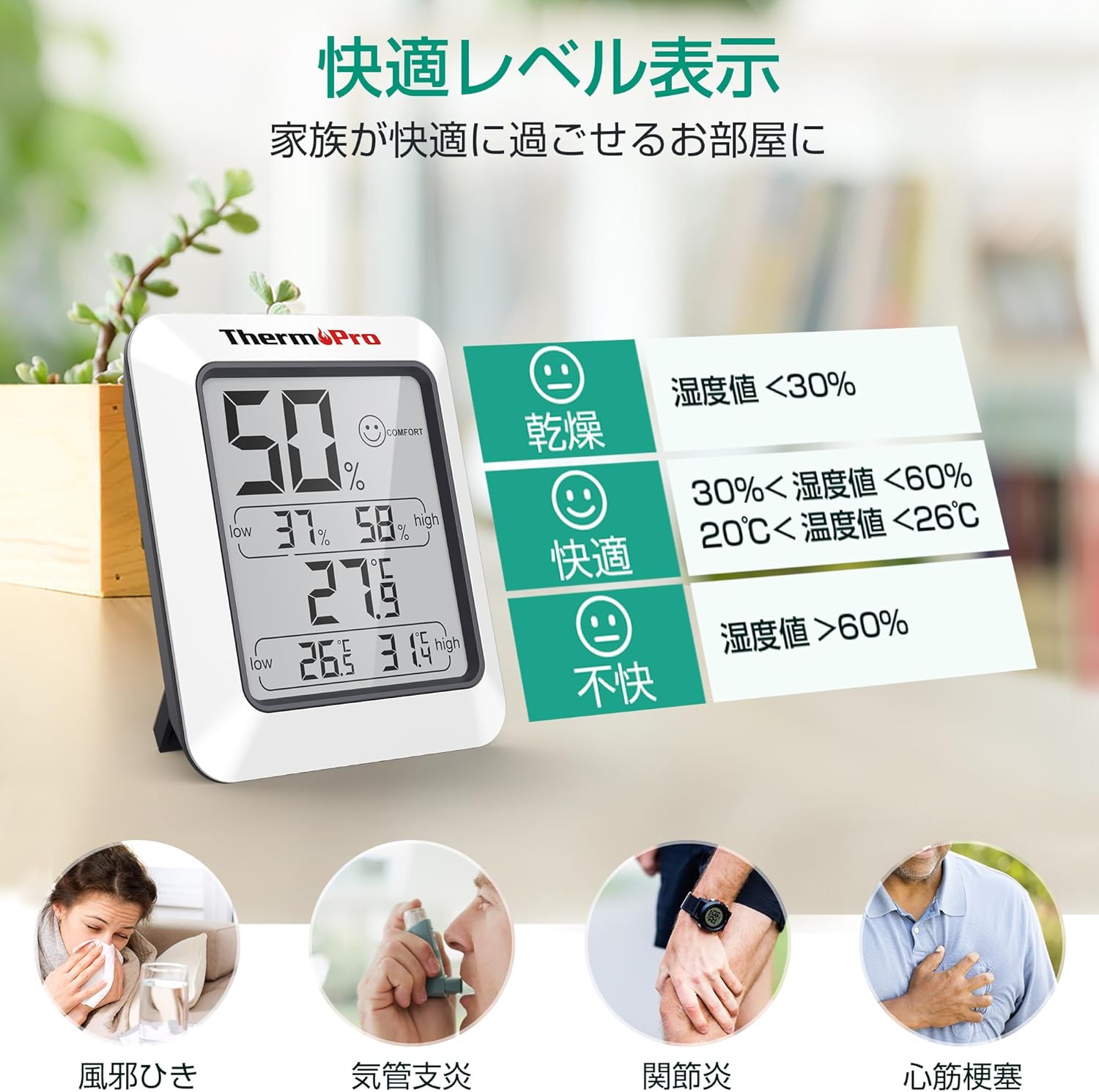
- Индикатор уровня комфорта: Utilizes a simple face icon to indicate one of three comfort levels: Dry, Comfort, or Uncomfortable, based on the current temperature and humidity.
- Универсальное размещение: Equipped with a strong magnet for attachment to metallic surfaces like refrigerators, and a foldable stand for tabletop use.
- Высокая точность: Provides precise measurements for effective environmental monitoring.

3. Настройка
3.1 Установка аккумулятора
- Найдите батарейный отсек на задней панели устройства.
- Откройте крышку батарейного отсека.
- Insert one (1) AAA 1.5V battery, ensuring the correct polarity (+/-) as indicated inside the compartment.
- Плотно закройте крышку батарейного отсека.
3.2 Начальная стабилизация
Upon initial power-on or after battery replacement, the sensor requires time to stabilize and accurately reflect the surrounding environment. Due to the small air intake hole on the back of the unit, it may take approximately 30 minutes for the device to display stable and accurate readings. Please allow this period for the device to calibrate before relying on the measurements.
4. Инструкция по эксплуатации
4.1 Чтение показаний дисплея
На большом ЖК-экране отображается следующая информация:
- Текущая влажность: Отображается в процентахtage (%) at the top of the display.
- Текущая температура: Shown in degrees Celsius (°C) or Fahrenheit (°F) in the middle of the display.
- Макс/Мин Влажность: The highest and lowest humidity recorded since the last reset are displayed below the current humidity.
- Макс./Мин. температура: The highest and lowest temperature recorded since the last reset are displayed below the current temperature.
- Comfort Level Icon: A face icon (Dry, Comfort, Uncomfortable) is displayed next to the current humidity reading.

4.2 Переключение единиц измерения температуры (°C/°F)
To switch between Celsius (°C) and Fahrenheit (°F), locate the '°F/°C' button on the back of the unit and press it. The display will instantly change the temperature unit.
4.3 Resetting Max/Min Records
The maximum and minimum temperature and humidity records are automatically updated every 10 seconds. To clear the recorded maximum and minimum values and start a new recording cycle, press and hold the 'CLEAR' button located on the back of the unit for approximately 3 seconds. The display will show the current readings as the new starting point for max/min tracking.

5. Техническое обслуживание
5.1 Очистка
To clean the unit, wipe it with a soft, damp cloth. Do not use abrasive cleaners or immerse the unit in water. Ensure the device is dry before re-using.
5.2. Замена батареи
When the display becomes dim or shows inaccurate readings, it may be time to replace the battery. Follow the battery installation steps in Section 3.1 to replace the AAA battery.
5.3 Хранение
If storing the unit for an extended period, remove the battery to prevent leakage and damage to the device.
5.4 Important Note on Water Resistance
Это устройство НЕ водонепроницаемый. Please avoid using it in wet environments such as bathrooms, washrooms, or near sinks, as exposure to water can damage the unit.
6. Поиск Неисправностей
6.1 Неточные показания
- Начальная настройка: As mentioned in Section 3.2, allow 30 minutes for the device to stabilize after initial setup or battery replacement.
- Размещение: Ensure the device is placed in a location with good air circulation, away from direct sunlight, heat sources, or drafts, which can affect readings.
- Препятствие: The small air intake hole on the back should not be obstructed.
6.2 Дисплей тусклый или пустой
- Проверка батареи: The battery may be low or depleted. Replace the AAA battery with a new one.
- Установка аккумулятора: Ensure the battery is installed correctly with the proper polarity.
7. Технические характеристики
| Спецификация | Деталь |
|---|---|
| Модель | TP50 |
| Размеры | Приблизительно 8.0 см (В) x 7.0 см (Ш) x 2.2 см (Г) |
| Масса | Около 60 г |
| Материал | АБС-смола |
| Источник питания | 1 x AAA 1.5V Battery (included) |
| Срок службы батареи | прибл. 1 год |
| Диапазон температур | -50°C до 70°C (-58°F до 158°F) |
| Диапазон влажности | Относительная влажность 10–99 % |
| Точность температуры | ±1°С (±1.8°F) |
| Точность влажности | ±2% RH (30%-80% RH), ±3% RH (10%-30% & 80%-99% RH) |
| Частота обновления | Каждые 10 секунд |
| Тип дисплея | ЖК-дисплей |
| Водостойкость | Нет (не водонепроницаемый) |

8. Гарантия и поддержка
Продукция ThermoPro разработана для обеспечения надежности и высокой производительности. На данный продукт предоставляется 1-летняя гарантия с даты покупки, покрывающая дефекты материалов и изготовления при нормальной эксплуатации.
For technical assistance, troubleshooting, or warranty claims, please contact ThermoPro customer support. Our friendly customer support team is available to assist you with any questions or concerns regarding your device.
ThermoPro is committed to providing high-quality products and support to its community of over 20 million users worldwide.
For more information and support, please visit the official ThermoPro brand store: ThermoPro Brand Store