
1. Введение
Thank you for choosing the OSD Audio PRE-1 High Definition Preamplifier. This unit is designed to enhance your audio experience by providing versatile source selection and precise audio control. The PRE-1 acts as a central hub for various audio components, including turntables, CD/DVD players, and tape decks, delivering a clean and powerful signal to your main ampпожизненнее.
This manual provides detailed instructions for the proper setup, operation, and maintenance of your PRE-1 preamplifier. Please read this manual thoroughly before operating the unit to ensure optimal performance and longevity.
2 Важная информация по безопасности
- Источник питания: Подключайте устройство только к тому типу источника питания, который указан на маркировочной этикетке.
- Вентиляция: Ensure adequate ventilation. Do not block any ventilation openings. Install in accordance with the manufacturer’s instructions.
- Вода и влага: Не используйте это устройство вблизи воды и не подвергайте его воздействию капель или брызг.
- Нагревать: Не устанавливайте вблизи источников тепла, таких как радиаторы, обогреватели, печи или другие приборы (включая amp(жирообразующие вещества), которые вырабатывают тепло.
- Уборка: Чистить только сухой тканью.
- Обслуживание: Не пытайтесь ремонтировать этот продукт самостоятельно. Поручите все обслуживание квалифицированному обслуживающему персоналу.
- Заземление: Данное устройство должно быть надлежащим образом заземлено.
3. Содержимое упаковки
Пожалуйста, проверьте, что в комплект входят следующие предметы:
- OSD Audio PRE-1 High Definition Preampпожизненнее
- Силовой кабель
- Руководство пользователя (этот документ)
4. Продукт закончилсяview
4.1. Передняя панель
The front panel provides access to all primary controls and a microphone input for convenient use.

This image displays the front panel of the OSD Audio PRE-1 Preamplifier, including its physical dimensions for installation planning.

Подробный view of the left side of the PRE-1's front panel, highlighting the Microphone Level, Bass, Midrange, and Treble adjustment knobs.

Подробный view of the right side of the PRE-1's front panel, showing the Loudness, Balance, and Volume controls, along with input selection and function buttons.
- Кнопка питания: Включает и выключает устройство.
- Микрофонный вход: Разъем 1/4 дюйма для подключения микрофона.
- Уровень микрофона: Регулирует громкость микрофонного входа.
- Управление басами: Регулирует низкочастотный выход.
- Средний контроль: Adjusts the mid-range frequency output.
- Регулировка высоких частот: Регулирует высокочастотный выход.
- Loudness: Engages or disengages a loudness contour for enhanced bass and treble at low volumes.
- Баланс: Регулирует баланс левого/правого канала.
- Объем: Master volume control for all outputs.
- Вход Выберите: Rotary knob to choose between Phono, AUX1, AUX2, and CD/DVD inputs.
- Tape Button: Activates the Tape Monitor loop.
- Моно кнопка: Combines stereo signals into a monaural output.
- Низкий фильтр: Engages a low-frequency cut-off filter.
- Немой: Silences all audio output.
4.2. Задняя панель
The rear panel houses all the necessary input and output connections for your audio system.
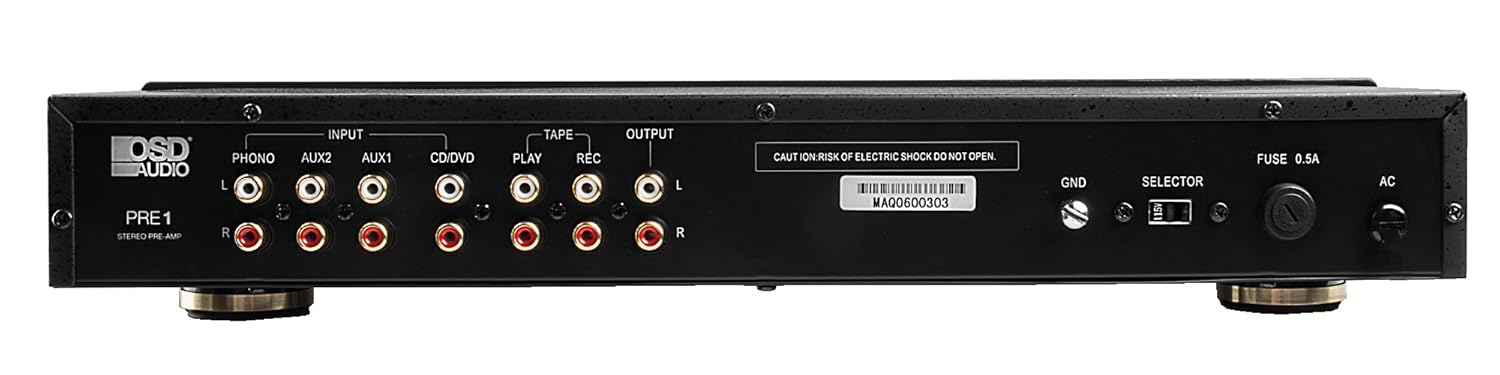
The rear panel of the PRE-1 Preamplifier, showing all input and output connections for various audio devices.
- Phono Input (L/R): RCA inputs for connecting a turntable. Includes a ground terminal.
- AUX1 Input (L/R): RCA inputs for general auxiliary devices.
- AUX2 Input (L/R): RCA inputs for a second auxiliary device.
- CD/DVD Input (L/R): RCA inputs for CD or DVD players.
- Tape Play (L/R): RCA inputs for the playback output of a tape deck or other recording device.
- Tape Rec (L/R): RCA outputs for connecting to the recording input of a tape deck or other recording device.
- Output (L/R): RCA outputs to connect to your main power ampпожизненнее.
- Наземный терминал (GND): Connects to the ground wire of your turntable to reduce hum.
- Переключатель: For internal configuration (typically left in default position unless specified).
- Предохранитель: Replace only with the specified fuse type and rating.
- Вход питания переменного тока: Connects to the supplied power cable.
5. Настройка и подключение
Follow these steps to properly set up your OSD Audio PRE-1 Preampпожизненнее:
- Размещение: Place the PRE-1 on a stable, flat surface, ensuring adequate ventilation around the unit. Avoid placing it near heat sources or in direct sunlight.
- Выключение: Ensure all audio components, including the PRE-1 and your main amplifier, are turned off before making any connections.
- Подключить источники:
- Проигрыватель: Connect the RCA cables from your turntable to the Phono Input (L/R) on the PRE-1. Connect the turntable's ground wire to the Земля terminal on the PRE-1.
- CD/DVD-плеер: Connect the RCA cables from your CD/DVD player to the CD/DVD Input (L/R).
- Other Devices (e.g., Streamer, Tuner): Connect RCA cables from these devices to the AUX1 Input (L/R) or AUX2 Input (L/R).
- Tape Deck: Connect the playback outputs of your tape deck to the Tape Play (L/R) inputs. Connect the recording inputs of your tape deck to the Tape Rec (L/R) выходы.
- Подключиться к Ampпожизненнее: Подключите Output (L/R) RCA jacks on the PRE-1 to the input jacks of your main power ampпожизненнее.
- Подключение питания: Подсоедините прилагаемый кабель питания к Вход питания переменного тока on the rear panel of the PRE-1, then plug it into a suitable wall outlet.
- Первоначальное включение: Turn on your main power amplifier first, then turn on the PRE-1. When powering off, turn off the PRE-1 first, then your main ampпожизненнее.
6. Инструкция по эксплуатации
Once your PRE-1 is connected, follow these steps for basic operation:
- Выберите ввод: Используйте Выбор входа rotary knob on the front panel to choose the desired audio source (Phono, AUX1, AUX2, CD/DVD).
- Отрегулируйте громкость: Начнем с Объем knob at its minimum setting. Begin playing your selected audio source and slowly increase the volume to a comfortable listening level.
- Регуляторы тембра: Используйте Бас, Середина, и Высокие частоты knobs to adjust the tonal characteristics of your audio. Turn clockwise to increase, counter-clockwise to decrease.
- Контроль баланса: Отрегулируйте Баланс knob to fine-tune the left and right channel output for optimal stereo imaging.
- Loudness: Нажмите Громкость button to activate a contour that boosts bass and treble frequencies, which can be beneficial at lower listening volumes. Press again to deactivate.
- Низкий фильтр: Нажмите Низкий фильтр button to engage a filter that reduces very low frequencies. This can help eliminate rumble from turntables or other unwanted low-frequency noise. Press again to deactivate.
- Мононуклеоз: Нажмите Мононуклеоз button to combine the left and right stereo channels into a single monaural signal. This is useful for playing mono recordings. Press again for stereo.
- Немой: Нажмите Немой button to instantly silence the audio output. Press again to restore sound.
- Использование микрофона: Plug a microphone into the Вход микрофона. Adjust the microphone's volume using the Уровень микрофона ручка.
- Tape Monitoring/Recording: If you have a tape deck connected, select the appropriate input for playback. To record, ensure your tape deck is set to record and the PRE-1 is passing the desired source through the Tape Rec outputs.
7. Техническое обслуживание
Proper care and maintenance will ensure the longevity and optimal performance of your PRE-1 Preampпожизненнее.
- Уборка: Use a soft, dry cloth to clean the exterior of the unit. Do not use liquid cleaners, aerosols, or harsh chemicals, as they may damage the finish or internal components.
- Вентиляция: Периодически проверяйте, чтобы вентиляционные отверстия были свободны от пыли и препятствий.
- Соединения: Occasionally check all cable connections to ensure they are secure. Loose connections can lead to signal loss or interference.
- Хранилище: При длительном хранении устройства отключите его от розетки и храните в прохладном, сухом месте, вдали от прямых солнечных лучей и экстремальных температур.
8. Поиск Неисправностей
If you experience issues with your OSD Audio PRE-1, refer to the following common problems and solutions:
| Проблема | Возможная причина | Решение |
|---|---|---|
| Нет электричества | Power cable not connected; Power outlet not active; Blown fuse | Ensure power cable is securely connected. Test the outlet with another device. Check and replace the fuse if necessary (refer to specifications for fuse type). |
| Нет звука | Incorrect input selected; Volume too low; Mute engaged; Loose audio cables; Main amplifier off or incorrect input selected | Select the correct input source. Increase the volume. Disengage Mute. Check all RCA cable connections. Ensure your main amplifier is on and set to the correct input. |
| Искаженный звук | Volume too high (clipping); Incorrect tone control settings; Faulty cables | Reduce the volume. Adjust Bass, Mid, and Treble controls to neutral or desired settings. Try replacing audio cables. |
| Жужжащий или гудящий шум | Ground loop; Loose ground wire (Phono); Interference from other electronics | Ensure turntable ground wire is connected to the PRE-1's GND terminal. Try moving the PRE-1 or other audio components away from power cables or other electronic devices. Use a ground loop isolator if necessary. |
| Микрофон не работает | Mic not connected; Mic Level too low; Faulty microphone | Ensure microphone is securely plugged into the Mic Input. Increase the Mic Level. Test with another microphone if available. |
9. Технические характеристики
Below are the technical specifications for the OSD Audio PRE-1 Preampпожизненнее:
| Особенность | Спецификация |
|---|---|
| Модель | ПРЕ-1 |
| Бренд | Экранное меню |
| Количество каналов | 2 |
| Тип крепления | Поверхностный монтаж |
| СКП | 819603012446 |
| ASIN | B01MPYJLPX |
| Производитель | Экранное меню |
10. Гарантия и поддержка
OSD Audio products are designed for reliability and performance. For specific warranty details and terms, please refer to the warranty card included with your product or visit the official OSD Audio website. If you require technical assistance or have questions not covered in this manual, please contact OSD Audio customer support.
OSD Audio Customer Support: Please visit the OSD Audio webсайт для получения контактной информации и ресурсов поддержки.