
1. Введение
Thank you for choosing the Baseus Encok S16 Neck Hung Bluetooth Wireless In-Ear Earphone. This manual provides detailed instructions for setup, operation, and maintenance to ensure optimal performance and longevity of your device. Please read this manual thoroughly before use.
2. Содержимое упаковки
Проверьте наличие всех предметов в упаковке:
- 1 x Baseus Encok S16 Wireless Earphone
- 1 х зарядный кабель
- 1 х Руководство пользователя
- 1 гарантийный талон

Image: Contents of the Baseus Encok S16 earphone package, showing the earphones, charging cable, user manual, and warranty card.
3. Продукт закончилсяview
The Baseus Encok S16 earphones feature a neck-hung design for comfortable and secure wear. Key features include:
- Магнитная фиксация: Earbuds can be magnetically joined when not in use, preventing tangling and loss.
- Adjustable Coils: The earphone line length can be adjusted by sliding for a customized fit.
- Высококачественный звук: Equipped with a dynamic speaker unit, composite diaphragm, and independent tune trope structure for clear audio.
- Эффективная мощность: Utilizes a British CSR chip and 120mAh battery for low power consumption and extended battery life.
- Универсальная совместимость: Smartly matches with smartphones and tablet PCs, compatible with all Bluetooth 4.0 enabled devices.

Image: Close-up of the Baseus Encok S16 earbuds demonstrating their magnetic connection capability.
4. Настройка
4.1 Зарядка наушников
- Connect the provided charging cable to the charging port on the earphone's control unit.
- Другой конец зарядного кабеля подключите к источнику питания USB (например, к порту USB компьютера, сетевому адаптеру USB).
- The indicator light will illuminate during charging and turn off or change color when fully charged.
- Полная зарядка обычно занимает около 1.5–2 часов.
4.2 Сопряжение по Bluetooth
- Убедитесь, что наушники полностью заряжены.
- Press and hold the Power button on the control unit until the indicator light flashes red and blue alternately, indicating pairing mode.
- На смартфоне или устройстве с поддержкой Bluetooth перейдите в настройки Bluetooth.
- Искать available devices and select "Baseus Encok S16" from the list.
- Once connected, the indicator light will flash blue slowly or turn solid blue.
- При запросе пароля введите «0000».
5. Инструкция по эксплуатации
5.1 Основные элементы управления
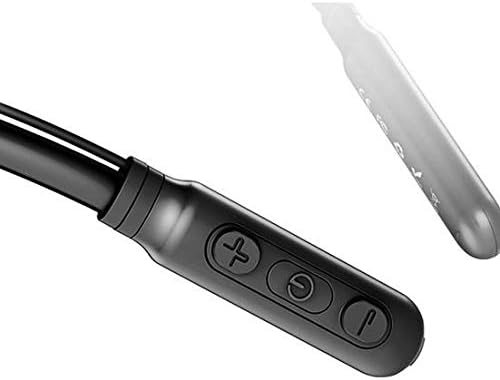
Image: Close-up of the Baseus Encok S16 earphone's inline control unit, showing the power/multi-function button, volume up, and volume down buttons.
| Кнопка | Функция |
|---|---|
| Кнопка питания (по центру) |
|
| Увеличение громкости (+) |
|
| Звук тише (-) |
|
5.2 Ношение наушников
Place the neckband around your neck, ensuring the control unit is easily accessible. Insert the earbuds comfortably into your ears. Adjust the earphone line length using the sliding coils for a secure and comfortable fit.
6. Техническое обслуживание
- Регулярно протирайте наушники и блок управления мягкой сухой тканью.
- Avoid exposing the earphones to extreme temperatures, humidity, or corrosive liquids.
- Store the earphones in a cool, dry place when not in use. The magnetic earbuds can help prevent tangling during storage.
- Не пытайтесь разбирать или ремонтировать наушники самостоятельно, так как это аннулирует гарантию.
7. Поиск Неисправностей
| Проблема | Решение |
|---|---|
| Невозможно включить питание | Ensure the earphones are fully charged. Press and hold the Power button for 3 seconds. |
| Невозможно подключиться к устройству |
|
| Нет звука или низкая громкость |
|
| Прерывистое соединение |
|
8. Технические характеристики
| Особенность | Деталь |
|---|---|
| Бренд | Базеус |
| Номер модели | FWP-E-S16 |
| Технология связи | Bluetooth |
| Версия Bluetooth | 4.0 (compatible with devices enabling Bluetooth 4.0) |
| Форм-фактор | In Ear, Neck Hung |
| Тип управления | Voice Control, Touch (via buttons) |
| Емкость аккумулятора | 120мАч |
| Масса | 30 грамм |
| Включенные компоненты | Wireless Earphone, Charging Cable, User Manual, Warranty Card |
9. Гарантия и поддержка
This product comes with a Limited Warranty. Please refer to the included Warranty Card for detailed terms and conditions regarding coverage and duration.
For technical support or warranty claims, please contact your retailer or visit the official Baseus webсайт с информацией об обслуживании клиентов.
Глобальный торговый идентификационный номер (GTIN): 06953156264489