
1. Введение
This manual provides comprehensive instructions for the installation, operation, and maintenance of the HP AP-314 IEEE 802.11ac Wireless Access Point, model JW795A. The Aruba 310 Series access points are designed to deliver high performance and an optimal user experience for mobile and IoT devices in dense office environments.
Основные характеристики данного устройства включают в себя:
- Wireless transmission speed: 2.10 Gbit/s
- Number of network (RJ-45) Ports: 1
- MU-MIMO capability for efficient multi-user communication
- Advanced client match radio management
- Integrated Aruba Beacon technologies
2. Информация по технике безопасности
Please read all safety instructions before installing or operating this device. Failure to follow these instructions may result in injury or damage to the product.
- Убедитесь, что устройство установлено в хорошо проветриваемом помещении.
- Use only the power adapter supplied with the device (if applicable).
- Не подвергайте устройство воздействию воды или чрезмерной влажности.
- Не размещайте устройство рядом с источниками тепла или под прямыми солнечными лучами.
- Данный продукт предназначен только для использования внутри помещений.
3. Что в коробке
После распаковки убедитесь, что в комплект входит следующий предмет:
- Access Point (HP AP-314)
- (Note: Power adapter and mounting hardware may be sold separately or included depending on the specific package.)
4. Продукт закончилсяview
The HP AP-314 is a high-performance wireless access point designed for robust network connectivity. It features a compact, discreet design suitable for various indoor environments.
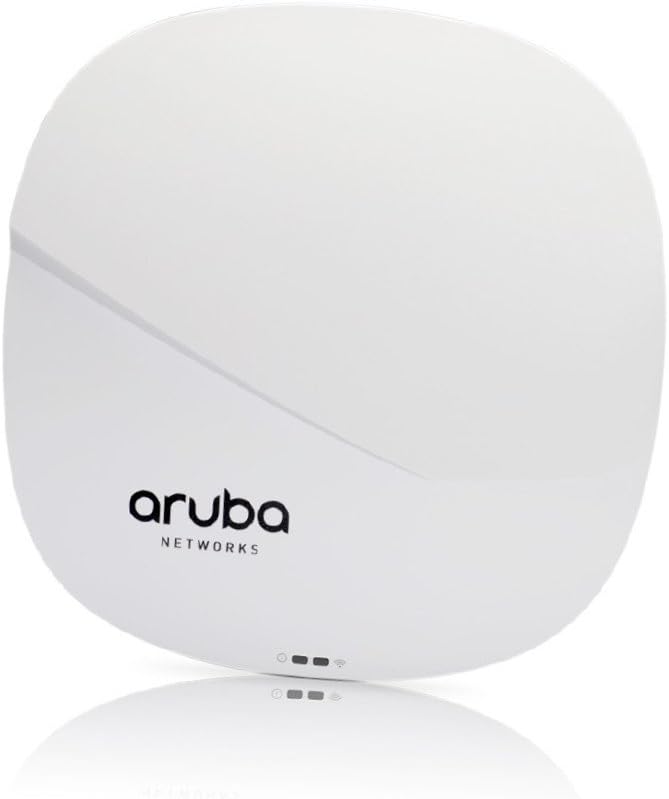
Figure 1: HP AP-314 Wireless Access Point Front View
The image displays the front of the HP AP-314 Wireless Access Point. It is a white, square-shaped device with rounded corners. The 'aruba NETWORKS' logo is prominently displayed in black text. Below the logo, three small indicator lights are visible, suggesting power, network activity, and wireless status.
4.1 Компоненты и индикаторы
- Светодиоды состояния: Indicate power, network connectivity, and wireless activity. Refer to the device's quick start guide or full technical documentation for specific LED patterns and their meanings.
- Порт Ethernet (RJ-45): For connecting to the wired network and receiving Power over Ethernet (PoE) if supported.
- USB-порт: For potential future expansion or specific configurations.
5. Настройка
5.1 Установка точки доступа
The AP-314 can be mounted on a ceiling or wall. Specific mounting hardware (not always included) is required. Ensure the mounting location allows for optimal wireless coverage and is away from obstructions.
- Выберите подходящее место для монтажа.
- Secure the mounting bracket (if applicable) to the chosen surface using appropriate screws.
- Attach the access point to the mounting bracket, ensuring it clicks securely into place.
5.2 Connecting to the Network and Power
- Connect an Ethernet cable from your network switch (preferably a PoE-enabled switch) to the RJ-45 port on the access point.
- If not using PoE, connect a compatible power adapter (sold separately) to the device's power input and then to a power outlet.
- Once powered, the status LEDs will illuminate, indicating the boot-up process.
5.3 Начальная конфигурация
Initial configuration typically involves accessing the device's web interface or using a network management system (e.g., Aruba Central or a local controller). Refer to the Aruba documentation for detailed configuration steps specific to your network environment.
- Connect a computer to the same network segment as the access point.
- Determine the IP address of the access point (e.g., via DHCP server logs or a discovery tool).
- Откройте web browser and navigate to the access point's IP address.
- Log in using the default credentials (refer to Aruba documentation for defaults).
- Configure wireless networks (SSIDs), security settings, and other network parameters as required.
6. Инструкция по эксплуатации
Once configured, the HP AP-314 operates autonomously to provide wireless network access. Users can connect to the configured SSIDs using their wireless-enabled devices.
6.1 Подключение к беспроводной сети
- On your wireless device (laptop, smartphone, tablet), scan for available Wi-Fi networks.
- Select the SSID (network name) you configured for the AP-314.
- Enter the network password or security key if prompted.
- Теперь ваше устройство должно быть подключено к беспроводной сети.
6.2 Monitoring and Management
The access point's status can be monitored via its web interface or through your network management system. This allows for checking connected clients, network traffic, and device health.
7. Техническое обслуживание
7.1 обновлений прошивки
Regularly check for and apply firmware updates to ensure optimal performance, security, and access to new features. Firmware updates are typically available from the HP/Aruba support webсайт.
7.2 Очистка
Clean the exterior of the access point with a soft, dry cloth. Do not use liquid cleaners or aerosols directly on the device.
7.3 Оптимальное размещение
Ensure the access point remains in an optimal location, free from new obstructions that could degrade wireless signal quality.
8. Поиск Неисправностей
| Проблема | Возможная причина | Решение |
|---|---|---|
| Нет питания / Устройство не включается | Power adapter not connected; PoE not active; faulty power source. | Check power connections. Ensure PoE switch port is active. Try a different power outlet. |
| Нет подключения к сети | Ethernet cable disconnected; network switch issue; incorrect IP configuration. | Verify Ethernet cable connection. Check network switch status. Confirm IP settings. |
| Слабый сигнал Wi-Fi или низкая скорость. | Interference; device placement; outdated firmware; too many connected devices. | Relocate the access point. Check for sources of interference. Update firmware. Consider network optimization. |
| Невозможно получить доступ web интерфейс | Неверный IP-адрес; проблемы с сетевым подключением; блокировка доступа брандмауэром. | Verify the access point's IP address. Ensure your computer is on the same network. Temporarily disable firewalls. |
9. Технические характеристики
| Особенность | Деталь |
|---|---|
| Бренд | HP |
| Номер модели | JW795A |
| Тип беспроводной связи | 802.11ac (also supports 802.11a/b/g/n) |
| Скорость беспроводной передачи | 2.10 Гбит/с |
| Number of Network (RJ-45) Ports | 1 |
| Количество портов USB 2.0 | 1 |
| Вес товара | 1.43 фунта (приблизительно 0.65 кг) |
| Размеры продукта (ДxШxВ) | 7 x 2 x 7 дюйма (прибл. 17.8 x 5.1 x 17.8 см) |
| Томtage | 3.6V (internal component voltage; external power supply requirements may vary) |
| Производитель | Хьюлетт Паккард |
| СКП | 190017041261 |
| Первый доступный | 11 августа 2016 г. |
10. Гарантия и поддержка
For warranty information, technical support, and additional resources, please refer to the official HP or Aruba Networks website. You can typically find detailed documentation, FAQs, and contact information for customer service there.
Ensure you have your product model number (JW795A) and serial number ready when contacting support.