
1. Введение
The Centralite Pearl Thermostat is designed to provide precise temperature control with an intuitive touch interface. It integrates seamlessly with various smart home platforms using ZigBee connectivity, offering efficient management of residential HVAC systems. This manual provides essential information for installation, operation, and maintenance of your Pearl Thermostat.
2.Основные характеристики
- Compatible with SmartThings, Spectrum, Cox, Time Warner Cable, Vera, and ZigBee platforms.
- Supports up to 2-stagе тепло и 2-еtage cool HVAC systems.
- Designed for quick installation, typically within 15 minutes.
- Features a built-in power amplifier for extended wireless range.
- Equipped with responsive touch controls for user interaction.
3. Содержимое упаковки
Проверьте наличие всех предметов в посылке:
- Pearl Thermostat
- Монтажные винты (4)
- Батарейки AA (4)
- Краткое руководство пользователя
- Этикетки для проводки
4. Установка
Перед началом установки убедитесь, что питание системы HVAC отключено с помощью автоматического выключателя, чтобы предотвратить поражение электрическим током.
4.1 Mounting the Backplate
- Carefully remove your old thermostat from the wall. Note the wiring connections before disconnecting.
- Mount the Pearl Thermostat backplate to the wall using the provided mounting screws. Ensure it is level.
4.2 Подключение
The Pearl Thermostat features quick-connect terminals for tool-free wiring. Match the wires from your HVAC system to the corresponding terminals on the thermostat backplate. Use the included wiring labels for identification.

Рисунок 1: Сзади view of the Pearl Thermostat backplate, illustrating battery compartments and quick-connect wiring terminals for HVAC system connection.
Common wiring configurations include:
- R/Rc/Rh: 24V AC power (usually red wire)
- C: Common wire (for continuous 24V power, often blue or black)
- В/В1: Heat (usually white wire)
- Г/Г1: Cool (usually yellow wire)
- G: Fan (usually green wire)
- O / B: Reversing valve for heat pumps
Insert each stripped wire end into its corresponding terminal until it is securely held.
4.3 Установка аккумулятора
Insert the four AA batteries into the designated compartments on the back of the thermostat unit. Ensure correct polarity.
4.4 Attaching the Thermostat
Align the thermostat unit with the mounted backplate and gently push until it clicks into place. Restore power to your HVAC system at the circuit breaker.
5. Инструкция по эксплуатации
The Pearl Thermostat features a clear LCD display and intuitive touch controls for easy operation.

Рисунок 2: Передняя часть view of the Pearl Thermostat, highlighting the digital display and touch-sensitive buttons for Mode, Hold, and Fan functions.
5.1 Регулировка температуры
Используйте + и - touch areas on the right side of the thermostat to increase or decrease the desired temperature set point.
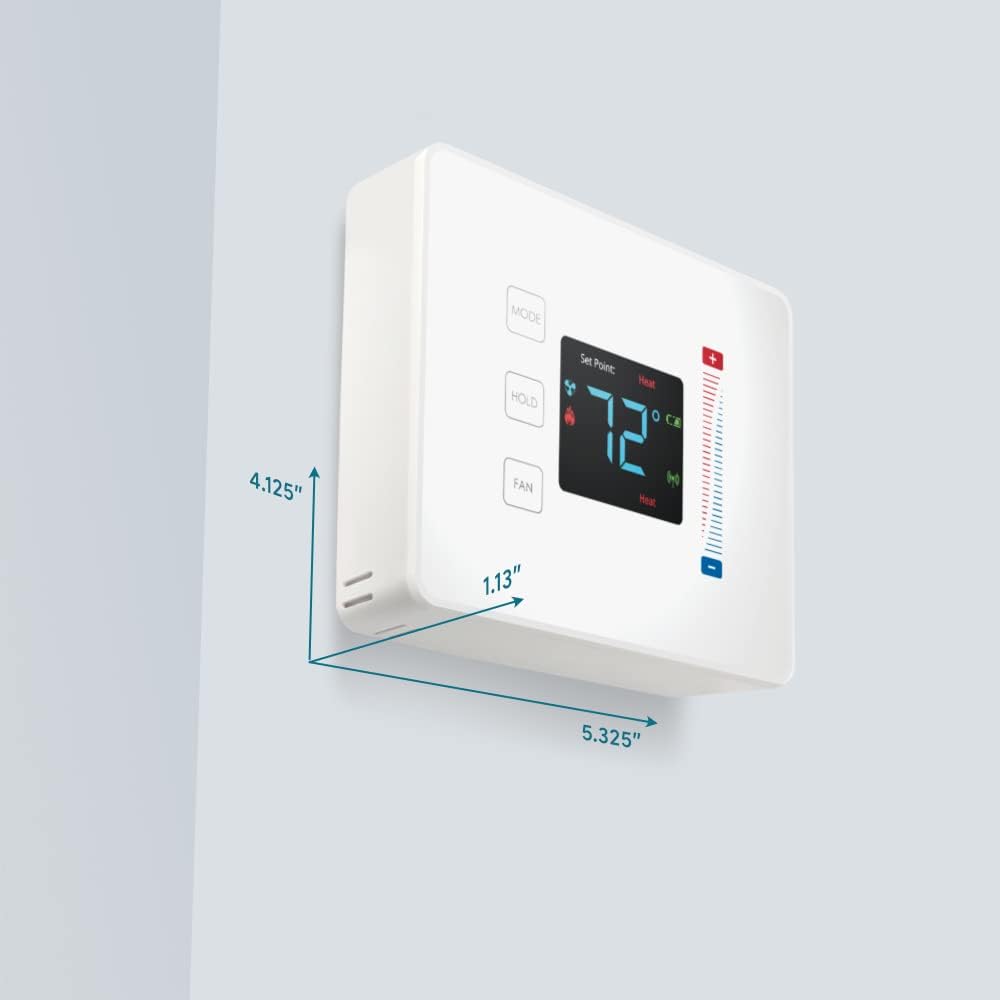
Figure 3: User interaction with the Pearl Thermostat's touch screen to modify temperature settings.
5.2 Выбор режима
Нажмите РЕЖИМ button to cycle through available operating modes: Heat, Cool, Auto, Off.
5.3 Функция удержания
Нажмите ДЕРЖАТЬ button to maintain the current temperature setting indefinitely, overriding any programmed schedules. Press again to release the hold and resume the schedule.
5.4 Управление вентилятором
Нажмите FAN button to cycle through fan settings: Auto (fan runs only when heating or cooling) or On (fan runs continuously).
6. Техническое обслуживание
6.1. Замена батареи
The Pearl Thermostat is powered by four AA batteries. When the battery level is low, a low battery indicator will appear on the display. To replace batteries:
- Gently pull the thermostat unit off its backplate.
- Remove the old AA batteries and dispose of them properly.
- Вставьте четыре новые щелочные батареи типа АА, соблюдая правильную полярность.
- Reattach the thermostat unit to the backplate.
Regular battery replacement ensures uninterrupted operation and maintains ZigBee connectivity.
6.2 Очистка
Протрите поверхность термостата мягкой тряпкой.amp cloth. Avoid using abrasive cleaners or solvents, as these can damage the display and finish.
7. Поиск Неисправностей
If you encounter issues with your Pearl Thermostat, refer to the following common troubleshooting steps:
- Нет дисплея/питания: Check if the AA batteries are correctly installed and fully charged. Ensure power to the HVAC system is on at the circuit breaker.
- Система HVAC не отвечает: Verify that the wiring connections to the backplate are secure. Confirm the thermostat is in the correct operating mode (Heat/Cool/Auto).
- Connectivity Issues (ZigBee): Ensure your smart home hub is powered on and within range. Refer to your smart home hub's instructions for device pairing. You may need to initiate a re-pairing process.
- Неправильные показания температуры: Убедитесь, что термостат не подвергается воздействию прямых солнечных лучей, сквозняков или источников тепла, которые могут повлиять на его внутренний датчик.
- Thermostat Not Responding to Touch: Gently clean the screen surface. If the issue persists, try removing the thermostat from its backplate, waiting 30 seconds, and reattaching it to perform a soft reset.
8. Технические характеристики

Figure 4: Dimensions of the Centralite Pearl Thermostat.
| Спецификация | Деталь |
|---|---|
| Бренд | Централит |
| Название модели | Centralite Pearl Thermostat |
| Номер модели | 3000-wC |
| Тип контроллера | SmartThings, Vera |
| Цвет | Белый |
| Тип контроля температуры | Программируемый, цифровой |
| Технология связи | ZigBee |
| Источник питания | Работает от батареек (4 батарейки типа АА в комплекте). |
| Вес товара | 0.97 фунта (приблизительно 15.5 унций) |
| Томtage | 230 Volts (HVAC system) |
| Материал | Жемчуг |
| Тип дисплея | ЖК-дисплей |
| Тип отделки | Сатин |
| Тип управления | Сенсорная панель управления |
| Метод контроля | Приложение |
| Тип крепления | Настенное крепление |
| Подсветка | Да |
| Размеры продукта (Д x Ш x В) | 5.33 x 1.13 x 4.13 дюйма |
| СКП | 812489022264 |
9. Гарантия и поддержка
For warranty information and technical support, please refer to the documentation included with your product or visit the official Centralite webСохраните чек в качестве подтверждения покупки.