
1. Введение
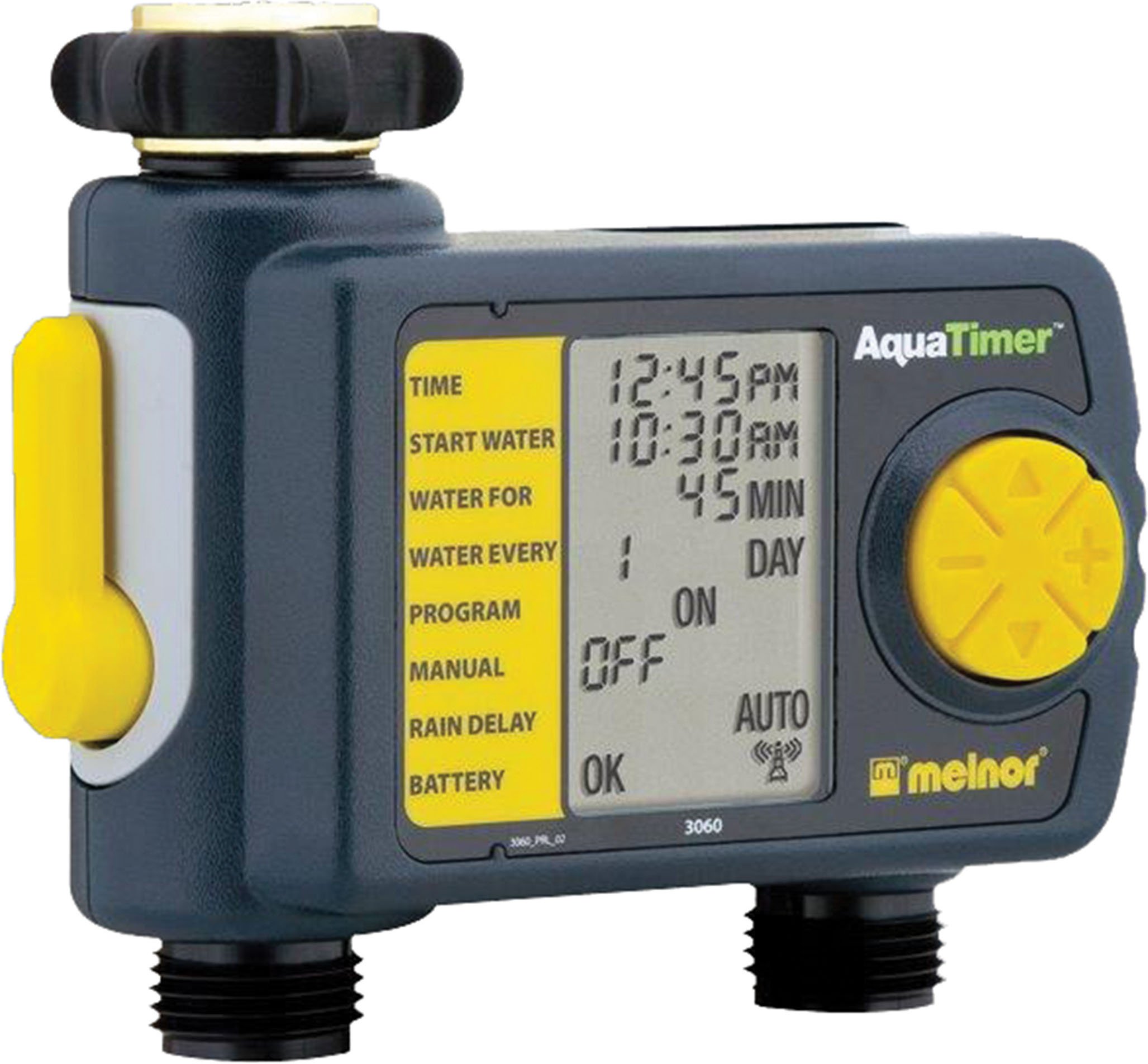
Thank you for choosing the Melnor 53100 2-Outlet Digital Water Timer. This device is designed to automate your watering schedule, providing convenience and efficiency for your garden or lawn. It features independent programming for two zones, a large LCD screen for clear information, and an easy-to-use interface for setting up your watering cycles.
2. Информация по технике безопасности
- Этот продукт предназначен для только для наружного использования. Do not use indoors or with potable water systems unless specifically approved.
- Убедитесь, что все соединения надежно закреплены, чтобы предотвратить протечки и повреждение водой.
- Do not expose the timer to freezing temperatures. Remove batteries and store indoors during winter months to prevent damage.
- Use only 1.5V AA alkaline batteries. Do not mix old and new batteries, or different types of batteries.
- Предупреждение о предложении 65 штата Калифорния: This product can expose you to chemicals including styrene, which is known to the State of California to cause cancer. For more information, please visit www.P65Warnings.ca.gov.
3. Содержимое упаковки
The Melnor 53100 package includes:
- 1 x Melnor 53100 2-Outlet Digital Water Timer
4. Особенности продукта
- Двойные розетки: Independently program two watering zones.
- Большой ЖК-экран: Provides clear, easy-to-read information on current settings and next watering cycle.
- Гибкое программирование: Set watering schedules up to 24 times per day for individual days of the week.
- Ручное управление: Easily start or stop watering manually without affecting programmed schedules.
- Прочная конструкция: Features a zinc connection nut with a non-slip rubberized grip for secure attachment.
- Soil Moisture Sensor Compatibility: Can be used with the HydroLogic soil moisture sensor (sold separately, SKU 15339).
5. Установка
- Прикрепить к крану: Screw the timer onto your outdoor faucet. Ensure the zinc connection nut is tightened securely by hand to prevent leaks. Do not overtighten with tools.
- Подсоедините шланги: Attach your garden hoses to the two outlets at the bottom of the timer. Tighten connections firmly.
6. Установка аккумулятора
- Найдите отсек для батареек на задней панели таймера.
- Откройте крышку аккумуляторного отсека.
- Insert two (2) fresh 1.5V AA alkaline batteries, observing the correct polarity (+/-) as indicated inside the compartment.
- Close the battery cover securely. The LCD screen should illuminate, and a battery status indicator will be visible.
- Примечание: Use only 1.5V AA alkaline batteries. Do not use 1.2V NiMH or NiCad rechargeable batteries, as they may not provide sufficient power for optimal operation.
7. Установка часов
- Turn the large dial to the УСТАНОВЛЕННОЕ ВРЕМЯ позиция.
- Используйте ВВЕРХ/ВНИЗ arrow buttons to adjust the current hour (AM/PM). Press OK для подтверждения.
- Используйте ВВЕРХ/ВНИЗ arrow buttons to adjust the current minute. Press OK для подтверждения.
- Используйте ВВЕРХ/ВНИЗ arrow buttons to set the current day of the week. Press OK для подтверждения.
- Поверните циферблат обратно в положение АВТОМАТИЧЕСКОЕ ОТКЛЮЧЕНИЕ or any other desired setting to save the time.
8. Программирование графиков полива
The Melnor 53100 allows independent programming for two zones. Follow these steps for each zone:
8.1. Выберите зону
- Нажмите ZONE 1 2 button to toggle between Zone 1 and Zone 2. Ensure the desired zone is selected before proceeding.
8.2. Set Start Time (START WATER)
- Поверните циферблат на НАЧАТЬ ВОДУ.
- Используйте ВВЕРХ/ВНИЗ arrow buttons to set the desired start time for watering (AM/PM). Press OK для подтверждения.
- You can set multiple start times for each zone if needed.
8.3. Set Watering Duration (HOW LONG)
- Поверните циферблат на СКОЛЬКО.
- Используйте ВВЕРХ/ВНИЗ arrow buttons to set the watering duration in minutes or hours. Press OK для подтверждения.
8.4. Set Watering Frequency (HOW OFTEN)
- Поверните циферблат на КАК ЧАСТО.
- Используйте ВВЕРХ/ВНИЗ arrow buttons to select the watering frequency:
- Every X hours (e.g., every 6 hours)
- Every X days (e.g., every 2 days)
- Specific days of the week (e.g., Mon, Wed, Fri)
- Нажимать OK для подтверждения вашего выбора.
After programming, turn the dial to АВТОМАТИЧЕСКОЕ ОТКЛЮЧЕНИЕ to activate the schedule. The display will show the next scheduled watering time.
9. Ручное управление
To manually water without affecting your programmed schedule:
- Ensure the dial is in the АВТОМАТИЧЕСКОЕ ОТКЛЮЧЕНИЕ позиция.
- Нажмите ON/OFF MANUAL кнопка.
- Используйте ZONE 1 2 button to select the desired zone (1 or 2).
- Используйте ВВЕРХ/ВНИЗ arrow buttons to set the desired manual watering duration.
- Нажимать OK to start manual watering. The timer will water for the set duration and then automatically turn off.
- To stop manual watering prematurely, press the ON/OFF MANUAL кнопку еще раз.
10. Функция задержки дождя
The rain delay function allows you to pause your watering schedule for a set period, conserving water after rainfall.
- Ensure the dial is in the АВТОМАТИЧЕСКОЕ ОТКЛЮЧЕНИЕ позиция.
- Нажмите и удерживайте + (UP arrow) button for a few seconds. The display will show a rain delay duration.
- Используйте ВВЕРХ/ВНИЗ arrow buttons to select the desired delay duration (e.g., 24, 48, 72 hours).
- Нажимать OK to confirm. The timer will pause all programmed watering cycles for the selected duration and resume automatically afterward.
- To cancel rain delay, press and hold the + (UP arrow) button again until the delay is cleared.
11. Техническое обслуживание
- Уборка: Протри таймер рекламойamp cloth as needed. Do not use abrasive cleaners or submerge the unit in water.
- Подготовка к зиме: Before the first frost, disconnect the timer from the faucet and hoses. Remove the batteries. Store the timer in a dry, frost-free location indoors.
- Замена батареи: Replace batteries when the low battery indicator appears on the LCD screen to ensure continuous operation.
12. Поиск Неисправностей
| Проблема | Возможная причина | Решение |
|---|---|---|
| Таймер не поливает | Батареи разряжены или разряжены Кран выключен Program not set or activated Rain delay is active | Заменить батареи Откройте кран Ensure dial is on AUTO OFF and program is set Cancel rain delay |
| Утечка воды из соединений | Ослабленное соединение Damaged washer | Tighten connections by hand Проверьте и замените резиновые шайбы, если они повреждены. |
| ЖК-дисплей неактивен или тусклый. | Батареи разряжены или разряжены | Replace batteries with fresh 1.5V AA alkaline batteries |
| Timer not keeping correct time/settings reset | Extremely low batteries Внутренняя неисправность | Замените батареи. Если проблема не устранена, обратитесь в службу поддержки клиентов. |
13. Технические характеристики
- Модель: 53100
- Розетки: 2
- Источник питания: 2 щелочные батарейки типа АА 1.5 В (в комплект не входят)
- Материал: Прочная конструкция
- Вес товара: Примерно 11.98 унции
- Количество настроек: 8 (referring to programming options)
- Цвет: Черный/Серый
14. Гарантия и поддержка
Melnor products are designed for durability and performance. For warranty information or technical support, please refer to the warranty card included with your purchase or visit the official Melnor webПожалуйста, укажите номер вашей модели (53100) и дату покупки при обращении в службу поддержки.