
Введение
This manual provides comprehensive instructions for the proper use and maintenance of your NAVIFORCE NF9024 Analog-Digital Men's Watch. Please read this manual thoroughly to ensure optimal performance and longevity of your timepiece. Keep this manual for future reference.
Продукт болееview
The NAVIFORCE NF9024 is a robust analog-digital watch featuring a black metal dial and band. It combines traditional analog timekeeping with modern digital functionalities, including date, alarm, and stopwatch. The watch is designed for durability and is water-resistant up to 30 meters.
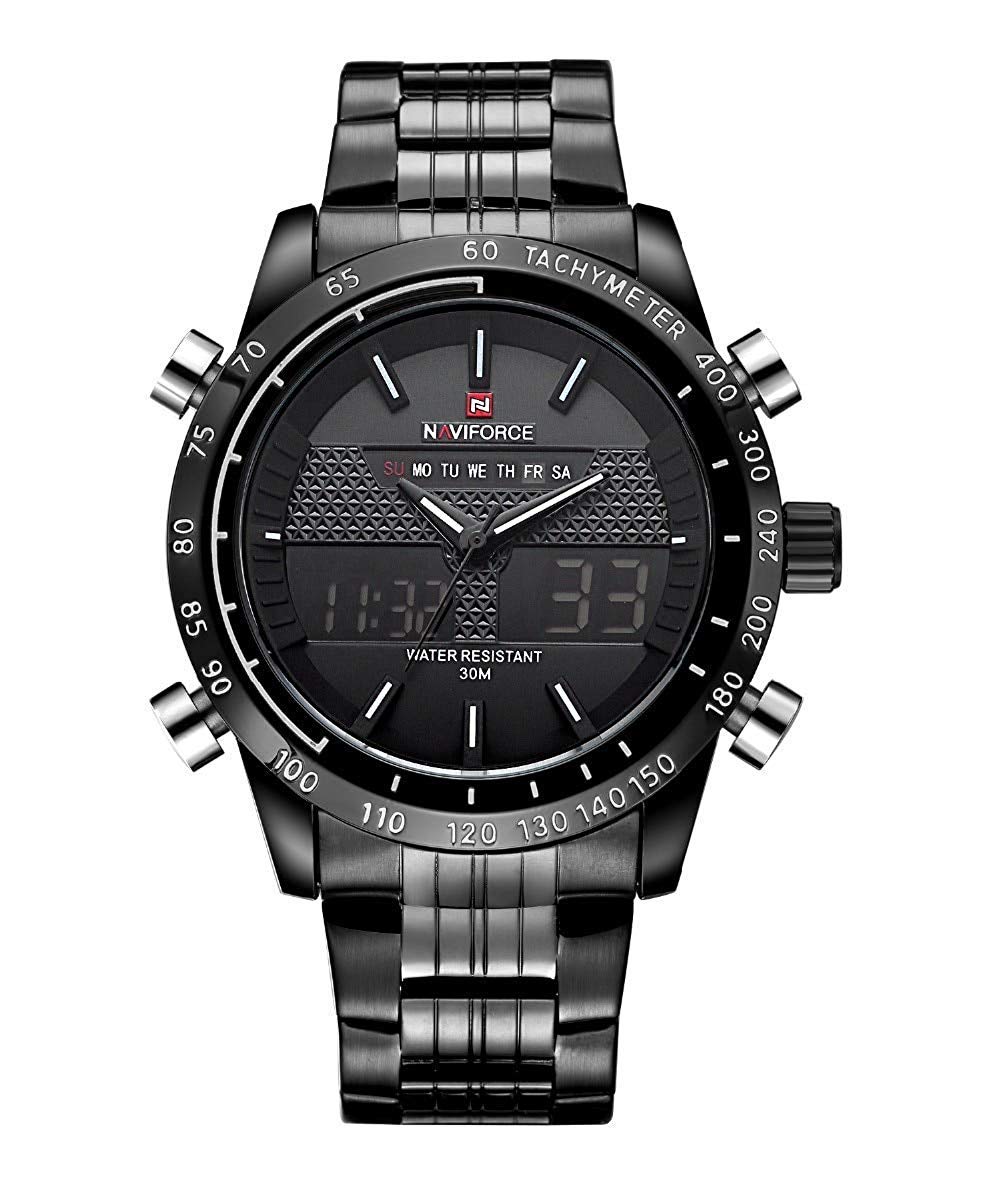
Рисунок 1: Передний view демонстрация часов NAVIFORCE NF9024asing its black metal design, analog hands, and digital display.

Рисунок 2: Задний view of the NAVIFORCE NF9024 watch, showing the stainless steel case back and metal band clasp.
Компоненты:
- Корона: Используется для установки аналогового времени.
- Push Buttons (A, B, C, D): Used for operating digital functions (mode, adjust, light, reset). Specific functions may vary; refer to detailed setup instructions.
- Аналоговый циферблат: Displays hours, minutes, and seconds with traditional hands.
- Цифровой дисплей: Shows digital time, date, day, and other functions.
- Металлическая группа: Durable metal strap with a secure clasp.
- Случай: Металл casing protecting the internal movement.
Инструкции по установке
Before using your watch, it is essential to set the correct time and date for both analog and digital displays.
1. Установка аналогового времени:
- Pull the crown (located on the right side of the watch) out to the first position.
- Rotate the crown clockwise or counter-clockwise to adjust the analog hour and minute hands to the desired time.
- Once the analog time is set, push the crown back into its normal position.
2. Установка цифрового времени и даты:
The digital display typically has multiple modes. Use the "Mode" button (often bottom-left) to cycle through them.
- In normal time display mode, press the "Mode" button until the time setting mode is activated (usually indicated by flashing digits).
- Use the "Adjust" button (often top-left) to select the digit or setting you wish to change (e.g., seconds, minutes, hours, 12/24-hour format, month, date, day).
- Use the "Reset" button (often bottom-right) to increase the value of the flashing digit. Hold it down for faster adjustment.
- Repeat steps 2 and 3 until all desired settings (time, date, day) are correctly configured.
- Press the "Mode" button again to exit the setting mode and return to the normal time display.

Рисунок 3: Digital display of the watch, illustrating the digital time and day indicators. This display is adjustable via the side buttons.
3. Настройка будильника:
- Press the "Mode" button repeatedly until you reach the alarm setting mode.
- Use the "Adjust" button to select the hour or minute digits.
- Use the "Reset" button to set the desired alarm time.
- Press "Mode" to confirm and exit.
- To activate/deactivate the alarm, typically press the "Reset" button while in alarm mode.
4. Функция секундомера:
- Press the "Mode" button repeatedly until you reach the stopwatch mode (usually indicated by "00:00:00").
- Press the "Reset" button to start the stopwatch.
- Press the "Reset" button again to pause/resume.
- Press the "Adjust" button to reset the stopwatch to zero.
Эксплуатация часов
1. Basic Time Reading:
The watch displays time both analogically (with hands) and digitally. The digital display also shows the current day of the week and date.
2. Using the Backlight:
In low-light conditions, press the "Light" button (often top-right) to illuminate the digital display for a few seconds.
3. Водонепроницаемость:
This watch is water-resistant up to 30 meters (3 ATM). This means it can withstand splashes of water or brief immersion. It is нет suitable for showering, swimming, diving, or any prolonged water activities. Do not operate the buttons or crown when the watch is wet.

Рисунок 4: Illustration of the watch's 30-meter water resistance, suitable for splashes and rain, but not for submersion or showering.
Обслуживание
1. Очистка:
Wipe the watch case and band regularly with a soft, dry cloth to remove dust and dirt. For stubborn grime, a slightly damp Можно использовать ткань, после чего сразу же высушить. Избегайте использования химических чистящих средств или абразивных материалов.
2. Замена батареи:
The watch uses a single AAA battery (included). When the digital display dims or the watch stops functioning, it may be time for a battery replacement. It is recommended to have the battery replaced by a qualified watch technician to ensure proper sealing and water resistance.
3. Хранение:
When not in use, store your watch in a cool, dry place away from direct sunlight, extreme temperatures, and strong magnetic fields. Keep it in its original packaging or a watch box to protect it from scratches.
Поиск неисправностей
- Watch not running / Digital display blank:
This usually indicates a depleted battery. Replace the battery as described in the Maintenance section.
- Analog and Digital times do not match:
The analog and digital movements are independent. Follow the "Setting Analog Time" and "Setting Digital Time and Date" instructions to synchronize them.
- Digital display is dim or flickering:
This is a sign of a low battery. Replace the battery promptly.
- Конденсат внутри часов:
If condensation appears, it suggests a breach in the watch's water resistance. Avoid further contact with water and seek professional service immediately.
- Кнопки не реагируют:
Ensure the watch is dry. If the issue persists, the internal mechanism may require inspection by a qualified technician.
Технические характеристики
| Особенность | Деталь |
|---|---|
| Номер модели | NF9024 |
| Тип движения | Кварцевые (аналого-цифровые) |
| Тип дисплея | Аналоговый и цифровой |
| Материал корпуса | Металл |
| Материал ремешка | Металл |
| Цвет циферблата | Черный |
| Диаметр корпуса | 46 мм |
| Толщина корпуса | 16 мм (1.6 см) |
| Длина ремешка | 24 см |
| Ширина полосы | 2.4 см |
| Глубина водонепроницаемости | 30 метров (3 АТМ) |
| Тип батареи | 1 батарейка ААА (входит в комплект) |
| Вес товара | 200 г (0.44 фунта) |

Рисунок 5: Product image displaying key specifications such as case diameter, thickness, band length, and band width.

Рисунок 6: Visual guide illustrating the 46mm dial diameter in comparison to common objects like a coin and a credit card.

Рисунок 7: Guide showing the recommended wrist size range of 6-7 inches for comfortable wear of the watch.
Гарантия и поддержка
The NAVIFORCE NF9024 watch comes with a 1-year Seller Warranty covering manufacturing defects. This warranty does not cover damage resulting from improper use, accidents, unauthorized repairs, or normal wear and tear.
For warranty claims or technical support, please contact your point of purchase or the authorized NAVIFORCE service center. Ensure you retain your purchase receipt as proof of purchase.
For additional information or inquiries, please visit the official NAVIFORCE webсайт или свяжитесь со службой поддержки клиентов.


