
Введение
This manual provides detailed instructions for the Inateck Bluetooth 4.1 Sport Headset, Model P20 (BH1001). Please read this guide thoroughly before using the product to ensure proper operation and to maximize your listening experience. This headset is designed for active lifestyles, offering wireless audio with a secure fit and integrated microphone.
1. Настройка
1.1 Содержимое упаковки
Проверьте наличие всех предметов в упаковке:
- Inateck Bluetooth Sport Headset (P20 / BH1001)
- USB-кабель для зарядки
- Multiple pairs of silicone ear tips (various sizes)
- Сумка для переноски
- Руководство пользователя (этот документ)
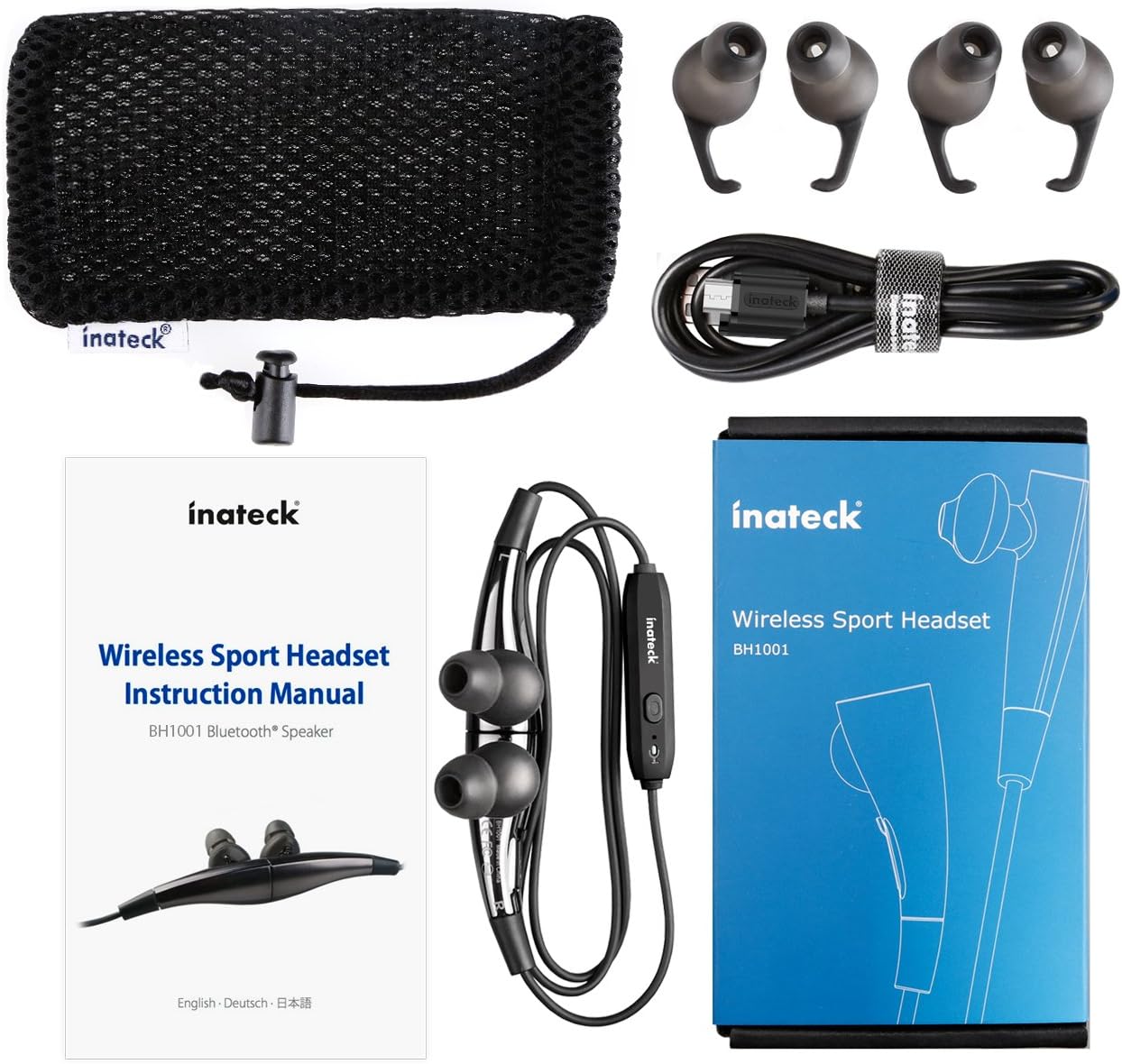
Рисунок 1.1: Contents of the Inateck Bluetooth Sport Headset package.
1.2 Зарядка гарнитуры
Before first use, fully charge the headset. A full charge takes approximately 3 hours and provides at least 8 hours of music playback.
- Locate the Micro USB charging port on the headset.
- Connect the small end of the provided USB charging cable to the headset's Micro USB port.
- Подключите больший конец USB-кабеля к источнику питания USB (например, к USB-порту компьютера, сетевому адаптеру USB).
- The status indicator light will illuminate during charging. It will change color or turn off once charging is complete.

Рисунок 1.2: Charging the Inateck Bluetooth Sport Headset via Micro USB.
1.3 Сопряжение с Bluetooth-устройством
Чтобы подключить гарнитуру к смартфону или другому устройству с поддержкой Bluetooth:
- Убедитесь, что гарнитура выключена.
- Press and hold the Multifunction Key (MFB) on the inline control unit for approximately 5-7 seconds until the status indicator light flashes red and blue alternately. This indicates pairing mode.
- На вашем устройстве с поддержкой Bluetooth включите Bluetooth и выполните поиск новых устройств.
- Select "Inateck BH1001" or "Inateck P20" from the list of available devices.
- Once paired, the status indicator light on the headset will flash blue slowly, and you may hear an audible confirmation.
- The headset will automatically attempt to reconnect to the last paired device when turned on.

Рисунок 1.3: Inateck Headset paired with a mobile device for music playback.
2. Инструкция по эксплуатации
2.1 Элементы управления гарнитурой
The inline control unit provides easy access to various functions:

Рисунок 2.1: Надview of the Inateck Headset control unit.
- Multifunction Key (MFB):
- Нажмите и удерживайте (5-7 с): Включение/выключение питания, переход в режим сопряжения.
- Короткое нажатие: воспроизведение/пауза музыки, ответ/завершение вызова
- Long press (during incoming call): Reject call
- Увеличение громкости (+) / Следующий трек:
- Короткое нажатие: увеличение громкости
- Длительное нажатие: переход к следующему треку
- Уменьшить громкость (-) / Предыдущий трек:
- Короткое нажатие: уменьшение громкости
- Long press: Go to previous track
- Порт Micro USB: Для зарядки гарнитуры.
- Индикатор состояния: Отображает состояние питания, сопряжения и зарядки.
- Микрофон: Для звонков без помощи рук.
2.2. Ношение гарнитуры
Select the ear tips that provide the most comfortable and secure fit for your ears. The headset is designed to be worn with the cable behind your neck, ensuring stability during physical activity.

Рисунок 2.2: Proper wearing of the Inateck Sport Headset for active use.
2.3 Magnetic Earbuds Feature
The earbuds feature integrated magnets. When not in use, you can connect the two earbuds together, forming a necklace around your neck. This action automatically pauses music playback and prevents the headset from falling off.

Рисунок 2.3: Magnetic earbuds feature for secure wearing around the neck.

Рисунок 2.4: Headset worn as a necklace using the magnetic feature.
3. Техническое обслуживание
- Уборка: Протрите гарнитуру мягкой сухой тканью. Не используйте абразивные чистящие средства или растворители.
- Советы по уху: Регулярно снимайте и очищайте силиконовые амбушюры мягким мылом и водой. Убедитесь, что они полностью высохли, прежде чем снова прикреплять их.
- Хранилище: When not in use, store the headset in the provided carrying pouch to protect it from dust and damage. Avoid extreme temperatures.
- Водостойкость: The headset is designed to be water-resistant for sports and exercise (e.g., sweat, light rain). Do not submerge it in water or expose it to heavy rain.
4. Поиск Неисправностей
4.1 Не удается включить питание
Ensure the headset is fully charged. Connect it to a power source using the USB cable and allow it to charge for at least 30 minutes before attempting to power on again.
4.2 Невозможно подключиться к устройству
- Ensure the headset is in pairing mode (status indicator flashing red and blue alternately).
- Make sure Bluetooth is enabled on your device and it is within range (typically 10 meters or 33 feet).
- Включите и выключите функцию Bluetooth на вашем устройстве.
- If previously paired, try "forgetting" or "unpairing" the headset from your device's Bluetooth settings and then re-pair.
- Убедитесь, что другие устройства Bluetooth не мешают соединению.
4.3 Нет звука или плохое качество звука
- Проверьте уровень громкости как на гарнитуре, так и на подключенном устройстве.
- Убедитесь, что гарнитура правильно сопряжена и подключена к вашему устройству.
- Move closer to your device to reduce potential interference or range issues.
- Ensure the ear tips are correctly seated in your ears for optimal sound delivery.
- Reboot both the headset and your connected device.
4.4 Прерывистое соединение
- Ensure there are no physical obstructions between the headset and your device.
- Avoid placing your device in areas where the signal might be blocked (e.g., deep pockets, behind thick walls).
- Сведите к минимуму помехи от других беспроводных устройств (Wi-Fi роутеров, других устройств Bluetooth).
- Keep the headset and your device within the recommended Bluetooth range.
5. Технические характеристики
| Бренд | Инатек |
| Название модели | Р20 |
| Номер модели | BH1001 |
| Технология связи | Блютус 4.1 |
| Форм-фактор | Внутриканальные наушники |
| Расположение ушей | Intra-aural |
| Разъем для наушников | USB (для зарядки) |
| Уровень водонепроницаемости | Waterproof (suitable for sweat/light rain) |
| Особые возможности | Sports and exercise, integrated microphone, magnetic earbuds |
| Вес товара | 78 грамм |
| Тип управления | Volume Control, Multifunction Button |
| Материал | Пластик |
6. Информация о гарантии
Inateck products typically come with a limited warranty. For specific warranty terms and conditions applicable to your Inateck Bluetooth Sport Headset, please refer to the warranty card included in your product packaging or visit the official Inateck webСохраните чек о покупке для предъявления гарантийных претензий.
7. Поддержка клиентов
If you encounter any issues not covered in this manual or require further assistance, please contact Inateck customer support. You can usually find contact information, FAQs, and additional resources on the official Inateck webсайт:
Webсайт: www.inateck.com
Please have your product model (P20 / BH1001) and purchase details ready when contacting support.