
Введение
This manual provides instructions for the setup, operation, and maintenance of your Youshiko Large LCD Radio Controlled Wall and Desk Clock, Model YC8055. This clock is designed to provide accurate time, date, indoor temperature, and humidity readings. It automatically synchronizes with the MSF radio time signal from the UK, ensuring precise timekeeping and automatic adjustments for Daylight Saving Time.
Информация по безопасности
- Use only the specified battery type (2 x AA Mignon LR06).
- Не смешивайте старые и новые батареи или батареи разных типов.
- Убедитесь, что батареи вставлены с соблюдением правильной полярности (+/-).
- Незамедлительно извлекайте разряженные батареи, чтобы предотвратить утечку.
- Не подвергайте часы воздействию экстремальных температур, прямых солнечных лучей или высокой влажности.
- Keep the clock away from strong magnetic fields.
- Clean the clock with a soft, dry cloth. Do not use abrasive cleaners or liquids.
Содержимое упаковки
- Youshiko Large LCD Radio Controlled Wall and Desk Clock (Model YC8055)
- Integrated stand for desk placement
- Отверстия для крепления к стене
Note: 2 x AA batteries are not included and must be purchased separately.
Продукт болееview
Макет дисплея
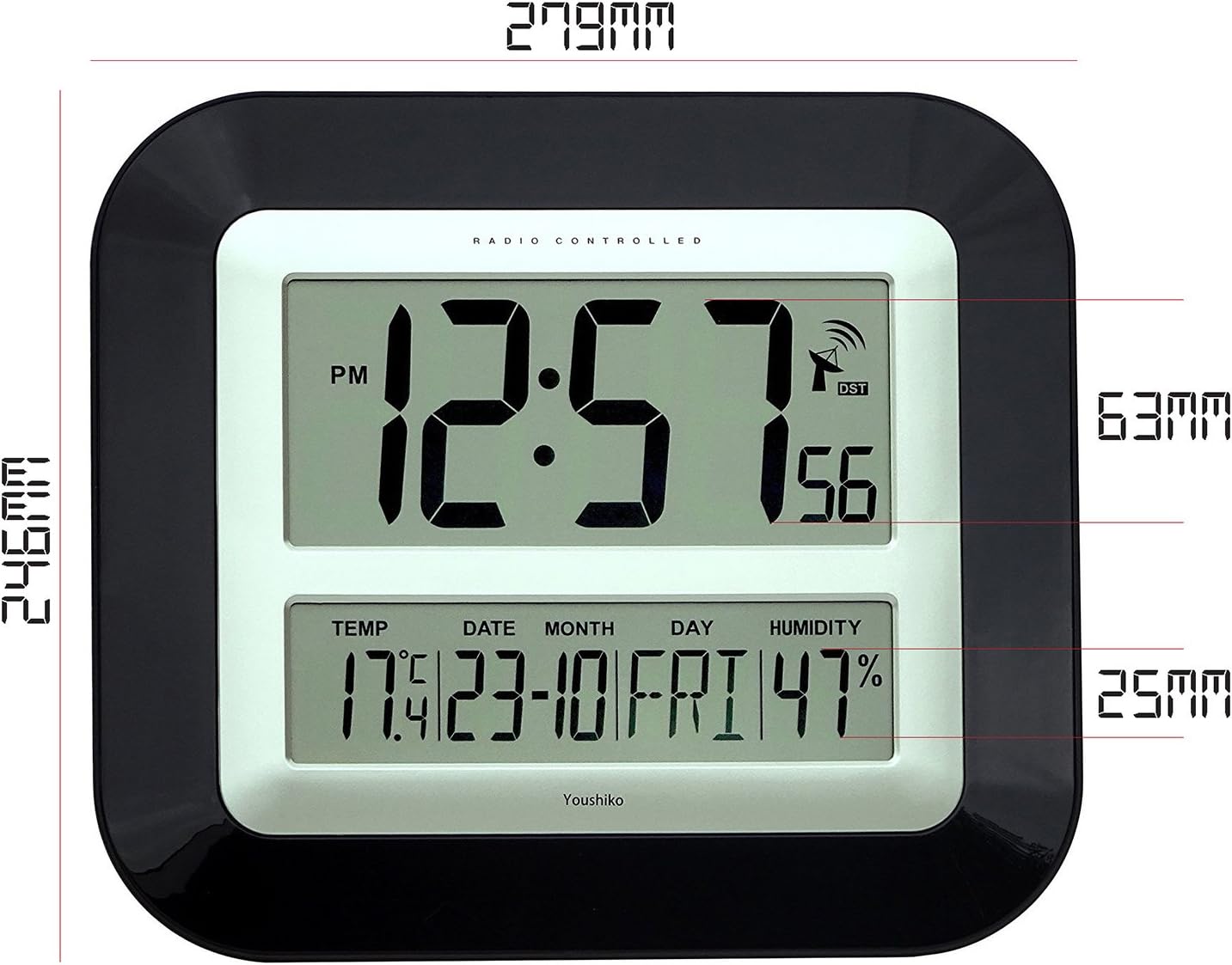
The large LCD screen provides clear visibility of time, date, temperature, and humidity. The display is designed for easy readability in various indoor environments.

Изображение: Передний view of the Youshiko YC8055 clock display, showing the time, date, day, temperature, humidity, and radio signal indicator. Dimensions are overlaid, indicating a height of 279mm and width of 246mm for the main unit, with display sections measuring 63mm and 25mm in height respectively.
Кнопки и элементы управления
The control buttons are located on the back of the unit for setting and adjusting various functions.

Изображение: Задний view of the Youshiko YC8055 clock, highlighting the control buttons: SET, ALARM, UP (▲), DOWN (▼), WAVE, and SNOOZE. The battery compartment is also visible at the bottom center.
Stand and Mounting Options
The clock can be placed on a desk using its integrated stand or mounted on a wall using the provided hanging holes.
Изображение: Сторона view of the Youshiko YC8055 clock, illustrating the extended integrated stand for stable desk placement.
Настраивать
1. Установка аккумулятора
- Откройте крышку батарейного отсека на задней панели часов.
- Insert 2 x AA (LR6) batteries, ensuring correct polarity (+ and -).
- Плотно закройте крышку батарейного отсека.
2. Первоначальный прием радиосигнала
Upon battery insertion, the clock will automatically attempt to receive the MSF radio time signal. This process may take a few minutes (typically less than 3 minutes). During this time, an antenna symbol will usually appear on the display, indicating it is searching for the signal. Once the signal is received, the clock will automatically set the correct time, date, and adjust for Daylight Saving Time (DST) if applicable.
If the clock does not set itself within a few minutes, try placing it near a window for better signal reception. Radio-controlled clocks can sometimes struggle to pick up signals in certain rooms or locations due to interference or building materials.
3. Radio Control Systems
This clock is designed for the UK and Ireland market, utilizing the MSF signal. For other regions, different radio control systems may be in use.

Изображение: Diagram illustrating the two main radio control systems in Europe: MSF for the UK and Ireland (transmitters in Cumbria, UK) and DCF-77 for the rest of Europe (transmitters in Mainflingen, Germany). It advises choosing the correct system for your location.
4. Manual Time/Date Adjustment (if needed)
In rare cases where the radio signal cannot be received, or if you wish to manually adjust certain settings, follow these steps:
- To change 12h/24h display format: Нажмите и удерживайте [Набор] button until the display shows either '12h' or '24h'. Use the [▲] (Вверх) или [▼] (Down) buttons to toggle to your desired setting. Press [Набор] again to confirm. Continue pressing [Набор] a few more times until the clock returns to displaying the time.
- Other manual settings (e.g., time zone, specific time/date) may be available by repeatedly pressing the [Набор] Кнопка. Используйте [▲] и [▼] кнопки для настройки значений.
Операционная
Отображение времени
The clock displays hours, minutes, and seconds. It can be set to either a 12-hour format (with AM/PM indicator) or a 24-hour format.
Отображение даты и дня недели
The lower section of the display shows the current date (day and month) and the day of the week.
Дисплей температуры и влажности
The clock continuously monitors and displays the indoor temperature (in Celsius or Fahrenheit) and relative humidity. While providing a general indication, these readings are not intended for scientific accuracy.
Функция будильника
The clock includes an alarm with a snooze function.
- Установка будильника: Нажмите [АВАРИЙНАЯ СИГНАЛИЗАЦИЯ] Нажмите кнопку для входа в режим настройки будильника. Используйте [▲] и [▼] Нажмите кнопки для установки желаемого времени будильника. [АВАРИЙНАЯ СИГНАЛИЗАЦИЯ] еще раз для подтверждения.
- Включение/выключение будильника: Нажмите [АВАРИЙНАЯ СИГНАЛИЗАЦИЯ] button briefly outside of setting mode to toggle the alarm on or off. An alarm icon will appear on the display when activated.
- Функция повтора: Когда прозвучит сигнал будильника, нажмите кнопку [SNOOZE] Кнопка для временного отключения будильника. Будильник снова зазвучит через короткий промежуток времени.
Обслуживание
Уборка
Wipe the clock with a soft, dry cloth. Do not use liquid cleaners, sprays, or abrasive materials, as these can damage the display or casing.
Замена батареи
When the display dims or the clock stops functioning, replace the batteries. Follow the battery installation steps in the Setup section. It is recommended to replace both batteries simultaneously.
Поиск неисправностей
| Проблема | Возможная причина | Решение |
|---|---|---|
| Clock does not display time or is incorrect. | Batteries are low or incorrectly inserted. No radio signal received. | Check battery polarity and replace if necessary. Move the clock to a location near a window and allow it to search for the signal. Manually set the time if signal reception remains an issue. |
| Antenna symbol is flashing or not displayed. | Clock is searching for or has lost the radio signal. | Ensure the clock is placed in an optimal location for signal reception (e.g., near a window, away from electronic interference). Allow several minutes for synchronization. |
| Показания температуры и влажности кажутся неточными. | Environmental factors or general indication. | The temperature and humidity displays provide general indications and are not calibrated for scientific precision. Ensure the clock is not in direct sunlight or near heat/cold sources. |
| Сигнализация не срабатывает. | Сигнализация не сработала или громкость слишком низкая (если она регулируется). | Ensure the alarm function is turned on (check for alarm icon on display). This model has a fixed alarm volume. |
Технические характеристики
| Особенность | Деталь |
|---|---|
| Бренд | Юшико |
| Номер модели | YC8055 |
| Тип дисплея | Цифровой LCD |
| Формат времени | 12h / 24h selectable |
| Радиоуправление | MSF (UK & Ireland) 60 kHz |
| Функции | Time, Date, Day of Week, Indoor Temperature, Indoor Humidity, Alarm with Snooze |
| Единица измерения температуры | Выбор Цельсия/Фаренгейта |
| Источник питания | 2 батарейки типа АА (LR6) (не входят в комплект) |
| Варианты монтажа | Wall mount or Desk stand |
| Размеры (В x Ш x Г) | 27.9 см x 24.6 см x 3.0 см (прибл. 11 x 9.7 x 1.2 дюймов) |
| Материал | Plastic with clear glass lens |
| Цвет | Черный |
| Для использования в помещении и на открытом воздухе | В помещении |
| UPC/GTIN | 635346122354 |
Гарантия и поддержка
For warranty information and customer support, please refer to the documentation provided with your purchase or contact Youshiko customer service directly. Keep your proof of purchase for any warranty claims.