
1. Введение
This manual provides detailed instructions for the Sharp EL1750V EL-1750V Two-Color Printing Calculator. This device is designed for efficient financial and general calculations, featuring a two-color printing mechanism for clear record-keeping. It includes functions such as automatic tax keys, a change calculation feature, and a large display for enhanced usability.
Ключевые особенности включают в себя:
- Two-color printing (positive numbers in black, negative in red) at 2.2 lines per second.
- 12-digit LCD display for large calculations.
- Built-in antimicrobial protection.
- Change calculation feature.
- Automatic Tax Keys (TAX+, TAX-).
- Rounding and Decimal Switches.
- Grand Total (GT) function.
- 4-key memory.
- Cost, Sell, Margin (CSM) keys.
2. Продукт закончилсяview
Familiarize yourself with the components and key features of your Sharp EL1750V calculator.

Рисунок 1: Передняя часть view of the Sharp EL1750V calculator, showing the display, keypad, and paper roll.

Рисунок 2: Болееview of key functions including Automatic Tax Keys, Rounding Switch, Decimal Switch, Grand Total Function, 4 Key Memory, Backspace Key, and Percent Key.
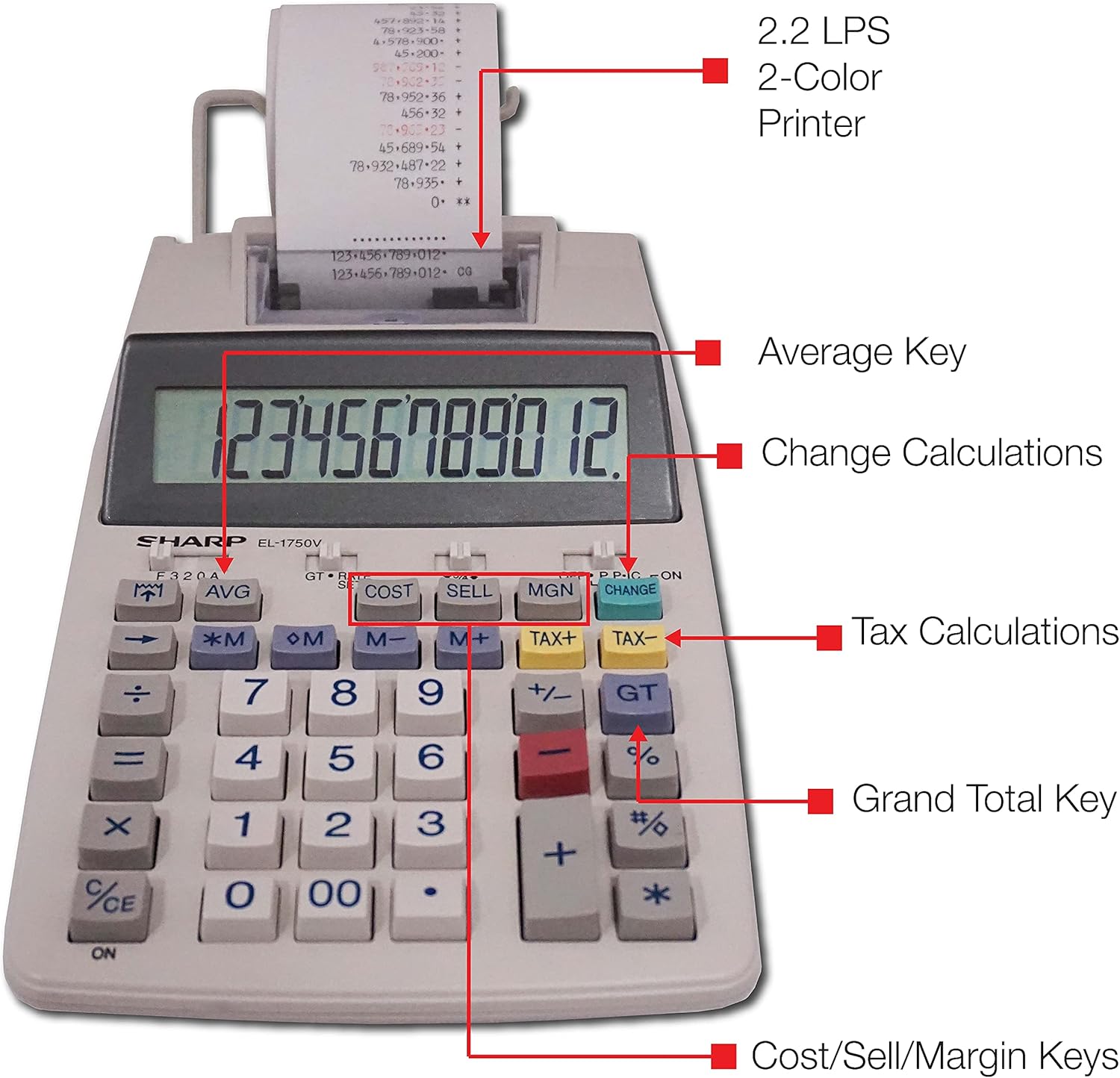
Рисунок 3: Подробная информация view highlighting the 2.2 LPS 2-Color Printer, Average Key, Change Calculations, Tax Calculations, Grand Total Key, and Cost/Sell/Margin Keys.

Figure 4: Dimensions of the Sharp EL1750V calculator, showing a width of 5.9 inches, depth of 9.1 inches, and height of 2 inches, with a 0.75 inch 12-digit LCD display.
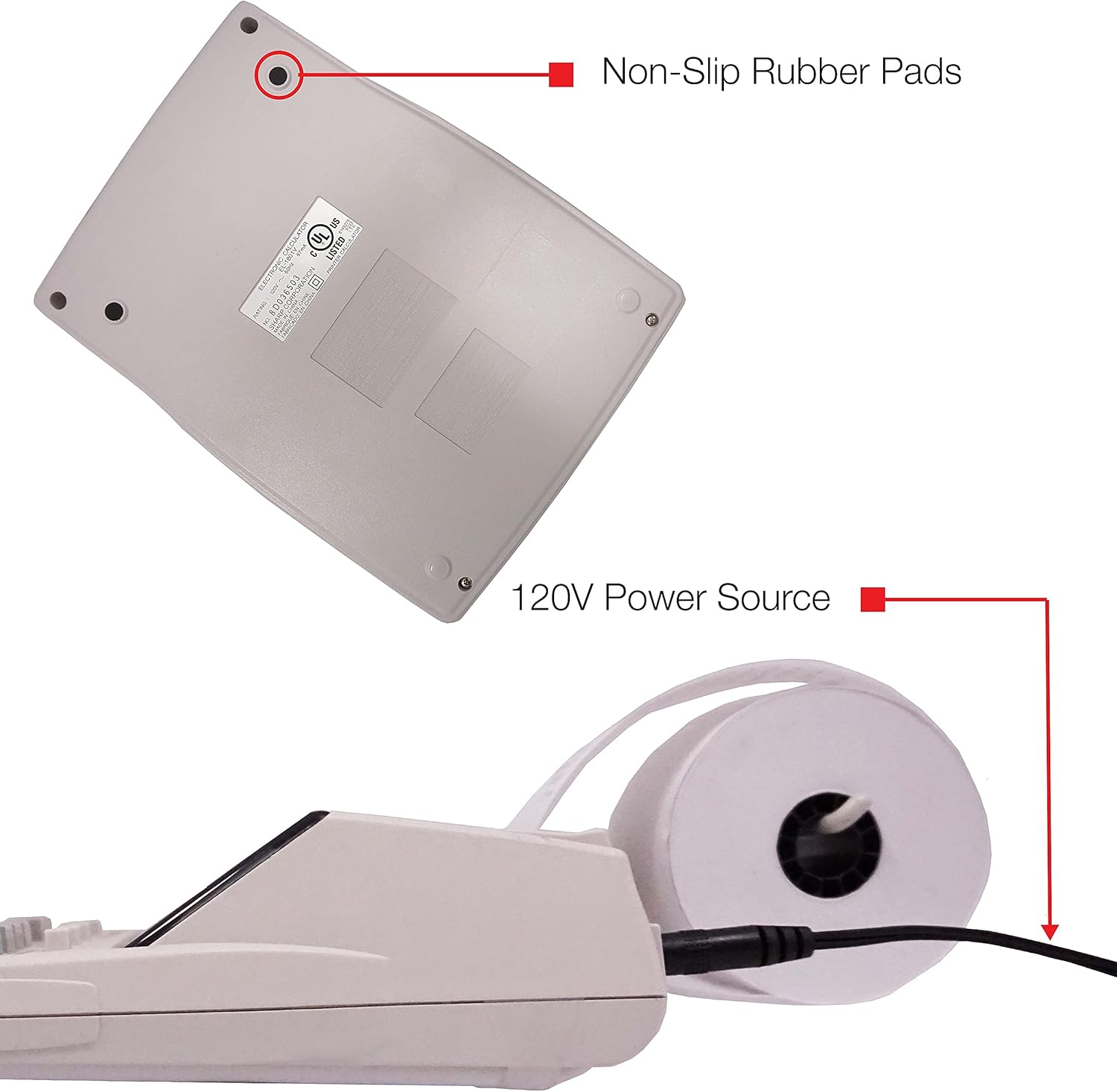
Рисунок 5: Внизу view of the calculator, illustrating the non-slip rubber pads and the 120V power source input.
3. Настройка
3.1 Источник питания
The Sharp EL1750V can be powered by an AC adapter (120V) or batteries. Ensure the correct power source is connected before operation.
- АС адаптер: Connect the provided AC adapter to the power input port on the side of the calculator (refer to Figure 5) and plug it into a standard 120V electrical outlet.
- Аккумуляторы: If using batteries, open the battery compartment (typically on the underside) and insert the required batteries, observing correct polarity.
3.2 Установка рулона бумаги
- Lift the printer cover to expose the paper roll compartment.
- Place a new paper roll into the compartment, ensuring the paper feeds from the bottom of the roll.
- Feed the leading edge of the paper into the printer mechanism slot until it emerges from the top.
- Закройте крышку принтера.
- Press the paper feed key (often marked with an arrow pointing up) to advance the paper and ensure it is properly aligned.
4. Инструкция по эксплуатации
4.1 Основные расчеты
Perform standard arithmetic operations:
- Дополнение (+): Введите первую цифру, нажмите +, введите второе число, нажмите =.
- Вычитание (-): Введите первую цифру, нажмите -, введите второе число, нажмите =.
- Умножение (х): Введите первую цифру, нажмите x, введите второе число, нажмите =.
- Деление (÷): Введите первую цифру, нажмите ÷, введите второе число, нажмите =.
- Clear Entry (CE/C): Сбрасывает последнее введенное число.
- Все ясно (AC): Очищает все записи и расчеты.
4.2 специальные функции
- Расчет налога (TAX+, TAX-):
- Set the tax rate using the appropriate function (refer to the calculator's specific tax rate setting procedure, usually involving a dedicated key or mode).
- Enter the amount, then press НАЛОГ+ to add tax or НАЛОГ- to subtract tax.
- Расчет изменений (ИЗМЕНЕНИЕ):
- Enter the total amount of the sale.
- Нажмите ИЗМЕНЯТЬ ключ.
- Enter the amount received from the customer.
- Нажимать = to display the change due.
- Общий итог (GT): Нажимать GT to recall the grand total of all previous calculations.
- Memory Functions (M+, M-, RM/CM):
- M+: Adds the displayed value to memory.
- M-: Subtracts the displayed value from memory.
- RM/CM: Recalls memory content (first press) or clears memory (second press).
- Себестоимость, Сбыт, Маржа (COST, ELL, MGN): These keys are used for profit margin calculations.
- Enter two of the three values (Cost, Selling Price, Margin Percentage) and press the key for the unknown value to calculate it.
- Rounding and Decimal Switches: Adjust these switches (typically located above the keypad) to control the number of decimal places and rounding method for calculations.
5. Техническое обслуживание
5.1 Очистка
To maintain the calculator's performance and appearance:
- Протрите внешнюю поверхность мягкой сухой тканью.
- Для удаления стойких загрязнений слегкаampсмочите ткань водой или мягким неабразивным чистящим средством.
- Do not use strong solvents or abrasive cleaners, as these can damage the surface or display.
- Avoid spraying liquids directly onto the calculator.
5.2 Замена рулона бумаги
Replace the paper roll when it runs out or the print becomes faint. Refer to Section 3.2 for installation instructions.
5.3 Ink Roller Replacement
When the print becomes faint or incomplete, the ink roller needs to be replaced. Consult your calculator's specific instructions for ink roller replacement, as the procedure may vary slightly.
6. Поиск Неисправностей
| Проблема | Возможная причина | Решение |
|---|---|---|
| Калькулятор не включается. | No power, AC adapter not connected, or batteries depleted/incorrectly installed. | Ensure AC adapter is securely plugged in. If using batteries, check battery installation and replace if necessary. |
| Отсутствует или едва различимый текст. | Paper roll empty or incorrectly installed; ink roller needs replacement. | Replace paper roll (Section 3.2). Replace ink roller (Section 5.3). |
| Display shows "E" or error message. | Calculation overflow, division by zero, or incorrect operation sequence. | Нажимать AC to clear the error. Re-enter the calculation carefully. |
| Замятие бумаги. | Paper roll not installed correctly or paper is creased. | Open printer cover, remove jammed paper, and re-install paper roll correctly (Section 3.2). |
7. Технические характеристики
- Модель: Sharp EL1750V
- Отображать: 12-значный ЖК-дисплей
- Скорость печати: 2.2 строки в секунду
- Printing Colors: 2 (Black for positive, Red for negative)
- Источник питания: AC Adapter (120V) or Battery Powered
- Размеры (прибл.): 5.9 дюйма (Ш) x 9.1 дюйма (Г) x 2 дюйма (В)
- Вес (прибл.): 0.16 ounces (Note: This weight seems unusually low for a printing calculator, likely an error in source data. User should refer to product packaging for accurate weight.)
- Материал: Пластик
- Особые характеристики: Antimicrobial protection, Change calculation, Tax functions, Cost/Sell/Margin functions, Grand Total, 4-key memory.
8. Гарантия и поддержка
For warranty information and technical support, please refer to the documentation included with your purchase or visit the official Sharp webСохраните чек о покупке в качестве подтверждения покупки для предъявления гарантийных претензий.
Производитель: Острый
Webсайт: www.sharpusa.com