
1. Настройка
1.1 Распаковка и содержимое
Аккуратно извлеките телевизор и все аксессуары из упаковки. Убедитесь, что все компоненты на месте:
- Sharp LC-40LE653U 40-Inch Smart LED TV
- Дистанционное управление
- 2 батарейки типа АА
1.2 Установка подставки
If placing the TV on a table, attach the included stand. Refer to the diagram below for proper assembly. Ensure all screws are securely fastened.
1.3 Подключение внешних устройств
Connect your external devices such as cable boxes, Blu-ray players, or gaming consoles to the TV's input ports. The TV features multiple connectivity options.


Доступные порты включают:
- HDMI: 2 ports for high-definition audio and video. One HDMI port supports MHL (Mobile High-Definition Link).
- USB: 1 port for media playback or connecting a USB device.
- Ethernet: Для проводного сетевого подключения.
- Component/Video: For older video devices.
- DTV/TV (Antenna): Для подключения антенны или кабельного телевидения.
- Аудио выход: Optical for digital audio, and RCA for analog audio.
1.4 Подключение питания
After connecting all necessary devices, plug the TV's power cord into a wall outlet.
1.5 Начальная настройка
Upon first power-on, the TV will guide you through an initial setup process. This includes language selection, time zone, and network configuration. For Wi-Fi setup, select your network and enter the password.
2. Инструкция по эксплуатации
2.1 Функции дистанционного управления
The remote control allows you to access all TV functions. Insert the two AA batteries into the remote control, ensuring correct polarity.

- Питание (красная кнопка): Включает и выключает телевизор.
- Вход: Выбор источника входного сигнала (HDMI, TV, USB и т. д.).
- ГРОМКОСТЬ +/-: Регулирует уровень громкости.
- СН +/-: Переключает каналы ТВ.
- Навигационные кнопки (Вверх/Вниз/Влево/Вправо/Enter): Используется для навигации по меню и выбора опций.
- УМНАЯ: Accesses the Smart Central Apps menu.
- МЕНЮ: Opens the main TV menu for settings adjustments.
- НЕТФЛИКС: Кнопка прямого доступа к приложению Netflix.
2.2 Smart TV Features (Smart Central Apps)
The Sharp LC-40LE653U features Smart Central Apps, providing access to various online services and a web browser. Ensure your TV is connected to the internet via Wi-Fi or Ethernet.

- Доступ к приложениям: Press the 'SMART' button on your remote to open the Smart Central Apps menu.
- Поддерживаемые услуги: Includes Hulu Plus, Netflix, Pandora, Vudu, and YouTube.
- Web Браузер: Используйте встроенную функцию web browser for general internet browsing. Navigation is done via the remote control.
2.3 Wallpaper Mode
When the TV is turned off, Wallpaper Mode can display virtually any image. To use this feature, connect a USB drive containing your desired images to the TV's USB port. Navigate to the Wallpaper Mode settings in the TV menu to select and configure your images.
3. Техническое обслуживание
3.1 Чистка телевизора
Чтобы очистить экран, аккуратно протрите его мягкой сухой тканью без ворса. Для удаления стойких загрязнений слегка потрите.ampen the cloth with water or a specialized screen cleaner. Avoid using harsh chemicals, abrasive cleaners, or direct spraying of liquids onto the screen or cabinet.
Clean the TV cabinet with a soft, dry cloth. Ensure the TV is unplugged before cleaning.
3.2 Обновления программного обеспечения
Periodically check for software updates through the TV's settings menu to ensure optimal performance and access to the latest features. Updates can be performed via the internet connection.
4. Поиск Неисправностей
If you encounter issues with your Sharp LC-40LE653U TV, refer to the following common solutions:
- Нет питания: Ensure the power cord is securely plugged into both the TV and a working wall outlet. Check if the power indicator light on the TV is on.
- Нет изображения/звука: Verify the correct input source is selected using the 'Input' button on the remote. Check all cable connections (HDMI, component, etc.) are secure.
- Плохое качество изображения: Настройте параметры изображения (яркость, контрастность, резкость) в меню телевизора. Убедитесь, что источник входного сигнала обеспечивает высокое качество сигнала.
- Нет соединения с интернетом: Check your Wi-Fi router or Ethernet cable connection. Re-enter your Wi-Fi password in the TV's network settings. Restarting your router may resolve connectivity issues.
- Пульт дистанционного управления не работает: Замените батарейки в пульте дистанционного управления. Убедитесь, что между пультом дистанционного управления и ИК-датчиком телевизора нет препятствий.
For more detailed troubleshooting steps, consult the full online manual or contact customer support.
5. Технические характеристики
Key technical specifications for the Sharp LC-40LE653U 40-Inch Smart LED TV:
| Особенность | Спецификация |
|---|---|
| Номер модели | ЛК-40ЛЕ653У |
| Размер экрана | 39.5 дюйма (класс 40 дюймов) |
| Технология отображения | ЖК-дисплей |
| Разрешение | 1080p (Full HD) |
| Частота обновления | 60 Гц |
| Соотношение сторон | 16:9 |
| Технология связи | Wi-Fi |
| аппаратный интерфейс | Ethernet, HDMI, USB |
| Total Number of HDMI Ports | 2 (one with MHL support) |
| Общее количество портов USB | 1 |
| Аудиовход | HDMI, Optical, USB |
| Максимальная выходная мощность динамика | 20 Вт |
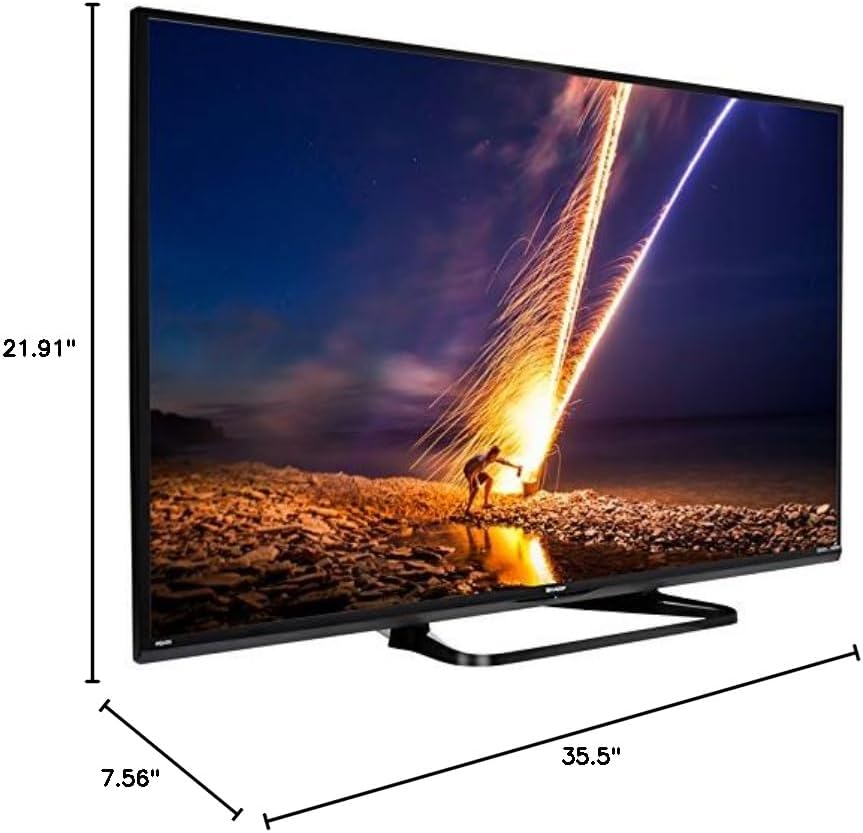
| Размеры продукта (Д x Ш x В) | 7.56" x 35.5" x 21.91" |
| Вес товара | 16.3 фунта |
| Тип крепления | Крепление на стол |
| Поддерживаемые интернет-сервисы | Hulu Plus, Netflix, Pandora, Vudu, YouTube |
| Сертификат Energy Star | Да |
6. Гарантия и поддержка
6.1 Гарантия на продукт
This Sharp LC-40LE653U TV comes with a Ограниченная гарантия сроком на 1 годСохраните чек о покупке для предъявления гарантийных претензий. Гарантия распространяется на производственные дефекты при нормальных условиях эксплуатации.
6.2 Поддержка клиентов
For technical assistance, troubleshooting beyond this manual, or warranty service, please contact Sharp customer support. Refer to the official Sharp webАктуальную контактную информацию можно найти на сайте или в регистрационной карточке продукта.