
1. Введение
The Argox AS8520 is a high-performance cordless imager designed for efficient barcode scanning. It features advanced wireless communication technology, allowing for a data transmission range of up to 100 meters. Equipped with a long-lasting Li-ion battery and an IP42 sealing level, the AS8520 is built for durability and mobility across various environments, including offices, supermarkets, warehouses, and manufacturing facilities.
2. Продукт закончилсяview
The AS8520 barcode scanner is designed for comfortable handling and robust performance. Key components include the scanning window, trigger button, and ergonomic grip.
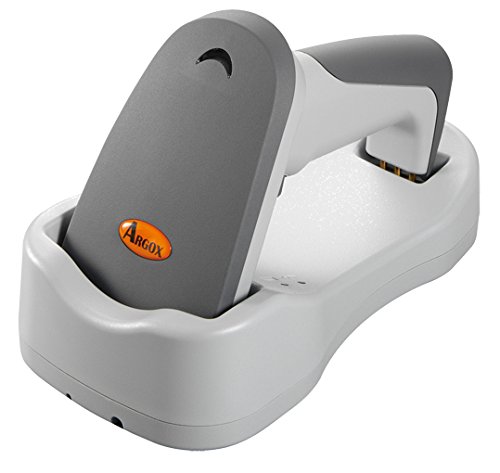
Рисунок 2.1: Сторона view of the Argox AS8520 Barcode Scanner, showing the ergonomic handle and trigger button.
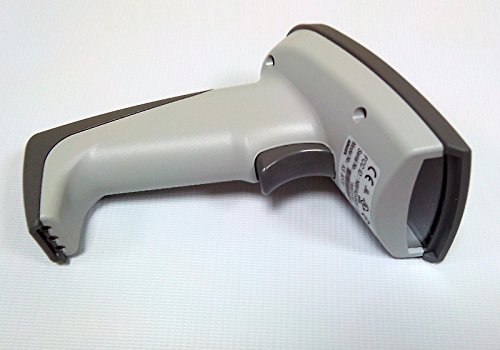
Рисунок 2.2: Передний view of the Argox AS8520 Barcode Scanner, highlighting the scanning window and product labels.
3. Руководство по установке
3.1 Установка и зарядка аккумулятора
- Ensure the scanner is powered off before installing or removing the battery.
- Locate the battery compartment on the scanner handle.
- Insert the Li-ion battery pack, ensuring correct polarity.
- Надежно закройте батарейный отсек.
- Connect the scanner to its charging base or power adapter using the provided cable. Allow the battery to fully charge before first use.
3.2. Подключение к хост-устройству
The Argox AS8520 can connect wirelessly to various host devices, including desktops, laptops, and smartphones. Refer to the separate quick start guide for specific pairing instructions for your operating system or device type.
4. Инструкция по эксплуатации
4.1. Базовое сканирование
- Убедитесь, что сканер включен и успешно сопряжен с вашим основным устройством.
- Наведите сканирующее окно на штрихкод, который хотите отсканировать.
- Press and hold the trigger button. A red LED light source (630nm Visible Red LED) will illuminate the barcode.
- Position the scanner at an appropriate distance (the AS8520 offers superior depth of field up to 40 inches on 40-mil codes) until the barcode is successfully read. A successful scan is typically indicated by an audible beep and/or a visual indicator.
- Отпустите кнопку спуска затвора.
4.2. Расширенные функции сканирования
- Rapid Scan Rate: The AS8520 provides a rapid scan rate of 450 scans/sec for efficient data capture.
- Barcode Symbology Support: Supports GS1 Databar (RSS) and CS (Composite Symbology) barcodes.
- Sunlight Readability: Designed to be readable under direct sunlight conditions.
5. Техническое обслуживание
5.1. Очистка сканера
- Перед чисткой убедитесь, что сканер выключен.
- Слегка используйте мягкую безворсовую ткань.ampДля протирки внешней поверхности сканера используйте воду или слабый чистящий раствор.
- Для очистки сканирующего окна используйте салфетку для протирки линз, чтобы избежать царапин.
- Do not use abrasive cleaners, solvents, or immerse the scanner in liquid. The IP42 sealing level protects against dust and light water splashes, but not full immersion.
5.2. Уход за аккумулятором
- To maximize battery life, avoid fully discharging the Li-ion battery frequently.
- Если сканер не используется в течение длительного времени, храните его в прохладном, сухом месте.
- If the battery performance degrades significantly, consider replacing it with an authorized Argox replacement battery.
6. Поиск Неисправностей
| Проблема | Возможная причина | Решение |
|---|---|---|
| Сканер не включается. | Аккумулятор разряжен или установлен неправильно. | Charge the battery. Ensure the battery is correctly seated in its compartment. |
| Сканер не считывает штрихкоды. | Barcode is damaged, scanner is too far/close, or incorrect symbology settings. | Ensure the barcode is clear. Adjust scanning distance. Check scanner programming for supported barcode types. |
| Данные на хост-устройство не передаются. | Scanner not paired or out of range. | Re-pair the scanner with the host device. Ensure the scanner is within the 100-meter transmission range. |
| Scanner is unresponsive. | Временный сбой программного обеспечения. | Perform a soft reset by powering off and then on the scanner. If issues persist, consult the manufacturer's support. |
7. Технические характеристики
| Особенность | Спецификация |
|---|---|
| Модель | AS8520 |
| Скорость сканирования | 450 сканирований/сек |
| Источник света | 630nm Visible Red LED |
| Производительность сканирования | Starting at 0.1mm (4 mil) |
| Глубина резкости | Up to 40 inches on 40-mil codes |
| Диапазон передачи данных | 100 meters (wireless) |
| Совместимые устройства | Настольный компьютер, ноутбук, смартфон |
| Источник питания | Battery Powered (Li-ion battery pack) |
| Рабочая температура | от 0°C до 50°C (от 32°F до 122°F) |
| Температура хранения | -20°C до 70°C (-4°F до 158°F) |
| Влажность | Относительная влажность от 10% до 90%, без конденсации |
| Уровень освещенности | До 70,000 XNUMX люкс |
| Current - Operating | 225 мА при 4.2 В постоянного тока |
| Current - Standby | 32 мА при 4.2 В постоянного тока |
| Power - Operating | 900 мВт |
| Power - Standby | 150 мВт |
| Reliability (Trigger) | 1,000,000 раза |
| Reliability (Cable) | 320,000 times (90° bend) |
| Спецификация падения | 1.5 метр |
| Sealing Level | IP42 |
| Вес товара | 1.3 кг |
| GTIN/UPC | 702563636336 |
8. Гарантия и поддержка
For detailed warranty information, please refer to the warranty card included with your product or visit the official Argox website. For technical support, service, or replacement parts, please contact your authorized Argox reseller or Argox customer service directly.